
1. Introduction
This manual provides instructions for the proper installation, use, and maintenance of your Spigen Tough Armor MagFit Case designed for the iPhone 15 Pro Max. This case is engineered to provide robust protection and enhanced functionality for your device.

Figure 1: Spigen Tough Armor MagFit Case for iPhone 15 Pro Max.
2. Setup: Case Installation
To ensure optimal protection, follow these steps for installing your Spigen Tough Armor MagFit case:
- Prepare your iPhone: Ensure your iPhone 15 Pro Max is clean and free of dust or debris. If using a screen protector, ensure it is properly aligned and secured.
- Insert the phone: Gently slide your iPhone 15 Pro Max into the case, starting with the top edge (camera side). Ensure all corners align correctly with the case.
- Secure the fit: Press firmly around the edges of the phone to ensure the case is snugly fitted and all buttons and ports are aligned with the case cutouts.

Figure 2: Side profile of the case, showing button alignment and port access.
3. Operating Features
The Spigen Tough Armor MagFit case offers several features designed to enhance your iPhone 15 Pro Max experience:
3.1. Built-in Kickstand
The integrated kickstand allows for hands-free viewing in landscape orientation. To deploy the kickstand, gently pull it out from its recessed position on the back of the case. Push it back in until it clicks to secure it when not in use.

Figure 3: The kickstand provides a stable viewing angle for media consumption.
3.2. MagSafe Compatibility
The case features an integrated magnetic ring for compatibility with MagSafe accessories. This allows for secure attachment of MagSafe chargers, wallets, and other accessories. Ensure the accessory is properly aligned with the magnetic ring on the case for optimal connection.

Figure 4: MagSafe accessories attach securely to the case.
3.3. Wireless Charging
The case is designed to be compatible with wireless charging. Place your iPhone with the case on a compatible wireless charging pad. Ensure proper alignment for efficient charging.
3.4. Button and Port Access
The case provides precise cutouts for all ports, speakers, and the USB-C port, ensuring full functionality without removing the case. The button covers are designed to maintain tactile feedback for volume and power buttons.
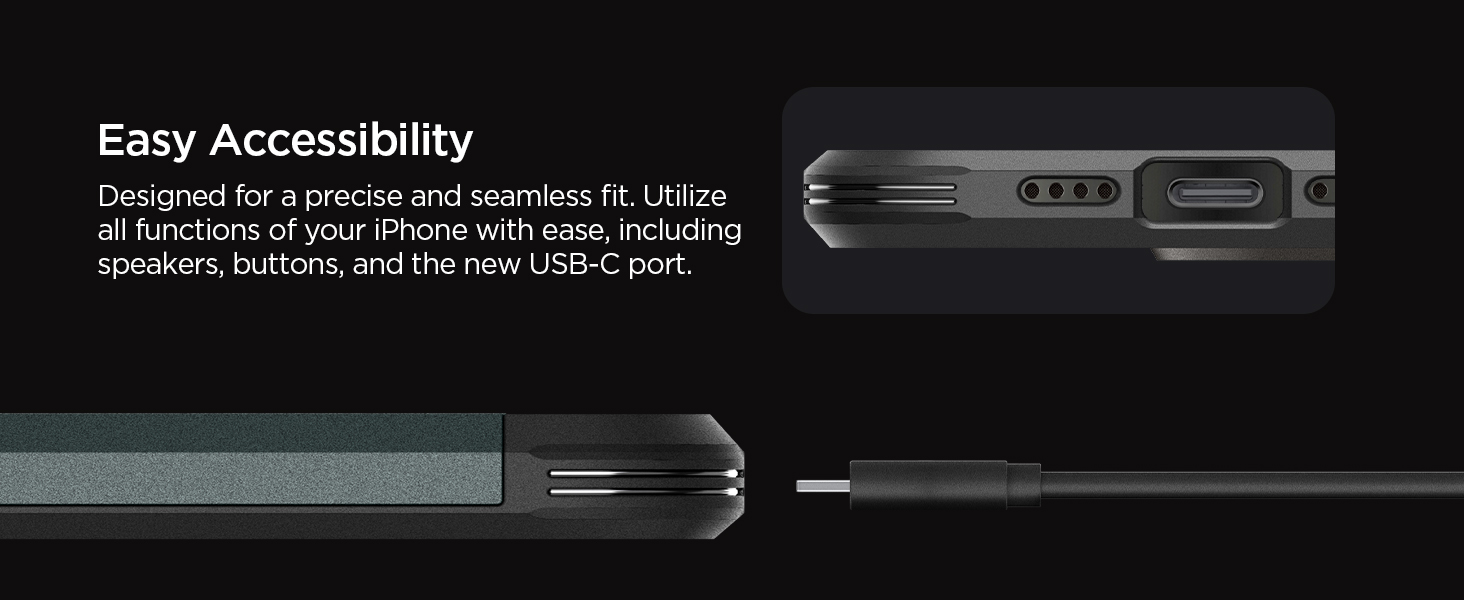
Figure 5: Clear access to charging port and speakers.
3.5. Protection Features
The Tough Armor MagFit case incorporates Extreme Protection Technology and Air Cushion Technology. This dual-layer design, consisting of PC, TPU, and Impact Foam, is engineered to absorb heavy impacts from shocks and drops. Raised edges around the screen and camera provide additional protection against scratches when placed on flat surfaces.

Figure 6: Multi-layer construction for enhanced drop protection.
Video 1: Overview of the Spigen Tough Armor case features and design.
4. Maintenance
To keep your Spigen Tough Armor MagFit case in optimal condition:
- Cleaning: Wipe the case regularly with a soft, damp cloth to remove dust and fingerprints. Avoid using harsh chemicals or abrasive cleaners, as these can damage the material.
- Inspection: Periodically inspect the case for any signs of wear or damage, especially after drops. If the case is significantly damaged, consider replacing it to ensure continued protection for your device.
- Storage: When not in use, store the case in a cool, dry place away from direct sunlight to prevent material degradation.
5. Troubleshooting
| Issue | Possible Cause | Solution |
|---|---|---|
| Case does not fit iPhone 15 Pro Max | Incorrect phone model or improper installation. | Ensure you have the correct case for iPhone 15 Pro Max. Re-install the case, ensuring all corners are properly seated. |
| MagSafe accessories do not attach securely | Misalignment or foreign objects between the case and accessory. | Ensure the MagSafe accessory is centered on the magnetic ring. Clean the back of the case and the accessory to remove any obstructions. |
| Wireless charging is slow or not working | Misalignment on charging pad or incompatible charger. | Adjust the phone's position on the wireless charging pad. Ensure the charging pad is MagSafe compatible for optimal performance. |
| Kickstand feels loose or does not stay open | Wear and tear or improper deployment. | Ensure the kickstand is fully extended and locked into position. If wear is significant, consider replacing the case. |
6. Specifications
- Brand: Spigen
- Model Name: Tough Armor MagFit
- Model Number: ACS06594
- Compatible Phone Models: iPhone 15 Pro Max
- Color: Black
- Material: Polycarbonate, Thermoplastic Polyurethane
- Item Weight: 50 g
- Item Dimensions: 3.27 x 0.55 x 6.54 inches
- Water Resistance Level: Not Water Resistant
- Additional Features: Slim Fit, Built-in Kickstand, MagSafe Compatible
7. Warranty Information
Spigen products typically come with a limited warranty covering manufacturing defects. For specific warranty terms and conditions, including duration and coverage details, please refer to the official Spigen website or contact their customer support directly. Keep your proof of purchase for warranty claims.
8. Customer Support
For further assistance, product inquiries, or technical support, please visit the official Spigen website. You can typically find FAQs, contact forms, and support resources there.
Official Spigen Website: www.spigen.com
