
1. Introduction
Thank you for choosing the PERFASCIN A998 Universal A/C Remote Control. This remote is designed to replace original remote controls for a wide range of air conditioner brands, offering a convenient and versatile solution. It features a 5000-in-1 code library, ensuring compatibility with most major air conditioner models. This manual provides detailed instructions for setup, operation, and troubleshooting to help you get the most out of your new remote control.
2. Product Overview
The PERFASCIN A998 is an infrared (IR) universal remote control for air conditioners. It requires no programming or pairing; simply install batteries, and it is ready for use with compatible units. Its ergonomic design and clear button layout ensure ease of use.
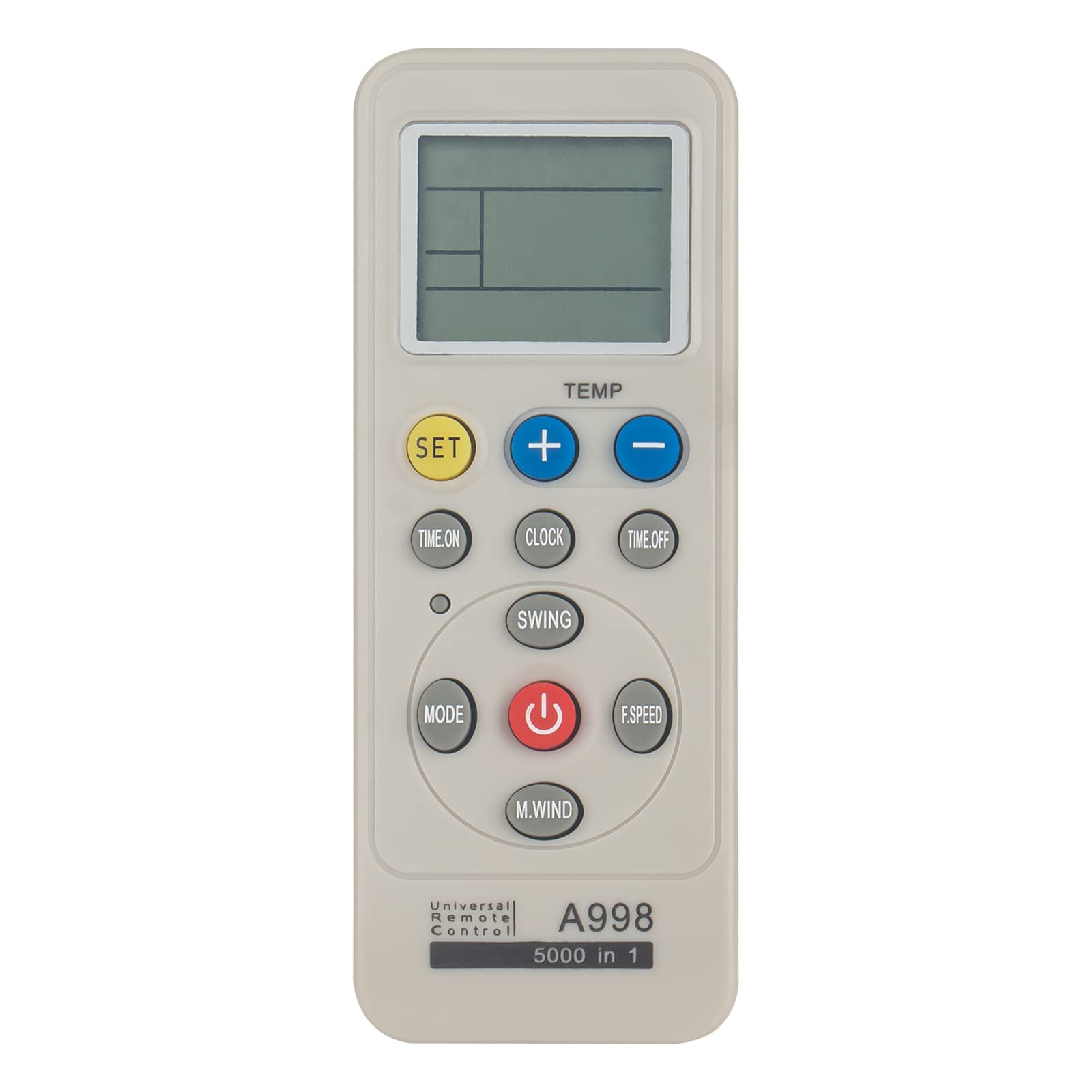
This image shows the front of the PERFASCIN A998 Universal A/C Remote Control. It features a prominent LCD display at the top, temperature adjustment buttons (blue '+' and '-' buttons), a yellow 'SET' button, and a red power button. Other buttons include 'MODE', 'FAN', 'SWING', 'TIME ON', 'TIME OFF', 'CLOCK', 'F.SPEED', and 'M.WIND'. The model number 'A998 5000 in 1' is printed on the lower right.
Compatible Brands Include:
- Carrier
- Samsung
- Kelon
- Hyundai
- Gree
- Mitsubishi
- Fujitsu
- Hitachi
- Funai
- Daikin
- Trane
- Toshiba
- Sanyo
- Haier
- LG
- York
- Midea
- And many more.
3. Setup
Battery Installation
- Open the battery compartment cover located on the back of the remote control.
- Insert two (2) new 1.5V AAA alkaline batteries, ensuring the correct polarity (+ and -) as indicated inside the compartment.
- Close the battery compartment cover securely.
The remote control is now ready for use. No additional programming is typically required for most air conditioner models.
4. Operating Instructions
Once batteries are installed, point the remote control directly at your air conditioner unit. The remote functions are generally intuitive and similar to your original remote.
Key Functions:
- Power Button (Red): Turns the air conditioner ON or OFF.
- TEMP +/- Buttons (Blue): Adjusts the desired temperature up or down.
- MODE Button: Cycles through operating modes such as Cool, Heat, Fan, Dry, Auto.
- FAN Button (or F.SPEED): Adjusts the fan speed (e.g., Low, Medium, High, Auto).
- SWING Button: Controls the louver swing function.
- TIME ON/OFF Buttons: Sets a timer for the unit to turn ON or OFF automatically.
- CLOCK Button: Sets the current time on the remote's display.
- SET Button (Yellow): Used for code searching or confirming settings (refer to Automatic Code Search section).
- M.WIND Button: May control specific wind patterns or modes depending on the AC unit.
5. Automatic Code Search
If the remote does not operate your air conditioner automatically after battery installation, you may need to perform an automatic code search to find the correct code for your specific unit. This process is detailed on the back of the remote control itself.

This image displays the back of the PERFASCIN A998 Universal A/C Remote Control. The battery compartment cover is visible, along with printed instructions for the 'Automatic search' function. These instructions detail how to long-press the 'SET' key to initiate code searching and how to confirm the correct code.
Steps for Automatic Code Search:
- Ensure your air conditioner is powered ON.
- Point the remote control towards your air conditioner unit.
- Long press the SET key for approximately 3 seconds. The code on the remote's display will start flashing.
- At this time, the code will increase successively, and the remote will continuously send power-on signals.
- Observe your air conditioner. When you hear a "beep" sound from the air conditioner, indicating an ON/OFF action, immediately release the SET key.
- Press the SET key again to confirm and exit the code search mode.
- Test other functions (e.g., temperature, mode) to ensure full compatibility. If not all functions work, repeat the process, as there might be multiple compatible codes for your unit.
6. Maintenance
- Battery Replacement: Replace batteries when the remote's display becomes dim or the remote stops responding. Always replace both batteries with new ones of the same type (AAA alkaline).
- Cleaning: Wipe the remote control with a soft, dry cloth. Do not use liquid cleaners or abrasive materials.
- Storage: If the remote will not be used for an extended period, remove the batteries to prevent leakage and damage.
7. Troubleshooting
- Remote not working:
- Check if batteries are inserted correctly with the right polarity.
- Replace old batteries with new ones.
- Ensure there are no obstructions between the remote and the air conditioner's IR receiver.
- Perform the Automatic Code Search (Section 5) to find the correct code.
- Some functions not working:
- It is possible that the current code is partially compatible. Repeat the Automatic Code Search process. When the AC beeps, try releasing the SET button at different points to find a more comprehensive code.
- Some advanced functions specific to your original remote might not be supported by a universal remote.
- Remote display is dim or blank:
- Replace the batteries.
8. Specifications
- Model: A998
- Power Supply: 2 x 1.5V AAA Alkaline Batteries (Not Included)
- Connectivity Technology: Infrared (IR)
- Compatible Devices: Air Conditioner
- Max Number of Supported Devices: 1 (controls one AC unit at a time)
- Product Dimensions: 7 x 2 x 0.65 inches
- Item Weight: 1.76 ounces
9. Warranty and Support
For any queries or assistance, please contact our customer service. While specific warranty details are not provided in this manual, we are committed to ensuring your satisfaction with the PERFASCIN A998 Universal A/C Remote Control. If you are unsure whether this remote is suitable for your air conditioner, our customer service team can provide professional suggestions.