
Introduction
This manual provides essential information for the proper use, installation, and maintenance of your UNIQ Moduo Screen Protector Case. The UNIQ Moduo is a modular hybrid protection solution designed for Apple Watch 45/44mm, featuring interchangeable bezels and a shock-absorbing bumper to provide robust defense for your device.
It includes tough bezels that rise above the screen surface for added defense and offers a precise fit with tactile buttons for full access to all watch functions.
Package Contents
- Watch Case x 1 (TPU)
- Polycarbonate Bezel x 2 (Interchangeable)
Setup and Installation
Follow these steps to properly install the UNIQ Moduo case and bezel onto your Apple Watch.
- Prepare Your Apple Watch: Ensure your Apple Watch is clean and free of dust or debris. Power off your watch for easier installation.
- Install the Main Case: Gently slide your Apple Watch into the main TPU case. Ensure all edges are seated correctly and the watch buttons align with the case's tactile buttons.
- Attach the Interchangeable Bezel: Select one of the two polycarbonate bezels. Align the bezel with the front of the case and snap it into place. Ensure it is securely fastened around the watch face.
- Verify Fit: Check that the case and bezel are snugly fitted and do not obstruct any sensors, speakers, or the Digital Crown.

Image: The UNIQ Moduo case components, including the main TPU case and a separate polycarbonate bezel, ready for assembly.

Image: A close-up view of the UNIQ Moduo case with the bezel being attached, demonstrating the modular design.
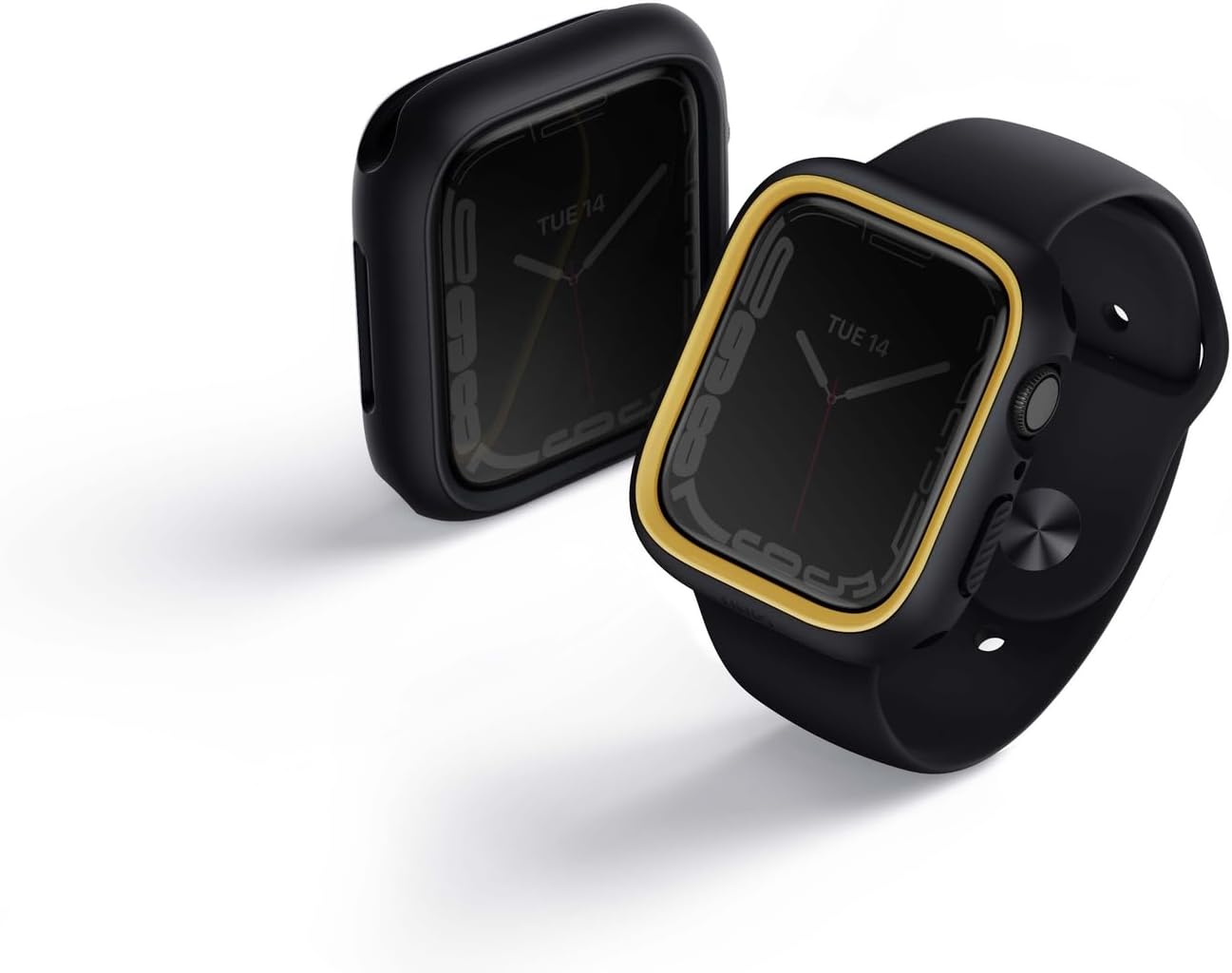
Image: An Apple Watch with the UNIQ Moduo case fully installed, alongside another case, illustrating the complete product appearance.
Operating Instructions
Once installed, the UNIQ Moduo case provides continuous protection for your Apple Watch. All watch functions, including the Digital Crown, side button, and screen, remain fully accessible and operational.
- Button Access: The case features tactile buttons that align perfectly with your Apple Watch's buttons, ensuring responsive feedback.
- Screen Protection: The raised bezels provide a protective barrier for the watch screen against direct impacts and scratches.
- Interchangeable Bezels: You can easily swap the polycarbonate bezels to change the aesthetic of your Apple Watch. To change, gently pry off the current bezel and snap on the desired one.
Maintenance and Care
To ensure the longevity and appearance of your UNIQ Moduo case, follow these maintenance guidelines:
- Cleaning: Wipe the case and bezels with a soft, damp cloth. Avoid using harsh chemicals or abrasive materials, as these can damage the finish.
- Storage: When not in use, store the case and spare bezel in a clean, dry place away from direct sunlight and extreme temperatures.
- Inspection: Periodically inspect the case and bezels for any signs of wear or damage. Replace if significant damage is observed to maintain optimal protection.
Troubleshooting
If you encounter any issues with your UNIQ Moduo case, refer to the following common problems and solutions:
| Problem | Possible Cause | Solution |
|---|---|---|
| Case does not fit properly. | Incorrect watch size or improper installation. | Ensure your Apple Watch is 45mm or 44mm. Re-install the case, ensuring it is fully seated around the watch. |
| Buttons are not responsive. | Case misalignment. | Remove and re-install the case, carefully aligning the tactile buttons with the watch's physical buttons. |
| Bezel detaches easily. | Bezel not fully snapped into place or damage to bezel clips. | Ensure the bezel is firmly snapped into all four corners. If clips are damaged, the bezel may need replacement. |
Specifications
| Feature | Detail |
|---|---|
| Model Number | UNIQ-45MM-MDBLKMUS |
| Compatible Devices | Apple Watch (45mm/44mm) |
| Materials | TPU (Thermoplastic Polyurethane) and Polycarbonate |
| Color | BlackMustard |
| Product Dimensions | 1.5 x 1.7 x 0.5 inches (3.81 x 4.32 x 1.27 cm) |
| Item Weight | 1.76 ounces (50 grams) |
| Special Features | Scratch Resistant, Shock-absorbing bumper, Interchangeable bezels, Tactile buttons |
| Form Factor | Case |
| Item Hardness | 9H (Refers to polycarbonate bezel hardness) |
| Finish Type | Matte |
Official Product Videos
No official product videos from the seller are available for this item in the provided data.
Warranty and Support
Specific warranty information for the UNIQ Moduo Screen Protector Case is not provided in this manual. For details regarding warranty coverage, returns, or technical support, please refer to the official UNIQ website or contact the seller directly.
You can visit the official UNIQ store page for more information: UNIQ Official Store