
Introduction
Thank you for purchasing the AMIR Digital Clock. This large LED display clock is designed for clear visibility and versatile use in various environments, from living rooms to offices. It features a remote control for easy adjustments, automatic brightness dimming, and multiple display functions including time, date, day of the week, and temperature. This manual provides detailed instructions for setup, operation, and maintenance to ensure optimal performance of your device.

Image: The AMIR Digital Clock displaying time, date, day, and temperature, accompanied by its remote control.
Product Features
- 13-inch Large LED Display: Features 3.5-inch high-contrast jumbo digits for easy viewing from a distance.
- 10 Levels Automatic Brightness Dimmer: Adjusts brightness manually via remote or automatically based on ambient light.
- Remote Control Operation: All settings can be easily managed using the included remote control.
- Count-up & Count-down Timer: Functionality for timing events up to 99 minutes and 99 seconds.
- USB Powered with Memory Function: Requires USB power (adapter not included); 2xAAA batteries (not included) provide memory backup for settings during power outages.
- Versatile Placement: Designed for both wall-mounting and desktop placement.
- Dual Alarm Settings: Allows for setting two separate alarms.
- Comprehensive Display: Shows time (12/24H), date, day of the week, and temperature (">C/"F).

Image: An illustrative diagram highlighting the 13-inch display, 3.5-inch numbers, and various features like adjustable brightness, date, 12/24H, remote control, indoor temperature, week, dual alarm, and DST.
Package Contents
Please check the package carefully to ensure all items are present:
- AMIR Digital Clock (1 unit)
- Remote Control (1 unit)
- USB Power Cable (3.5m/137.8inch) (1 unit)
- User Manual (1 unit)
- Mounting Template (1 unit)
Note: 5V1A or 5V2A USB power adapter and 2xAAA batteries for memory backup are not included.

Image: The complete package contents, including the digital clock, remote control, USB cable, user manual, and mounting template.
Setup
1. Powering On
- Connect the provided USB cable to the DC 5V 1A/2A input port on the back of the clock.
- Plug the other end of the USB cable into a compatible USB power adapter (not included) or a USB port.
- The clock display will light up.
2. Installing Backup Batteries
- Locate the battery compartment on the back of the clock.
- Insert 2 AAA batteries (not included) into the compartment, observing the correct polarity (+/-).
- These batteries are for memory backup only and will save your settings during a power outage. The screen will turn off when running on battery backup.
3. Initial Setup (Time, Date, Temperature)
All initial settings can be performed using the remote control. Refer to the 'Operating Instructions' section for detailed steps on setting time, date, and other functions.
4. Mounting Options
- Wall-Mounted: Use the integrated wall holes on the back of the clock. A mounting template is provided for easy installation. Ensure the USB cable can reach a power source without strain.
- Desktop Placement: The clock has a stable base for placement on any flat surface.

Image: The rear of the AMIR Digital Clock, showing the outlet hole, battery compartment for 2AAA batteries, wall hole for mounting, SET and +/- buttons, DC 5V 1A input, and winding groove.
Operating Instructions
The AMIR Digital Clock is primarily operated using the included remote control. Ensure the remote control has working batteries and is pointed towards the clock's signal receiving area (up to 10m obstacle-free distance).
1. Remote Control Usage
The remote control allows for convenient adjustment of all clock functions without needing to physically access the clock's buttons.
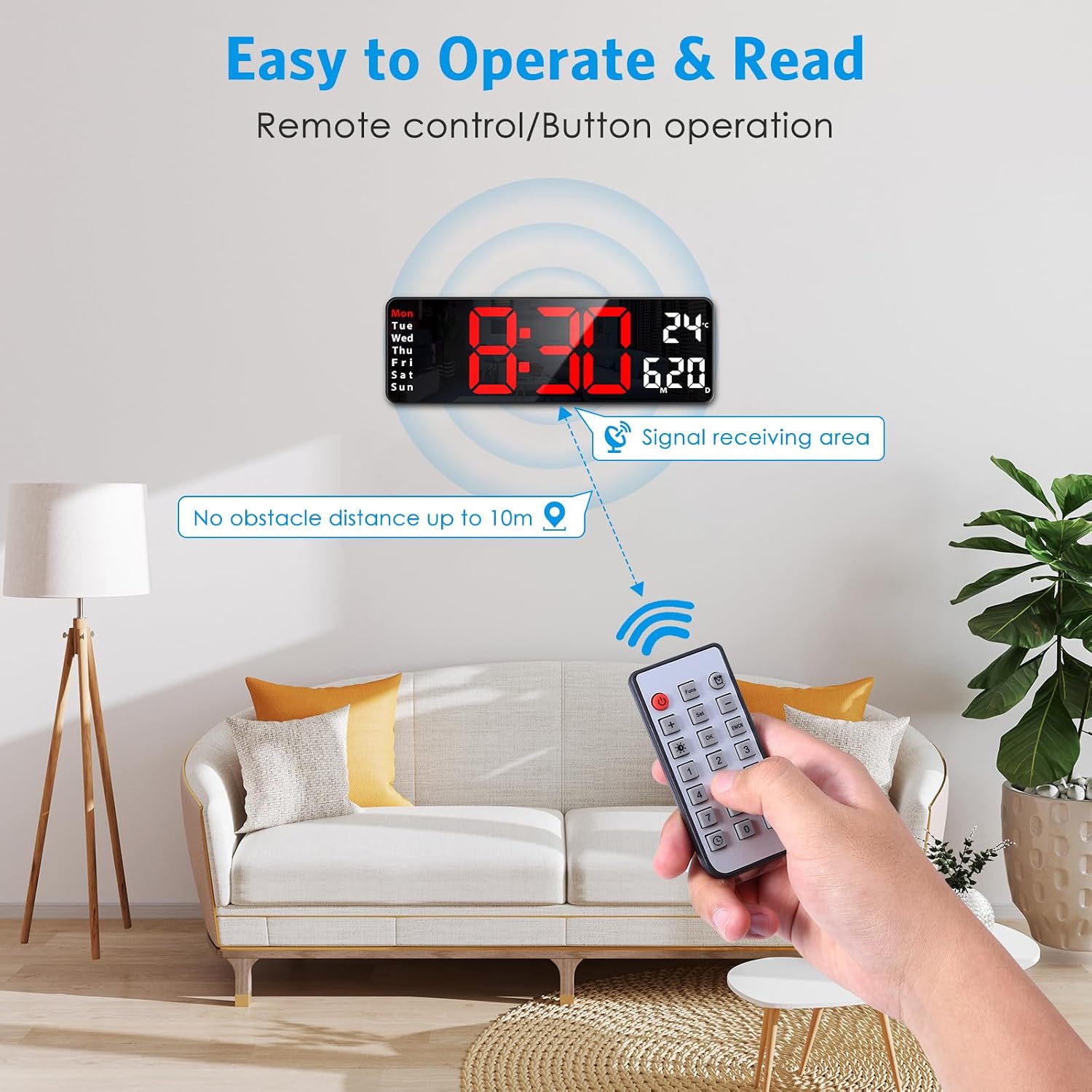
Image: A person using the remote control to adjust the AMIR Digital Clock, illustrating the signal receiving area and effective distance.
2. Brightness Adjustment
- Manual Adjustment: Use the brightness buttons on the remote control to cycle through 10 levels of brightness.
- Automatic Brightness Mode: Press the brightness button on the remote control twice to activate auto-brightness. The clock will automatically adjust its display intensity based on the surrounding ambient light.

Image: A visual representation of the 10 brightness levels (L1-L10) available for the AMIR Digital Clock, demonstrating manual and auto-brightness options.
3. Setting Time and Date
Refer to the specific instructions in the included paper manual for precise button sequences on the remote control to set the time, date, day of the week, and 12/24H format.
4. Alarm Settings
The clock supports setting two independent alarms. Consult the paper manual for detailed steps on how to set, activate, and deactivate alarms using the remote control.
5. Timer Function (Count-up/Count-down)
The clock features a versatile timer function:
- Count-up: Start a timer that counts upwards from zero.
- Count-down: Set a specific duration (up to 99 minutes and 99 seconds) for the timer to count down from.
Instructions for activating and controlling the timer are available in the detailed user manual.

Image: A visual demonstration of the count-up and count-down timer functions available on the AMIR Digital Clock, controlled by the remote.
6. Daylight Saving Time (DST)
The clock includes a DST function. Refer to the user manual for instructions on how to enable or disable Daylight Saving Time adjustments.
Maintenance
1. Cleaning
To clean the clock, gently wipe the display and casing with a soft, dry, or slightly damp cloth. Avoid using abrasive cleaners, solvents, or strong chemicals, as these may damage the surface.
2. Battery Backup
The 2xAAA batteries (not included) are for memory backup only. They ensure that time and settings are retained during a power outage. Replace batteries annually or if you notice settings are not being saved after a power interruption. The screen will not display when running on battery backup.
Troubleshooting
| Problem | Possible Cause | Solution |
|---|---|---|
| Clock does not power on. | No power supply; faulty USB cable/adapter. | Ensure USB cable is securely connected. Try a different USB adapter (5V1A or 5V2A) or USB port. |
| Remote control not working. | Remote batteries low/dead; obstacle between remote and clock; remote not pointed correctly. | Replace remote control batteries. Ensure no obstacles are blocking the signal. Point the remote directly at the clock's signal receiving area. |
| Settings are lost after power outage. | Backup batteries not installed or dead. | Install 2 new AAA batteries in the battery compartment. Ensure correct polarity. |
| Display is too dim or too bright. | Brightness setting needs adjustment; auto-brightness mode active. | Use the remote control to manually adjust brightness. If in auto-brightness mode, ensure ambient light conditions are suitable or switch to manual mode. |
| Temperature reading seems inaccurate. | Clock placed near heat source/vent. | Relocate the clock to an area with stable room temperature, away from direct sunlight, heating/cooling vents, or other heat sources. |
Specifications
| Feature | Detail |
|---|---|
| Brand | AMIR |
| Model Number | WA128-JG-US |
| Display Type | Digital LED |
| Display Size | 13 inches (diagonal) |
| Digit Height | 3.5 inches |
| Product Dimensions | 3.05 x 3.81 x 10.41 cm (approx.) |
| Item Weight | 472 g |
| Power Source | USB Powered (5V1A or 5V2A adapter not included) |
| Memory Backup | 2 x AAA batteries (not included) |
| Special Features | Memory Function, Count Up & Down Timer, Wall-Mounted or Desktop, 10 Levels Automatic Brightness Dimmer with Remote Control, Day/Date/Temperature Display, Dual Alarms. |
Warranty and Support
AMIR products are manufactured with high quality standards. For any questions, technical support, or warranty inquiries, please refer to the contact information provided in the product packaging or visit the official AMIR store on Amazon. Please retain your proof of purchase for warranty claims.

