
1. Introduction
Thank you for choosing the HTU 3.0 Upgrade Suction Car Phone Holder. This device is designed to securely hold your mobile phone in your vehicle, providing convenient access for navigation, calls, and media while driving. Please read this manual carefully before installation and use to ensure optimal performance and safety.
2. Product Components
The HTU Car Phone Mount package includes the following components:
- HTU Car Phone Holder Unit with telescopic arm
- Military-Grade Suction Cup Base
- Charging Easy Cable Organizer
- User Guide & Wipe
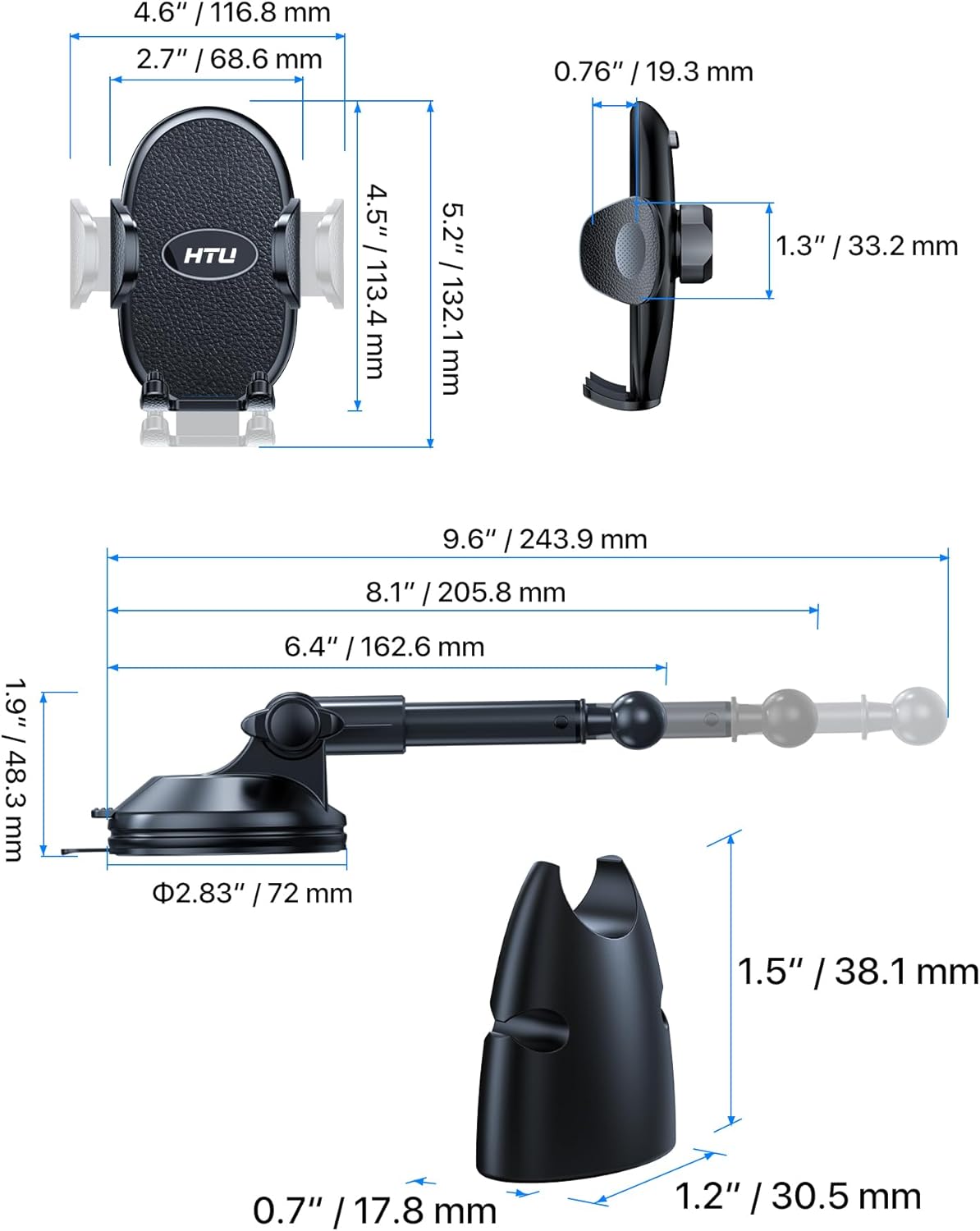
Figure 2.1: Overview of the HTU Car Phone Mount components and their dimensions.
3. Setup Instructions
The HTU Car Phone Mount can be installed on either your dashboard or windshield. Follow these steps for secure installation:
3.1 Surface Preparation
- Clean the desired mounting surface (dashboard or windshield) thoroughly with the provided wipe or a clean cloth. Ensure the surface is free of dust, oil, and moisture.
- Important Note: This suction cup is not suitable for dashboards with leather, waxed, oiled, breathable, uneven, deeply textured, curved, or plush cloth surfaces. If your dashboard has these characteristics, please mount the holder on the windshield instead.
3.2 Attaching the Suction Cup
- Place the suction cup base firmly onto the cleaned surface.
- Press down on the center of the suction cup for approximately 15 seconds to expel air.
- Flip the locking lever down to secure the suction cup in place.

Figure 3.1: Examples of secure installation on a car dashboard and windshield.

Figure 3.2: The suction cup features triple-layer nano-gel technology for strong adhesion and temperature resistance.
4. Operating Instructions
Once installed, the HTU Car Phone Mount offers flexible adjustment and secure phone holding.
4.1 Adjusting the Telescopic Arm
- The upgraded non-knob telescopic arm allows for quick, one-hand adjustment. Simply extend or retract the arm to your desired length (from 4.92 inches to 8.15 inches).
- The arm is crafted from aluminum alloy for durability and bend resistance.

Figure 4.1: Adjusting the telescopic arm with one hand for optimal reach.
4.2 Adjusting Viewing Angle
- The mount features 360-degree rotation at the suction cup base and 360-degree rotation at the phone holder, along with a 270-degree adjustable telescopic arm.
- These multiple points of adjustment allow you to achieve any desired viewing angle. Precision-injected damping grease ensures smooth and silent rotation.
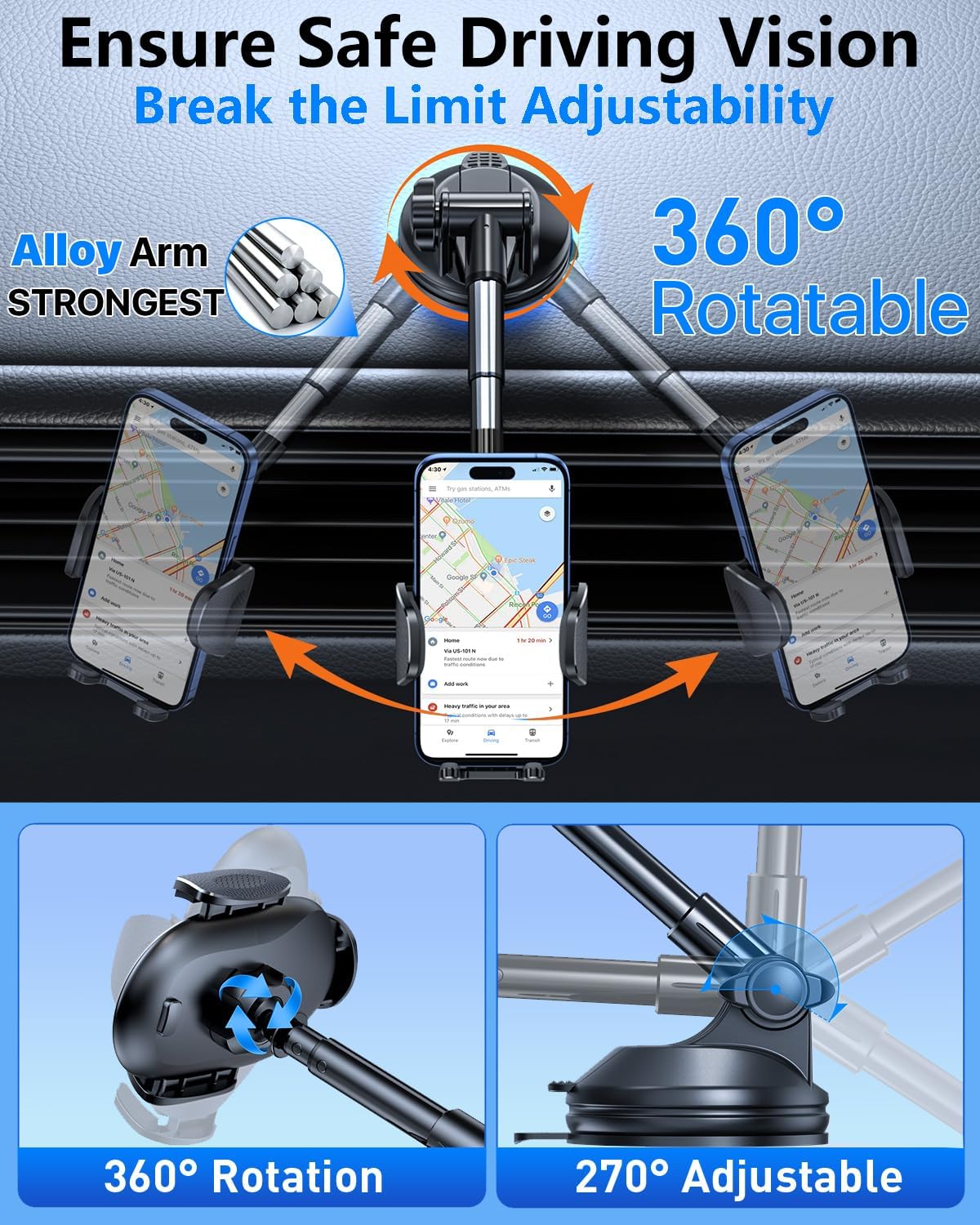
Figure 4.2: The mount offers extensive adjustability for perfect viewing.
4.3 Inserting and Removing Your Phone
- Gently open the side clamps of the phone holder.
- Place your phone into the holder, ensuring it sits securely against the backrest. The holder is compatible with 4-7 inch cell phones and most phone cases (up to 0.24 inches thick), excluding ring phone cases.
- Press the easy release button to open the clamps and remove your phone.
- The bottom feet of the holder are adjustable to accommodate different phone sizes and charging port locations.

Figure 4.3: The phone holder accommodates various phone sizes and case types.

Figure 4.4: Easy release button and adjustable feet for secure phone placement.
4.4 Using the Cable Organizer
- The integrated cable organizer helps manage your charging cable, keeping your car interior tidy.
- Its U-shaped design also provides additional support for your phone, enhancing stability.

Figure 4.5: The cable organizer keeps charging cables neat and provides extra phone support.
5. Maintenance
To ensure the longevity and optimal performance of your HTU Car Phone Mount, follow these maintenance guidelines:
- Cleaning the Suction Cup: If the suction cup loses its stickiness, rinse it with warm water and let it air dry. Do not use harsh chemicals or abrasive materials.
- General Cleaning: Wipe the mount with a soft, damp cloth to remove dust and grime. Avoid excessive moisture.
- Storage: When not in use for extended periods, detach the mount and store it in a cool, dry place away from direct sunlight.
6. Troubleshooting
If you encounter issues with your HTU Car Phone Mount, refer to the following common solutions:
- Mount Not Sticking:
- Ensure the mounting surface is clean, dry, and smooth.
- Press firmly on the suction cup for 15 seconds before engaging the locking lever.
- If mounting on the dashboard, verify it is not a leather, waxed, oiled, breathable, uneven, deeply textured, curved, or plush cloth surface. If it is, use the windshield instead.
- Clean the suction cup with warm water and air dry if it has lost its adhesion.
- Phone Not Holding Securely:
- Ensure your phone is properly centered in the holder and the clamps are fully closed.
- Adjust the bottom feet to provide adequate support for your phone's size.
- Check if your phone case thickness exceeds 0.24 inches or if it's a ring phone case, which may affect compatibility.
- Arm or Holder is Stiff to Adjust:
- The joints are designed for firm hold. Apply gentle, consistent pressure.
- If the issue persists, contact customer support.
7. Specifications
| Feature | Specification |
|---|---|
| Model Number | HTU 3.0 Upgrade Suction Car Phone Holder |
| Mounting Type | Dashboard, Windshield |
| Compatible Phone Sizes | 4-7 inch cell phones |
| Max Case Thickness | 0.24 inches (excluding ring phone cases) |
| Telescopic Arm Length | 4.92 inches to 8.15 inches |
| Rotation | 360° (suction base), 360° (mount), 270° (telescopic arm) |
| Material | Luxury Leather, Upgraded Aluminum, Aviation-Grade PC, Silicon Damping Fluid |
| Weight Capacity | Up to 80 lbs |
| Temperature Resistance | -45°F to 215°F (-43°C to 101°C) |
8. Warranty and Support
HTU provides 5 years of dedicated support for this product. If you have any questions, concerns, or require assistance, please contact HTU customer service through the retailer's platform or the official HTU website.


