
Product Overview
This manual provides detailed instructions for the PINDOWS PDS-8006B-N6 Men's Sport Watch. This military-style digital watch features a large dual dial design, Japan original digital movement, and LED backlight for clear time display in various conditions. It is designed for durability and functionality, suitable for both daily wear and outdoor activities.

Figure 1: Front view of the PINDOWS PDS-8006B-N6 Sport Watch, highlighting its digital display and button layout.
Key Features
- Military Sport Design: Stylish and rugged, ideal for everyday wear and outdoor activities.
- Imported Japanese Movement: Provides precise and reliable timekeeping with a battery life of over 3 years.
- High-Quality Materials: Constructed with 304 stainless steel and a durable TPU band, featuring IP vacuum plating for enhanced texture and color retention.
- Multifunctionality: Includes Stopwatch, Alarm, LED Backlight, Calendar (date, week display), 12/24 hour time display, Dual Time, and Shockproof capabilities.
- 50M Waterproof: Suitable for swimming, diving, and daily water exposure.

Figure 2: Overview of watch functions and button assignments.
Setup
Battery Information
The PINDOWS PDS-8006B-N6 watch comes with one Lithium Metal battery pre-installed. No user installation is typically required for initial use. If battery replacement becomes necessary, it is highly recommended to seek professional assistance to ensure the watch's water resistance is maintained.
Initial Time Setting
Upon first use or after a battery replacement, you may need to set the current time and date. Please refer to the "Operating Instructions" section for detailed steps on how to adjust these settings.
Operating Instructions
Button Functions
The PINDOWS PDS-8006B-N6 watch features four primary buttons, each with specific functions:
- LIGHT Button: Located at the top-left. Activates the LED backlight for improved visibility in low-light conditions.
- MODE Button: Located at the bottom-left. Cycles through different operational modes such as Time Display, Stopwatch, Alarm, and Dual Time.
- START/PAUSE Button: Located at the top-right. Used to start/stop the stopwatch, adjust settings, or confirm selections in various modes.
- ADJUSTMENT Button: Located at the bottom-right. Used to reset the stopwatch, move between setting options, or exit a setting mode.

Figure 3: The LED backlight illuminates the display for clear viewing in the dark.
Setting Time and Date
- In normal time display mode, press the MODE button repeatedly until the time setting mode is activated. This is usually indicated by flashing digits (e.g., hours or minutes).
- Use the START/PAUSE button to adjust the flashing digit (e.g., increment hours, minutes, year, month, or day).
- Use the ADJUSTMENT button to move to the next setting item (e.g., from hours to minutes, then to year, etc.).
- Once all desired settings are complete, press the MODE button to exit the setting mode and return to normal time display.
Using the Stopwatch
- Press the MODE button to navigate to the Stopwatch mode. The display will typically show "00:00:00".
- Press the START/PAUSE button to begin timing.
- Press the START/PAUSE button again to pause the stopwatch.
- Press the ADJUSTMENT button to reset the stopwatch to zero.
Setting the Alarm
- Press the MODE button to navigate to the Alarm mode.
- Use the START/PAUSE and ADJUSTMENT buttons to set the desired alarm time (hours and minutes).
- Press the MODE button to confirm the alarm setting and exit.
- The watch supports up to three independent alarm groups.
Dual Time Display
The PINDOWS PDS-8006B-N6 watch allows you to track time in two different time zones simultaneously. Navigate to the Dual Time mode using the MODE button and follow the on-screen prompts to set the second time zone as required.
Maintenance
Cleaning
To keep your watch in optimal condition, wipe it regularly with a soft, dry cloth. For more persistent dirt, a slightly damp cloth can be used, followed immediately by thorough drying. Avoid using harsh chemical cleaners, solvents, or abrasive materials, as these can damage the watch's finish and seals.
Water Resistance
The watch is rated for 50 meters (5 ATM) water resistance, making it suitable for swimming, diving, and general water exposure. However, to maintain its water resistance, avoid pressing any buttons while the watch is submerged in water. Also, do not expose the watch to hot water, steam, or extreme temperature changes (e.g., hot showers, saunas), as this can compromise the integrity of the seals.

Figure 4: The watch is designed to withstand water immersion up to 50 meters.
Storage
When not in use, store your PINDOWS watch in a cool, dry place, away from direct sunlight, extreme temperatures, and strong magnetic fields. This will help preserve its functionality and appearance over time.
Troubleshooting
Watch Not Displaying Time
- Battery Depletion: The most common cause is a depleted battery. Contact a professional watch repair service for battery replacement.
- System Reset: In some cases, a soft reset might resolve minor display issues. Try pressing and holding all four buttons simultaneously for a few seconds. If this does not work, consult a professional.
Display is Dim or Faint
- Low Battery: A dim display is often an early indicator of a low battery. Consider professional battery replacement.
- Backlight Function: Ensure the backlight is functioning correctly by pressing the LIGHT button. If the backlight is also dim, it further suggests a low battery.
Water Inside Watch
- Immediate Action: If you notice condensation or water inside the watch, immediately stop using it.
- Professional Repair: Take the watch to a qualified watch repair technician as soon as possible. Do not attempt to dry it yourself, as this can cause further damage. Water damage is typically not covered under warranty if proper care instructions were not followed.
Specifications
| Feature | Detail |
|---|---|
| Model Number | PDS-8006B |
| Brand | PINDOWS |
| Movement | Japan Original Quartz Movement |
| Water Resistance | 50M (5 ATM) |
| Case Material | High-quality IP vacuum plating |
| Band Material | TPU |
| Back Cover | 304 Stainless Steel |
| Battery Type | Lithium Metal (1 included) |
| Battery Life | Over 3 years |
| Functions | Stopwatch, Alarm, LED Backlight, Calendar (Date, Week), 12/24 Hour Display, Dual Time, Shockproof |
| Package Dimensions | 9.91 x 8.71 x 6.91 cm |
| Item Weight | 132 g |

Figure 5: Detailed dimensions of the watch case and strap.
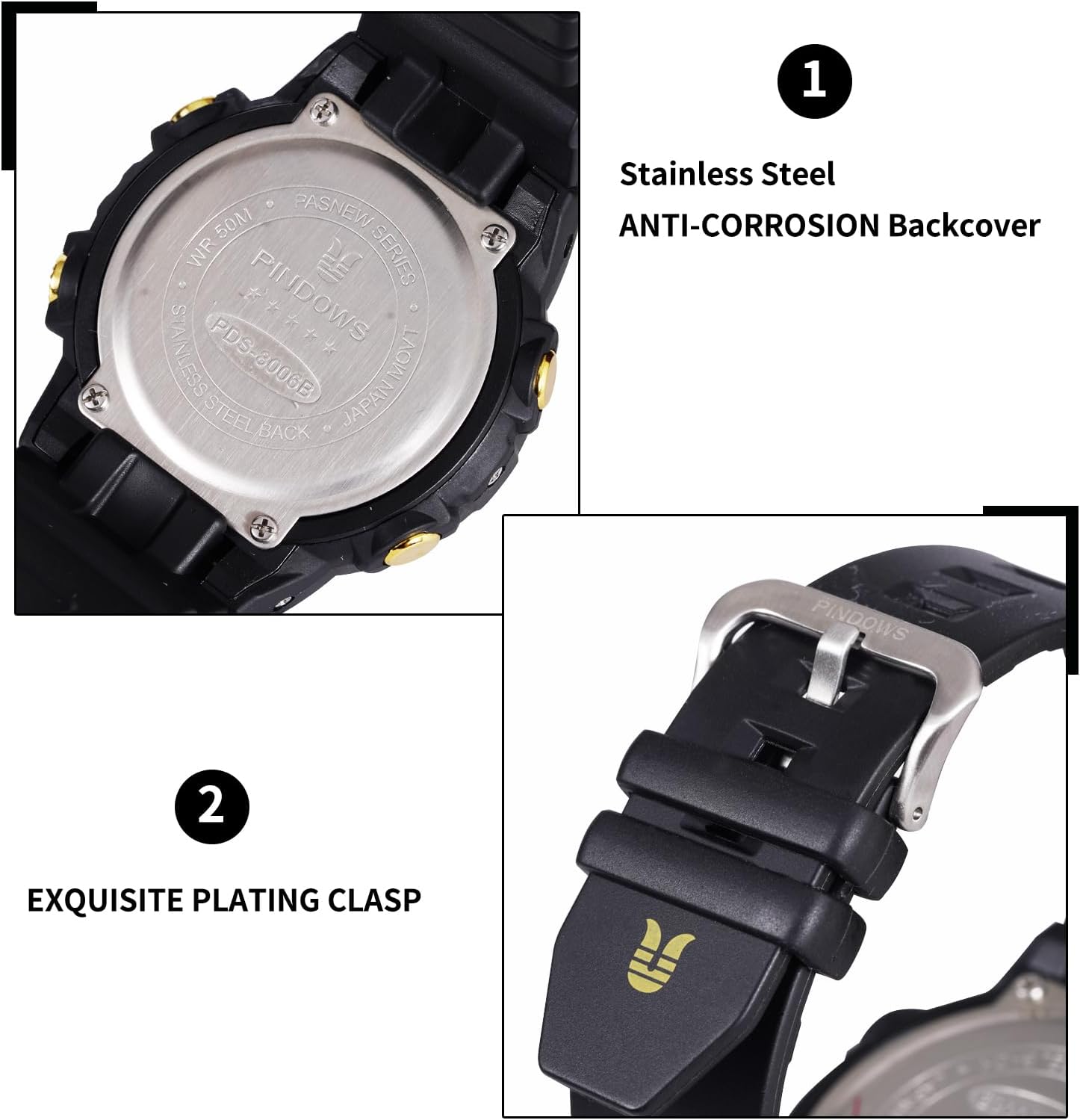
Figure 6: Details of the watch's durable back cover and clasp.
Warranty and Support
PINDOWS provides a 12-month warranty service for the PDS-8006B-N6 Men's Sport Watch from the date of purchase. This warranty covers manufacturing defects under normal use.
For any questions, technical support, or warranty claims, please contact PINDOWS customer service. Refer to the product packaging or the retailer's website where you purchased the watch for specific contact information (e.g., email, phone number, or support portal).
For more information about PINDOWS products and services, please visit the official PINDOWS website or contact your local authorized distributor.


