
AODK AODK Mobile 2-Drawer Filing Cabinet
AODK Mobile 2-Drawer Filing Cabinet User Manual
Model: Fully Assembled Filing Cabinet (B0C5LLMHWG)
Introduction
Thank you for choosing the AODK Mobile 2-Drawer Filing Cabinet. This manual provides essential information for the proper setup, operation, and maintenance of your new filing cabinet. Please read these instructions carefully before use and retain them for future reference.

Image: The AODK Mobile 2-Drawer Filing Cabinet in black, featuring a printer on its top surface and one drawer open, revealing organized hanging files. This illustrates the cabinet's design and storage capacity.
Safety Information
- Ensure the cabinet is placed on a level surface to prevent tipping.
- Do not overload drawers, as this may affect stability and drawer mechanism.
- Always close drawers completely after use to maintain stability and security.
- Keep keys in a safe place, away from children.
- Avoid standing or sitting on the cabinet.
Setup and Assembly
The AODK Mobile 2-Drawer Filing Cabinet is designed for quick setup, arriving largely pre-assembled. You can begin using it within minutes by following these simple steps.

Image: An overview diagram illustrating the three quick assembly steps for the filing cabinet: attaching the metal handles, removing internal foam packaging, and securing the wheels to the base.
- Install Metal Handles: Attach the provided metal handles to each drawer using the included screws.
- Remove Foam Boards: Carefully remove any internal foam packaging or protective boards from within the cabinet structure.
- Install Wheels: Securely attach the five universal wheels to the bottom of the cabinet. Ensure the two brake casters are positioned at the front for easy locking.

Image: Detail of the metal handle and key lock mechanism on a drawer.

Image: Close-up view of one of the cabinet's universal wheels, highlighting its mobility feature.
Operation
Drawer Functionality
The cabinet features two fully extendable drawers, designed for smooth and effortless access to your documents.
- File Compatibility: The adjustable hanging rods within each drawer accommodate various file sizes, including Legal, Letter, and A4 documents.
- Full Extension: Drawers extend completely, allowing full visibility and easy retrieval of items stored at the back.

Image: An open drawer of the filing cabinet, demonstrating its capacity for hanging files and indicating compatibility with both A4 and Letter-sized documents.
Locking Mechanism
Each drawer is equipped with an independent lock to safeguard your important documents.
- Insert the key into the lock and turn to secure or unlock the drawer.
- Each drawer comes with its own set of keys for enhanced security.
Mobility and Stability
The cabinet is designed for easy movement and stable placement.
- Universal Wheels: Five smooth-rolling wheels allow you to easily move the cabinet as needed.
- Brake Casters: Two of the front wheels are equipped with brakes. Engage these brakes to secure the cabinet in a stationary position.
- Anti-Tipping Wheel: A fifth wheel located at the bottom-front of the cabinet provides additional support and stability, preventing tipping when drawers are extended.

Image: A detailed view of the cabinet's five universal wheels, distinguishing between the brake casters and swivel casters for controlled movement and stability.
Maintenance
- Cleaning: Wipe the cabinet surfaces with a soft, damp cloth. Avoid abrasive cleaners or harsh chemicals that could damage the finish.
- Drawer Slides: Periodically check the drawer slides for any debris. If drawers become stiff, a small amount of silicone lubricant can be applied to the slides.
- Locks: Ensure the locks operate smoothly. If a lock becomes difficult to turn, a graphite lubricant can be used sparingly.
- Wheels: Keep the wheels free of dust and hair to ensure smooth movement.
Troubleshooting
| Problem | Possible Cause | Solution |
|---|---|---|
| Drawers do not close completely or smoothly. |
|
|
| Cabinet is unstable or tips easily. |
|
|
| Lock is difficult to operate. |
|
|
Specifications
| Brand | AODK |
| Model Name | File Cabinet with 2 Drawers |
| Item Model Number | Fully Assembled Filing Cabinet |
| ASIN | B0C5LLMHWG |
| UPC | 850053190018 |
| Color | Black |
| Product Dimensions (D x W x H) | 15.75" x 15.75" x 26.18" |
| Item Weight | 41.3 Pounds |
| Frame Material | Metal and Wood |
| Special Features | No Assembly Required (minimal setup), Sturdy and Durable, Lockable, Mobile |
| Mounting Type | Floor Mount |
| Installation Type | Freestanding |
| Country of Origin | China |
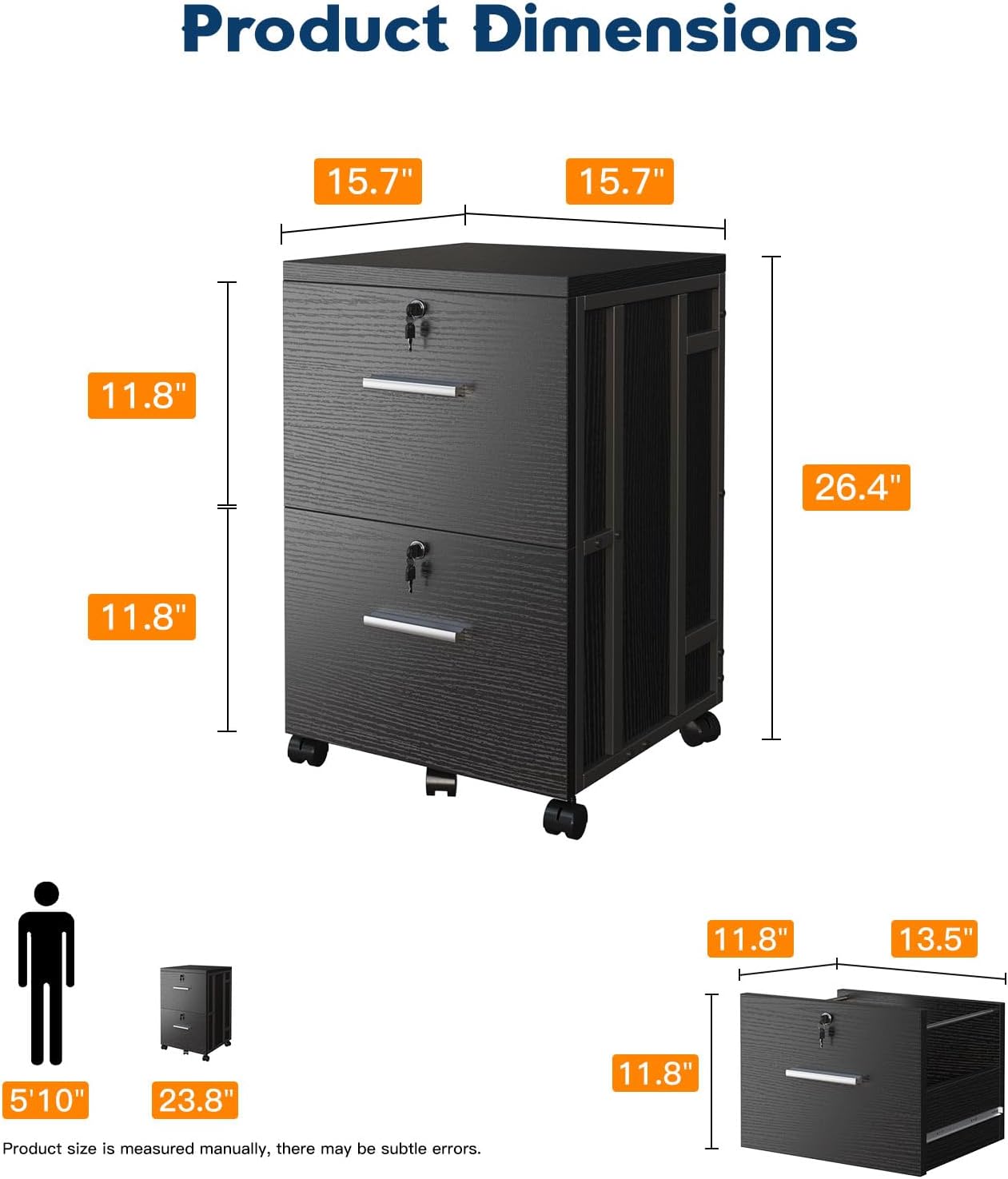
Image: A detailed diagram illustrating the product dimensions of the AODK filing cabinet, including depth, width, and height measurements.
Warranty and Support
For warranty information or technical support, please contact AODK customer service. Refer to your purchase documentation for specific warranty terms and contact details.
You can also visit the official AODK store on Amazon for more product information and support: AODK Store.
Ask a question about this manual
Ask about setup, troubleshooting, compatibility, parts, safety, or missing instructions. Manuals+ will review the question and use this page’s manual context to help answer it.