
1. Introduction
This manual provides instructions for the safe and proper use of your Bontempi Digital Drum, Model 18 0510. This electronic percussion instrument features 4 drum pads, 12 rhythmic percussion instruments, 6 musical styles, and various playback modes. Please read this manual thoroughly before operating the device and retain it for future reference.
2. Package Contents
Ensure all items listed below are present in the package:
- Bontempi Digital Drum Unit
- Instruction Manual (this document)
Note: Batteries are not supplied and must be purchased separately.
3. Setup
3.1. Battery Installation
The Digital Drum requires 3 x 1.5V R6/AA batteries (not supplied).
- Locate the battery compartment on the underside of the unit.
- Using a screwdriver, open the battery compartment cover.
- Insert 3 x 1.5V R6/AA batteries, ensuring correct polarity (+/-) as indicated inside the compartment.
- Replace the battery compartment cover and secure it with the screw.
Important:
- Do not mix old and new batteries.
- Do not mix alkaline, standard (carbon-zinc), or rechargeable (nickel-cadmium) batteries.
- Remove batteries if the unit will not be used for an extended period.
3.2. Initial Assembly
The Digital Drum may require minor assembly. Follow any visual guides on the packaging or included diagrams to attach any separate components, such as the green musical note stand, if applicable. Ensure all parts are securely connected before use.

Figure 1: Bontempi Digital Drum in its retail packaging, illustrating the product's design and features.
4. Operating Instructions
4.1. Power On/Off
Locate the ON/OFF switch on the unit. Slide the switch to the "ON" position to power on the Digital Drum. Slide it to "OFF" to power off the unit.
4.2. Drum Pads and Percussion Instruments
The Digital Drum features 4 drum pads. Each pad can produce different sounds. The unit includes 12 rhythmic percussion instruments. Pressing the "DIGITAL DRUM" button cycles through these instruments, assigning them to the drum pads.
4.3. Musical Styles (Demos)
The unit includes 6 pre-programmed musical styles (demos). Use the "MUSIC STYLES" button to select and play different demo tracks. The "Style 1", "Style 2", "Speed-", "Speed+", and "Mute" buttons control the playback of these demos.
4.4. Accompanying Demos
While a demo is playing, you can accompany it by playing on the 4 drum pads. The sounds produced by the pads will blend with the selected musical style.
4.5. Speed Adjustment
Adjust the playback speed of the demo tracks using the "Speed-" and "Speed+" buttons.
4.6. Any Key Playback Mode
Activate the "Any Key Play" mode by pressing the corresponding button. In this mode, pressing any drum pad will advance the melody of the selected demo, allowing for interactive play.
4.7. Volume Control
Adjust the overall volume of the Digital Drum using the dedicated volume control knob or buttons, typically labeled with "+" and "-" symbols or a rotary dial.
4.8. Rhythm LEDs / Light Effect
The unit features Rhythm LEDs and a "LIGHT EFFECT" button. Press this button to activate or deactivate visual light effects that synchronize with the rhythm or drum play.
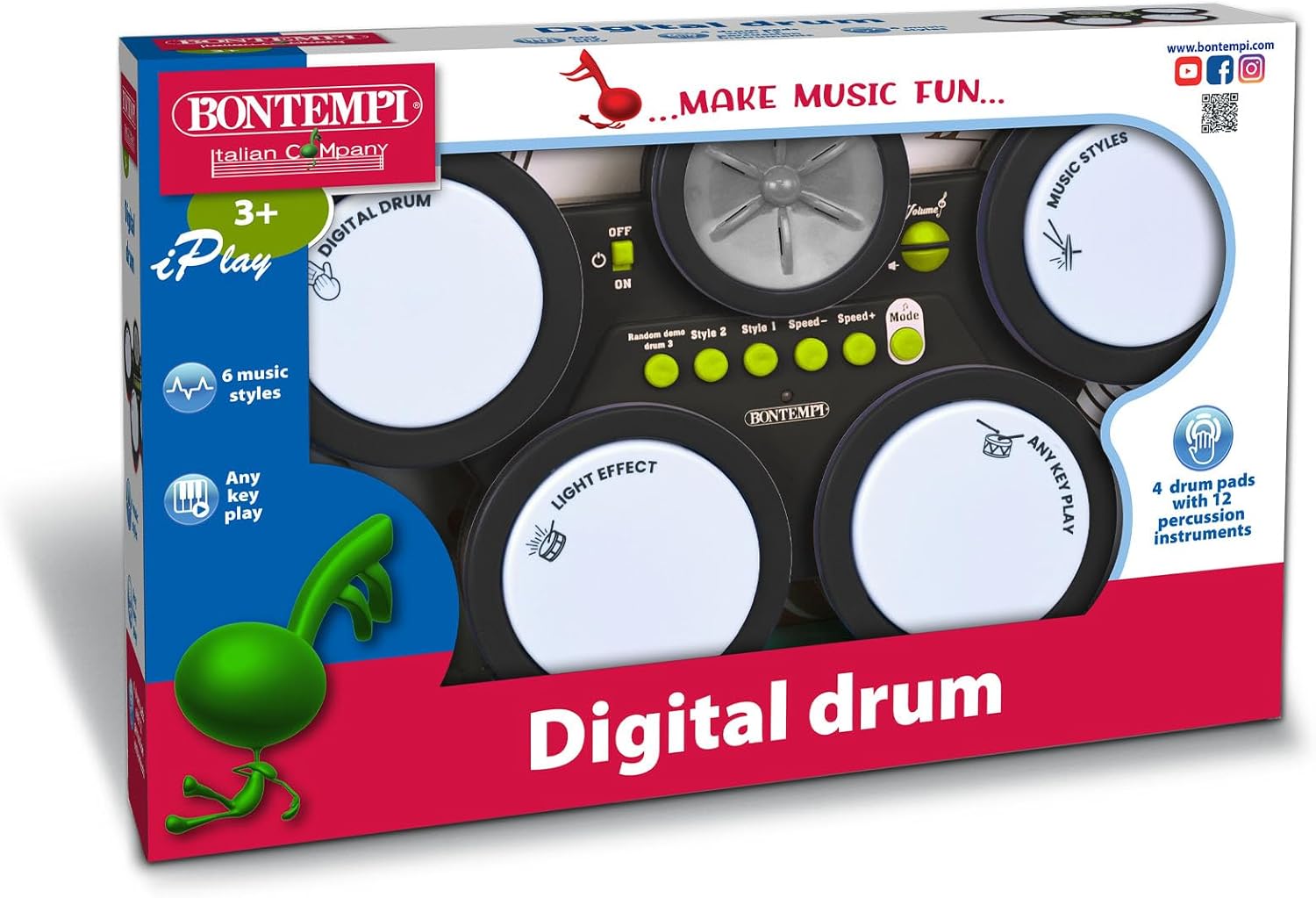
Figure 2: Detailed view of the Bontempi Digital Drum, highlighting the control buttons and drum pads for operation.
5. Maintenance
- Cleaning: Wipe the unit with a soft, dry cloth. Do not use abrasive cleaners or solvents.
- Storage: Store the Digital Drum in a cool, dry place away from direct sunlight and extreme temperatures.
- Battery Care: Remove batteries if the unit is not used for extended periods to prevent leakage.
6. Troubleshooting
| Problem | Possible Cause | Solution |
|---|---|---|
| No sound or power | Batteries are dead or incorrectly installed. | Check battery polarity and replace with new batteries if necessary. Ensure the ON/OFF switch is in the "ON" position. |
| Low volume | Volume control is set too low. | Adjust the volume control to a higher setting. |
| Buttons unresponsive | Temporary electronic glitch. | Turn the unit OFF, wait a few seconds, then turn it back ON. |
7. Specifications
- Model: 18 0510
- Brand: Bontempi
- Type: Electronic Percussion
- Drum Pads: 4
- Percussion Instruments: 12 rhythmic instruments
- Musical Styles (Demos): 6
- Playback Modes: Accompany demos, Any Key Play
- Controls: Speed adjustment, Volume control, Rhythm LEDs, Light Effect
- Power Supply: 3 x 1.5V R6/AA batteries (not supplied)
- Dimensions: 390 x 250 x 65 mm (approximately 15.35 x 9.84 x 2.56 inches)
- Material: Plastic
- Weight: 0.1 Kilograms
- Assembly Required: Yes
- Educational Objective: Develop motor skills, rhythm, and creativity
8. Safety Information
- This product is intended for children aged 3 years and older.
- Adult supervision is recommended during use.
- Keep small parts away from young children to prevent choking hazards.
- Do not expose the unit to water or excessive moisture.
- Do not attempt to disassemble or modify the unit.
- Dispose of batteries responsibly according to local regulations.
9. Warranty and Support
For warranty information or technical support, please refer to the product packaging or contact your retailer. Keep your purchase receipt as proof of purchase.


