
1. Introduction
Thank you for choosing the POWERMASTER HY-1001 Motorcycle Bluetooth Intercom Headset. This device is designed to provide seamless communication and entertainment while riding, featuring Bluetooth 5.0 technology for stable connections and clear audio. Please read this manual carefully before use to ensure proper operation and to maximize your experience.
Package Contents
The package includes the following items:
- 1 x Helmet Intercom Unit
- 1 x Pair of Earphones (with Microphone)
- 4 x Adhesive Earphone Pads
- 1 x Clip
- 1 x Screwdriver
- 1 x Charging Cable (Type-C)
- 1 x User Manual (English)
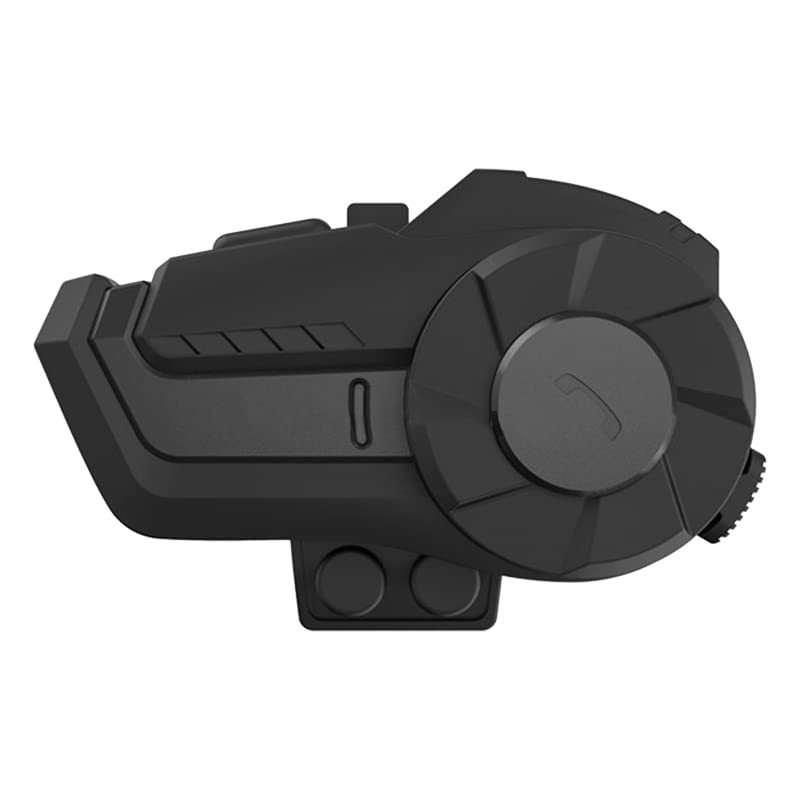
Image: The POWERMASTER HY-1001 intercom unit with its included accessories, such as earphones, charging cable, and mounting clip.
2. Safety Information
Please observe the following safety guidelines to prevent injury or damage to the device:
- Road Safety: Always prioritize road safety. Do not operate the device in a way that distracts you from riding.
- Volume Control: Avoid listening at excessively high volumes for prolonged periods to prevent hearing damage. Ensure you can still hear ambient traffic sounds.
- Water Resistance: The device has an IP65 waterproof rating, meaning it is resistant to water splashes and dust. Do not submerge it in water.
- Charging: Use only the provided charging cable and a compatible 5V/1A charger. Do not use damaged cables or chargers.
- Temperature: Operate the device within the specified temperature range (5~40°C). Avoid extreme temperatures.
- Disassembly: Do not attempt to disassemble or modify the device. This will void the warranty and may cause damage.
3. Setup
3.1 Charging the Device
Before first use, fully charge the intercom unit.
- Connect the provided Type-C charging cable to the charging port on the intercom unit.
- Connect the other end of the cable to a DC 5 Volt 1A power adapter (not included) or a USB port on a computer.
- The indicator light will show the charging status. A full charge typically takes approximately 2 hours.
- Once fully charged, disconnect the charging cable.
Note: The device uses a 600mAh rechargeable polymer battery, providing up to 18 hours of talk time and 300 hours of standby time.
3.2 Helmet Installation
Install the intercom unit and earphones inside your motorcycle helmet.
- Mount the Intercom Unit: Use the provided clip to attach the intercom unit to the side of your helmet. Ensure it is securely fastened and does not obstruct your vision or helmet functionality.
- Install Earphones: Place the earphones inside the helmet's ear pockets. Use the adhesive earphone pads to secure them in place. Position them directly over your ears for optimal sound quality.
- Position Microphone: Route the microphone arm so that the microphone is positioned close to your mouth, ensuring clear voice transmission.
- Connect Earphones: Plug the earphone cable into the designated port on the intercom unit.
4. Operating Instructions
4.1 Power On/Off
- Power On: Press and hold the Power button for approximately 3 seconds until you hear an audible prompt and the indicator light flashes.
- Power Off: Press and hold the Power button for approximately 3 seconds until you hear an audible prompt and the indicator light turns off.
4.2 Bluetooth Pairing with Mobile Device
Pair your HY-1001 with your smartphone to make calls, listen to music, and receive GPS instructions.
- Ensure the HY-1001 is powered off.
- Press and hold the Power button for approximately 5-7 seconds until the indicator light flashes red and blue alternately, indicating pairing mode.
- On your mobile phone, enable Bluetooth and search for available devices.
- Select "HY-1001" from the list of devices.
- Once paired, the indicator light will flash blue slowly, and you will hear a confirmation tone.
Note: The Bluetooth transmission distance is approximately 10 meters in an open environment. The device supports A2DP and AVRCP profiles.
4.3 Intercom Function
The HY-1001 allows for wireless intercom communication with another compatible HY-1001 unit.
- Ensure both HY-1001 units are powered on and within range.
- On one unit, initiate intercom pairing (refer to specific button press in your quick start guide, typically a short press of the intercom button).
- On the second unit, also initiate intercom pairing.
- Once connected, the indicator lights will change, and you can begin communicating.
Note: The intercom wireless transmission range is approximately 800 meters in an open environment.
4.4 Music Playback and Call Management
Once paired with your mobile device, you can control music and calls.
- Play/Pause Music: Short press the Multi-function button (usually the main button).
- Next Track: Short press the Volume Up button.
- Previous Track: Short press the Volume Down button.
- Volume Adjustment: Long press the Volume Up/Down buttons.
- Answer Call: Short press the Multi-function button when a call comes in.
- End Call: Short press the Multi-function button during a call.
- Reject Call: Long press the Multi-function button when a call comes in.
- Voice Assistant: Double-press the Multi-function button to activate your phone's voice assistant (Siri, Google Assistant).
Note: Specific button functions may vary slightly. Refer to the quick start guide for detailed button mapping. The device can also be controlled via an application or remote, if available.
5. Maintenance
Proper maintenance ensures the longevity and optimal performance of your HY-1001 headset.
- Cleaning: Wipe the unit with a soft, damp cloth. Do not use harsh chemicals or abrasive cleaners.
- Storage: Store the device in a cool, dry place away from direct sunlight and extreme temperatures when not in use.
- Battery Care: To prolong battery life, avoid fully discharging the battery frequently. Charge the device regularly, even if not in use for extended periods.
- Water Exposure: While water-resistant, avoid unnecessary exposure to heavy rain or submersion. Ensure the charging port cover is securely closed.
6. Troubleshooting
If you encounter issues with your HY-1001, try the following solutions:
| Problem | Possible Solution |
|---|---|
| Device does not power on. | Ensure the battery is charged. Connect to a charger and try again. |
| Cannot pair with mobile phone. |
|
| No sound or low volume. |
|
| Intercom not connecting. |
|
| Short battery life. |
|
7. Specifications
| Feature | Detail |
|---|---|
| Brand | POWERMASTER |
| Model Name | HY-1001 |
| Bluetooth Version | 5.0 |
| Bluetooth Profiles | A2DP, AVRCP |
| Signal Frequency Range | 2.4GHz |
| Intercom Wireless Transmission Range | Approx. 800m (Open environment) |
| Bluetooth Transmission Distance | Approx. 10m (Open environment) |
| Operating Temperature | 5~40°C |
| Battery | 600mAh rechargeable polymer battery |
| Talk Time | 18 hours |
| Standby Time | 300 hours |
| Charging Time | 2 hours |
| Charging Voltage | DC 5 Volt 1A |
| Charging Input | Type-C |
| Waterproof Level | IP65 (Water-resistant) |
| Earphone Diameter | 40mm |
| Material | ABS, Acrylic, Silicone |
| Color | Black |
| Product Size | 8.3 x 4.7 x 2.5 cm (3.26 x 1.85 x 0.98 inches) |
| Product Weight | 47g (1.65 Oz) |
| Compatible Devices | Motorcycle |
| Control Method | Application, Remote (Device buttons) |
| Audio Driver Type | Dynamic Driver |
8. Warranty and Support
Specific warranty information for the POWERMASTER HY-1001 is not provided within the product details. For warranty claims, technical support, or further assistance, please refer to the contact information provided with your purchase or visit the official POWERMASTER website.
Always retain your proof of purchase for warranty purposes.