
ROARBATT 4000W or 8000W
ROARBATT 4000W Pure Sine Wave Power Inverter
Instruction Manual
Model: 4000W or 8000W
Introduction
Thank you for choosing the ROARBATT 4000W Pure Sine Wave Power Inverter. This device is designed to convert 12V DC power from your battery into stable 110V/120V AC pure sine wave power, suitable for a wide range of electronic devices and appliances. Its advanced features ensure reliable and safe operation for your truck, RV, car, or solar system. Please read this manual thoroughly before installation and operation to ensure proper use and longevity of your inverter.
What's in the Box
- 1x ROARBATT 4000W Pure Sine Wave Inverter
- 1x 15ft Remote Controller
- 1x Instruction Manual
- 2x Pairs of Battery Cables (Black and Red)
- 6x 40A Fuses
- 1x Wrench
- 2x Earth Wires
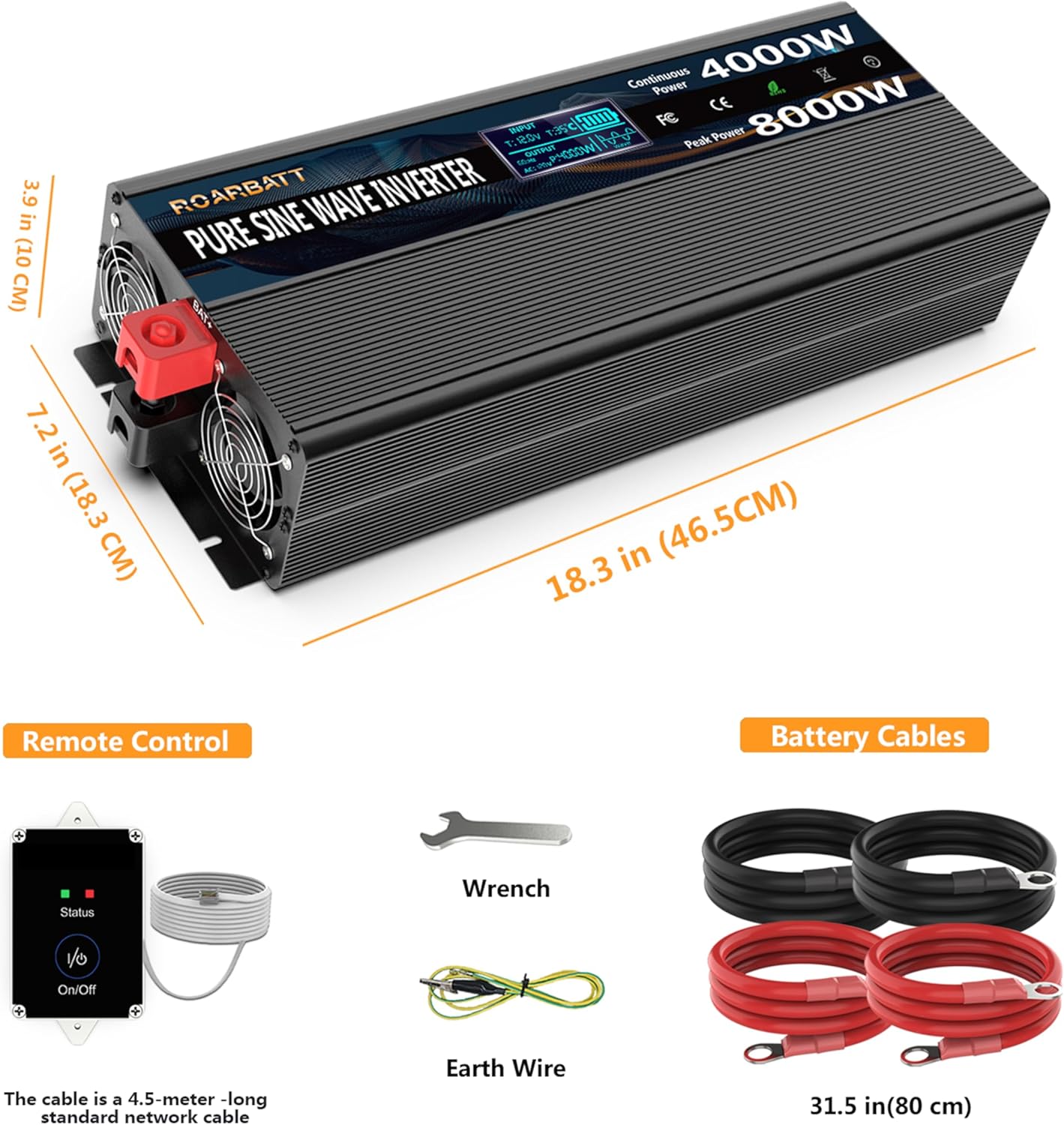
Image: All components included with the ROARBATT 4000W Pure Sine Wave Inverter.
Key Features
- Advanced Protection Features: Includes Over Voltage, Low Voltage, Overload, Short Circuit, Over Heat, and grounding protection to extend the inverter's lifespan.
- High Efficiency & Low Consumption: True rated continuous 4000W and 8000W peak power pure sine wave output. Converts 12V DC to 120V/110V AC with over 90% conversion efficiency and low no-load loss (0.6±0.1A).
- Versatile Connectivity: Equipped with 4 AC outlets, 1 AC Terminal Block for heavy-duty applications, and 2x 3.4A USB ports for charging mobile devices.
- Clear LED Display & Remote Control: An integrated LED display shows input/output voltage, battery capacity, and protection indicators. The included 15ft remote controller allows convenient on/off operation from a distance.
- Durable Construction: Features a robust aluminum housing that protects the inverter from drops and bumps. Built-in cooling fans ensure silent operation and maintain optimal temperature.

Image: Detailed view of the inverter's features and ports.
Technical Specifications
| Specification | Value |
|---|---|
| Model Name | 4000W or 8000W |
| Continuous Power | 4000W |
| Peak Power | 8000W |
| Input Voltage | 12V DC |
| Output Voltage | 110V/120V AC |
| Output Waveform | Pure Sine Wave |
| USB Output | 2x DC 5V 3.4A |
| Product Dimensions | 18.3 x 7.2 x 3.9 inches |
| Item Weight | 14.77 pounds |
| Cooling | Built-in Cooling Fan |
| No-Load Current | 0.6±0.1A |
Setup Instructions
Follow these steps to properly set up your ROARBATT Pure Sine Wave Power Inverter:
1. Prepare the Inverter and Battery
Ensure the inverter is placed on a stable, dry, and well-ventilated surface. Keep it away from direct sunlight, heat sources, and flammable materials. Make sure your 12V DC battery is fully charged and in good condition.

Image: Overview of the inverter and its accessories for setup.
2. Connect Battery Cables
Connect the red battery cable to the positive (+) terminal of the inverter and the positive (+) terminal of your 12V battery. Connect the black battery cable to the negative (-) terminal of the inverter and the negative (-) terminal of your 12V battery. Ensure all connections are tight and secure to prevent arcing and overheating.
Video: Demonstrates the proper connection of battery cables to the inverter terminals.
Video: Shows the connection process for the 4000W model, including securing the battery cables.
3. Connect Earth Wire
For safety, connect the included earth wire to the grounding terminal on the inverter and to a proper earth ground point (e.g., vehicle chassis, ground rod).
Image: The grounding terminal is located on the left side of the inverter's output panel.
4. Connect Remote Controller (Optional)
If using the remote controller, plug its cable into the "Remote Port ON/OFF" jack on the inverter. This allows you to turn the inverter on/off from a convenient location.
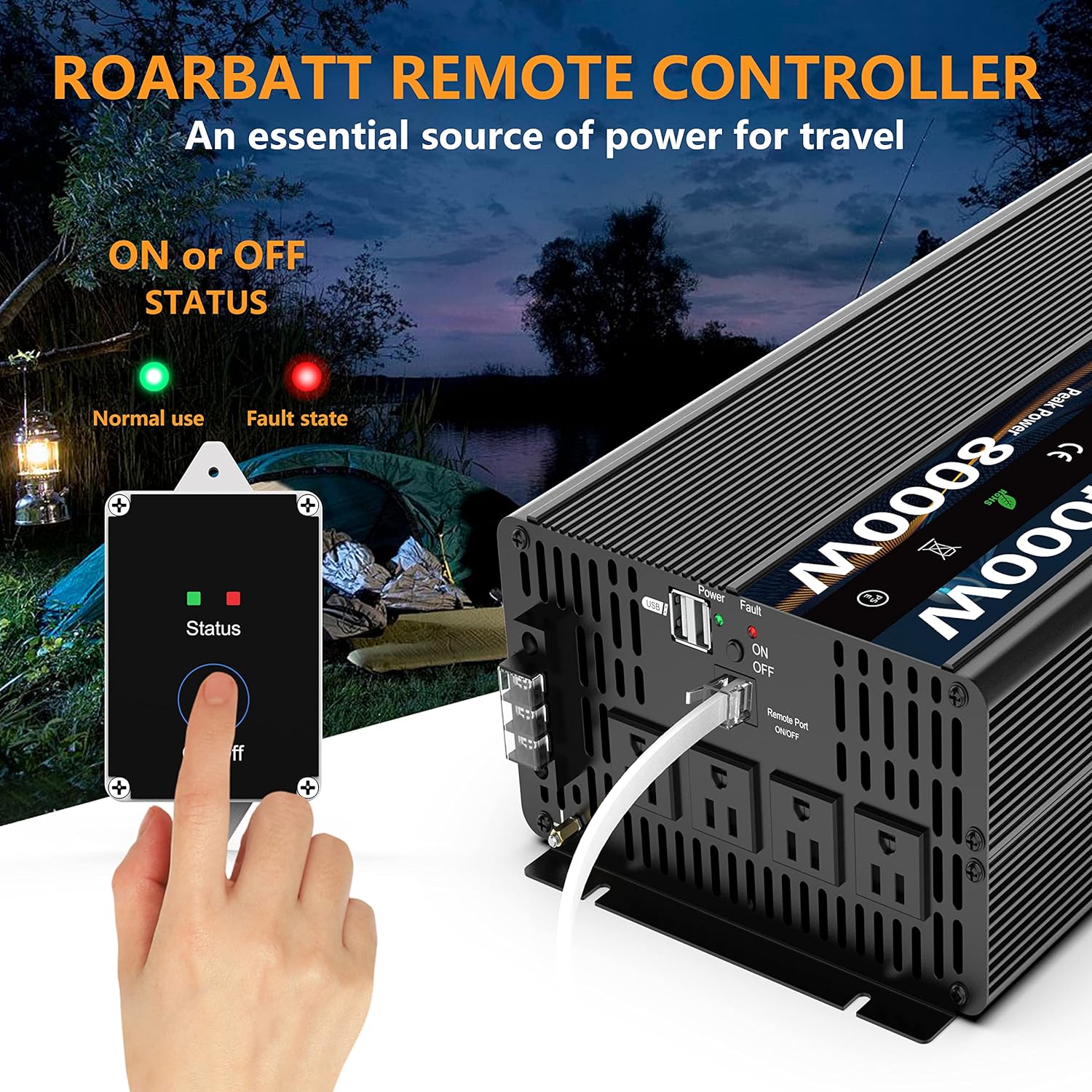
Image: The remote controller provides convenient power management.
Operating Instructions
1. Powering On the Inverter
Once all connections are secure, switch the inverter's main power button to the "ON" position. If using the remote, ensure the main switch is ON, then use the remote's ON/OFF button. The LED display will illuminate, showing input voltage, output voltage, and battery capacity.
Video: Demonstrates powering on the inverter and the information displayed on the LED screen, including various protection indicators.

Image: Understanding the Intelligent LED Display on your inverter.
2. Connecting Appliances
Plug your AC appliances into the 120V AC outlets or use the AC Terminal Blocks for higher power loads. For charging smaller devices, use the dual USB ports. Ensure the total wattage of connected appliances does not exceed the inverter's continuous power rating (4000W).

Image: The inverter is ideal for powering sensitive electronic devices.

Image: Heavy-duty AC output and other connectivity options.
3. Typical Usage Scenarios
The ROARBATT 4000W inverter is suitable for a variety of applications, including:
- RV and Camping: Powering appliances and electronics in recreational vehicles or during outdoor camping trips.
- Emergency Backup: Providing essential power during blackouts or natural disasters.
- Solar Systems: Converting solar panel DC output to usable AC power for off-grid living.
- Workshops & Field Work: Running power tools and equipment in remote locations.

Image: Common applications for the 4000W inverter.

Image: Convert power anytime and anywhere with the ROARBATT inverter.
Maintenance
- Regular Cleaning: Keep the inverter's exterior clean and free from dust and debris. Ensure the cooling fan vents are unobstructed.
- Check Connections: Periodically inspect all cable connections (battery, AC outlets, grounding) to ensure they are tight and free from corrosion.
- Battery Health: Monitor your battery's charge level and condition. A healthy battery is crucial for optimal inverter performance.
- Storage: When not in use for extended periods, store the inverter in a cool, dry place. Disconnect it from the battery.
Troubleshooting & FAQs
- Q: How much battery capacity should I use?
- A: Operating time = battery capacity / (power consumption / voltage). Select the appropriate battery capacity according to your needs.
- Q: What happens when I receive a product without output?
- A: Check whether the connection mode, battery, and electrical appliances are normal. Pay attention to the error code on the inverter screen and contact seller support.
- Q: How should I choose the right product?
- A: Do not exceed the rated power of the product. Pay attention to the inverter power overload caused by the instantaneous power of electrical appliances.
Warranty and Support
ROARBATT is committed to providing high-quality products and excellent customer service. For any questions, technical support, or warranty claims, please refer to the contact information provided with your purchase or visit the official ROARBATT website. We offer 24-hour friendly customer service to assist you.
Ask a question about this manual
Ask about setup, troubleshooting, compatibility, parts, safety, or missing instructions. Manuals+ will review the question and use this page’s manual context to help answer it.