
1. Introduction
The ANCEL BST100 Car Battery Tester is a versatile and accurate tool designed to assess the health of 12V automotive batteries. It provides comprehensive analysis of battery, cranking, and charging systems, helping users identify potential issues before they lead to unexpected failures. This manual provides detailed instructions for setting up, operating, and maintaining your BST100 tester.
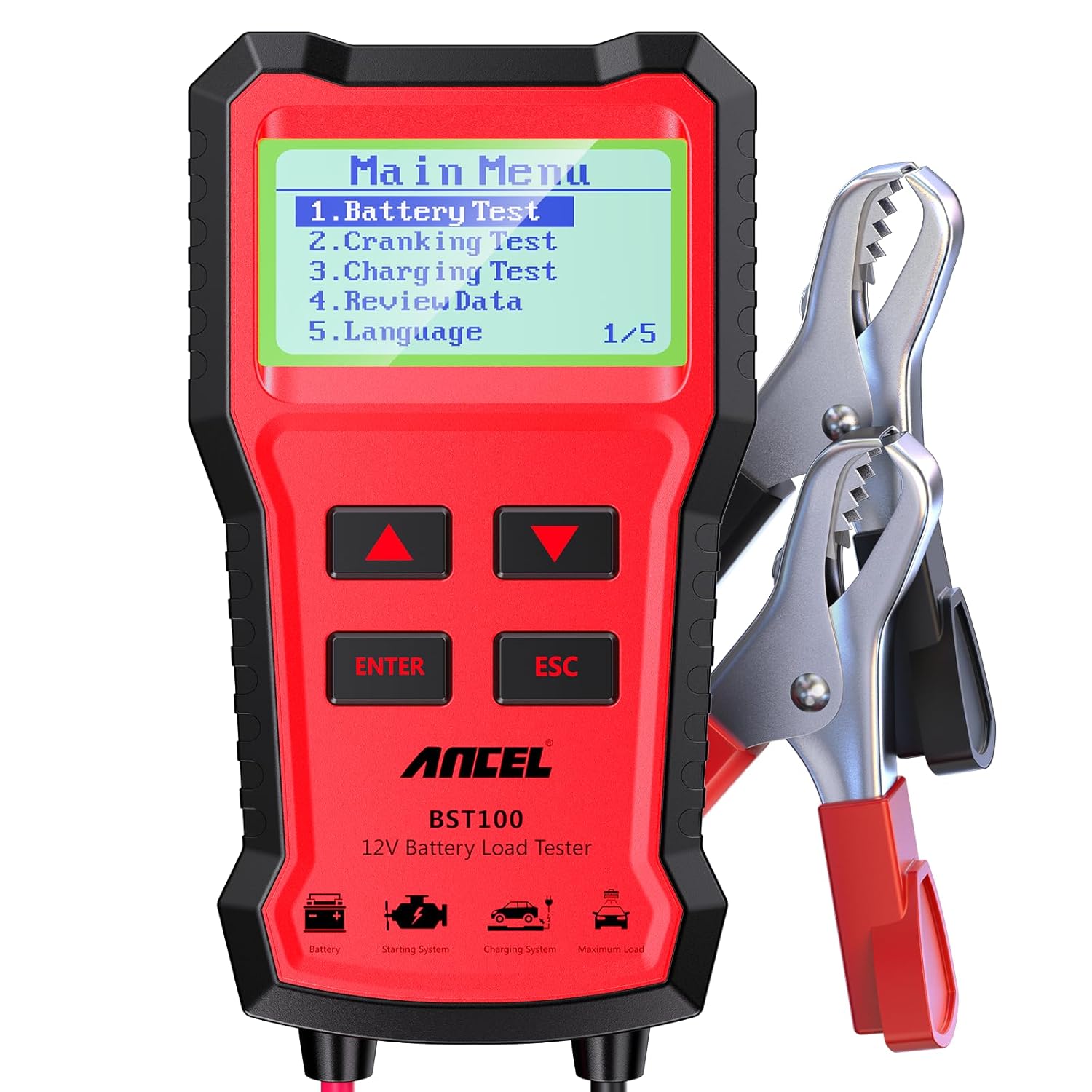
2. What's in the Box
- 1 x ANCEL BST100 Battery Tester
3. Product Features
- High Accuracy: Provides 99.8% accuracy in battery health assessment.
- Wide Compatibility: Capable of testing all 12V 100-2000CCA batteries, including ordinary lead acid, AGM flat plate, AGM spiral, and Gel batteries.
- Multiple Test Standards: Supports CCA, IEC, EN, DIN, JIS, GB, SAE, MCA, BCI, CA standards.
- User-Friendly Interface: Features a clear digital display and supports 7 different languages for easy navigation and interpretation of results.
- Multifunctional Testing: Includes Battery Test, Cranking Test, and Charging Test functions.
- Safety Features: Equipped with polar reversal protection, over voltage input protection, and loose lead detection for safe operation.
- Portable Design: Compact size and sturdy build quality for convenient carrying.


4. Setup Guide
4.1 Connecting the Tester
- Ensure the vehicle's ignition is off and all accessories are turned off.
- Locate the vehicle's 12V battery.
- Connect the red clamp of the BST100 to the positive (+) terminal of the battery.
- Connect the black clamp of the BST100 to the negative (-) terminal of the battery.
- The tester will power on automatically once connected correctly.

5. Operating Instructions
5.1 Main Menu Overview
Upon successful connection, the BST100 will display the main menu. Use the UP and DOWN arrow buttons to navigate through the options, and press ENTER to select.
- 1. Battery Test: Checks the overall health and charge of the battery.
- 2. Cranking Test: Evaluates the vehicle's starting system.
- 3. Charging Test: Assesses the alternator and charging system performance.
- 4. Review Data: Allows viewing of previously saved test results.
- 5. Language: Adjusts the display language.
5.2 Battery Test
The Battery Test function provides a quick and accurate assessment of the battery's condition. It measures voltage, internal resistance, and cold cranking amps (CCA).
- From the Main Menu, select "Battery Test" and press ENTER.
- Select the battery type (e.g., Regular Flooded, AGM Flat Plate) and input the battery's rated CCA value as found on the battery label.
- The tester will perform the test and display results including Healthy percentage, Charge percentage, Internal Resistance, and a final rating (e.g., "GOOD BATTERY", "REPLACE").
5.3 Cranking Test
The Cranking Test evaluates the performance of the vehicle's starting system, including the starter motor and battery's ability to deliver current during engine start-up.
- From the Main Menu, select "Cranking Test" and press ENTER.
- Follow the on-screen prompts, which will instruct you to start the engine.
- The tester will measure the cranking voltage and time, providing a result indicating if the cranking is normal or abnormal.
5.4 Charging Test
The Charging Test assesses the vehicle's charging system, including the alternator, rectifier, and voltage regulator, to ensure proper charging voltage and ripple.
- From the Main Menu, select "Charging Test" and press ENTER.
- Follow the on-screen prompts, which may include increasing engine RPM to a specified level (e.g., 2500 RPM) for a few seconds.
- The tester will display results for loaded and unloaded voltage, and ripple, indicating if the charging system is functioning normally.
5.5 Reviewing Data
The BST100 stores the results of your tests, allowing you to review them at a later time.
- From the Main Menu, select "Review Data" and press ENTER.
- Use the UP and DOWN arrow buttons to scroll through the stored test results.
- Press ESC to return to the Main Menu.
6. Maintenance
To ensure the longevity and accuracy of your ANCEL BST100, follow these maintenance guidelines:
- Keep the device clean and dry. Wipe with a soft, damp cloth if necessary.
- Store the tester in a cool, dry place away from direct sunlight and extreme temperatures.
- Inspect the cables and clamps regularly for any signs of damage or wear. Replace if necessary.
- Avoid dropping the device or subjecting it to strong impacts.
7. Troubleshooting
This section addresses common issues you might encounter while using the BST100.
| Problem | Possible Cause | Solution |
|---|---|---|
| Tester does not power on. | Incorrect connection to battery terminals; battery voltage too low. | Ensure clamps are securely connected to the correct positive (+) and negative (-) terminals. Check battery voltage with a multimeter; if below 8V, charge the battery. |
| "REPLACE" message after Battery Test. | Battery health is significantly degraded. | The battery needs to be replaced. |
| "CHARGE-RETEST" message after Battery Test. | Battery charge is low or internal resistance is too high due to low charge. | Charge the battery fully and re-run the test. If the message persists, the battery may need replacement. |
| Inaccurate test results. | Loose connections; incorrect battery type/CCA input; dirty battery terminals. | Ensure all connections are tight. Verify correct battery type and CCA input. Clean battery terminals if corroded. |
8. Specifications
- Product Dimensions: 3.1 x 1.2 x 5.7 inches
- Item Weight: 10.58 ounces (0.3 Kilograms)
- Model Number: BST100
- Brand: ANCEL
- Power Source: Corded Electric (powered by battery under test)
- Color: Red
- Supported Battery Types: Ordinary Lead Acid, AGM Flat Plate, AGM Spiral, Gel, EFB
- CCA Range: 100-2000 CCA
- Operating Temperature: -4°F to 140°F (-20°C to 65°C)
9. Warranty and Support
ANCEL is committed to providing high-quality products and excellent customer service.
- Warranty: The ANCEL BST100 comes with a 24-month warranty from the date of purchase.
- Returns & Replacements: A 30-day return and replacement policy is available.
- Technical Support: 7/24H technical support is available to assist with any product-related inquiries or issues.
- For support, please refer to the contact information provided in your product packaging or visit the official ANCEL website.

