1. Introduction
This manual provides comprehensive instructions for the ZdalaMit Replacement Remote Control, designed for various ATYME TV models. This remote is a direct replacement and requires no complex programming, offering a straightforward solution for controlling your television.

Image 1.1: The ZdalaMit Replacement Remote Control shown in a typical home entertainment environment, highlighting its intended use with an ATYME TV.
The remote is pre-programmed for immediate use with compatible ATYME TV models, ensuring a seamless experience. It is constructed from durable ABS material and offers a reliable operating range.

Image 1.2: Key features of the remote control, including its pre-programmed functionality, durable ABS material construction, effective operating range of up to 33 feet (10 meters), button durability exceeding 160,000 clicks, and a quick response time of 0.2 seconds.
2. Setup
Setting up your new ZdalaMit Replacement Remote Control is a simple process that primarily involves installing the batteries. No programming or pairing is required for this remote to function with compatible ATYME TV models.
2.1 Battery Installation
- Locate the battery compartment on the back of the remote control.
- Slide open the battery cover.
- Insert two (2) 1.5V AAA Alkaline batteries, ensuring the positive (+) and negative (-) terminals align correctly with the markings inside the compartment.
- Close the battery cover securely.
Once the batteries are installed, the remote control is ready for immediate use with your ATYME TV.
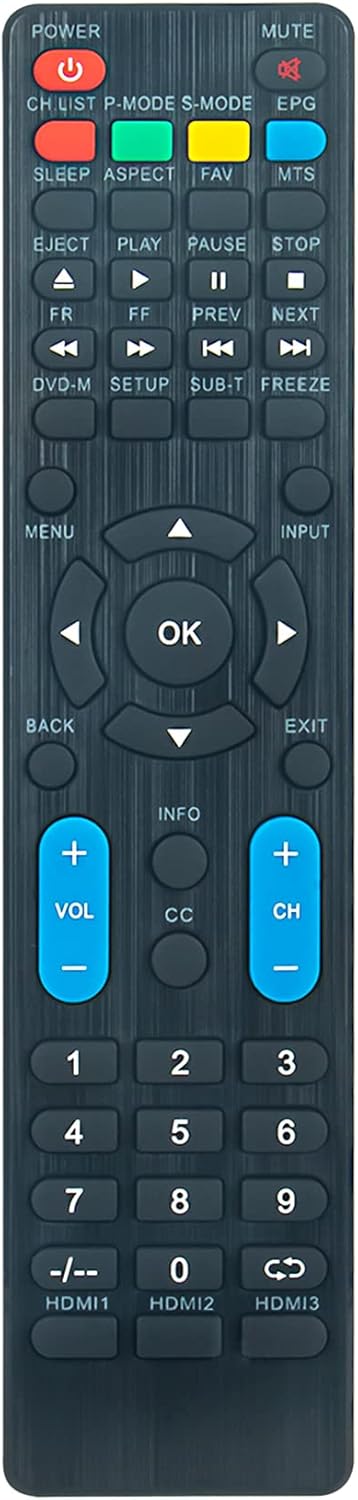
Image 2.1: A clear front view of the ZdalaMit Replacement Remote Control, showing the layout of all buttons. The battery compartment is located on the reverse side.
3. Operating Instructions
The ZdalaMit Replacement Remote Control provides full functionality for your ATYME TV. Below is a guide to the primary buttons and their functions.
Image 3.1: A detailed view of the remote control, illustrating the position and labeling of each button for easy identification.
3.1 Button Functions
| Button | Function |
|---|---|
| POWER | Turns the TV on or off. |
| MUTE | Mutes or unmutes the TV sound. |
| CH LIST | Displays the channel list. |
| P-MODE | Cycles through picture modes (e.g., Standard, Dynamic, Movie). |
| S-MODE | Cycles through sound modes (e.g., Standard, Music, Movie). |
| EPG | Accesses the Electronic Program Guide. |
| SLEEP | Sets the sleep timer. |
| ASPECT | Adjusts the screen aspect ratio. |
| FAV | Accesses favorite channels. |
| MTS | Selects Multi-channel Television Sound (e.g., Stereo, SAP). |
| EJECT | (If applicable) Ejects media from a connected device. |
| PLAY / PAUSE / STOP / FR / FF / PREV / NEXT | Controls media playback functions. |
| DVD-M | Accesses DVD menu (if applicable). |
| SETUP | Opens the TV setup menu. |
| SUB.T | Toggles subtitles on/off. |
| FREEZE | Freezes the current screen image. |
| MENU | Opens the main TV menu. |
| INPUT | Cycles through input sources (HDMI, AV, etc.). |
| Navigation Arrows (Up, Down, Left, Right) | Navigates through menus and options. |
| OK | Confirms selections in menus. |
| BACK / EXIT | Returns to the previous menu or exits the current menu. |
| VOL + / - | Increases or decreases the volume. |
| CH + / - | Changes channels up or down. |
| INFO | Displays current program information. |
| CC | Toggles Closed Captions on/off. |
| Number Buttons (0-9) | Direct channel selection. |
| -/-- | Used for two-digit channel entry. |
| HDMI1 / HDMI2 / HDMI3 | Directly selects the corresponding HDMI input. |
4. Maintenance
Proper maintenance ensures the longevity and optimal performance of your remote control.
4.1 Battery Replacement
- Replace batteries when the remote's response becomes sluggish or it stops functioning.
- Always replace both batteries simultaneously with new 1.5V AAA Alkaline batteries.
- Do not mix old and new batteries, or different types of batteries.
- Remove batteries if the remote will not be used for an extended period to prevent leakage.
4.2 Cleaning
- Wipe the remote control with a soft, dry cloth.
- For stubborn dirt, slightly dampen the cloth with water or a mild, non-abrasive cleaner. Ensure no liquid enters the remote.
- Avoid using harsh chemicals, solvents, or abrasive cleaning materials.
4.3 Storage
- Store the remote in a cool, dry place away from direct sunlight and extreme temperatures.
- Keep it away from moisture and dust.
5. Troubleshooting
If you encounter issues with your ZdalaMit Replacement Remote Control, refer to the following common problems and solutions.
5.1 Remote Not Responding
- Check Batteries: Ensure batteries are inserted correctly with the correct polarity (+/-). Replace old batteries with new 1.5V AAA Alkaline batteries.
- Line of Sight: Make sure there are no obstructions between the remote control and the TV's infrared sensor. The remote requires a clear line of sight to the TV.
- Distance: Ensure you are within the effective operating range (typically up to 33 feet or 10 meters).
- TV Compatibility: Verify that your ATYME TV model is listed as compatible with this replacement remote.
5.2 Specific Buttons Not Working
- Clean Buttons: Dirt or debris might be lodged under the buttons. Gently clean around the affected buttons.
- Battery Check: Even if some buttons work, low battery power can affect others. Replace batteries.
5.3 Intermittent Operation
- Battery Connection: Ensure batteries are seated firmly in the compartment.
- Environmental Interference: Strong light sources (like direct sunlight or certain types of fluorescent lights) can interfere with the infrared signal. Try operating the remote in different lighting conditions.
6. Specifications
| Feature | Detail |
|---|---|
| Product Dimensions | 5 x 1.5 x 0.5 inches (approximately 12.7 x 3.8 x 1.3 cm) |
| Item Weight | 2 ounces (approximately 56.7 grams) |
| Power Supply | 2 x 1.5V AAA Alkaline Batteries (not included) |
| Material | High Quality ABS Material |
| Special Feature | Pre-Programmed, No Programming Required |
| Compatible Devices | ATYME Televisions (various models including 320GM5HD, 320AM5DVD, 395AM7HD, etc.) |
| Operating Range | Up to 33 Feet / 10 Meters |
| Button Lifespan | Over 160,000 Clicks |
| Response Time | 0.2 Seconds |

Image 6.1: The remote control displayed with its approximate dimensions: 8.4 inches in length and 2.0 inches in width.
7. Support
For any queries, concerns, or assistance regarding your ZdalaMit Replacement Remote Control, please do not hesitate to contact the manufacturer or seller. Refer to your purchase documentation for specific contact details.
Your satisfaction is important, and support is available to help resolve any issues you may encounter.


