
1. Introduction and Overview
This manual provides essential information for the safe and efficient use of your Fein 18V GBA Li-Ion Battery Starter Set. This set includes two 4.0 Ah batteries and a rapid charger, designed for compatibility with all 18V cordless tools utilizing AMPShare or Bosch Professional 18V battery interfaces.
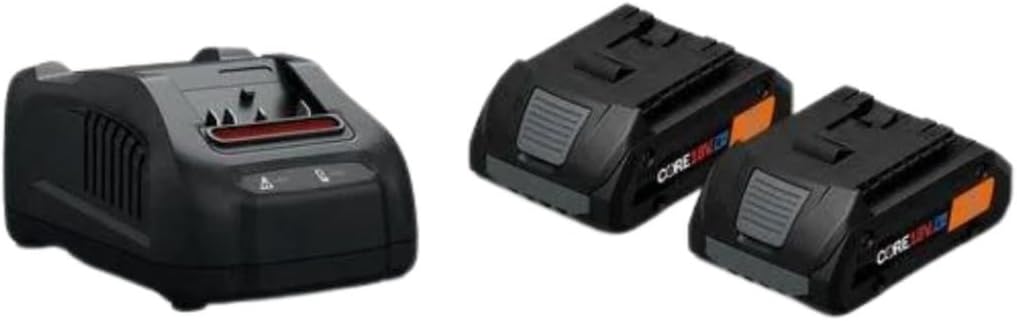
Figure 1: Fein 18V GBA Li-Ion Battery Starter Set, featuring two 4.0 Ah batteries and a rapid charger.
Key Features:
- Fast Charging: The included rapid charger powers batteries to 80% in approximately 32 minutes, minimizing downtime.
- Powerful 4.0 Ah Batteries: Two high-capacity 4.0 Ah batteries deliver consistent, long-lasting power for demanding tasks.
- Organized Charger Design: The charger features a cord wrap for easy storage and a tidy workspace.
- Wide Compatibility: Fully compatible with all 18V cordless tools using AMPShare or Bosch Professional 18V battery interfaces.
- Durable and Reliable: Engineered for rigorous daily use, providing dependable power for challenging projects.
2. Setup and Initial Use
2.1 Charging the Battery
Before first use, fully charge the batteries. Ensure the charger is connected to a suitable power outlet.
- Connect the rapid charger to a standard 120V AC power outlet. The charger's indicator light will illuminate.
- Slide a 4.0 Ah Li-Ion battery onto the charger until it clicks securely into place.
- Observe the charger's indicator lights. A blinking green light typically indicates active charging. A solid green light indicates the battery is fully charged.
- Once fully charged, remove the battery by pressing the release button and sliding it off the charger.
Video 1: Demonstration of battery features, installation, and compatibility with Bosch 18V tools.
Video 2: Illustrates the insertion of an 18V battery into a compatible Bosch charger.
2.2 Inserting and Removing Battery from Tool
- Align the battery with the battery slot on your compatible 18V AMPShare or Bosch Professional tool.
- Slide the battery firmly into the tool until it locks into place with an audible click.
- To remove, press the battery release button(s) on the tool and slide the battery out.
3. Operating Instructions
3.1 Battery Charge Indicator
The 4.0 Ah Li-Ion batteries feature an integrated charge indicator. Press the button on the battery to view the current charge level. Typically, multiple illuminated LEDs indicate a higher charge.
3.2 Compatibility and Performance
This battery starter set is designed to provide consistent high-power performance across a wide range of 18V AMPShare and Bosch Professional tools. The advanced electronic cell protection helps prevent overload, overheating, and total discharge, ensuring reliable operation.

Figure 2: A Fein Multimaster tool powered by an 18V battery, showcasing consistent high-power performance during operation.
Video 3: Explains the Bosch PROFACTOR Complete Cooling System, which enhances battery and tool longevity.
Video 4: Overview of the Bosch PROFACTOR Battery Platform System, highlighting its versatility and power.
Video 5: Features the Fein Multimaster with AMPShare, demonstrating tool and battery integration.
4. Maintenance
4.1 Cleaning
- Regularly clean the battery and charger with a soft, dry cloth.
- Do not use water, solvents, or abrasive cleaners.
- Ensure ventilation openings on the charger and battery are free from dust and debris.
4.2 Storage
- Store batteries and charger in a cool, dry place, away from direct sunlight and extreme temperatures.
- For long-term storage, charge batteries to approximately 50-60% capacity.
- Avoid storing batteries in a completely discharged state.

Figure 3: The rapid charger and batteries, highlighting active air cooling and controlled charging for optimal battery health.
5. Troubleshooting
5.1 Battery Not Charging
- Check Power Connection: Ensure the charger is securely plugged into a working power outlet.
- Battery Seating: Verify the battery is correctly seated on the charger. Remove and re-insert if necessary.
- Temperature: If the battery is too hot or too cold, the charger may not initiate charging. Allow the battery to reach room temperature (approximately 68°F / 20°C) before attempting to charge.
- Charger Indicator: Refer to the charger's indicator lights for error codes or status. Consult the charger's specific manual for detailed light interpretations.
5.2 Tool Not Powering On
- Battery Charge: Ensure the battery is fully charged. Check the battery's charge indicator.
- Battery Seating: Confirm the battery is securely inserted into the tool.
- Tool Condition: If the battery is charged and properly inserted, the issue may lie with the tool itself. Refer to the tool's instruction manual.
6. Specifications
| Feature | Specification |
|---|---|
| Product Dimensions | 21 x 9 x 13 inches |
| Item Weight | 5 pounds |
| Batteries Included | 2 Lithium Ion batteries (4.0 Ah each) |
| Output Voltage | 18 Volts |
| Specification Met | UL, CE, FCC |
| Manufacturer | Fein |
| Color | Black |
7. Warranty and Support
Fein products are manufactured to high-quality standards. For specific warranty information regarding your Fein 18V GBA Li-Ion Battery Starter Set, please refer to the documentation included with your purchase or visit the official Fein website. For technical support or service inquiries, please contact Fein customer service.


