Introduction
The Kwikset SmartCode 916 Z-Wave Smart Lock integrates advanced security with convenient keyless access. This touchscreen deadbolt features Home Connect technology, enabling wireless communication with compatible Z-Wave smart home systems. Users can remotely monitor lock status, lock or unlock the door, and receive notifications through a web-enabled device when connected to a Z-Wave hub. The lock offers one-touch locking, a backlit keypad for visibility, and patented SecureScreen™ technology to prevent code detection from fingerprints. It is designed for easy installation and operates on 4 AA batteries. The SmartKey Security feature provides a backup keyway for re-keying the lock.
This manual provides detailed instructions for the proper installation, programming, and operation of your SmartCode 916 lock.
Included Components
Verify that all the following components are present before beginning installation:
- Lock Assembly (Exterior Keypad and Interior Unit)
- Latch
- Strike Plate
- Keys (for SmartKey Security)
- Mounting Screws
- 4 AA Batteries

Image: Front view of the Kwikset SmartCode 916 Z-Wave Smart Lock, displaying the touchscreen keypad and keyhole.
Setup and Installation
Installation of the SmartCode 916 lock typically requires only a Phillips head screwdriver. The lock is designed to fit standard doors between 1-3/8" and 1-3/4" thick.
1. Mechanical Installation
- Prepare the Door: Ensure your door is properly prepped according to the provided template (if applicable) and that the existing deadbolt is removed.
- Install Latch: Insert the latch into the door edge, ensuring the bolt is facing the correct direction. Secure with screws.
- Install Exterior Assembly: Route the cable through the door and position the exterior keypad assembly.
- Install Interior Assembly: Connect the cable from the exterior assembly to the interior assembly. Mount the interior assembly, ensuring the turn piece is vertical. Secure with mounting screws.
- Install Batteries: Insert the 4 AA batteries into the battery pack.

Image: Kwikset SmartCode 916 Z-Wave Smart Lock installed on a door, demonstrating its appearance with a handle set.
2. Programming User Codes
The lock supports up to 30 unique user codes. Refer to the full programming guide for detailed steps on adding, deleting, and managing user codes.
3. Z-Wave Pairing
To enable remote access and smart home integration, the SmartCode 916 requires a compatible Z-Wave smart home hub (e.g., Ring, SmartThings, Wink, Amazon Alexa, Google Assistant via hub). Follow your Z-Wave controller's instructions to add the lock to your network. This process typically involves putting the hub into inclusion mode and then initiating the pairing sequence on the lock.
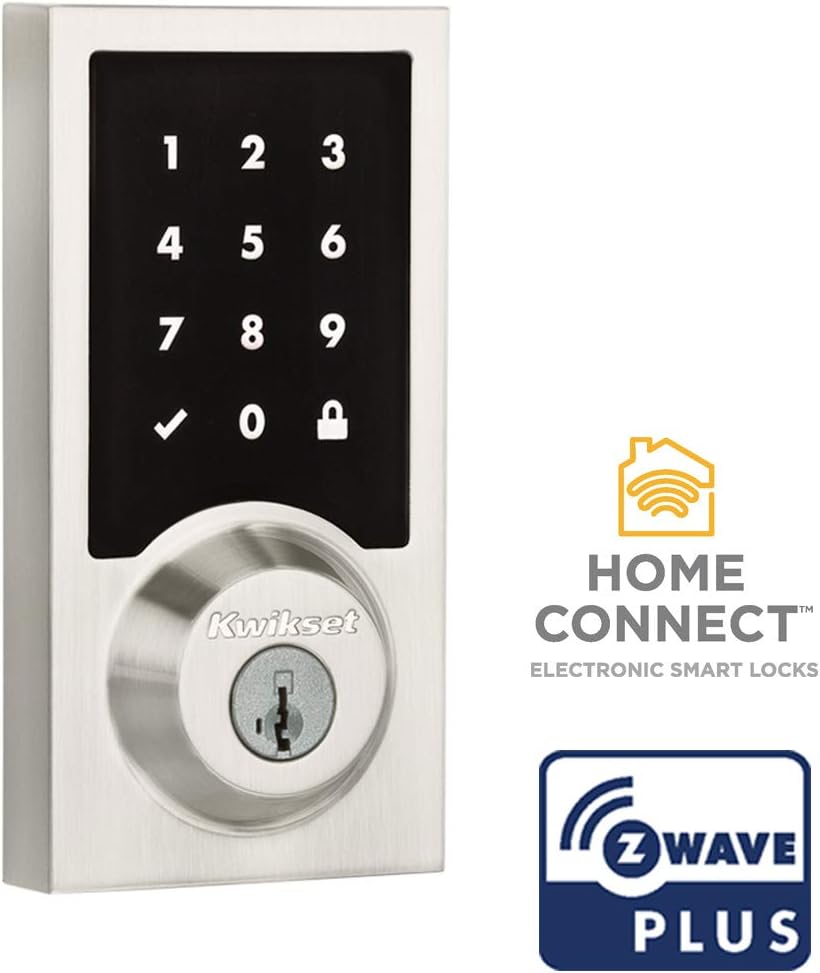
Image: The SmartCode 916 lock highlighting its Home Connect and Z-Wave Plus capabilities.
4. SmartKey Re-Key Security
The SmartKey Security feature allows you to re-key your lock yourself in seconds, matching it to an existing Kwikset key. This is useful for consolidating keys or after moving. A reset tool is included for this process. For detailed instructions, refer to the dedicated SmartKey re-keying guide.

Image: Diagram explaining the SmartKey Security feature and its benefits.
Operating Instructions
Locking the Door
- One-Touch Locking: Press the "Lock" symbol on the touchscreen keypad.
- Auto-Locking: If enabled, the deadbolt will automatically extend to lock the door after a set period (e.g., 30 seconds) following entry or exit.
- From Interior: Rotate the turn piece on the interior assembly to the vertical position.
Unlocking the Door
- Using a User Code:
- Touch the keypad to activate it.
- Enter your 4-8 digit user code.
- Press the "Checkmark" symbol. The deadbolt will retract.
- Using a Key: Insert the physical key into the keyhole and turn to unlock.
- From Interior: Rotate the turn piece on the interior assembly to the horizontal position.
- Remote Access: If connected to a Z-Wave hub, unlock the door remotely via your smart home application.
SecureScreen™ Technology
This patented technology displays random digits before you enter your code, ensuring that fingerprints left on the touchscreen cannot be used to identify your personal code, enhancing security.
Maintenance
Battery Replacement
The SmartCode 916 operates on 4 AA alkaline batteries (included). Battery life can vary based on usage and environmental factors, but typically lasts 12 months or longer. Replace batteries when the low battery indicator illuminates or when the lock's motor sounds sluggish. Kwikset recommends against using rechargeable batteries as they may not provide consistent power levels.
Cleaning
Clean the touchscreen and exterior finish with a soft, damp cloth. Avoid abrasive cleaners or solvents, which can damage the finish and electronic components.
Lubrication
Periodically (e.g., once or twice a year), apply a small amount of graphite-based lock lubricant to the keyway to ensure smooth operation and prevent seizing.
Troubleshooting
| Problem | Possible Cause | Solution |
|---|---|---|
| Lock does not respond or motor is sluggish. | Low batteries. | Replace all 4 AA alkaline batteries. |
| Keypad does not light up. | Batteries are completely drained or incorrectly installed. | Check battery orientation or replace batteries. |
| Lock makes loud or grating noise during operation. | Misalignment of lock components or worn mechanism. | Ensure proper alignment during installation. If issue persists, contact Kwikset support. |
| Cannot pair with Z-Wave hub. | Hub not in inclusion mode, lock too far from hub, or interference. | Ensure hub is in inclusion mode. Move lock closer to hub temporarily. Perform a factory reset on the lock if necessary and try pairing again. |
| User code not working. | Incorrect code entered, code not programmed, or lock in programming mode. | Verify the user code. Ensure the lock is not in programming mode. Reprogram the user code if needed. |
Specifications
| Feature | Detail |
|---|---|
| Brand | Kwikset |
| Model Name | SmartCode Deadbolts Touchscreen with Home Connect |
| Model Number | 99160-041 |
| Lock Type | Keypad, Pin Tumbler |
| Special Features | SmartKey Re-Key, Z-Wave |
| Material | Metal, Plastic |
| Color | Satin Nickel |
| Style | Contemporary |
| Item Dimensions (L x W x H) | 7.9 x 8.19 x 13.67 inches |
| Item Weight | 3.39 Pounds |
| Power Source | 4 AA Batteries (included) |
| Connectivity Protocol | Z-Wave |
| Controller Type Compatibility | Amazon Alexa, Google Assistant, Ring, SmartThings, Wink (via Z-Wave hub) |
| Door Thickness Compatibility | 1-3/8" to 1-3/4" |
| UPC | 883351859424 |
Warranty and Support
Warranty Information
Kwikset provides a lifetime mechanical and finish warranty for the lock and handles, and a 1-year electronics warranty. For complete details regarding warranty coverage and terms, please refer to the official Kwikset warranty documentation or visit the Kwikset website.
Customer Support
For further assistance, technical support, or to view additional resources such as detailed installation videos and programming guides, please visit the official Kwikset website or contact their customer service department. You can find contact information and FAQs at www.kwikset.com.


