
1. Introduction
The WUBEN L1 is a versatile and powerful rechargeable LED flashlight designed for various applications, including outdoor activities, emergencies, and professional use. It features a unique 180-degree rotatable head, dual light sources (spotlight and floodlight), and a magnetic tailcap for hands-free operation. This manual provides detailed instructions for the proper use, maintenance, and troubleshooting of your WUBEN L1 flashlight.

Image 1.1: WUBEN L1 Flashlight in its straight and right-angle configurations, showcasing its rotatable head design.
2. Package Contents
Please verify that all items are present in your package:
- WUBEN L1 Flashlight
- Holster
- USB Type-C Charging Cable
- Lanyard
- Spare O-rings
- User Manual (this document)

Image 2.1: The complete contents of the WUBEN L1 Flashlight package, including the flashlight, holster, charging cable, and accessories.
3. Product Features
- 180° Rotatable Head: Allows for flexible illumination angles, converting between a straight flashlight and a right-angle light.
- Dual Light Sources: Equipped with both a spotlight (SST-40 LED) and a floodlight (P9 or 519A LED) for varied lighting needs.
- High Lumens Output: Up to 2000 lumens for powerful illumination.
- IP68 Waterproof Rating: Designed to withstand immersion in water up to 2 meters for 1 hour.
- Magnetic Tailcap: Provides hands-free attachment to metal surfaces.
- Power Bank Function: Can be used to charge other devices via its USB-A output port.
- USB Type-C Rechargeable: Fast and convenient charging.

Image 3.1: The WUBEN L1 Flashlight demonstrating its 180-degree rotatable head for flexible lighting angles.

Image 3.2: The WUBEN L1 Flashlight in use, showcasing its dual light sources (spotlight and floodlight) for comprehensive illumination.
4. Setup
4.1 Initial Charging
Before first use, fully charge the WUBEN L1 flashlight. Connect the provided USB Type-C cable to the flashlight's charging port and to a USB power source (e.g., wall adapter, computer USB port). The charging indicator light will show the charging status.
- Red Light: Charging in progress.
- Blue Light: Fully charged.
A full charge typically takes approximately 2.5 hours with a 5V/2A input.

Image 4.1: The WUBEN L1 Flashlight connected for charging, demonstrating its USB Type-C input.
5. Operation
5.1 Power On/Off
- To Turn On: Press and hold the main power button for approximately 0.5 seconds.
- To Turn Off: Press and hold the main power button for approximately 0.5 seconds when the light is on.
5.2 Mode Switching
The WUBEN L1 features two independent light sources, each with its own modes:
- SST-40 LED (Spotlight): Short press the main power button to cycle through modes: Low → Med → High → Turbo. Double-press for Strobe, triple-press for SOS.
- P9/519A LED (Floodlight): Short press the secondary button to cycle through modes: Low → Med → High.

Image 5.1: Diagram illustrating the various lighting modes for the SST40 (spotlight) and P9/519A (floodlight) LEDs.
5.3 Dual Light Activation
Both the spotlight and floodlight can be activated simultaneously. Simply turn on each light source using its respective button.
5.4 Using the Magnetic Tailcap
The magnetic tailcap allows the flashlight to be securely attached to any ferrous metal surface, providing hands-free illumination. This is ideal for tasks such as vehicle repair or working in confined spaces.
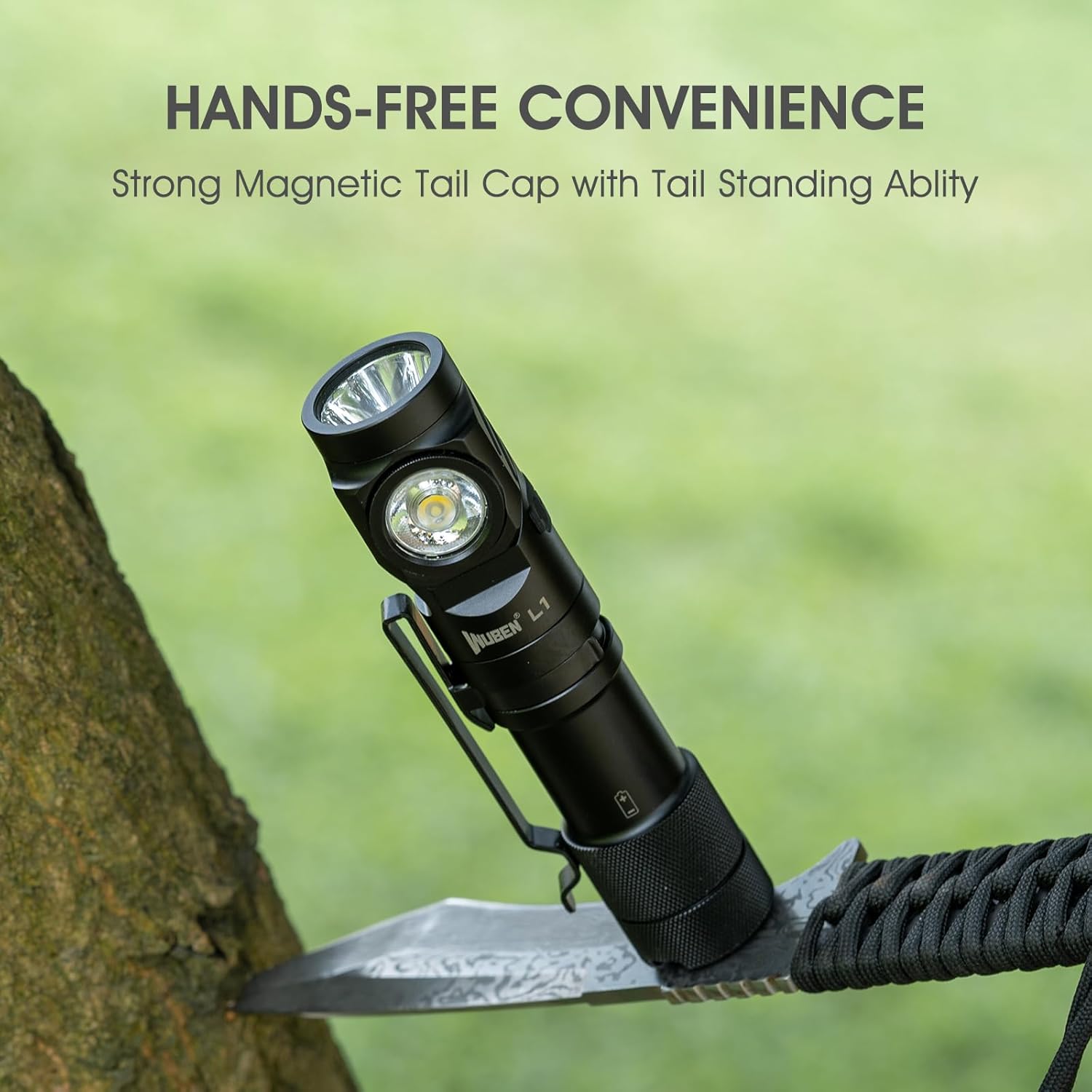
Image 5.2: The WUBEN L1 Flashlight attached to a tree trunk via its magnetic tailcap, demonstrating hands-free use.
5.5 Using the Pocket Clip
The included pocket clip allows for secure attachment to clothing, belts, or backpack straps, offering convenient carrying and quick access.
6. Charging and Power Bank Function
6.1 Charging the Flashlight
Connect the USB Type-C cable to the flashlight's input port and a 5V/2A USB power source. The indicator light will be red during charging and turn blue when fully charged.
6.2 Using as a Power Bank
The WUBEN L1 can function as a portable power bank. Connect your device (e.g., smartphone) to the flashlight's USB-A output port using a compatible cable. The flashlight will provide a 5V/2A output to charge your device.

Image 6.1: The WUBEN L1 Flashlight demonstrating its capability to charge a smartphone, acting as a portable power bank.
7. Maintenance
- Cleaning: Wipe the flashlight with a clean, soft cloth. Do not use abrasive cleaners or solvents.
- O-rings: Periodically inspect and lubricate the O-rings to maintain the IP68 waterproof rating. Replace if damaged.
- Storage: Store the flashlight in a cool, dry place away from direct sunlight and extreme temperatures. For long-term storage, charge the battery every 3-6 months to prolong its lifespan.
- Battery Care: Avoid fully discharging the battery frequently. Recharge promptly when the battery level is low.
8. Troubleshooting
- Flashlight not turning on:
- Ensure the battery is charged.
- Check for proper battery contact.
- Flashlight not charging:
- Verify the USB Type-C cable is securely connected to both the flashlight and the power source.
- Try a different USB cable and power adapter.
- Ensure the power source is active.
- Reduced brightness or runtime:
- The battery may be low; recharge the flashlight.
- Operating in Turbo mode for extended periods can cause heat, leading to automatic brightness reduction for protection.
- Water ingress:
- Ensure the tailcap is fully tightened.
- Inspect O-rings for damage or displacement.

Image 8.1: The WUBEN L1 Flashlight submerged in water, illustrating its IP68 waterproof rating.
9. Specifications
| Feature | Specification |
|---|---|
| Brand | WUBEN |
| Model | L1 |
| Light Source Type | LED (SST-40, P9/519A) |
| Max Output | 2000 Lumens |
| Max Throw | 340 Meters |
| Power Source | Battery Powered (Lithium Ion) |
| Battery Capacity | 4800mAh (estimated from runtime/output) |
| Charging Port | USB Type-C (5V/2A input) |
| Power Bank Output | USB-A (5V/2A output) |
| Water Resistance | IP68 (2m underwater for 1h) |
| Impact Resistance | 1.5 Meters |
| Material | Aluminum |
| Dimensions | 128.2mm (Length) x 28mm (Diameter) |
| Item Weight | 9.9 ounces (approx. 280g) |
Note: Specifications are subject to change without prior notice.
10. Warranty and Support
WUBEN products are manufactured with high-quality materials and craftsmanship. For warranty information or technical support, please refer to the official WUBEN website or contact their customer service directly. Keep your purchase receipt as proof of purchase.
For further assistance, please visit: www.wubenlight.com


