
PSOOO M16
PSOOO 50000mAh 65W Fast Charging Portable Power Bank
Model: M16 - User Instruction Manual
1. Product Overview
The PSOOO 50000mAh 65W Portable Power Bank is a high-capacity external battery designed to provide fast and efficient charging for a wide range of devices, including laptops, smartphones, and tablets. Its robust capacity ensures multiple charges, making it ideal for travel, outdoor activities, and emergency power needs. This manual provides essential information for safe and effective use of your power bank.

Image: The PSOOO 50000mAh 65W Power Bank, a compact and powerful portable charging solution.
2. Package Contents
Upon opening your product package, please verify that all items listed below are included and in good condition:
- PSOOO 50000mAh 65W Portable Power Bank (Model M16)
- USB-C to USB-C Charging Cable
- User Manual

Image: Contents of the product package, including the power bank, charging cable, and user manual.
3. Key Features
3.1. 65W Fast Charging Capability
The power bank supports up to 65W fast charging via its Type-C output port, making it compatible with various laptops such as MacBook, Dell, and Thinkpad. This allows for significantly faster charging speeds compared to standard power banks. The other two USB output ports support up to 22.5W fast charging.

Image: Illustration of the 65W fast charging capability, demonstrating rapid charging for a MacBook Pro 13 inch.
3.2. 50000mAh High Capacity
With a massive 50000mAh capacity, this portable charger can provide multiple charges for your devices. For example, it can charge a MacBook Pro 13'' approximately 2 times, a tablet 3 times, and an iPhone up to 8 times, offering reliable power for an entire week. This makes it an excellent choice for extended outdoor activities, travel, business trips, or home emergencies.

Image: Visual representation of the 50000mAh capacity, showing the number of charges for various devices like iPhone, iPad Pro, and MacBook Pro.
3.3. Multiple Output and Input Ports
The power bank features three output ports (two USB-A and one Type-C) allowing you to charge up to three devices simultaneously. The Type-C port also serves as the input port, supporting 65W fast input charging to quickly replenish the power bank itself. This multi-port design enables convenient sharing of power with family and friends.
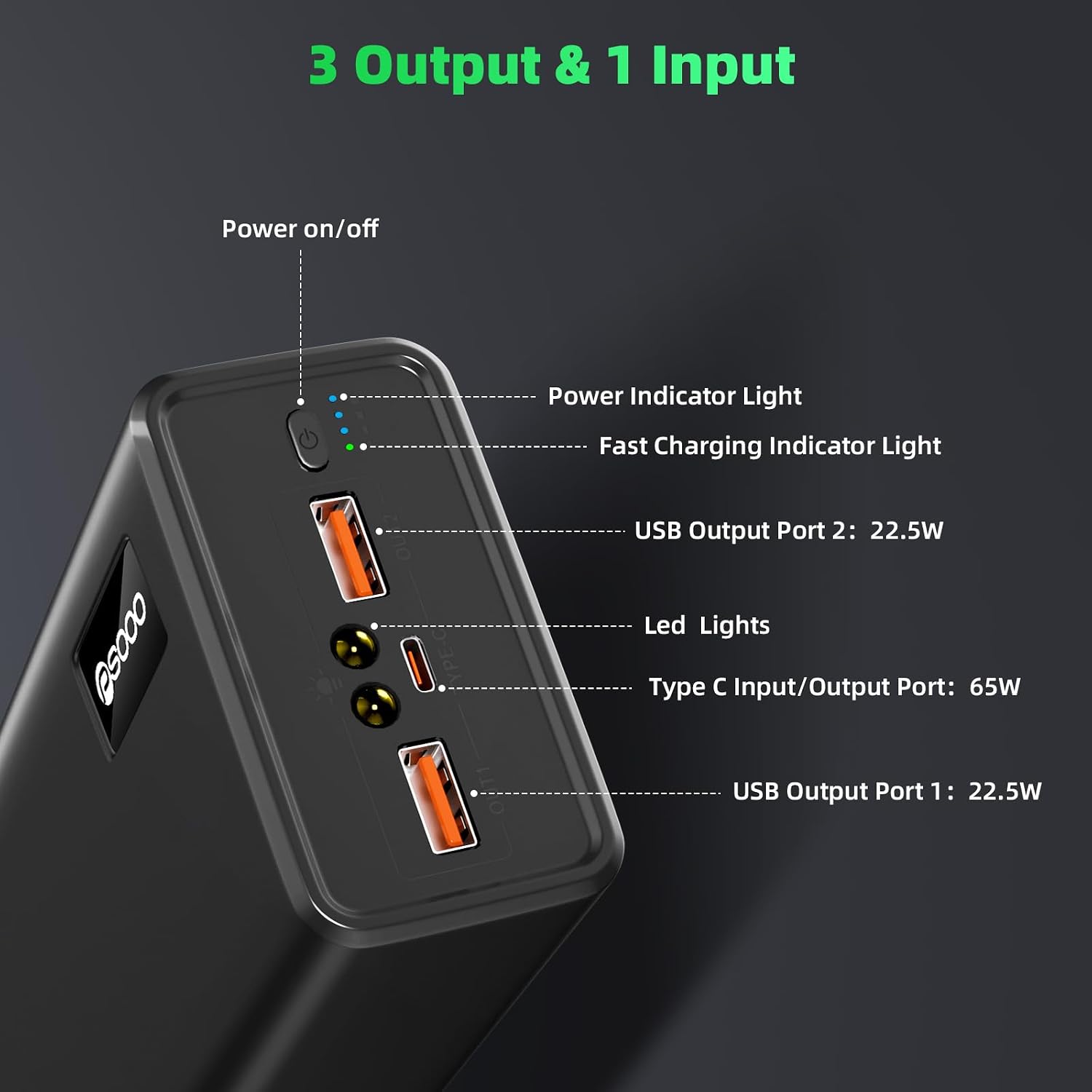
Image: Close-up view of the power bank's ports, highlighting the two USB-A outputs and the versatile Type-C input/output port.
3.4. Bright LED Lights
Equipped with bright LED lights, the power bank offers three different modes: bright light, low light, and SOS mode. This feature is highly convenient for various situations, including home emergencies, outdoor sports, camping, and hiking, providing essential illumination when needed.

Image: Depiction of the power bank's integrated LED lights, illustrating bright, low, and SOS modes for various lighting needs.
3.5. Advanced Safety Protections
The power bank incorporates multiple safety features to protect both the device and your connected electronics. These include overcharge protection, over-voltage protection, over-heat protection, and over-current protection, ensuring a safe and reliable charging experience.

Image: Diagram illustrating the various safety protections built into the power bank, such as overcharge, over-voltage, over-heat, and over-current protection.
4. Getting Started
4.1. Initial Charging of the Power Bank
Before first use, it is recommended to fully charge your PSOOO power bank. Connect the provided USB-C to USB-C cable to the power bank's Type-C input port and connect the other end to a compatible 65W PD (Power Delivery) wall adapter (not included). The power indicator lights will illuminate to show charging progress. A full charge can be achieved in several hours with a 65W PD adapter.

Image: The power bank being recharged using a 65W PD adapter, indicating quick replenishment of its internal battery.
4.2. Checking Battery Level
Press the power button once to check the current battery level indicated by the LED lights. Each light typically represents a percentage of the total capacity.
5. Operating Instructions
5.1. Charging Your Devices
To charge a device, connect your device's charging cable to one of the power bank's output ports (USB-A or Type-C). The power bank will automatically begin charging. For optimal fast charging, use the Type-C port for compatible laptops and devices. You can charge up to three devices simultaneously.

Image: The power bank connected to and charging multiple devices, including a laptop, smartphone, and earbuds.
5.2. Using the LED Flashlight
To activate the LED flashlight, double-press the power button. Double-press again to cycle through the light modes (bright, low, SOS). To turn off the flashlight, double-press the power button rapidly until the light extinguishes.
6. Care and Maintenance
- Keep the power bank away from extreme temperatures, direct sunlight, and liquids.
- Do not disassemble, modify, or attempt to repair the device.
- Clean the power bank with a soft, dry cloth. Avoid using harsh chemicals or abrasive materials.
- Store the power bank in a cool, dry place when not in use for extended periods.
7. Troubleshooting
| Problem | Possible Cause | Solution |
|---|---|---|
| Power bank not charging devices. | Low battery on power bank; incorrect cable/port; device not compatible. | Recharge power bank fully. Ensure correct cable and port are used (e.g., Type-C for laptops). Verify device compatibility. |
| Power bank not recharging. | Faulty charging adapter/cable; power bank internal issue. | Use a different 65W PD adapter and the provided USB-C cable. If issue persists, contact customer support. |
| LED flashlight not working or stuck on. | Incorrect button press sequence; internal malfunction. | Double-press the power button rapidly to cycle modes or turn off. If unresponsive, contact customer support. |
| Power bank gets hot during use. | Normal operation during fast charging; excessive load. | Slight warmth is normal. If it becomes excessively hot, disconnect devices and allow it to cool down. Avoid charging in confined spaces. |
8. Technical Specifications
- Model Number: M16
- Battery Capacity: 50000mAh / 3.7V
- Rated Energy: 185Wh
- Input (Type-C): 5V/3A, 9V/3A, 12V/3A, 15V/3A, 20V/3.25A (65W Max)
- Output (Type-C): 5V/3A, 9V/3A, 12V/3A, 15V/3A, 20V/3.25A (65W Max)
- Output (USB-A OUT1): 5V/3A, 9V/2A, 12V/1.5A
- Output (USB-A OUT2): 5V/3A, 9V/2A, 12V/1.5A
- Product Dimensions: 7.52 x 3.46 x 1.93 inches
- Item Weight: 1.38 pounds
- Manufacturer: Shenzhen Wannengda Technology Co., Ltd.
- Country of Origin: China
- Date First Available: May 16, 2023
9. Warranty and Customer Support
For any questions, concerns, or technical assistance regarding your PSOOO 50000mAh 65W Portable Power Bank, please refer to the contact information provided with your purchase or visit the official PSOOO store on Amazon:
Please retain your proof of purchase for warranty claims. Specific warranty terms and conditions may vary and are typically outlined in the product packaging or on the manufacturer's website.
Ask a question about this manual
Ask about setup, troubleshooting, compatibility, parts, safety, or missing instructions. Manuals+ will review the question and use this page’s manual context to help answer it.