
1. Introduction
The Vanexiss VM10 UV Camera Sunscreen Test Mirror is a portable device designed to help users visualize sunscreen application and coverage. It features a built-in UV camera that displays areas with and without sunscreen, promoting more effective skin protection. This manual provides instructions for the proper use and care of your device.

Image 1.1: The Vanexiss VM10 UV Camera Sunscreen Test Mirror, illustrating its dual functionality as a UV camera display and a standard mirror.
2. Product Overview
2.1 Key Features
- UV Camera Visualization: Helps to identify areas where sunscreen has been applied or missed.
- 4-Inch High-Definition Screen: Provides a clear view of your face for detailed application checks.
- Rechargeable Battery: Equipped with a 2500 mAh battery for extended use.
- Smart Touch Design: Easy control for turning the UV display on and off.
- Compact and Portable: Designed for convenient travel and daily use.
- Dual Functionality: Includes a standard mirror for regular makeup application.
2.2 Package Contents
Verify that all items are present in the package:
- Vanexiss VM10 UV Camera Sunscreen Test Mirror
- USB-C Charging Cable
- Cleaning Cloth
- UV Test Card
- User Manual (this document)

Image 2.1: Illustration of the items included in the product package.
3. Setup
3.1 Charging the Device
- Locate the USB-C charging port on the side of the mirror.
- Connect the provided USB-C cable to the mirror and a compatible USB power adapter (not included).
- The device will indicate charging status (e.g., an indicator light).
- Once fully charged, disconnect the cable.

Image 3.1: Detail of the Type-C charging port and power button on the device.
Note: The device has a built-in 2500mAh Lithium Polymer battery.
4. Operating Instructions
4.1 Powering On/Off and UV Display Control
- To power on the device and activate the UV camera display, long press the power switch located on the side of the mirror.
- To turn off the UV display, long press the power switch again.
- The device may also feature a touch switch on the vanity mirror side to easily toggle the UV display on/off.

Image 4.1: Component diagram highlighting the power button and touch switch for UV display control.
4.2 Using for Sunscreen Visualization
The UV camera helps you see where sunscreen has been applied. Sunscreen typically appears dark or black on the UV display, while unprotected skin appears lighter.
- Turn on the UV display.
- Hold the mirror approximately 6-12 inches from your face.
- Observe your face on the 4-inch screen. Areas with sunscreen will appear darker.
- Apply sunscreen to areas that appear lighter or show insufficient coverage.
- Re-check with the UV mirror to ensure even and complete coverage.

Image 4.2: Visual guide for sunscreen application and checking coverage with the UV mirror.
Important Note: Chemical sunscreens are typically more visible on the UV mirror than mineral sunscreens. Mineral sunscreens may appear less distinct or transparent.
4.3 Using for Makeup Removal Check
The UV camera can also assist in verifying complete makeup removal, especially for products containing UV filters.
- After cleansing your face, activate the UV display.
- Examine your face on the screen. Any remaining makeup with UV filters may appear as dark spots or streaks.
- Perform additional cleansing as needed to ensure all product is removed.
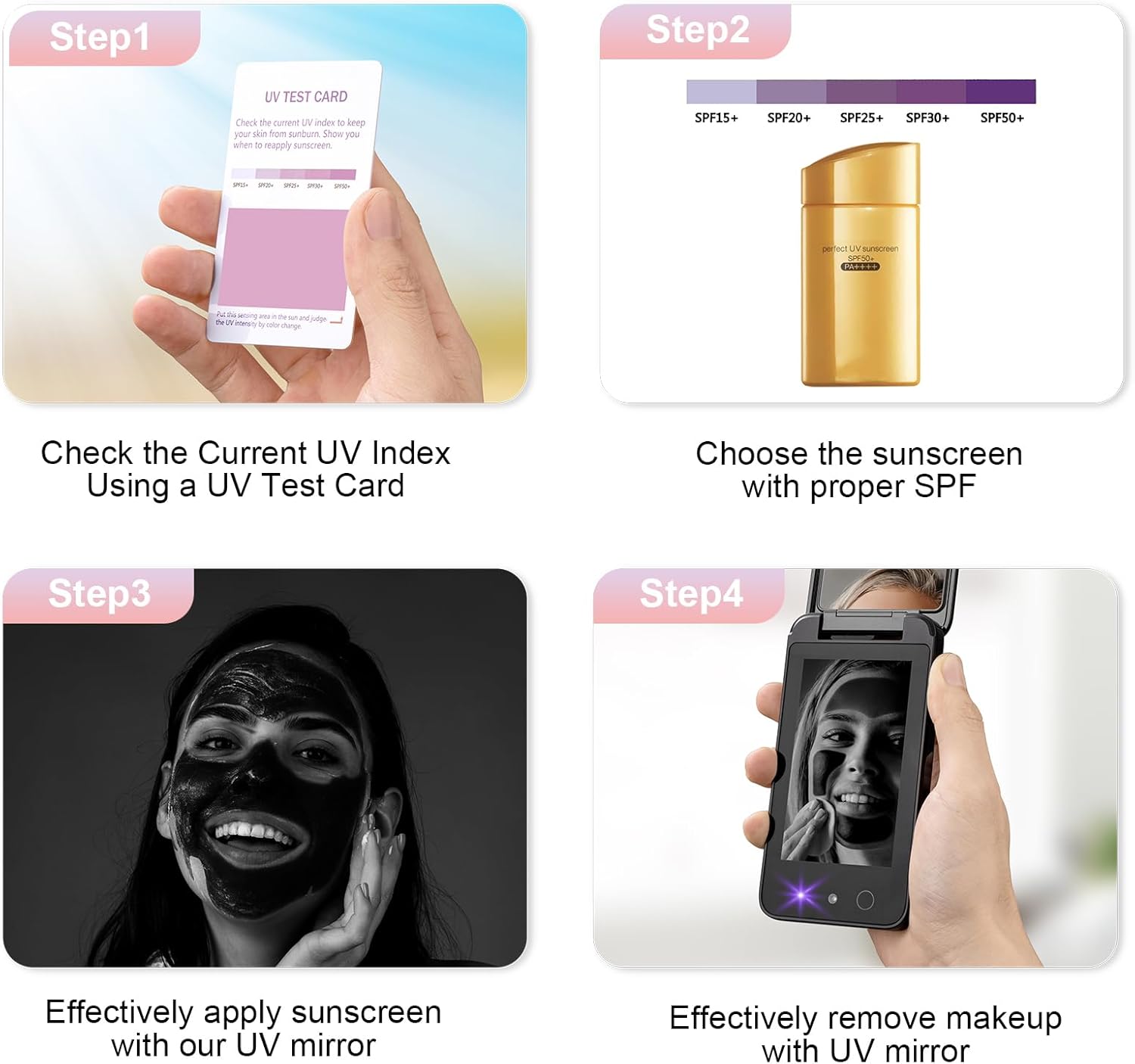
Image 4.3: Step-by-step guide for using the UV mirror for both sunscreen application and makeup removal.
4.4 Using the UV Test Card
The included UV test card changes color when exposed to UV radiation, providing an indication of the current UV index. This can help you determine appropriate SPF levels for sun protection.
- Expose the UV test card to direct sunlight.
- Observe the color change on the card.
- Refer to the card's legend to understand the UV intensity and recommended SPF.
5. Maintenance
5.1 Cleaning
- Use the provided cleaning cloth or a soft, lint-free cloth to gently wipe the mirror surfaces and screen.
- Do not use abrasive cleaners, alcohol, or harsh chemicals, as these can damage the device.
5.2 Battery Care
- To prolong battery life, avoid fully discharging the battery frequently.
- Store the device in a cool, dry place when not in use for extended periods.
- Recharge the device regularly, even if not used, to maintain battery health.
6. Troubleshooting
- Q: The UV display is dim or hard to see.
- A: Ensure the device is fully charged. Screen visibility can be reduced in bright ambient light; use the mirror in a shaded or indoor environment for optimal viewing.
- Q: Sunscreen does not appear dark on the UV display.
- A: The visibility of sunscreen on the UV display can vary based on the type of sunscreen. Chemical sunscreens typically appear darker, while mineral sunscreens (containing zinc oxide or titanium dioxide) may appear less distinct or transparent. Ensure you are using a chemical sunscreen for clearer visualization.
- Q: The device is not turning on.
- A: Ensure the device is fully charged. Long press the power button to turn it on. If the issue persists, try charging it for a longer period.
7. Specifications
| Brand | Vanexiss |
| Model Number | VM10 UV Mirror |
| Product Dimensions | 2.7"L x 5.1"W |
| Item Weight | 4.8 ounces |
| Screen Size | 4 inches |
| Battery Capacity | 2500 mAh Lithium Polymer |
| Charging Port | USB Type-C |
| Special Features | Adjustable, Shatterproof, UV Protection |
| Material | Glass, Plastic Frame |
8. Safety Information and Important Considerations
- This product is intended as a tool to assist in checking sunscreen application. It does not replace the need for proper sunscreen use and reapplication as recommended by health professionals.
- The UV camera display shows sunscreen as dark. This mirror is primarily suitable for individuals with fair, light, or brown skin tones. It is not recommended for those with dark skin tones, as the visualization may not be effective.
- The device emits UVC-UVB ultraviolet light for short-term use. The energy gained from using this mirror for 1000 minutes is equivalent to 1 minute of sunlight exposure. For short-term use, its impact is negligible and does not reach the damage index to the skin.
- Avoid direct eye exposure to the UV light for prolonged periods.
- Keep out of reach of children.

Image 8.1: Information regarding the safety of the UVC-UVB ultraviolet light emitted by the device.
9. Warranty and Support
Vanexiss provides lifetime 7*24 hours technical support for this product. If you require professional assistance or have any questions, please contact Vanexiss customer service.
Your satisfaction is our top priority.