
PULITUO 20V Drill - Pro work
PULITUO 20V Cordless Drill Set User Manual
Brand: PULITUO | Model: 20V Drill - Pro work
1. Introduction and Overview
Thank you for choosing the PULITUO 20V Cordless Drill Set. This manual provides essential information for the safe and effective operation, maintenance, and troubleshooting of your new tool. Please read it thoroughly before first use and keep it for future reference.
Key Features:
- Powerful Torque: 45 N.m (398 In.lbs) for various tasks.
- 25+1 Torque Settings: Precise control for different materials and applications.
- Dual-Speed Adjustment: Low speed (0-400 RPM) for screwdriving, high speed (0-1500 RPM) for drilling.
- High-Capacity Battery: 20V/2.0Ah Lithium-ion battery for extended runtime and 1-hour fast charging.
- Versatile Accessory Kit: Includes 43 pieces, such as drill bits, screwdriver bits, and cleaning drill brush heads.
- Built-in LED Light: Illuminates the work area for improved visibility.
- Battery Indicator: Monitors battery levels for efficient work management.

Figure 1: Complete PULITUO 20V Cordless Drill Set with accessories.
2. Components and Package Contents
Your PULITUO Cordless Drill Set includes the following items:
- 1 x PULITUO 20V Cordless Drill
- 1 x 20V/2.0Ah Lithium-ion Battery
- 1 x Battery Charger
- 1 x Tool Storage Bag
- 1 x Flexible Shaft Extension
- 1 x Extension Bar
- Various Screwdriver Bits (10x25mm, 10x50mm assortments)
- Wood Drill Bits (4mm, 5mm, 6mm, 8mm, 10mm)
- HSS Twist Drill Bits (4mm, 5mm, 6mm, 8mm, 10mm)
- Drill Brush Set (red and black brushes)

Figure 2: All components of the PULITUO 20V Cordless Drill Set.
3. Setup
3.1 Charging the Battery
- Ensure the battery is securely inserted into the charger.
- Plug the charger into a standard electrical outlet.
- The charger's LED indicator will show the charging status (e.g., red for charging, green for fully charged).
- A full charge typically takes approximately 1 hour.
- Once charged, disconnect the charger from the outlet and remove the battery.

Figure 3: The 20V Lithium-ion battery, showing its internal components.
3.2 Installing and Removing Bits
- To install a bit, rotate the chuck counter-clockwise to open the jaws.
- Insert the desired drill bit or screwdriver bit fully into the chuck.
- Rotate the chuck clockwise to tighten the jaws securely around the bit. Ensure the bit is centered and firmly gripped.
- To remove a bit, rotate the chuck counter-clockwise until the jaws open sufficiently to release the bit.

Figure 4: Steps for bit installation and torque setting.
4. Operating Instructions
4.1 Variable Speed Trigger
The drill features a variable speed trigger. Press the trigger lightly for lower speeds and increase pressure for higher speeds. This allows for precise control depending on the application and material.
4.2 Forward/Reverse Switch
Located above the trigger, the forward/reverse switch controls the rotation direction of the chuck. Push it to the left for forward (clockwise) rotation for drilling and driving screws. Push it to the right for reverse (counter-clockwise) rotation for removing screws or backing out bits. Ensure the switch is in the center position when not in use to prevent accidental activation.
4.3 Torque Setting (Clutch)
The 25+1 position torque adjustment ring allows you to set the amount of torque applied. This prevents over-driving screws and stripping screw heads, especially in softer materials. The '+1' setting is for maximum torque, typically used for drilling. Rotate the ring to select the desired torque level. Start with a lower setting and increase as needed.

Figure 5: Torque setting guide for various materials.
4.4 Speed Modes
The drill has two speed modes, controlled by a switch on top of the drill:
- Low Speed (0-400 RPM): Recommended for screwdriving applications where more torque and less speed are required.
- High Speed (0-1500 RPM): Recommended for drilling applications where higher speed is beneficial.

Figure 6: Understanding the two speed modes for optimal performance.
4.5 Built-in LED Light
The integrated LED light automatically illuminates the work area when the trigger is pressed, providing better visibility in dimly lit spaces. It features a delay function, staying on for a short period after the trigger is released.
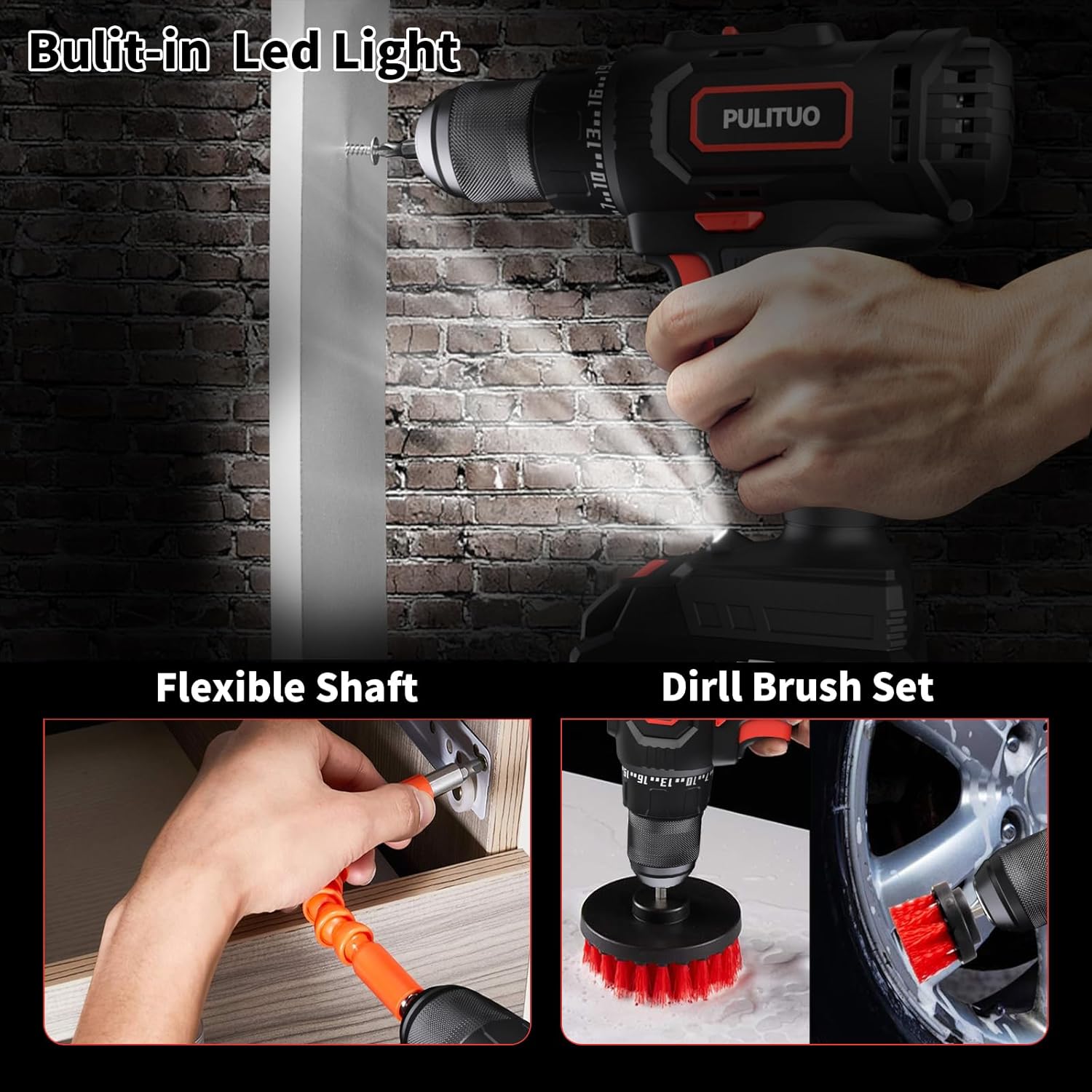
Figure 7: LED light in action, along with flexible shaft and drill brush applications.
5. Maintenance
Regular maintenance ensures the longevity and optimal performance of your drill.
- Cleaning: After each use, wipe down the drill with a clean, damp cloth. Do not use harsh chemicals or abrasive cleaners. Keep ventilation openings clear of dust and debris.
- Battery Care: Store the battery in a cool, dry place away from direct sunlight and extreme temperatures. Do not store fully discharged. For long-term storage, charge the battery to approximately 50% capacity.
- Chuck Maintenance: Periodically clean the chuck jaws to ensure proper gripping of bits.
- Inspection: Regularly inspect the power cord (if applicable for charger), battery, and drill for any signs of damage. Do not use if damaged.
6. Troubleshooting
If you encounter issues with your PULITUO Cordless Drill, refer to the following common problems and solutions:
| Problem | Possible Cause | Solution |
|---|---|---|
| Drill does not turn on. | Battery is not charged or not properly inserted. | Ensure battery is fully charged and securely clicked into place. |
| Bit slips in chuck. | Chuck not tightened sufficiently or bit shank is dirty/damaged. | Tighten chuck firmly. Clean bit shank. Replace damaged bits. |
| Drill lacks power. | Battery low, incorrect torque setting, or wrong speed mode. | Recharge battery. Adjust torque setting higher. Switch to high speed mode for drilling. |
| Overheating during use. | Prolonged heavy use or blocked ventilation. | Allow drill to cool down. Clear any obstructions from ventilation slots. Avoid excessive pressure. |
7. Specifications
Refer to the table below for detailed technical specifications of your PULITUO 20V Cordless Drill.
| Feature | Specification |
|---|---|
| Brand | PULITUO |
| Model | 20V Drill - Pro work |
| Power Source | Battery Powered |
| Voltage | 20 Volts |
| Battery Capacity | 2.0Ah Lithium-ion |
| Maximum Rotational Speed | 1500 RPM |
| Maximum Torque | 45 N.m (280 Inch Pounds) |
| Torque Settings | 25+1 |
| Chuck Type | Keyless |
| Maximum Chuck Size | 0.5 Inches (1/2 inch) |
| Number of Speeds | 2 (0-400 RPM / 0-1500 RPM) |
| Item Weight | 7.51 pounds (with battery) |
| Product Dimensions | 11"L x 4"W x 13"H |
| Material | Plastic, Metal |

Figure 8: Detailed specifications of the drill.
8. Warranty and Support
PULITUO stands behind the quality of its products. For specific warranty details, please refer to the warranty card included in your product packaging or visit the official PULITUO website. Keep your purchase receipt as proof of purchase.
For customer support, technical assistance, or to inquire about replacement parts, please contact PULITUO customer service through their official channels or visit their Amazon store:
Related documents20V Drill - Pro work

Ask a question about this manual
Ask about setup, troubleshooting, compatibility, parts, safety, or missing instructions. Manuals+ will review the question and use this page’s manual context to help answer it.