
Introduction
Thank you for choosing the EXF Smart Color Changing Fairy String Lights. This product is designed to provide versatile and vibrant lighting for various indoor and outdoor decorative purposes. Featuring 100 LED bulbs on a 33ft flexible silver wire, these lights offer 16 color options, multiple lighting modes, and a convenient timer function, all controlled via a remote. Please read this manual carefully to ensure proper setup, operation, and maintenance.
Safety Information
- Ensure the USB power source is appropriate for the device (5V).
- Do not expose the USB connector to water or moisture. When used outdoors, protect the USB part from rain or splashes.
- Avoid excessive force when bending or shaping the wire to prevent damage to the LEDs or wiring.
- Keep out of reach of children to prevent entanglement or ingestion of small parts.
- Do not attempt to repair or modify the product. Contact customer support for assistance.
Package Contents
- 1 x EXF Smart Color Changing Fairy String Lights (33ft, 100 LED)
- 1 x Remote Control
- 1 x USB Cable
Product Overview
The EXF Smart Color Changing Fairy String Lights consist of 100 small LED bulbs distributed along a 33-foot flexible silver wire. The lights are powered via a USB connection and controlled by an infrared remote. The remote allows for color changes, mode selections, and timer settings.

The EXF Smart Color Changing Fairy String Lights, showing the coiled 33ft string with 100 LED bulbs and the included remote control for various settings.
Setup
- Unpack the Lights: Carefully uncoil the string lights from their packaging. The silver wire is flexible, allowing for easy shaping.
- Prepare the Remote Control: The remote control typically comes with a plastic battery separator. Gently pull this tab out from the bottom of the remote to activate the pre-installed battery.
- Connect to Power: Plug the USB cable into a compatible 5V USB power source. This can be a USB wall adapter, a power bank, or a USB port on a computer or other device.
- Placement: Arrange the lights as desired. The flexible wire allows them to be wrapped around objects, draped, or shaped. For outdoor use, ensure the USB power connection is protected from direct water exposure.
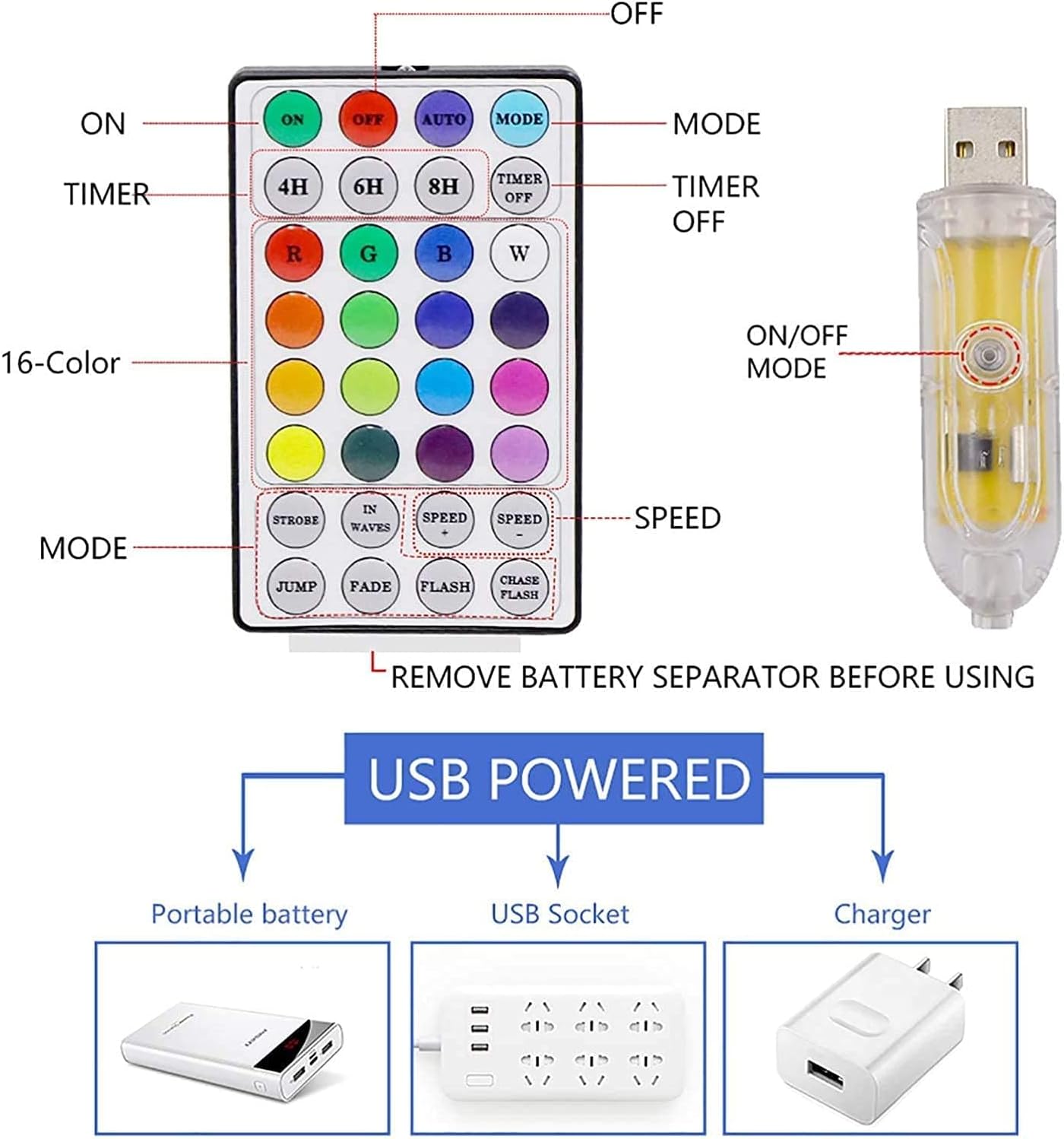
An illustration detailing how the EXF fairy lights are USB powered (via portable battery, USB socket, or charger) and an annotated diagram of the remote control buttons, including ON/OFF, Timer, 16-Color, Mode, and Speed settings.
Operating Instructions
Use the included remote control to manage your fairy lights. Point the remote directly at the USB receiver for optimal response.
- ON/OFF: Press the ON button to turn the lights on, and the OFF button to turn them off.
- Color Selection: Choose from 16 static colors by pressing the corresponding color button on the remote.
- Lighting Modes: Select from various dynamic lighting effects using the mode buttons: STROBE, IN WAVES, JUMP, FADE, FLASH, CHASE FLASH.
- Speed Adjustment: For dynamic modes, use the SPEED + and SPEED - buttons to increase or decrease the effect speed.
- Timer Function:
- Press 4H, 6H, or 8H to activate the timer. The lights will stay on for the selected duration and then turn off automatically. They will then turn on again at the same time the next day.
- Press TIMER OFF to deactivate the timer function.

A Christmas tree demonstrating the 16 distinct color options available with the EXF Smart Color Changing Fairy String Lights.
Maintenance
- Cleaning: Gently wipe the lights and wire with a soft, dry cloth. Do not use harsh chemicals or abrasive cleaners.
- Storage: When not in use, carefully coil the lights and store them in a cool, dry place, away from direct sunlight and extreme temperatures.
- Water Protection: While the lights themselves are water-resistant, the USB connector is not. Always ensure the USB power source and connection point are protected from water, especially during outdoor use.
Troubleshooting
| Problem | Possible Cause | Solution |
|---|---|---|
| Lights do not turn on. | No power to USB, remote battery dead/separator not removed, remote not pointed at receiver. | Check USB connection and power source. Ensure remote battery separator is removed. Point remote directly at the USB receiver. |
| Remote control is unresponsive. | Remote battery low/dead, remote too far or not aimed correctly, obstruction. | Replace remote battery if necessary. Ensure clear line of sight to the USB receiver and operate within range. |
| Timer function not working. | Timer not set correctly, power interruption. | Re-set the timer by pressing the desired duration button (4H, 6H, or 8H). Ensure continuous power supply. |
| Lights are dim or flickering. | Insufficient power from USB source, damaged wire. | Try a different USB power source. Inspect the wire for any visible damage. |
Specifications
- Brand: EXF
- Model: YHY-diankong
- Light Type: LED Fairy String Lights
- Length: 33 feet
- Number of LEDs: 100
- Color: RGB-Color Changing (16 static colors)
- Power Source: USB Powered (Corded Electric)
- Voltage: 5 Volts
- Wattage: 5 Watts
- Control Method: Remote Control
- Special Features: Color Changing, Remote Controlled, Timer, Twinkling, Water Resistant (lights only, USB connector not waterproof)
- Indoor/Outdoor Usage: Yes
- Included Components: Remote Control, USB Cable
Warranty and Support
EXF is committed to providing high-quality products. If you encounter any questions or problems with your EXF Smart Color Changing Fairy String Lights, please do not hesitate to contact our customer service team. We aim to respond within twenty-four hours to assist you.
For support, please refer to the contact information provided with your purchase or visit the official EXF store page.