
I2GO Air Pro GO 2.0
I2GO TWS Air Pro GO 2.0 Wireless Bluetooth Earbuds User Manual
Model: Air Pro GO 2.0 (PROEAR020)
1. Introduction
Thank you for choosing the I2GO TWS Air Pro GO 2.0 Wireless Bluetooth Earbuds. These earbuds are designed to provide a clear audio experience with deep bass, offering maximum wireless freedom for enjoying music and making calls. This manual will guide you through the setup, operation, and maintenance of your new earbuds.
2. Package Contents
Please check the box for the following items:
- 1 Pair of I2GO TWS Air Pro GO 2.0 Wireless Bluetooth Earbuds
- 1 Charging Case
- 1 USB-C Charging Cable
- 1 Pair of Additional Silicone Eartips
- 1 User Manual (this document)
3. Product Overview
The I2GO TWS Air Pro GO 2.0 earbuds feature a compact, anatomical design for a secure and comfortable fit. The charging case is lightweight and includes a digital display to show the remaining battery charge.

Image: The I2GO TWS Air Pro GO 2.0 earbuds shown with their open charging case, displaying the model name and a digital battery indicator.

Image: A woman wearing one I2GO TWS Air Pro GO 2.0 earbud, highlighting its compact and anatomical design for a perfect fit.

Image: The I2GO TWS Air Pro GO 2.0 charging case being placed into a jeans pocket, demonstrating its light and compact portability.
4. Setup
4.1. Charging the Earbuds and Case
Before first use, fully charge the earbuds and the charging case.
- Place the earbuds into the charging case. They will magnetically secure and begin charging automatically.
- Connect the USB-C charging cable to the charging port on the case and to a power source (DC 5V / 0.3A).
- The digital display on the case will show the battery percentage during charging.
A full charge provides up to 4 hours of playback for the earbuds, with the charging case offering an additional 16 hours (up to 4 extra charges), totaling up to 20 hours of use.
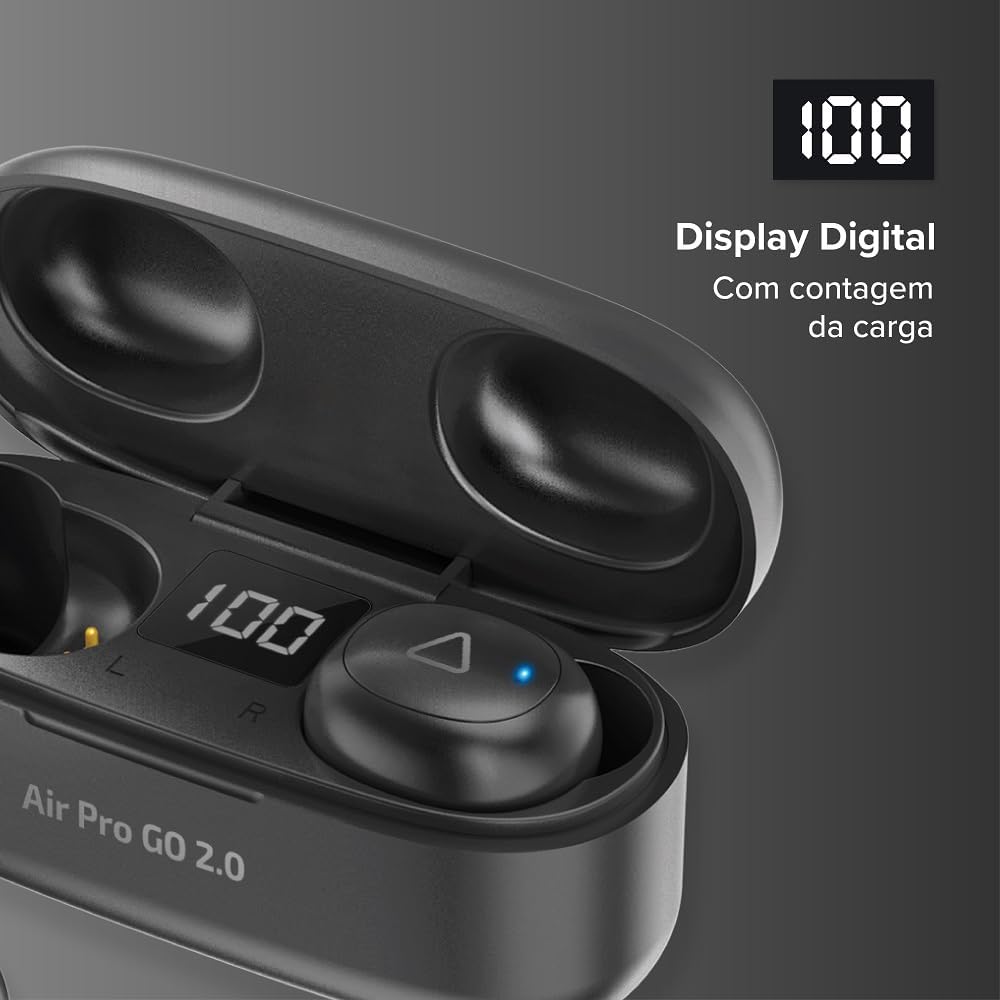
Image: A close-up of the I2GO TWS Air Pro GO 2.0 charging case's digital display, showing a '100' charge count.
4.2. Bluetooth Pairing
The earbuds use Bluetooth 5.2 for a stable and fast wireless connection.
- Open the charging case. The earbuds will automatically enter pairing mode.
- On your device (smartphone, tablet, computer), enable Bluetooth.
- Search for available Bluetooth devices and select "I2GO Air Pro GO 2.0" from the list.
- Once connected, you will hear a confirmation tone, and the earbuds will be ready for use.
The earbuds support TWS (True Wireless Stereo) technology, ensuring a synchronized and stable connection without wires.

Image: A man wearing I2GO TWS Air Pro GO 2.0 earbuds while cycling, with a graphic indicating Bluetooth 5.2 and TWS technology for wireless comfort and sound quality.
5. Operating the Earbuds
The I2GO TWS Air Pro GO 2.0 earbuds feature sensitive touch controls for easy management of music and calls.
5.1. Touch Controls
Specific touch functions may vary slightly by device, but common controls include:
- Play/Pause: Single tap on either earbud.
- Next Track: Double tap on the right earbud.
- Previous Track: Double tap on the left earbud.
- Answer/End Call: Single tap on either earbud during an incoming call or active call.
- Reject Call: Press and hold on either earbud during an incoming call.
- Activate Voice Assistant: Triple tap on either earbud (e.g., Siri, Google Assistant).

Image: A woman pointing to the I2GO TWS Air Pro GO 2.0 earbud in her ear, illustrating the sensitive touch control feature for various functions.
6. Maintenance
Proper care ensures the longevity and optimal performance of your earbuds.
- Cleaning: Use a soft, dry cloth to clean the earbuds and charging case. Do not use abrasive cleaners or solvents.
- Storage: When not in use, store the earbuds in their charging case to protect them and keep them charged.
- Water Resistance: The earbuds are water-resistant. However, avoid submerging them in water or exposing them to heavy rain for extended periods. Dry them thoroughly if they get wet.
- Charging Port: Keep the USB-C charging port free of dust and debris.
7. Troubleshooting
If you encounter issues with your I2GO TWS Air Pro GO 2.0 earbuds, try the following solutions:
7.1. Earbuds Not Pairing
- Ensure both earbuds are charged.
- Turn off Bluetooth on your device, then turn it back on.
- Forget the "I2GO Air Pro GO 2.0" device from your device's Bluetooth settings and try pairing again.
- Place both earbuds back into the charging case, close the lid, wait a few seconds, then open it again to reset.
7.2. Only One Earbud Working
- Ensure both earbuds are charged.
- Place both earbuds back into the charging case, close the lid, and then open it again. This often re-syncs them.
- Try resetting the earbuds by following the pairing steps again.
7.3. Low Volume
- Increase the volume on both your connected device and using the earbud touch controls (if applicable).
- Ensure the eartips are properly sealed in your ear canal. Try different sized eartips for a better fit.
- Clean any debris from the earbud speaker mesh.
7.4. Charging Issues
- Ensure the USB-C cable is securely connected to both the case and the power source.
- Try a different USB-C cable and power adapter.
- Clean the charging contacts on both the earbuds and inside the case.
8. Specifications
| Feature | Specification |
|---|---|
| Model Name | TWS Air Pro GO 2.0 |
| Model Number | PROEAR020 |
| Bluetooth Version | 5.2 |
| Wireless Range | <10 meters |
| Driver Size | 8mm |
| Frequency Response | 20Hz - 20,000Hz |
| Sensitivity | 95dB |
| Impedance | 32 Ohms |
| Earbud Battery Capacity | 40mAh (each) |
| Charging Case Battery Capacity | 300mAh |
| Total Playtime | Up to 20 hours (4h earbuds + 16h case) |
| Charging Time | Approximately 1.5 hours |
| Charging Port | USB-C (DC 5V / 0.3A) |
| Control Type | Touch Control |
| Weight | 30 grams (total product) |
| Water Resistance | Water-resistant |
| Material | Plastic |
| Compatible Devices | Android, iOS, Windows, and other Bluetooth-enabled devices |
9. Warranty Information
The I2GO TWS Air Pro GO 2.0 Wireless Bluetooth Earbuds come with a 1-year manufacturer's warranty against manufacturing defects. This warranty is valid from the date of purchase and requires the original sales receipt or invoice.
The warranty does not cover damages resulting from:
- Normal wear and tear
- Misuse or improper handling
- Accidental damage
- Unauthorized repairs or modifications
For warranty claims, please retain your proof of purchase and contact I2GO customer support.
10. Customer Support
If you have any questions, require assistance, or need to report an issue that is not covered in this manual, please contact I2GO customer support through their official website or the contact information provided with your product packaging.
Related documentsAir Pro GO 2.0

Ask a question about this manual
Ask about setup, troubleshooting, compatibility, parts, safety, or missing instructions. Manuals+ will review the question and use this page’s manual context to help answer it.