
VRURC VRURC 20000mAh Power Bank
VRURC 20000mAh Portable Charger User Manual
Model: VRURC 20000mAh Power Bank
Product Overview
The VRURC 20000mAh Portable Charger is a versatile power bank designed for fast and efficient charging of multiple devices. It features a high-capacity 20000mAh battery, built-in AC wall plug, and integrated charging cables (Micro USB, USB-C, and for iPhone) for ultimate convenience. The intelligent LED display shows the remaining charge level, and its compact design makes it ideal for travel.

Figure 1: VRURC 20000mAh Portable Charger. This image displays the front and back of the navy-colored power bank, highlighting its compact form factor and integrated charging solutions.
Key Features
- Built-in AC Wall Plug and Cables: Features a 90-degree folding AC plug and integrated Micro USB, USB-C, and for iPhone cables, eliminating the need for external cables.
- 22.5W QC Fast Charging: Supports up to 22.5W fast charging output via the USB port, allowing for rapid device charging.
- 20000mAh High Capacity: Provides multiple charges for various devices, suitable for extended use.
- Intelligent LED Display: Clearly shows the remaining battery charge percentage.
- Multi-Device Charging: Capable of charging up to 3 devices simultaneously.
- Safety Protections: Equipped with smart chip technology for overcharge, overvoltage, overcurrent, short-circuit, and overtemperature protection.
- Travel-Friendly: Complies with aviation flight safety standards, making it suitable for air travel.

Figure 2: Product Functional Introduction. This diagram illustrates the key functional components including the foldable AC wall plug, digital LED display, USB-C port, and integrated cables.
Setup and Initial Use
Charging the Power Bank
Before first use, it is recommended to fully charge the power bank. There are two methods to recharge the VRURC 20000mAh Portable Charger:
- Using the Built-in AC Wall Plug:
Fold out the integrated AC wall plug and insert it directly into a standard wall outlet. The LED display will show the charging progress. A full charge typically takes approximately 11 hours using this method.
- Using a 9V/2A Power Adapter (USB-C Input):
Connect a 9V/2A power adapter (not included) to the USB-C input port of the power bank. This method allows for faster recharging, with a full charge typically achieved within 6 hours.

Figure 3: Two Ways to Recharge the Power Bank. This image illustrates both the direct wall plug charging and the USB-C cable charging methods.
Operating Instructions
Charging Your Devices
The VRURC 20000mAh Portable Charger can charge up to three devices simultaneously using its various output options:
- Built-in Cables:
Utilize the integrated Micro USB, USB-C, or for iPhone cables by pulling them out from their storage slots and connecting them directly to your compatible device. These cables provide convenient charging without needing to carry extra wires.
- USB Output Port:
Connect your device's charging cable to the standard USB output port on the power bank. This port supports up to 22.5W fast charging for compatible devices.
- USB-C Output Port:
Use the USB-C port for charging devices that support USB-C input. This port also functions as an input for recharging the power bank itself.
Once connected, the power bank will automatically begin charging your device(s). The LED display will show the remaining battery percentage of the power bank.

Figure 4: Supports Charging 3 Devices Simultaneously. This image demonstrates the power bank's ability to charge multiple devices at once using its various output options.
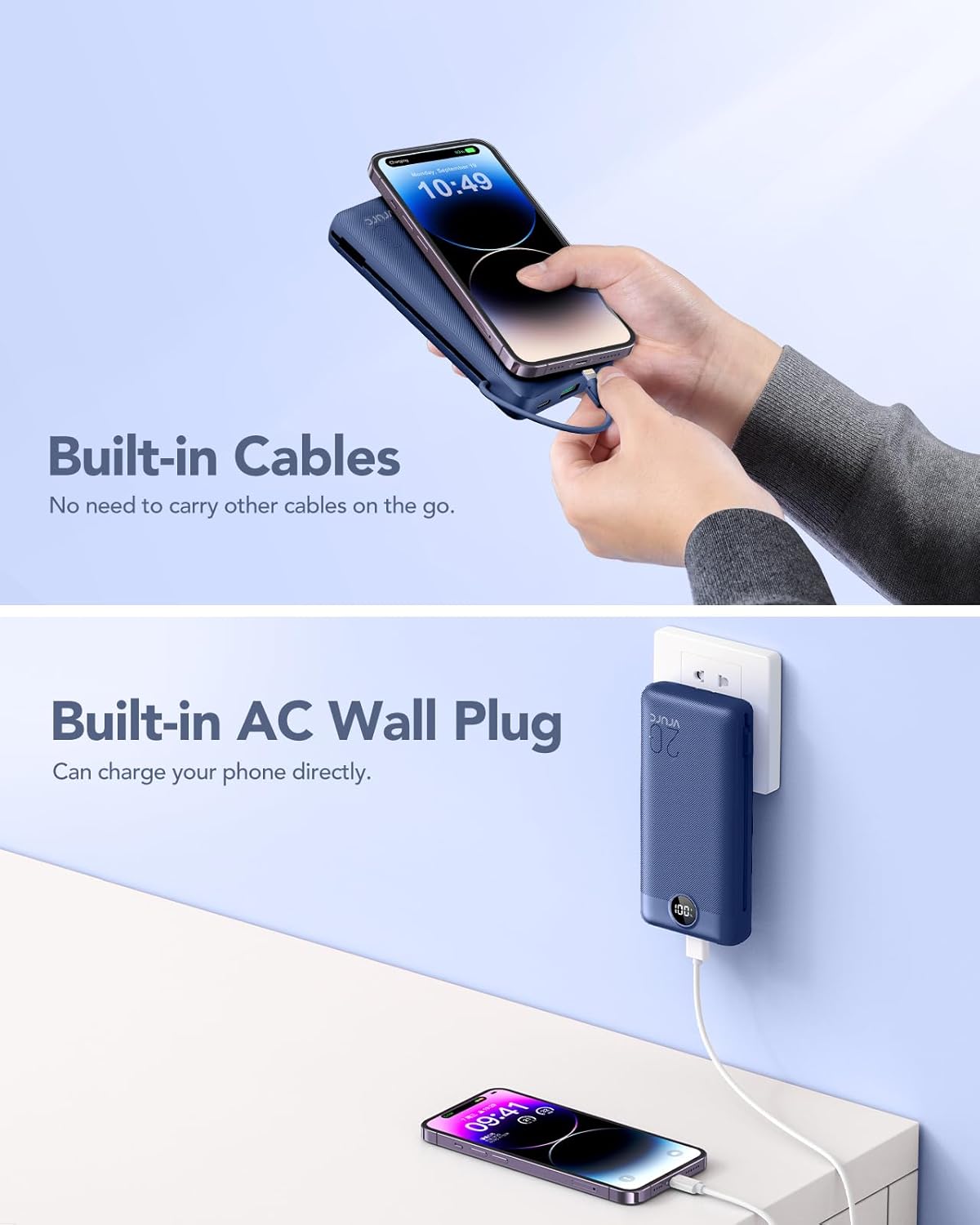
Figure 5: Built-in Cables and AC Wall Plug in Use. This image highlights the convenience of the integrated cables and the direct wall charging capability.
Maintenance
- Cleaning: Use a soft, dry cloth to clean the surface of the power bank. Avoid using harsh chemicals or abrasive materials.
- Storage: Store the power bank in a cool, dry place away from direct sunlight, extreme temperatures, and humidity.
- Battery Care: To prolong battery life, fully charge the power bank at least once every three months if not in regular use. Avoid completely draining the battery frequently.
- Handling: Do not drop, disassemble, or attempt to repair the power bank yourself. This can void the warranty and cause damage.
Troubleshooting
| Problem | Possible Cause | Solution |
|---|---|---|
| Power bank not charging | AC plug not fully inserted; faulty wall outlet; charging cable (if using USB-C input) is damaged or not connected properly. | Ensure AC plug is fully inserted or try a different outlet. Check USB-C cable and connection, try a different cable or adapter. |
| Device not charging from power bank | Power bank battery is depleted; cable not connected properly; device is not compatible; power bank is in protection mode. | Recharge the power bank. Ensure cables are securely connected to both the power bank and the device. Verify device compatibility. Disconnect and reconnect the device to reset. |
| Slow charging | Using a non-fast charging port/cable; device does not support fast charging; multiple devices charging simultaneously. | Ensure you are using the 22.5W USB output port for fast charging. Use a fast-charging compatible cable. Charging multiple devices may reduce individual charging speeds. |
| LED display not working | Power bank is off or battery is completely drained; internal malfunction. | Try charging the power bank. If the issue persists, contact customer support. |
Specifications
| Feature | Detail |
|---|---|
| Model | VRURC 20000mAh Portable Charger |
| Battery Capacity | 20000 Milliamp Hours (mAh) |
| Input (AC Wall Plug) | AC 100-240V, 50/60Hz, 0.5A |
| Input (USB-C) | 5V/3A, 9V/2A (Max 18W) |
| Output (USB-A) | 5V/3A, 9V/2.5A, 12V/1.87A (Max 22.5W) |
| Output (USB-C Cable) | 5V/3A, 9V/2.22A, 12V/1.67A (Max 20W) |
| Output (Micro USB Cable) | 5V/2A |
| Output (for iPhone Cable) | 5V/2.4A |
| Dimensions | 5.91 x 2.83 x 1.09 inches (15.0 x 7.2 x 2.77 cm) |
| Weight | 0.81 lbs (367 grams) |
| Color | Navy |
| Connector Type | USB Type C |

Figure 6: Product Dimensions and Package Contents. This image provides a visual representation of the product's size and what is included in the package.
Safety Information
This power bank is designed with multiple safety features to protect your devices and ensure safe operation. These include:
- Overcharge Protection
- Overvoltage Protection
- Overcurrent Protection
- Short-circuit Protection
- Overtemperature Protection
Always use the product as intended and avoid exposing it to extreme conditions, liquids, or physical impact. The power bank is compliant with international aviation flight safety standards, allowing it to be carried on airplanes.

Figure 7: Safety and Reliability. This image highlights the product's safety features and its suitability for air travel.
Warranty and Support
For warranty information and customer support, please refer to the contact details provided in the product packaging or visit the official VRURC website. Keep your purchase receipt for warranty claims.
If you encounter any issues not covered in the troubleshooting section, please contact VRURC customer service for assistance.
Related documentsVRURC 20000mAh Power Bank


Ask a question about this manual
Ask about setup, troubleshooting, compatibility, parts, safety, or missing instructions. Manuals+ will review the question and use this page’s manual context to help answer it.