
1. Product Overview
The Genmitsu PROVerXL 4030 V2 is an advanced 3-axis CNC router machine designed for precision engraving and cutting across a wide range of materials, including wood, metal, acrylic, PCB, and MDF. This upgraded model features closed-loop motors and ball screws for enhanced speed, accuracy, and reduced noise, making it suitable for hobbyists, DIY enthusiasts, and small business owners.

Figure 1.1: Genmitsu PROVerXL 4030 V2 CNC Router Machine.
Key Features:
- Closed-Loop Motors: Offers improved precision, eliminates step loss, and operates with lower noise levels.
- 1204 Ball Screws: Enhances accuracy and stability for precise motion control.
- GRBL-Based Control Board: Easy operation via USB interface with software like Candle or Universal Gcode Sender.
- Robust Chassis Design: Ensures long-lasting and reliable performance.
- Working Area: Generous 400mm x 300mm x 110mm (15.75in x 11.81in x 4.33in) for small to medium-sized projects.
- Material Compatibility: Capable of cutting and carving wood, plastics, soft metals, and more.
2. Setup and Assembly
The PROVerXL 4030 V2 comes partially assembled, making the setup process straightforward. Most users can complete the assembly within an hour by following the detailed instructions provided in the included user manual.
Package Contents:
Ensure all components listed below are present before beginning assembly. The kit includes the main CNC machine components, control box, various tools, and cables.
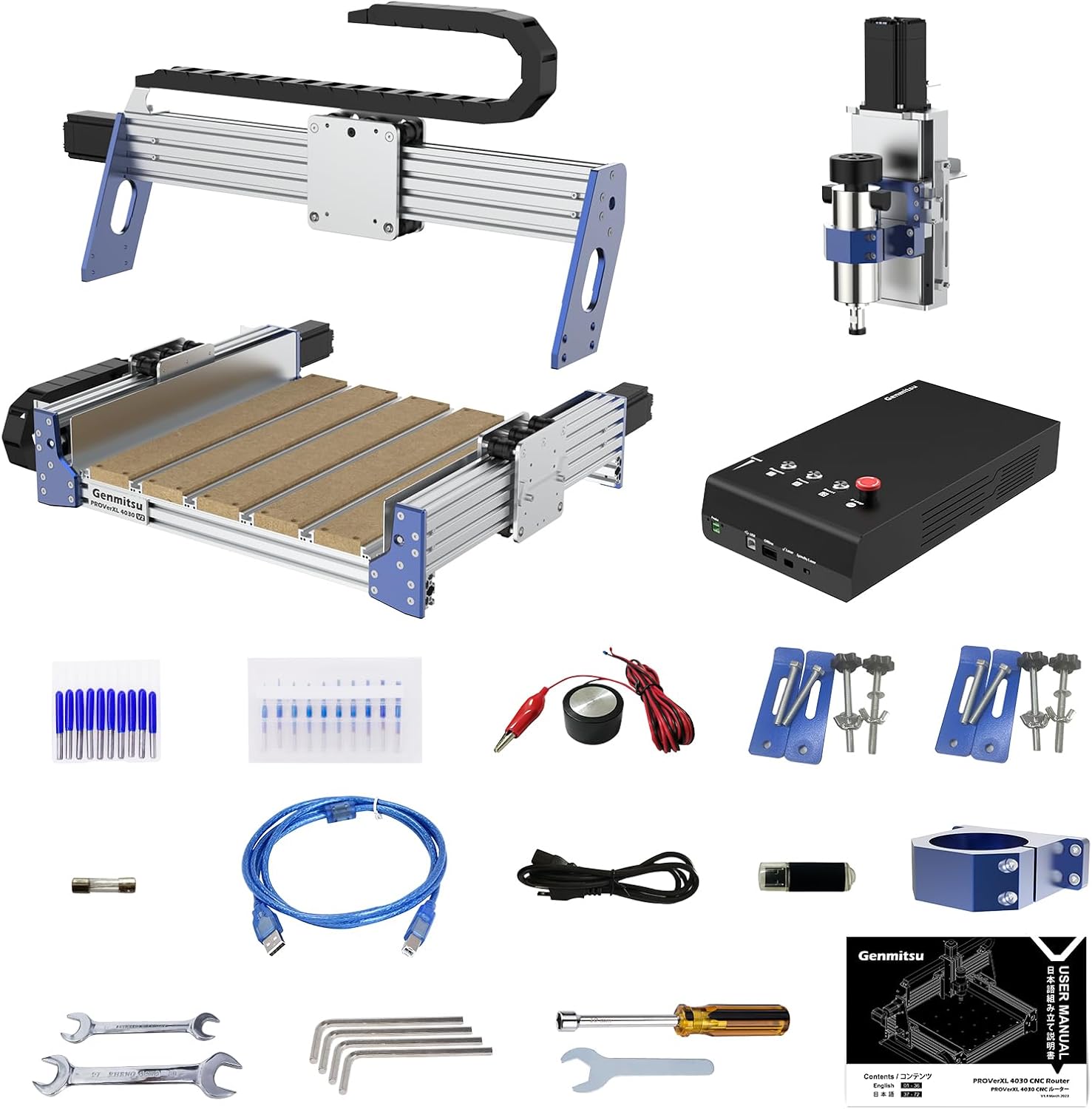
Figure 2.1: Included components of the CNC Machine Kit.
Assembly Steps:
- Unpack Components: Carefully remove all parts from the packaging.
- Frame Assembly: Connect the pre-assembled sections of the machine frame. The design allows for intuitive alignment.
- Motor and Ball Screw Installation: Ensure the closed-loop stepper motors and 1204 ball screws are securely mounted.
- Control Box Connection: Connect all motor and limit switch cables to the control box. Cables are typically well-marked for easy identification.
- Spindle Installation: Mount the spindle securely onto the Z-axis carriage.
- Power Connection: Connect the power supply to the control box.
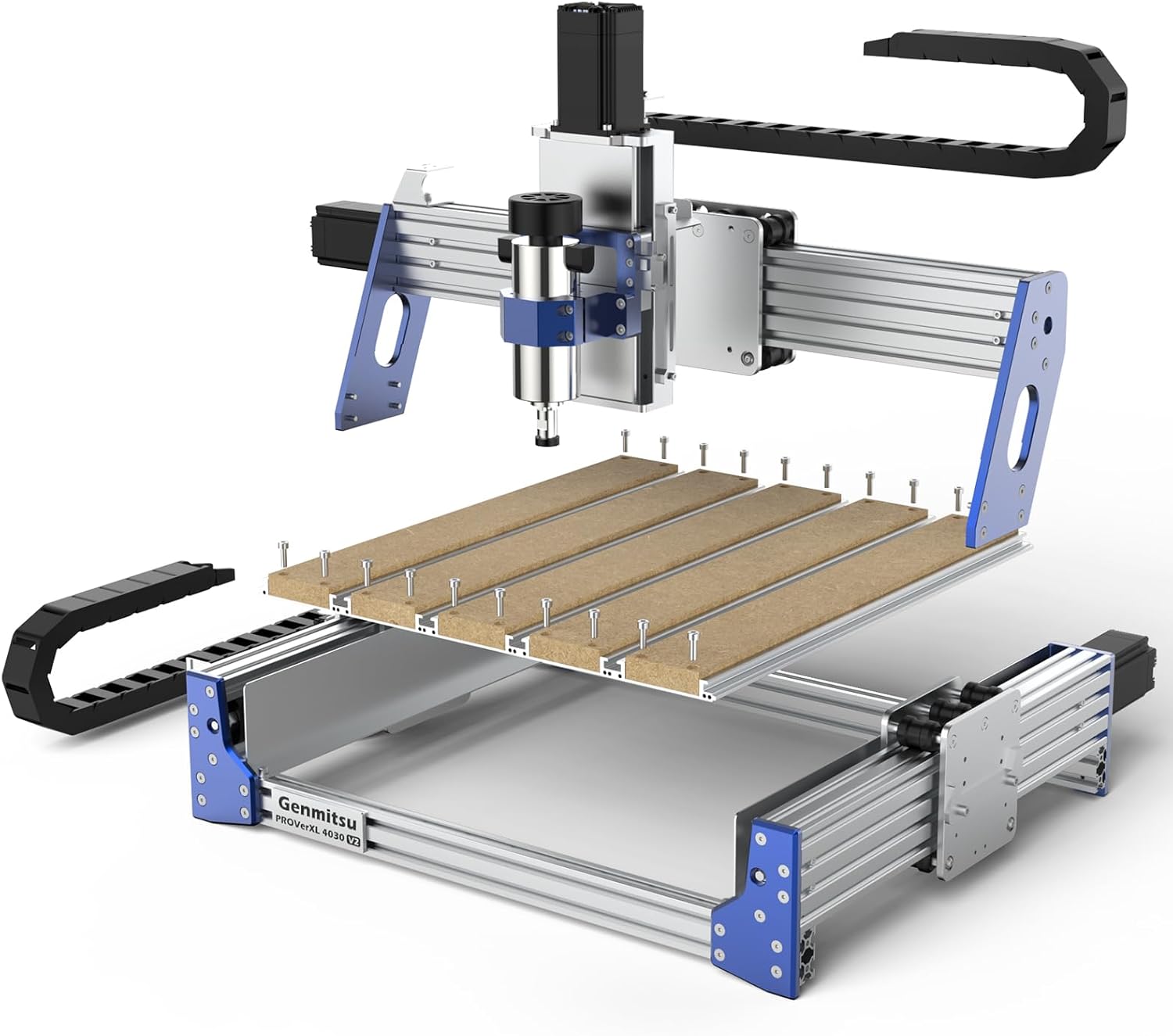
Figure 2.2: Exploded view of the PROVerXL 4030 V2 for assembly reference.
3. Operating Instructions
The Genmitsu PROVerXL 4030 V2 operates using a GRBL-based control system, allowing for flexible control via various software applications.
Software and Connectivity:
- Control Software: Compatible with GRBL-based software such as Candle and Universal Gcode Sender (UGS). These applications allow you to load G-code files and control the machine's movements.
- USB Interface: Connect the control box to your computer via the provided USB cable for direct control.
- Remote Control (Optional): The machine supports remote control via an APP and a Wireless Control Kit, which can be purchased separately.
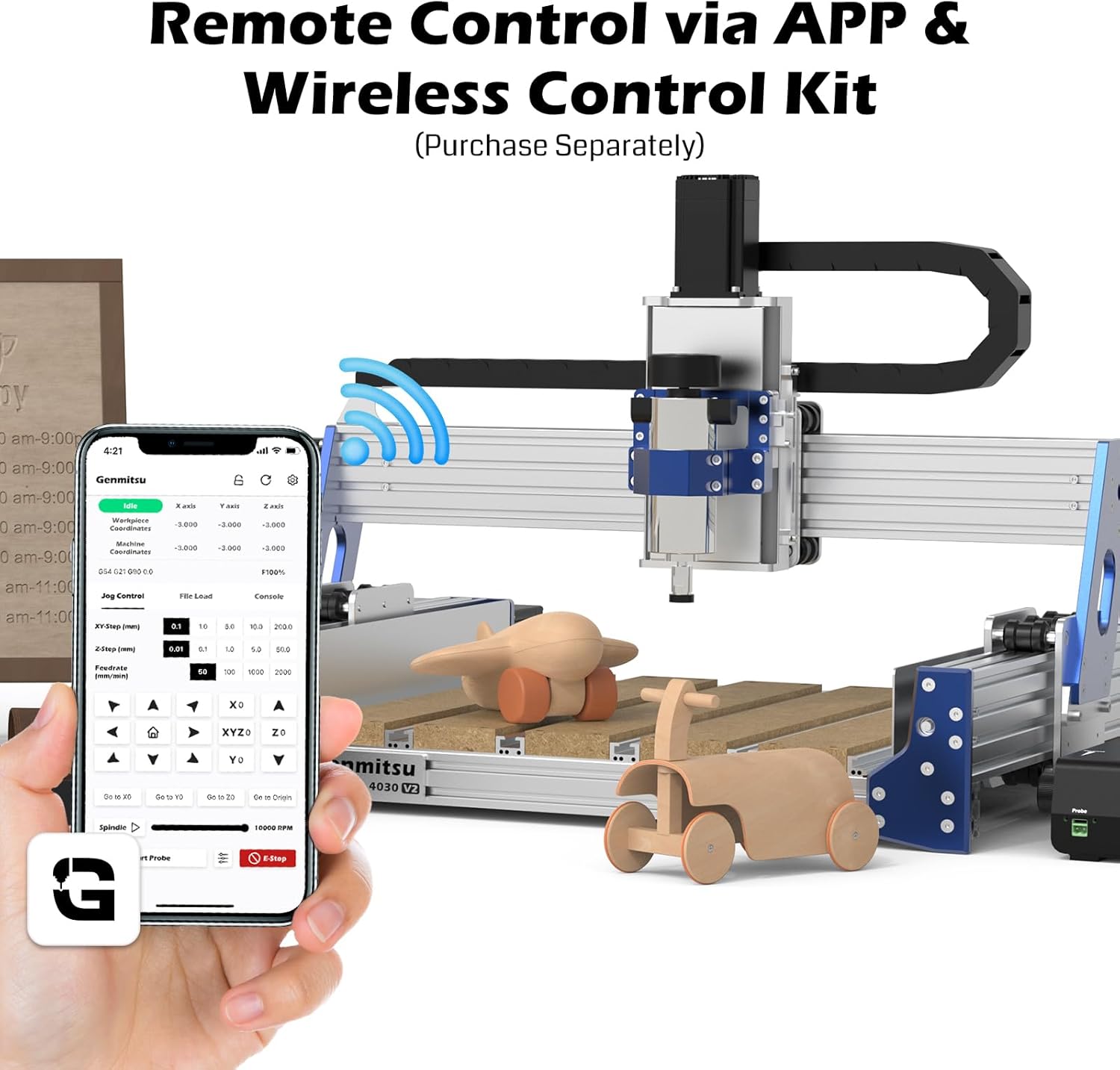
Figure 3.1: Remote control via APP (Wireless Control Kit sold separately).
Material Handling:
The T-slot hybrid table is designed to securely hold various materials during the CNC machining process. Use clamps or other appropriate fixtures to ensure the workpiece is stable and does not shift during operation.

Figure 3.2: Clamping material on the T-slot hybrid table.
Working Area:
The machine offers a working area of 400mm (15.75in) in X-axis, 300mm (11.81in) in Y-axis, and 110mm (4.33in) in Z-axis. This allows for a variety of small to medium-sized projects.

Figure 3.3: Working area dimensions.
Spindle Compatibility:
The PROVerXL 4030 V2 is compatible with various spindle types, including laser modules, 65mm trimmers, and 69mm trimmers, offering versatility for different applications.

Figure 3.4: Spindle compatibility options.
4. Maintenance
Regular maintenance ensures the longevity and optimal performance of your Genmitsu PROVerXL 4030 V2 CNC machine. The robust design requires minimal maintenance.
General Maintenance Tips:
- Keep Clean: Regularly clean the machine, especially the lead screws, rails, and working area, to prevent dust and debris buildup.
- Lubrication: Periodically apply a suitable lubricant to the ball screws and linear guides to ensure smooth movement and reduce wear.
- Check Connections: Ensure all electrical connections, including motor cables and limit switch wires, are secure and free from damage.
- Inspect Components: Periodically check for any loose screws, worn parts, or signs of damage. Address any issues promptly.
- Eccentric Nut Adjustment: The eccentric nut adjustment for the rollers provides greater flexibility and control. Ensure it is properly set for optimal stability.
5. Troubleshooting
This section provides solutions to common issues you might encounter with your PROVerXL 4030 V2.
Symptom 1: The machine doesn't stop at limits or won't home properly.

Figure 5.1: Troubleshooting guide for limit switch issues.
- Check Wiring: Ensure all limit switch cables are securely connected.
- Verify Mounting: Confirm switches are firmly installed and properly aligned.
- Reset Settings: In Candle/UGS, enter
$RST=$before homing. - Test Switches: Manually press each switch during homing; the correct axis should stop immediately.
Note: Please report test results to support for replacement assistance if issues persist.
Symptom 2: Spindle doesn't rotate when activated.

Figure 5.2: Troubleshooting guide for spindle rotation issues.
- Adjust Spindle Knob: Turn speed control to MAX on the control box.
- Software Check: Start spindle through Candle control software.
- Voltage Test: Use a multimeter to measure between the spindle's red and blue wires.
- Normal voltage (48V) indicates a likely spindle motor fault.
- 0V reading indicates a need to check the motherboard/wiring.
Note: Contact support with test results for replacement.
6. Specifications
| Attribute | Detail |
|---|---|
| Brand | Genmitsu |
| Model Number | PROVerXL 4030 V2 |
| Material | Metal |
| Power Source | AC |
| Voltage | 230 Volts |
| Item Weight | 31.34 Kilograms (68.9 pounds) |
| Working Area (X, Y, Z) | 400mm x 300mm x 110mm |
| Base Type | Fixed |
| Included Components | CNC Machine Kit |
7. Warranty and Support
Genmitsu is committed to providing excellent customer service and support for the PROVerXL 4030 V2. Many users have reported positive experiences with prompt and helpful responses from the support team.
Customer Support:
For any technical assistance, troubleshooting beyond this manual, or warranty claims, please contact Genmitsu customer support. They are known for providing detailed instructions and replacement parts when necessary.
You can often find support contact information on the official Genmitsu Store on Amazon or through the documentation included with your machine.
Warranty Information:
Specific warranty terms and conditions are typically provided with your purchase documentation. It is recommended to review these details upon receipt of your machine. Please note that any issues resulting from user modifications may not be covered under warranty.


