Introduction
This manual provides essential instructions for the safe and effective use of your ReadyWired power cord. Please read this manual thoroughly before connecting and operating your device to ensure proper functionality and safety. This power cord is designed to provide reliable power to compatible electronic devices.
Product Overview
The ReadyWired power cord is a high-quality replacement or spare power cable designed for various electronic devices. It features a standard Type B plug for wall outlets and a C7 (figure-8) connector for the device. The cable measures 6 feet (72 inches) in length, providing ample reach for most setups.
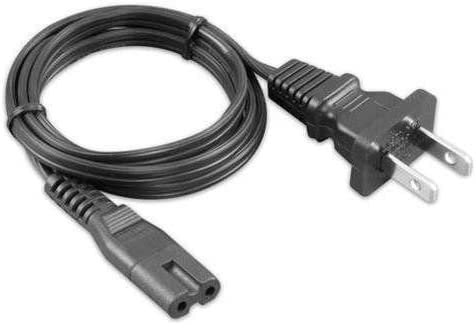
Image: ReadyWired power cord. This image displays the full length of the black power cord, coiled, with its two-prong Type B plug visible at one end and the figure-8 C7 connector at the other.
Key Features:
- Length: 6 feet (72 inches)
- Connector Type: Male-to-Male (Type B plug to C7 connector)
- Compatibility: Designed for devices requiring a C7 power input, such as the Technics Turntable System SL-D30 and Yamaha HS8 Studio Monitor.
Setup
Follow these steps to properly connect your ReadyWired power cord to your electronic device and power source:
- Verify Compatibility: Ensure your device requires a C7 (figure-8) power connector. Refer to your device's manual for power input specifications.
- Power Off Device: Before connecting, ensure your electronic device is turned off and unplugged from any existing power source.
- Connect to Device: Insert the C7 connector end of the ReadyWired power cord firmly into the power input port on your electronic device.
- Connect to Power Outlet: Insert the Type B plug end of the power cord into a standard, grounded electrical wall outlet. Ensure the connection is secure.
- Power On Device: Once both ends are securely connected, you may power on your electronic device.
Safety Note: Always ensure the power cord is not pinched, kinked, or placed under heavy objects. Do not use the power cord if it appears damaged.
Operating
The ReadyWired power cord functions as a conduit for electrical power. Once properly connected to a compatible device and a live electrical outlet, it will supply the necessary power for your device to operate. There are no operational controls on the power cord itself.
- Ensure the power cord is fully inserted into both the device and the wall outlet.
- Avoid overloading electrical outlets.
- Disconnect the power cord from the wall outlet when the device is not in use for extended periods or during electrical storms.
Maintenance
Proper care and maintenance will extend the life of your ReadyWired power cord:
- Cleaning: Disconnect the power cord from all power sources before cleaning. Wipe the cord with a soft, dry cloth. Do not use liquid cleaners or abrasive materials.
- Storage: When not in use, coil the power cord loosely. Avoid tight coiling or bending, which can damage the internal wires. Store in a cool, dry place away from direct sunlight and extreme temperatures.
- Inspection: Periodically inspect the power cord for any signs of damage, such as cuts, fraying, or bent prongs. If any damage is observed, discontinue use immediately and replace the cord.
Troubleshooting
If your device is not receiving power after connecting the ReadyWired power cord, consider the following:
- No Power to Device:
- Ensure both ends of the power cord are fully and securely inserted into the device and the wall outlet.
- Check if the wall outlet is functional by plugging in another known working appliance.
- Verify that the device's power switch is in the "On" position.
- Inspect the power cord for any visible damage. If damaged, replace it.
- Loose Connection: If the cord feels loose, gently push it in further until it is snug. Avoid forcing it.
If troubleshooting steps do not resolve the issue, contact customer support or consult a qualified technician.
Specifications
| Feature | Specification |
|---|---|
| Brand | ReadyWired |
| Connector Type | Male-to-Male (Type B plug to C7 connector) |
| Plug Format | Type B |
| Cable Length | 6 feet (72 inches) |
| Item Weight | 6.4 ounces (0.4 Pounds) |
| Compatibility | Technics Turntable System SL-D30, Yamaha HS8 Studio Monitor, and other devices requiring a C7 power input. |
Warranty and Support
Your ReadyWired power cord comes with a 1-Year Warranty, guaranteeing compatibility and quality. If you experience any issues or have questions regarding your power cord, please contact ReadyWired customer support for assistance.
For warranty claims or technical support, please refer to the contact information provided with your purchase or visit the official ReadyWired website.


