1. Introduction
The NiPoGi AM08PRO is a high-performance mini PC designed for both gaming and professional use. Featuring an AMD Ryzen 7 7735HS processor, AMD Radeon 680M graphics, 32GB DDR5 RAM, and a 512GB M.2 NVMe SSD, this compact system delivers robust performance for demanding applications, complex 3D visualization, and efficient multitasking. Its unique vertical design and customizable operating modes make it a versatile addition to any setup.
2. Package Contents
Verify that all items listed below are included in your package:
- 1 x NiPoGi AM08PRO Mini PC
- 1 x Power Adapter (European standard)
- 1 x User Manual
- 1 x HDMI Cable
- 1 x VESA Mount
3. Product Overview
3.1 Key Features
- Processor: AMD Ryzen 7 7735HS (8 Cores, 16 Threads, up to 4.75 GHz)
- Graphics: Integrated AMD Radeon 680M (12 Cores, 2200 MHz)
- Memory: 32GB DDR5 RAM (Dual-channel, expandable up to 64GB)
- Storage: 512GB M.2 2280 PCIe 3.0 NVMe SSD (expandable up to 2TB with additional NVMe or SATA SSD)
- Connectivity: Wi-Fi 6 (802.11ax, Dual Band 2.4/5 GHz), Bluetooth 5.2, Gigabit Ethernet
- Display Output: Triple 4K display support via 2x HDMI 2.0 and 1x Full-function Type-C port
- Operating Modes: Silent, Auto, and Performance modes for optimized usage
- Cooling System: Dual fan design with 3 heat pipes
3.2 Front and Rear Panel
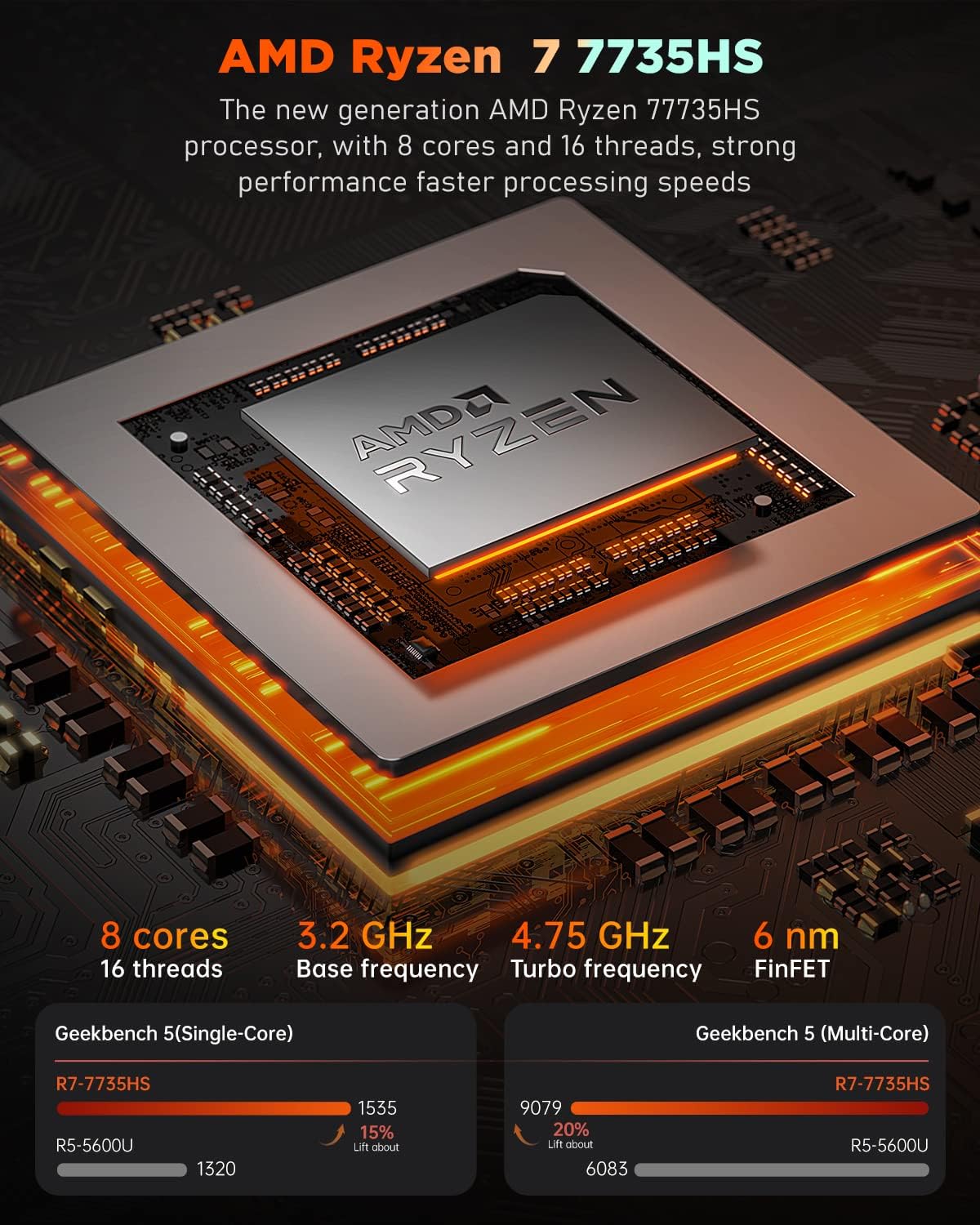
Image: Front view of the NiPoGi AM08PRO Mini PC, showing the power button, USB 3.2 ports, and Type-C port.

Image: Rear view of the NiPoGi AM08PRO Mini PC, illustrating the various ports including HDMI, USB 3.2, Gigabit Ethernet, and DC power input.
The front panel includes the power button, audio in/out, 2x USB 3.2 Type-A ports, and 1x full-function Type-C port. The rear panel features 2x HDMI 2.0 ports, 2x USB 3.2 Type-A ports, 1x Gigabit Ethernet port, and the DC power input.
4. Setup Guide
4.1 Initial Connection
- Connect your monitor(s) to the HDMI or Type-C video output ports.
- Connect your keyboard and mouse to the available USB ports.
- Connect the power adapter to the DC input port on the mini PC, then plug it into a power outlet.
- Press the power button on the front panel to turn on the device.
4.2 First Boot Notes
Upon the first startup, the system will guide you through the initial Windows 11 Pro setup. Follow the on-screen prompts to:
- Select your preferred language and country/region.
- Set up your user account.
Important: To avoid potential initial configuration issues, it is recommended to skip connecting to the network or Wi-Fi during the initial Windows setup. Proceed with the setup offline, and connect to the internet once the operating system is fully loaded and stable.
4.3 Automatic Power On (BIOS Setting)
The NiPoGi AM08PRO supports automatic power-on after a power failure. To enable this feature:
- During startup, repeatedly press the ESC key to enter the BIOS interface.
- Navigate to the Boot section.
- Locate and enable the Automatic Power On option.
- Save changes and exit BIOS.
5. Operating Modes
The AM08PRO features a unique 3-mode design, allowing you to optimize performance and noise levels based on your usage scenario. You can switch between modes using the physical switch on the device.
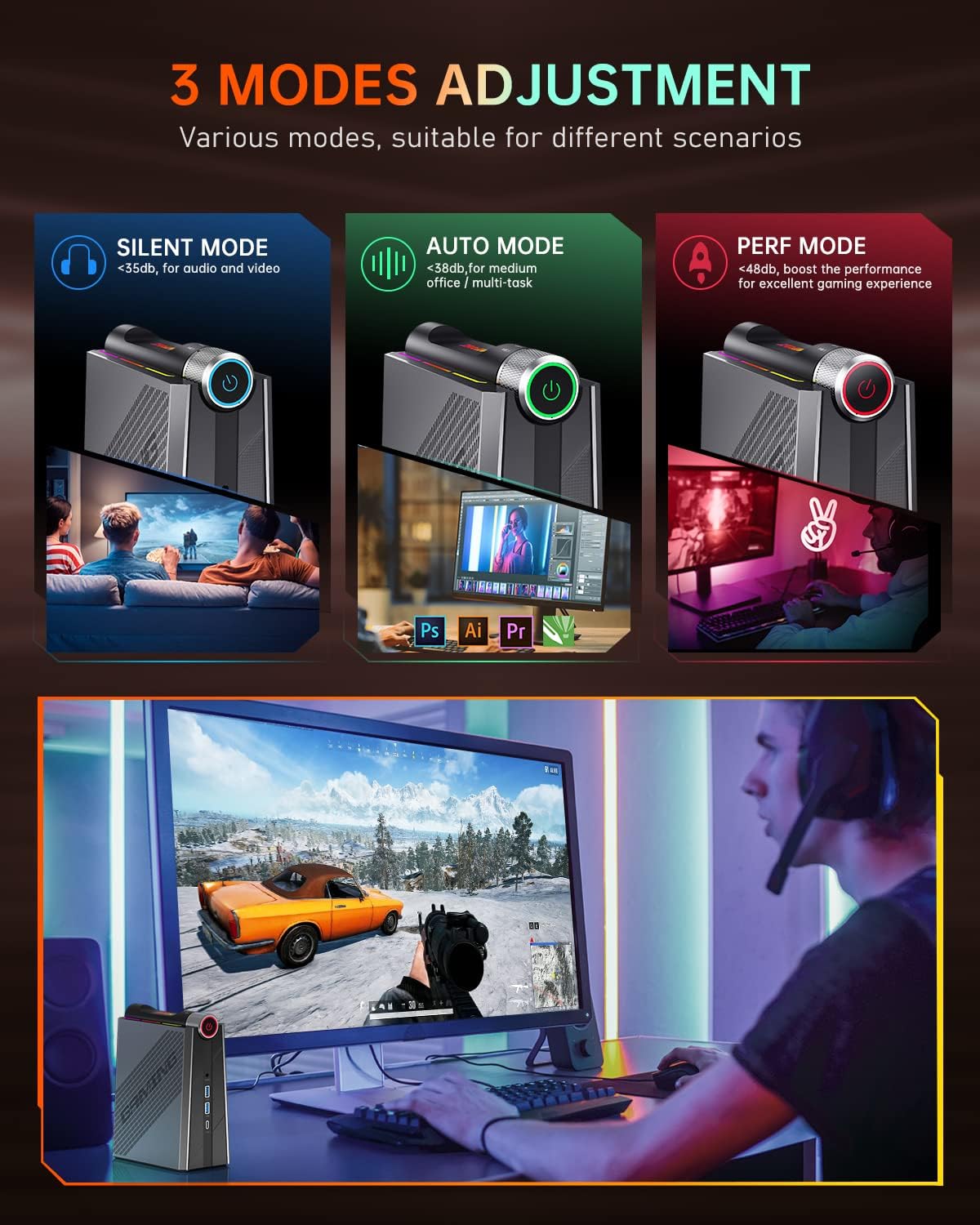
Image: Illustration of the three operating modes: Silent, Auto, and Performance, with their respective noise levels and recommended uses.
- Silent Mode (<35dB): Ideal for media consumption, such as watching movies or listening to music, where minimal noise is desired.
- Auto Mode (<38dB): Suitable for general office tasks, web browsing, and light multitasking, balancing performance and acoustics.
- Performance Mode (<48dB): Boosts performance for demanding applications like gaming or complex computations, providing an excellent experience at higher fan speeds.
6. Maintenance and Upgrades
6.1 Storage Expansion
The NiPoGi AM08PRO allows for easy storage expansion. The device features a magnetic side panel for convenient access to internal components.

Image: Internal view of the NiPoGi AM08PRO, showing the M.2 SSD slot and SO-DIMM DDR5 slots, accessible via the magnetic side panel.
You can expand the storage capacity up to 2TB by adding an additional M.2 NVMe or SATA SSD (not included) in the available 2.5-inch slot.
6.2 Memory Upgrade
The mini PC comes with 32GB DDR5 RAM (2 x SO-DIMM). You can upgrade the memory up to a maximum of 64GB (2 x 32GB) by replacing the existing SO-DIMM modules with higher capacity ones.
6.3 General Care
- Keep the device in a well-ventilated area to ensure optimal cooling.
- Avoid exposing the device to extreme temperatures or humidity.
- Clean the exterior with a soft, dry cloth. Do not use liquid cleaners.
7. Troubleshooting
7.1 Network/Wi-Fi Connection Issues
If you encounter problems connecting to the network or Wi-Fi after initial setup:
- Ensure that you have completed the initial Windows setup without an internet connection.
- If using a wired connection, try disconnecting and reconnecting the Ethernet cable, then restart the device.
- If Wi-Fi is not loading, try restarting your router.
- Verify that the Wi-Fi drivers are correctly installed in Device Manager.
7.2 General System Instability
For general system issues or unexpected shutdowns:
- Ensure all cables are securely connected.
- Check for any pending Windows updates and install them.
- Monitor system temperatures, especially during heavy load. The AM08PRO features an efficient dual-fan cooling system to prevent overheating.

Image: Diagram illustrating the dual-fan cooling system with three heat pipes, designed for efficient heat dissipation.
If problems persist, refer to the Warranty and Support section for contact information.
8. Specifications
| Feature | Detail |
|---|---|
| Brand | NiPoGi |
| Model Number | AM08PRO |
| Operating System | Windows 11 Pro |
| Processor | AMD Ryzen 7 7735HS (8 Cores, 16 Threads) |
| Processor Speed | Base 3.2 GHz, Turbo up to 4.75 GHz |
| L3 Cache | 16 MB |
| Graphics | Integrated AMD Radeon 680M |
| RAM | 32 GB DDR5 (2x SO-DIMM) |
| Maximum RAM | 64 GB |
| Storage | 512 GB M.2 2280 PCIe 3.0 NVMe SSD |
| Storage Expansion | Supports additional M.2 NVMe or SATA SSD up to 2TB |
| Wireless Connectivity | Wi-Fi 6 (802.11ax), Bluetooth 5.2 |
| Wired Connectivity | Gigabit Ethernet (1000 Mbit/s) |
| USB Ports | 4x USB 3.2 Type-A |
| Video Output | 2x HDMI 2.0, 1x Full-function Type-C (Supports Triple 4K Display) |
| Audio Port | Combined Headphone/Microphone Interface |
| Power Supply | DC |
| Dimensions (L x W x H) | 13.29 x 15.61 x 7.2 cm |
| Weight | 2.17 kg |
| Special Features | 3 Operating Modes, Vertical Design, RGB Lighting, Easy Upgrade Access |
Note: Specifications are subject to change without prior notice. For the most up-to-date information, please refer to the official product page or contact customer support.
9. Warranty and Support
NiPoGi is committed to providing high-quality products and excellent customer service.
9.1 Warranty Information
- 12-Month Free Replacement: Your NiPoGi AM08PRO Mini PC is covered by a 12-month free replacement policy from the date of purchase.
- Lifetime Technical Support: NiPoGi offers lifetime technical support for all its products.
- Certifications: The product complies with CE and UKCA safety certificates.
9.2 Contact Support
Should you require assistance or have any questions regarding your NiPoGi AM08PRO Mini PC, please contact our support team:
- Email: support@inipogi.com
- Phone: +49 800 182 1386 (Monday-Friday, 9 AM - 5 PM EST)
- Amazon Support: Log in to your Amazon account, go to "Your Orders," and select "Ask Product Question."
During the warranty period, NiPoGi provides maintenance services for repair or replacement of the Mini PC.


