
1. Introduction
Thank you for choosing the Radtel RT-420 Multi-Band Two-Way Radio. This manual provides essential information for the safe and efficient operation of your device. Please read it thoroughly before use to ensure proper functionality and to maximize your radio's capabilities. The RT-420 is designed for amateur radio enthusiasts, offering a wide range of frequencies and features including air band reception and NOAA weather alerts.
Included Components:
- Radtel RT-420 Radio Unit
- Antenna
- Lithium-Ion Battery (pre-installed or separate)
- Charging Cable (Type-C)
- User Manual (this document)

Figure 1: Radtel RT-420 Multi-Band Two-Way Radio.
2. Product Features
The Radtel RT-420 offers a comprehensive set of features for diverse communication needs:
- Transmit/Receive Frequencies: 144-148MHz, 420-450MHz
- Receive Only Frequencies:
- 136-174MHz
- 200-260MHz
- 350-400MHz
- 400-520MHz
- 108-136MHz (AM RX) - Air Band
- 66-108MHz (FM RX) - FM Radio
- NOAA Weather Channel Reception
- One-key frequency copy from other radios
- 50 sets of CTCSS, 105 sets of DCS
- Transmission Time Out (TOT)
- Voice Encryption (Frequency Hopping Function)
- 8 selectable step sizes: 2.5k, 5k, 6.25k, 10k, 12.5k, 20k, 25k, 50k
- Power Saving Mode
- VOX (Voice Operated Transmit)
- Support scrambling and offline function
- Busy Channel Lockout (BCL)
- Low battery warning and battery voltage display
- Automatic backlight
- Three channel display modes (frequency, channel number, channel name)
- Three scanning methods (time, carrier, search)
- Frequency difference direction selectable in frequency mode
- Frequency difference range: 0-99.9995MHz in frequency mode
- 256 storage channels (128x2 groups)
- Emergency alarm function
- DTMF code function
- Support boot interface customization
- FM Radio
- Computer programming capability
- Dual frequency point waiting
3. Setup
3.1 Battery Installation
- Ensure the radio is powered off.
- Locate the battery compartment on the back of the radio.
- Align the battery with the contacts and gently push it into place until it clicks securely.
- Close the battery compartment cover, if applicable.
3.2 Antenna Attachment
- Screw the antenna clockwise onto the antenna connector at the top of the radio until it is finger-tight. Do not overtighten.
3.3 Charging the Battery
The RT-420 supports Type-C charging. Ensure the radio is off during charging for optimal battery life.
- Connect the Type-C charging cable to the radio's charging port.
- Connect the other end of the cable to a compatible USB power source (e.g., USB wall adapter, computer USB port, vehicle charger).
- The charging indicator on the radio's display will show charging status.
- Charging is complete when the indicator changes or shows a full battery icon.
Optional charging accessories include desktop chargers and six-unit chargers.

Figure 2: Radtel RT-420 connected for Type-C charging.
4. Operating Instructions
4.1 Power On/Off and Volume
- Power On: Rotate the power/volume knob clockwise until you hear a click and the display illuminates.
- Power Off: Rotate the power/volume knob counter-clockwise until you hear a click and the display turns off.
- Volume Adjustment: Rotate the power/volume knob to adjust the audio output level.
4.2 Frequency Mode and Channel Mode
The RT-420 operates in two primary modes: Frequency Mode (VFO) for direct frequency input and Channel Mode (MR) for stored channels.
- Switching Modes: Use the designated VFO/MR button (refer to your radio's keypad layout) to toggle between Frequency and Channel modes.
- Frequency Mode: Allows direct input of frequencies using the keypad.
- Channel Mode: Allows selection of pre-programmed channels. Use the UP/DOWN arrow keys to navigate through channels.
4.3 Direct Frequency Input
- Ensure the radio is in Frequency Mode.
- Use the numeric keypad to enter the desired frequency (e.g., 145.000 for 145.000 MHz).
- Press the PTT (Push-To-Talk) button to transmit on the entered frequency, or listen for activity.
4.4 Storing Channels
The RT-420 supports 256 storage channels. Channel parameters can be edited and stored in frequency mode.
- In Frequency Mode, set the desired frequency, CTCSS/DCS codes, offset, and other parameters.
- Access the menu (usually via a 'MENU' button).
- Navigate to the 'Memory' or 'Channel Store' option.
- Select an empty channel number or an existing channel to overwrite.
- Confirm the storage.
Note: For detailed steps on menu navigation and specific channel storage procedures, please refer to the full manual or contact customer support if this summary is insufficient.
4.5 NOAA Weather Channel Reception
The radio can receive NOAA weather channels for real-time weather warnings.
- Access the NOAA weather channel function via the menu or a dedicated button (if available).
- The radio will scan and receive broadcasts from the nearest NOAA weather station.

Figure 3: Radtel RT-420 receiving NOAA weather channel.
4.6 Air Band Reception (AM RX 108-136MHz)
Listen to global airport aviation frequencies in real-time.
- Switch to Frequency Mode.
- Input a frequency within the 108-136MHz range. The radio will automatically switch to AM modulation for this band.
- Adjust volume to listen to air traffic control communications.
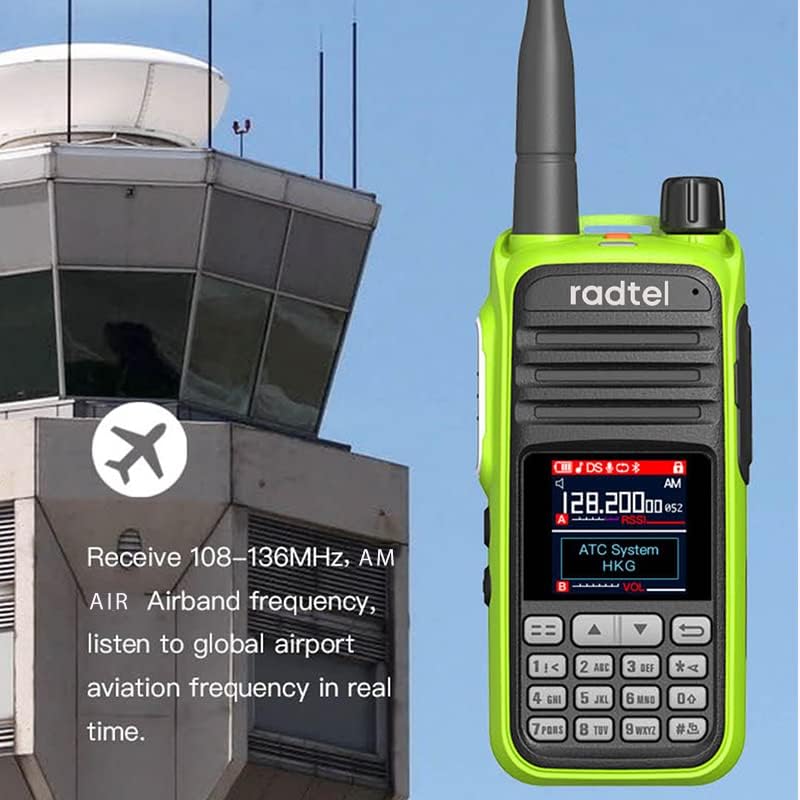
Figure 4: Radtel RT-420 tuned to an air band frequency near an airport tower.

Figure 5: Radtel RT-420 displaying an air band frequency with an aircraft in the background.
4.7 VOX Function
VOX (Voice Operated Transmit) allows hands-free transmission when your voice is detected.
- Access the menu and navigate to the VOX setting.
- Enable VOX and adjust the sensitivity level as needed.
- When VOX is active, speaking into the microphone will automatically initiate transmission.
4.8 Scanning
The RT-420 offers three scanning methods: Time, Carrier, and Search.
- To initiate scanning, press the 'SCAN' button (or access via menu).
- The radio will scan through frequencies or channels based on the selected method.
- Scanning will pause when a signal is detected.
4.9 Emergency Alarm
Activate the emergency alarm in critical situations.
- Press the dedicated 'SOS' or 'ALARM' button (refer to your radio's layout) to activate the emergency alarm.
- The radio will emit an audible alarm and/or transmit an emergency signal.
4.10 Computer Programming
The RT-420 supports computer programming for advanced customization of channels, frequencies, and other settings. This requires a compatible programming cable and software (sold separately or available from the manufacturer).
5. Maintenance
- Cleaning: Use a soft, damp cloth to clean the radio's exterior. Do not use harsh chemicals or solvents.
- Battery Care: Charge the battery regularly. Avoid fully discharging the battery frequently. If storing the radio for an extended period, charge the battery to approximately 50% and remove it from the radio.
- Storage: Store the radio in a cool, dry place away from direct sunlight and extreme temperatures.
- Water Resistance: This radio is not water resistant. Avoid exposure to rain, splashes, or immersion in water.
6. Troubleshooting
If you encounter issues with your Radtel RT-420, please refer to the following common solutions:
- Radio does not power on:
- Ensure the battery is correctly installed and fully charged.
- Check that the power/volume knob is rotated clockwise past the 'off' position.
- No reception or poor audio:
- Verify the antenna is securely attached.
- Adjust the volume level.
- Ensure you are on an active frequency or channel.
- Check squelch settings; a high squelch level may block weak signals.
- Cannot transmit:
- Confirm the battery has sufficient charge.
- Ensure you are on a transmit-enabled frequency (144-148MHz or 420-450MHz).
- Check if Busy Channel Lockout (BCL) is active and the channel is currently in use.
- Verify CTCSS/DCS settings match the receiving radio.
- Display shows unfamiliar language (e.g., Chinese):
- Access the radio's menu and navigate to the 'Language' setting. Select 'English'.
- If unable to navigate, a factory reset (refer to advanced manual or support) might be necessary, but this will erase all custom settings.
- Difficulty programming channels:
- Ensure you are in Frequency Mode when attempting to store channel parameters.
- Refer to the specific channel storage steps in the full manual or consider using computer programming for easier setup.
7. Specifications
| Feature | Specification |
|---|---|
| Brand | radtel |
| Model | RT-420 |
| Item Package Dimensions (L x W x H) | 9.5 x 7 x 2 inches |
| Package Weight | 0.99 Pounds |
| Color | Green |
| Number of Channels | 256 (128x2 groups) |
| Special Feature | Emergency Alarm, NOAA Weather, Air Band RX, VOX |
| Frequency Range (TX) | 144-148 MHz, 420-450 MHz |
| Frequency Range (RX) | 136-174 MHz, 200-260 MHz, 350-400 MHz, 400-520 MHz, 108-136 MHz (AM), 66-108 MHz (FM) |
| Talking Range Maximum | 5 Kilometer (approx. 3.1 miles) |
| Voltage | 3.7 Volts (DC) |
| Water Resistance Level | Not Water Resistant |
| Number of Batteries | 1 Lithium Ion battery (included) |
| Included Components | Antenna |
8. Warranty and Support
For warranty information, technical support, or further assistance with your Radtel RT-420 radio, please contact the seller or manufacturer directly. You can typically find contact details on the product packaging or the official Radtel website.
Manufacturer: Xiamen Radtel Electronics Co Ltd
Seller: Radtel Direct
Please retain your proof of purchase for any warranty claims.
