
1. Product Overview
The Cmokifuly Frog Cute Keycaps are a 148-key set designed for mechanical keyboards. These keycaps feature an MDA profile for ergonomic comfort and are constructed from durable PBT material with dye-sublimated frog-themed designs. The set includes various key sizes to accommodate most keyboard layouts.
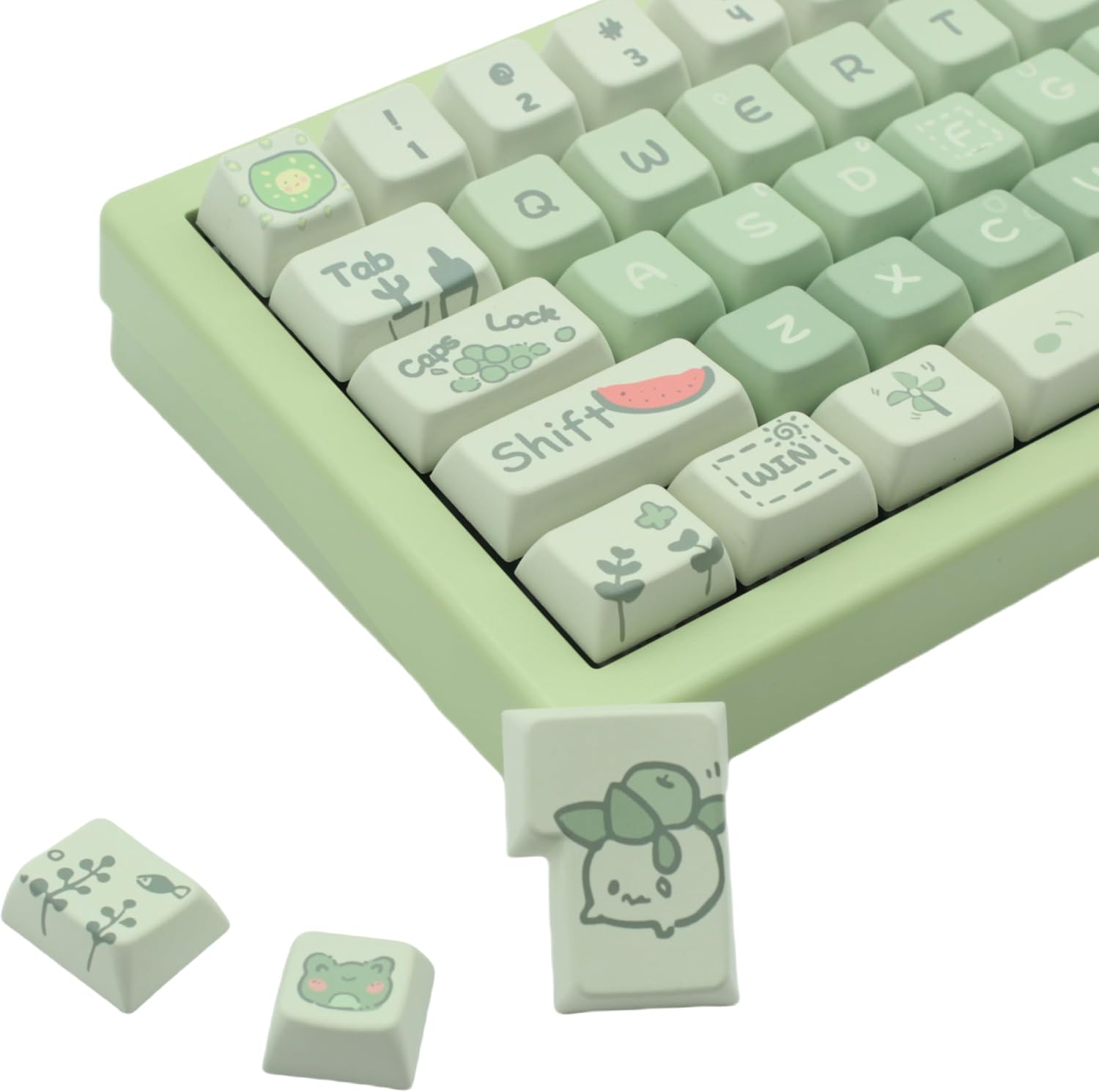
Image: Cmokifuly Frog Cute Keycaps on a mechanical keyboard.
2. Product Features
- Custom Theme Keycaps: Features multiple 5-side dye-sublimated keys, enhancing the visual depth and completeness of the custom patterns.
- MDA Profile: Utilizes an ergonomic streamlined MDA profile key position layout, designed to adapt to natural hand movements for comfortable typing.
- High-Quality PBT Material: Constructed from PBT plastic, known for its durability. Advanced dye-sublimation technology ensures patterns and letters do not fade, resist oiling, and maintain a grainy texture over time.
- Broad Compatibility: Compatible with most mechanical switches, including Cherry, Gateron, Outemu, Kailh, and AKKO. Not compatible with membrane keyboards or low-profile switches.
- Full Size Key Set: Includes 148 keys, suitable for various keyboard layouts. Features different specification spacebars (e.g., 7u, 2.75u, 6.25u) to fit non-standard keyboards.

Image: Detailed view of frog and nature-inspired keycap designs.
3. Package Contents
The Cmokifuly Frog Cute Keycaps set includes:
- 1x 148-Keycap Set (Cmokifuly Frog Cute Keycaps)
4. Installation Guide
To install your new keycaps, follow these steps:
- Prepare Your Keyboard: Ensure your mechanical keyboard is powered off and unplugged from your computer.
- Remove Existing Keycaps: Use a keycap puller (often included with mechanical keyboards or keycap sets) to carefully remove your current keycaps. Gently pull straight up on each keycap to avoid damaging the switch stem.
- Organize New Keycaps: Refer to the provided layout diagram (if available) or the standard keyboard layout to identify the correct placement for each new keycap. The 148-key set includes various sizes for different rows and special keys.
- Install New Keycaps: Align each Cmokifuly Frog Cute Keycap with its corresponding switch stem. Press down firmly but gently until the keycap is securely seated. Ensure the keycap is level and does not wobble.
- Test Functionality: Once all keycaps are installed, plug in your keyboard and test each key to ensure proper functionality and feel.

Image: Side profile of keycaps on a mechanical keyboard, showing the MDA profile.

Image: Keycap layout diagram for the 148-key set.
5. Usage and Ergonomics
The MDA profile of these keycaps is designed for an ergonomic typing experience. The sculpted shape of each keycap is intended to conform to the natural curve of your fingertips, reducing strain during extended typing sessions. The PBT material provides a comfortable, slightly textured feel that enhances grip and prevents slipperiness.

Image: Close-up of individual keycaps, showing the MDA profile.
6. Care and Maintenance
To ensure the longevity and appearance of your Cmokifuly Frog Cute Keycaps:
- Regular Cleaning: Dust and debris can accumulate between keycaps. Use a soft brush or compressed air to remove loose particles regularly.
- Deep Cleaning: For deeper cleaning, carefully remove the keycaps using a keycap puller. Wash them in lukewarm water with a mild soap. Avoid harsh chemicals or abrasive materials, as these can damage the PBT plastic and dye-sublimated designs. Rinse thoroughly and allow them to air dry completely before re-installing.
- Avoid Excessive Force: When installing or removing keycaps, apply gentle, even pressure to prevent damage to the keycaps or keyboard switches.
- Dye-Sublimation Durability: The dye-sublimation process ensures the designs are embedded into the PBT plastic, making them highly resistant to fading and wear from normal use.
7. Troubleshooting
If you encounter any issues during or after installation, consider the following:
- Keycap Height Discrepancies: The MDA profile features varying keycap heights across different rows for ergonomic purposes. Ensure keycaps are placed on their correct rows (e.g., R1, R2, R3, R4) as indicated in the layout diagram to maintain the intended ergonomic curve. Mixing keycaps from different rows may result in an uneven typing surface.
- Compatibility Issues: Verify that your keyboard uses mechanical switches compatible with standard keycaps. This set is not designed for membrane keyboards or keyboards with low-profile switches. If keys do not fit, double-check your keyboard's switch type.
- Loose or Wobbly Keycaps: Ensure the keycap is fully pressed onto the switch stem. If a keycap remains loose, inspect the switch stem for damage or manufacturing defects.
8. Specifications
| Specification | Detail |
|---|---|
| Item Weight | 15.8 ounces |
| Manufacturer | Cmokifuly |
| Item Model Number | KNK-XQW |
| Material | Polybutylene Terephthalate (PBT) |
| Keycap Profile | MDA Profile |
| Number of Keys | 148 |
| Printing Method | Dye-Sublimation |
| Compatible Devices | Gaming computers and laptops with mechanical keyboards using compatible switches |
| Recommended Uses | Gaming, Office |
9. Additional Resources
The following videos provide further visual guidance and demonstrations related to keycap installation and typing experience:
KiiBOOM X Cosydiaries Rainy Froggy Day Keycap Set
Video demonstrating the sound and feel of frog-themed keycaps on a mechanical keyboard, showcasing typing experience.
GEKUCAP PBT Keycaps 132 Keys Spring Theme Green Keycaps
Video illustrating the installation and typing sound of green, spring-themed PBT keycaps on a mechanical keyboard.
Womier PBT Keycaps Green, Jade Translucent Key caps Custom
Video showing the process of installing green PBT keycaps and a demonstration of typing on them.
KiiBoom Phantom81 Lite Keyboard & Sprout Picnic Keycaps
Video showcasing the aesthetic and typing experience of a mechanical keyboard with themed keycaps.
10. Support and Warranty
Cmokifuly is dedicated to ensuring customer satisfaction. For any questions, concerns, or assistance with your keycaps, please contact our customer service team. While specific warranty details for keycaps are not provided, the brand emphasizes its commitment to providing quality service.
Optional protection plans are available for purchase separately to cover your product beyond standard manufacturer support. These plans offer extended coverage for various durations:
- 3-Year Protection Plan
- 4-Year Protection Plan
- Complete Protect (monthly plan covering eligible purchases)
For more information on these plans, please refer to the product listing or contact the plan provider.