
Important Safety Information
Always ensure the desk is properly assembled and stable before use. Follow the assembly instructions carefully to prevent any safety hazards.
Product Overview
The GreenForest 59-inch Office Desk is designed for home office, study, or gaming environments, offering a blend of functionality and modern aesthetics. This desk features a spacious work surface, integrated power outlets, LED lighting, and versatile storage options.
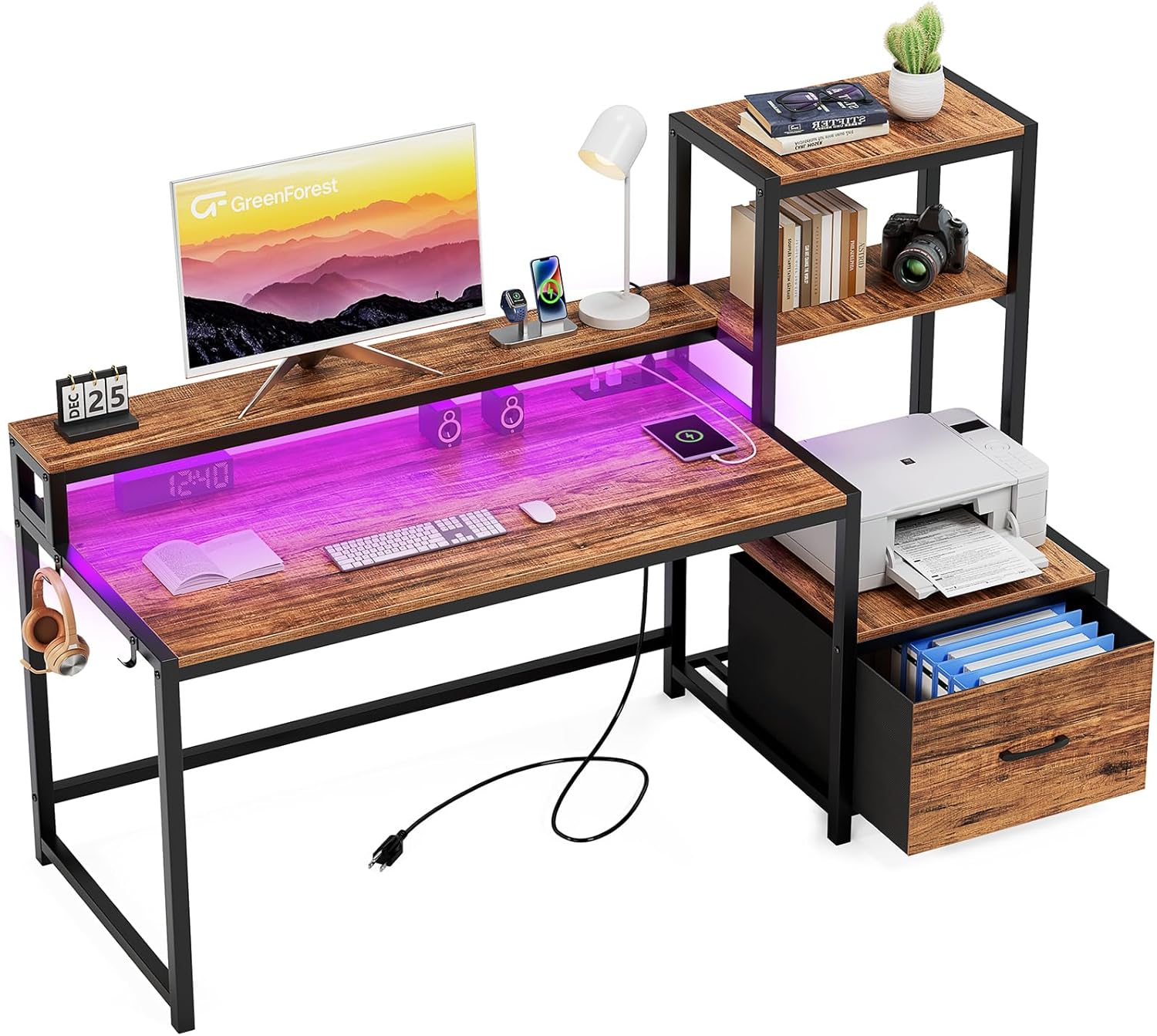
Figure 1: Overall view of the GreenForest 59-inch Office Desk.
Key Features:
- LED Lights and Power Outlets: The monitor stand is equipped with an RGB strip light offering 20 colors, 21 dynamic modes, 8 brightness levels, and 8 speeds. Power outlets include 3 AC outlets and 2 USB ports.
- Printer Stand with Drawers: Side shelves provide 4 tiers of storage, including 1 fabric drawer, suitable for a printer, computer tower, documents, and other office items.
- Full Monitor Stand: An ergonomic monitor stand helps reduce strain on the neck, shoulders, and back, and can reduce eye fatigue by positioning the monitor correctly.
- Reversible Design of Shelves: The shelves can be configured on either the left or right side to adapt to room layouts and personal preferences.
- Easy to Assemble: The desk comes with necessary tools and instructions, with clearly labeled parts for assembly in approximately 30 minutes.
Package Contents
Verify that all components are present before beginning assembly.
- Desk Frame Components (Metal)
- Desk Top Panels (Engineered Wood)
- Monitor Stand
- Printer Shelf
- Fabric Drawer
- Built-in Outlet with 3 AC outlets and 2 USB ports
- Headphone Hook
- RGB LED Strip Light with Remote Control
- Assembly Hardware (screws, bolts, etc.)
- Assembly Tools (e.g., Allen wrench)
- Instruction Manual
Setup and Assembly
Assembly of the GreenForest Office Desk is designed to be straightforward. Please follow the included step-by-step instructions and diagrams carefully. All parts are labeled to assist with identification.
Before You Begin:
- Clear a spacious area for assembly.
- Verify all parts are present against the package contents list.
- Keep children and pets away from the assembly area.
Assembly Steps:
- Unpack all components and lay them out on a soft, clean surface to prevent scratches.
- Identify the main desk frame components. Assemble the desk legs and crossbars using the provided hardware.
- Attach the main desktop panel to the assembled frame.
- Assemble the monitor stand and attach it to the main desktop.
- Assemble the side shelving unit, including the printer shelf and the frame for the fabric drawer.
- Decide on the desired orientation for the shelving unit (left or right side of the main desk) and attach it securely.
- Insert the fabric drawer into its designated slot.
- Install the built-in power outlet unit into the pre-drilled slot on the monitor stand.
- Affix the LED light strip to the underside of the monitor stand, ensuring proper cable management.
- Attach the headphone hook to the side of the desk.
- Once assembled, gently move the desk to its final position. Ensure all connections are tight and the desk is stable.

Figure 2: Desk dimensions and component layout.

Figure 3: Reversible design of the desk shelves.
Video 1: Overview of the GreenForest Computer Desk with its features, including drawers, LED lighting, and power outlets.
Operating Instructions
Using the LED Lights:
The integrated RGB LED strip light is controlled by a remote. Point the remote at the LED receiver to change settings.
- Power On/Off: Press the power button on the remote.
- Color Selection: Choose from 20 static colors using the color buttons.
- Dynamic Modes: Select from 21 dynamic modes (e.g., flash, jump, fade) to create different lighting effects.
- Brightness Adjustment: Adjust the brightness using the dedicated buttons.
- Speed Adjustment: Modify the speed of dynamic modes using the speed control buttons.

Figure 4: Desk with LED lights and remote control.
Using the Power Outlets and USB Ports:
The desk includes a built-in power strip with 3 AC outlets and 2 USB charging ports for convenient access to power.
- Plug the desk's main power cord into a standard wall outlet.
- Connect your devices (e.g., laptop, monitor, phone) to the AC outlets or USB ports as needed.
- Ensure devices are compatible with the provided power specifications (125V/12A for AC, 5V/2A for USB).

Figure 5: Built-in power outlets and USB charging ports.
Video 2: Demonstration of the GreenForest Office Desk with monitor stand and storage shelves.
Maintenance
To ensure the longevity and appearance of your GreenForest Office Desk, follow these simple maintenance guidelines:
- Cleaning: Wipe the desk surfaces with a dry cloth regularly to remove dust and debris. Avoid using harsh chemicals or abrasive cleaners, which can damage the finish.
- Spills: Immediately wipe up any spills with a soft, dry cloth to prevent staining or damage to the wood finish.
- Stability Check: Periodically check all screws and connections to ensure they remain tight. Retighten if necessary to maintain desk stability.
- Heat and Moisture: Avoid placing hot items directly on the desk surface. Use coasters or protective pads. Keep the desk away from excessive moisture or direct sunlight to prevent warping or fading.
Troubleshooting
If you encounter any issues with your GreenForest Office Desk, refer to the following common problems and solutions:
- Desk is Wobbly:
- Ensure all screws and bolts are securely tightened.
- Check that the desk is on a level surface. Adjust the leveling feet if present.
- LED Lights Not Working:
- Verify the desk's main power cord is securely plugged into a working wall outlet.
- Check the connection of the LED strip to the power source and receiver.
- Ensure the remote control has working batteries and is pointed directly at the receiver.
- Power Outlets/USB Ports Not Functioning:
- Confirm the desk's main power cord is plugged in and receiving power.
- Test the wall outlet with another device to ensure it is functional.
- Check for any tripped circuit breakers in your home.
- Drawer Does Not Slide Smoothly:
- Ensure the fabric drawer is correctly inserted and not obstructed.
- Check for any debris in the drawer's sliding mechanism.
If the issue persists, please contact GreenForest customer support for further assistance.
Specifications
| Feature | Detail |
|---|---|
| Brand | GreenForest |
| Model Number | TOMAS-S-SH-1WNT |
| Product Dimensions (D x W x H) | 18.9"D x 58.9"W x 49.1"H |
| Size | 59 inch |
| Color | Walnut |
| Style | Modern |
| Base Material | Metal |
| Top Material Type | Engineered Wood |
| Finish Type | Painted |
| Special Feature | Reversible |
| Included Components | Built-in Outlet, Built-in USB Port, Headphone Hook, Monitor stand |
| Number of Drawers | 1 |
| Number Of Shelves | 2 (on side unit) |
| Item Weight | 48.9 Pounds |
| Power Outlets | 3 AC Outlets (125V/12A) |
| USB Ports | 2 USB Ports (5V/2A) |
| Power Cord Length | 6.5-Foot |
| LED Lights | RGB Strip, 20 Colors, 21 Dynamic Modes, 8 Brightness Levels, 8 Speeds |
Warranty and Support
This product is returnable until January 31, 2026. For any questions, concerns, or assistance with your GreenForest Office Desk, please contact customer support. Refer to your purchase documentation for specific warranty details.
You can also visit the GreenForest Store on Amazon for more information and products.


