
Introduction
This manual provides essential information for the installation, operation, and maintenance of your Swann Enforcer™ 1080p Full HD DVR Audio/Video Add-On Security Camera. Please read this manual thoroughly before using the product to ensure proper setup and functionality. This camera is designed to integrate with compatible Swann DVR systems (DVR-4580RN, DVR-4680RN, DVR-5580RN, or DVR-5680RN).
Safety Information
- Ensure all connections are secure and properly insulated to prevent electrical hazards.
- Do not expose the camera to extreme temperatures outside its operating range (up to 50°C).
- Avoid placing the camera in direct sunlight for prolonged periods, as this may affect performance.
- Keep the camera away from strong magnetic fields.
- Only use the power adapter supplied with your DVR system or a compatible Swann power supply.
- Do not attempt to disassemble or modify the camera. This will void the warranty.
Package Contents
Verify that all items listed below are included in your package:
- 2 x Swann Enforcer™ 1080p Full HD Bullet Cameras (Model: SWPRO-1080MQB)
- Mounting Screws and Wall Plugs
- Operating Instructions / Quick Start Guide

Image: Two Swann Enforcer PRO-1080MQB cameras included in the pack.
Product Overview
The Swann Enforcer™ camera is a robust security solution designed for both indoor and outdoor use, featuring advanced detection and deterrence capabilities.

Image: Detailed diagram highlighting key components and features of the Swann Enforcer camera.
- Durable Stand: For easy and secure mounting.
- Weatherproof Casing (IP66 Rated): Suitable for indoor and outdoor installation.
- Lens (85° Angle View): Provides a wide field of view.
- High-powered Sensor Spotlights & Controllable Red & Blue Flashing Lights: For active deterrence and enhanced night vision.
- Color Night Vision Image Sensor: Delivers full-color video in low-light conditions.
- Microphone: For audio recording up to 16 feet.
- True Detect™ PIR Heat & Motion Sensor: Advanced thermal and motion detection to reduce false alarms.
Setup
1. DVR Compatibility
This camera requires a compatible Swann DVR system. Ensure your DVR model number ends with RN (e.g., DVR-4580RN, DVR-4680RN, DVR-5580RN, DVR-5680RN) for proper functionality.
2. Mounting the Camera
The camera is designed for ceiling mount installation. Choose a location that provides the desired viewing angle and is within reach of your DVR's video and power cables.
- Position the camera in the desired location and mark the screw holes using the camera base as a template.
- Drill pilot holes into the marked spots. If mounting on drywall or masonry, insert the provided wall plugs.
- Secure the camera base to the surface using the mounting screws.
- Adjust the camera's angle to cover the desired area.

Image: Front view of a single Swann Enforcer camera, illustrating its form factor for mounting.
3. Connecting the Camera
- Connect the camera's BNC video cable to an available video input port on your compatible Swann DVR.
- Connect the camera's power cable to a power output from your DVR's power adapter or a dedicated 12V DC power supply.
- Ensure all connections are firm and secure.
Operating Instructions
1. Powering On
Once the camera is securely mounted and connected to your DVR, power on your DVR system. The camera will automatically power on and begin transmitting video to the connected channel on your DVR.
2. Key Features
True Detect™ Thermal and Motion Detection
The camera utilizes True Detect™ technology, which combines heat and motion sensing to accurately detect moving objects, such as people and cars, reducing false alarms triggered by environmental factors like leaves or rain. This feature is managed through your connected DVR settings.
Color Night Vision
With its advanced image sensor, the camera provides full-color video surveillance even in low-light conditions, offering more detailed and informative footage than traditional black and white night vision.
Red and Blue Flashing Lights
The camera features police-style red and blue flashing lights that can be activated upon detection of suspicious activity. This visual deterrent is designed to ward off intruders. Activation settings are configurable via your DVR.
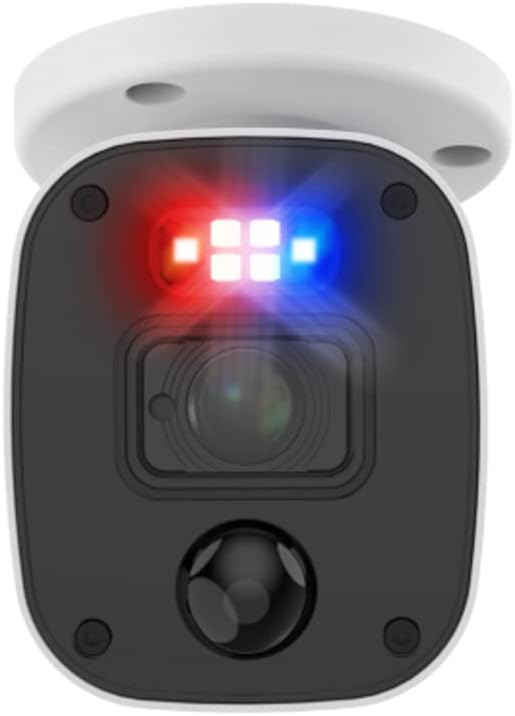
Image: Swann Enforcer camera with its red and blue flashing lights actively engaged.
Audio Recording
The integrated microphone allows for audio recording up to 16 feet from the camera. This provides an additional layer of security and context to your video surveillance. Audio recording settings are managed through your DVR.
Maintenance
- Cleaning: Gently wipe the camera lens and body with a soft, damp cloth. Do not use harsh chemicals or abrasive cleaners.
- Cable Inspection: Periodically check all cables for signs of wear, damage, or loose connections.
- Firmware Updates: Check the Swann support website for any available firmware updates for your DVR, as these may improve camera compatibility and performance.
Troubleshooting
| Problem | Possible Cause / Solution |
|---|---|
| No video signal from camera |
|
| Poor image quality / blurry video |
|
| No audio recording |
|
| False motion detections |
|
Specifications
| Feature | Specification |
|---|---|
| Video Resolution | 1080p Full HD |
| Field of View | 85° (Lens Angle) |
| Night Vision | Color Night Vision, IR LEDs, Red & Blue Flashing Lights |
| Audio | Built-in Microphone (up to 16 feet) |
| Motion Detection | True Detect™ Thermal & Motion Sensing |
| Indoor/Outdoor Use | Yes (IP66 Weatherproof) |
| Operating Temperature | Up to 50°C (122°F) |
| Power Requirement | 12V DC (via compatible DVR) |
| Dimensions (Approx.) | 6.65 x 6.42 x 6.22 inches (Package) |
| Weight (Approx.) | 2.68 pounds (Item) |
| Model Number | SWPRO-1080MQB |
Warranty and Support
Swann products come with a limited warranty. For detailed warranty information, product registration, technical support, and frequently asked questions, please visit the official Swann support website.
Online Support: www.swann.com/us/support
It is recommended to register your product to receive updates and access to full support services.


