
1. Introduction
This manual provides essential information for setting up, operating, maintaining, and troubleshooting your VIVO V25 Pro 5G smartphone. Please read this guide thoroughly to ensure optimal performance and longevity of your device.
The VIVO V25 Pro 5G features a 120 Hz refresh rate 6.56-inch OLED touchscreen display, powered by Android 12.0 with Funtouch OS 12. It includes a versatile triple rear camera system (64MP primary, 8MP ultra-wide, 2MP macro) and a 32MP front camera, along with a 4830mAh battery supporting fast charging. The device supports 5G connectivity and offers 8GB RAM with 128GB of internal storage.
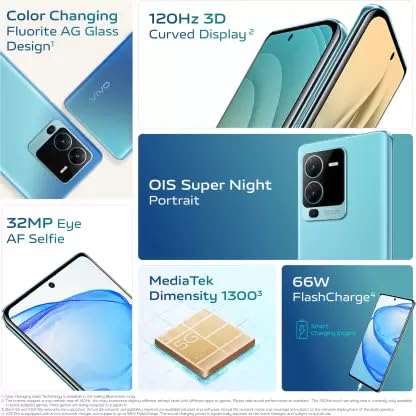
Image: Key features of the VIVO V25 Pro 5G, including its 120Hz 3D Curved Display, OIS Super Night Portrait, 32MP Eye AF Selfie, MediaTek Dimensity 1300 processor, and 66W FlashCharge.
2. Device Setup
2.1. Package Contents
- VIVO V25 Pro 5G Smartphone
- USB-C Cable
- Power Adapter (if included)
- SIM Ejector Tool
- Quick Start Guide
- Protective Case (may vary by region)
2.2. Inserting SIM Cards
- Locate the SIM card tray on the side of your phone.
- Insert the SIM ejector tool into the small hole next to the tray and press firmly until the tray pops out.
- Place your Nano-SIM cards into the designated slots on the tray, ensuring the gold contacts face downwards.
- Carefully push the tray back into the phone until it is flush with the side.
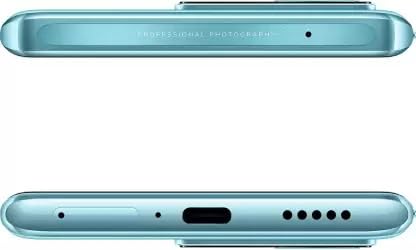
Image: Top and bottom view of the VIVO V25 Pro 5G, highlighting the USB-C port, speaker grille, and SIM card tray location.
2.3. Initial Power On and Setup
- Press and hold the Power button (located on the right side) until the VIVO logo appears.
- Follow the on-screen instructions to select your language, region, connect to Wi-Fi, and set up your Google account.
- Configure security features such as fingerprint recognition and screen lock.
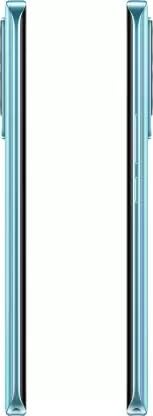
Image: Side view of the VIVO V25 Pro 5G, illustrating the placement of the power and volume buttons.
2.4. Charging the Device
Connect the USB-C cable to the phone's charging port and the other end to the power adapter. Plug the adapter into a wall outlet. The phone supports proprietary fast charging for quick power-ups.
3. Operating Your VIVO V25 Pro 5G
3.1. Basic Navigation
Your VIVO V25 Pro 5G runs on Funtouch OS 12, based on Android 12.0. Use gestures or on-screen navigation buttons to move between apps, access settings, and return to the home screen. The 120Hz refresh rate display provides a smooth user experience.
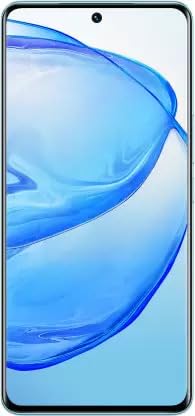
Image: Front view of the VIVO V25 Pro 5G, showcasing its vibrant OLED display.
3.2. Camera Features
The V25 Pro 5G is equipped with a versatile camera system:
- Rear Cameras: 64-megapixel primary (f/1.89), 8-megapixel ultra-wide (f/2.2), and 2-megapixel macro (f/2.4).
- Front Camera: 32-megapixel selfie camera (f/2.45).
Open the Camera app to access various shooting modes, including Aperture Priority, Portrait, Night, and more. Utilize the OIS Super Night Portrait feature for enhanced low-light photography.
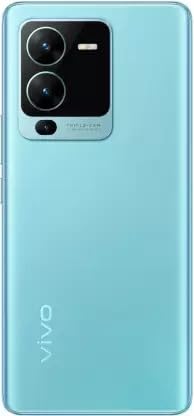
Image: Rear view of the VIVO V25 Pro 5G, highlighting the triple camera module.
3.3. Connectivity
Your device supports 5G cellular technology for high-speed internet. It also includes Wi-Fi and Bluetooth for wireless connections. The USB-C port facilitates data transfer and charging.
4. Maintenance and Care
4.1. Cleaning Your Device
Use a soft, lint-free cloth to clean the screen and body of your phone. Avoid using harsh chemicals or abrasive materials, which can damage the finish. While the device is water resistant, avoid submerging it in water or exposing it to excessive moisture.
4.2. Software Updates
Regularly check for and install software updates to ensure your phone has the latest features, security patches, and performance improvements. You can usually find this option in your phone's Settings menu under "System" or "Software Update."
4.3. Battery Care
To prolong battery life, avoid extreme temperatures. Use the original charger and cable for optimal charging performance. It is recommended to keep the battery charge between 20% and 80% for long-term health, though occasional full charges/discharges are acceptable.
5. Troubleshooting
5.1. Device Not Powering On
- Ensure the battery is charged. Connect the phone to its charger for at least 15 minutes before attempting to power it on.
- Press and hold the Power button for 10-15 seconds to perform a forced restart.
5.2. Connectivity Issues (Wi-Fi/Bluetooth/5G)
- Toggle Wi-Fi, Bluetooth, or Mobile Data off and on again from the Quick Settings panel.
- Restart your phone.
- For Wi-Fi, forget the network and reconnect. For Bluetooth, unpair and re-pair the device.
- Ensure your SIM card is properly inserted and your mobile plan supports 5G.
5.3. Display Problems
- If the screen is unresponsive, try restarting the device.
- Adjust screen brightness in Settings.
- If display anomalies persist, consider a factory reset (back up your data first) or contact customer support.
5.4. General Performance Issues
- Close unused applications running in the background.
- Clear cache for apps that are causing issues.
- Ensure sufficient storage space is available.
- If problems persist, a factory reset may resolve them. Remember to back up all important data before performing a factory reset.
6. Specifications
| Feature | Detail |
|---|---|
| Brand | VIVO |
| Model | V25 Pro 5G |
| Operating System | Android 12.0 (Funtouch OS 12) |
| RAM | 8 GB |
| Storage Capacity | 128 GB |
| Screen Size | 6.56 Inches |
| Display Type | OLED |
| Resolution | 1080 x 2376 pixels |
| Refresh Rate | 120 Hz |
| Rear Camera | 64 MP (Primary), 8 MP (Ultra-wide), 2 MP (Macro) |
| Front Camera | 32 MP |
| Battery Capacity | 4830 mAh (Lithium-Ion) |
| Charging | Proprietary Fast Charging |
| Cellular Technology | 5G |
| Connectivity | Bluetooth, USB, Wi-Fi |
| SIM Card Slot | Dual SIM (Nano) |
| Biometric Security | Fingerprint Recognition |
| Water Resistance | Water Resistant |
| Dimensions (H x W x T) | 158.90 x 73.52 x 8.62 mm |
| Weight | 190.00 grams (0.57 Kilograms) |
7. Warranty and Support
7.1. Product Warranty
Your VIVO V25 Pro 5G comes with a 1-year limited warranty from the date of purchase. This warranty covers manufacturing defects and malfunctions under normal use. It does not cover damage caused by misuse, accidents, unauthorized modifications, or normal wear and tear. Please retain your proof of purchase for warranty claims.
7.2. Customer Support
For technical assistance, warranty claims, or further inquiries, please visit the official VIVO support website or contact their customer service. You can find contact information and FAQs on the official VIVO website: www.vivo.com/global/support


