
1. Introduction
Thank you for choosing the Phreeze PHR-GH-W Wireless Gaming Headset. This headset is engineered to provide an immersive audio experience for gamers across multiple platforms, including PlayStation 5, PlayStation 4, PC, Nintendo Switch, and more. Featuring 2.4 GHz ultra-low latency wireless connectivity, a noise-canceling microphone, and comfortable design, it ensures clear communication and precise sound for competitive play and entertainment.
This manual will guide you through the setup, operation, and maintenance of your new gaming headset to help you get the most out of its advanced features.

Image 1.1: Phreeze PHR-GH-W Wireless Gaming Headset. This image shows the overall design of the headset, highlighting its sleek black finish and RGB lighting on the earcups.
2. Package Contents
Please check the package for the following items:
- 1x Phreeze GH-W Gaming Headset
- 1x USB-C Wireless Dongle
- 1x USB-A to USB-C Adapter
- 1x Audio Cable 1.5M (3.5mm Audio Jack)
- 1x USB-C Charging Cable 1M
- 1x Detachable Microphone
- 1x User Manual

Image 2.1: What's in the box. This image displays all the components included with the Phreeze GH-W Gaming Headset, neatly arranged next to its packaging.
3. Product Overview
The Phreeze PHR-GH-W headset is designed for comfort and high-fidelity audio. Familiarize yourself with its key components and controls.
3.1 Headset Features
- High-Quality Audio: Certified 40mm Hi-Res drivers deliver a wide frequency range, helping detect subtle in-game sounds.
- Immersive Surround Sound: Experience crystal-clear audio with three-dimensional precision, allowing quicker reactions to off-screen targets.
- Passive Noise Cancellation: Integrated microphones work to eliminate external sound, enhancing focus.
- AI Noise-Canceling Microphone: Eliminates ambient noise for clear communication with teammates.
- RGB Lighting: Customizable RGB lighting on the earcups for a personalized gaming aesthetic.
- Comfortable Design: Features an adjustable headband and soft, breathable memory foam ear cushions for extended wear.
- Long Battery Life: Up to 30 hours of continuous playtime on a full charge.
- Fast Charging: Get up to 6 hours of use after a quick 15-minute USB-C charge.
- Ultra-Low Latency Wireless: 2.4 GHz lossless wireless connection for lag-free gaming.

Image 3.1: Hyper Sensitive Immersive Surround Sound 50mm Drivers. This image highlights the headset's audio capabilities, emphasizing the 50mm drivers for high-quality sound.

Image 3.2: Perfect Fit Over Ears, 7.1 Virtual Surround Sound, RGB Lighting, Lightweight. This image shows a person wearing the headset, illustrating its comfortable fit and the RGB lighting on the earcups.
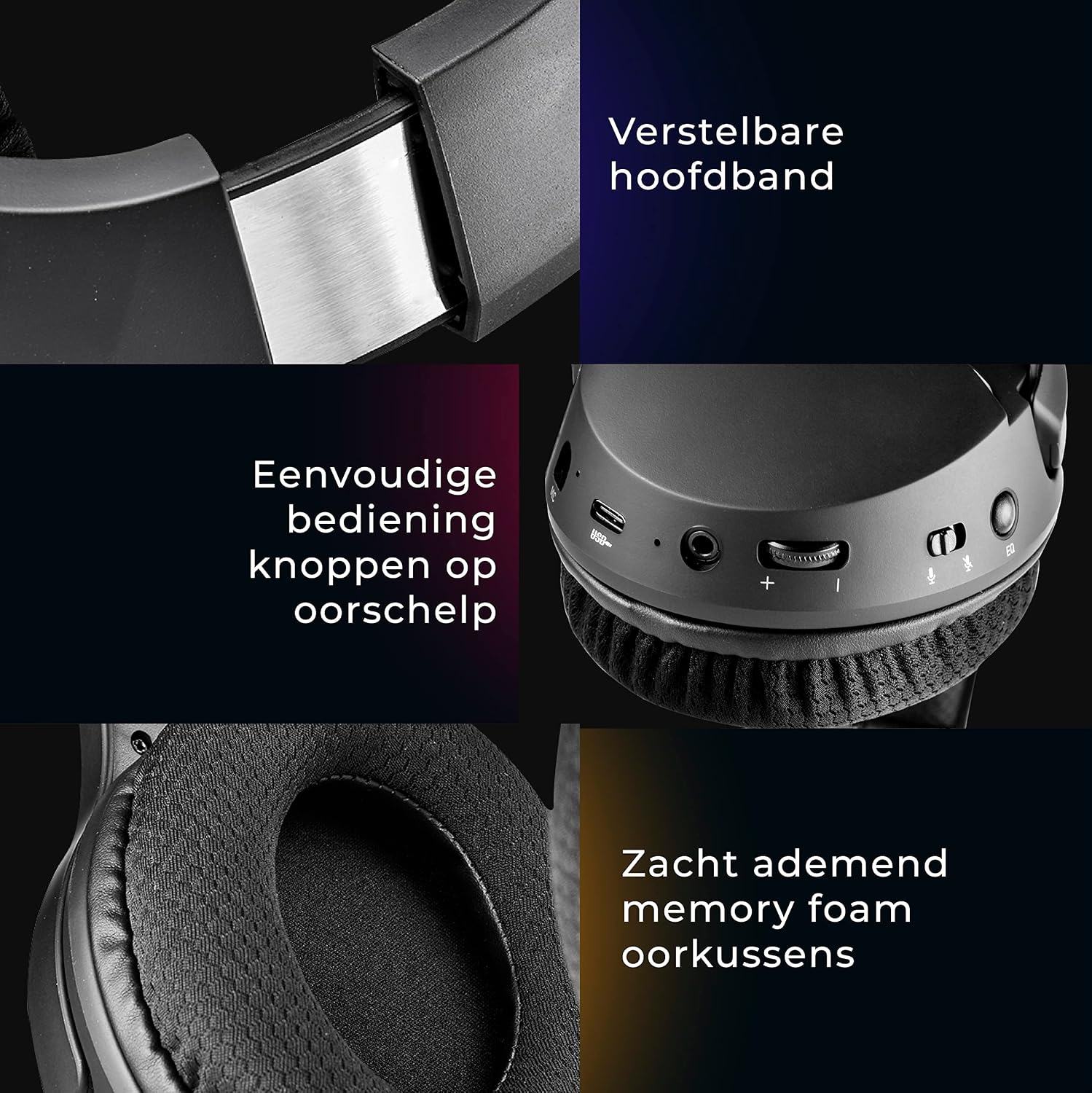
Image 3.3: Adjustable Headband, Easy Control Buttons on Earcup, Soft Breathable Memory Foam Ear Cushions. This collage image details the ergonomic features of the headset, including the adjustable headband, control buttons, and ear cushion material.
3.2 Detachable Microphone
The headset features a detachable, flexible, noise-canceling microphone designed to filter out up to 80% of background noise. A quick mute button is located on the microphone for convenience.

Image 3.4: Detachable & Flexible Noise Cancelling Microphone. This image focuses on the microphone, showing its flexibility and the quick mute button, along with a visual representation of noise reduction.
4. Setup
4.1 Charging the Headset
- Connect the supplied USB-C charging cable to the USB-C port on the headset.
- Connect the other end of the USB-C cable to a USB power source (e.g., PC, wall adapter).
- The LED indicator on the headset will show charging status. A full charge takes approximately 2 hours.
4.2 Attaching the Microphone
Insert the detachable microphone into the microphone jack located on the left earcup until it clicks into place.
4.3 Connecting to Devices
The Phreeze PHR-GH-W headset offers multiplatform compatibility via 2.4 GHz wireless or 3.5mm audio cable.

Image 4.1: Multiplatform Compatibility. This image illustrates the headset's compatibility with various devices including PlayStation 4, PlayStation 5, Xbox One, Xbox Series S/X, PC, Mac, Nintendo Switch, Laptops, Tablets, and Smartphones.
4.3.1 Wireless Connection (2.4 GHz)
For PS4, PS5, PC, Nintendo Switch (docked), and other compatible devices:
- Insert the USB-C Wireless Dongle into an available USB-C port on your device. If your device only has USB-A ports, use the provided USB-A to USB-C adapter with the dongle.
- Power on the headset by pressing and holding the Power button until the LED indicator lights up.
- The headset will automatically pair with the dongle. The LED indicator will show a solid light once connected.
- On your device, ensure the audio output is set to the "Phreeze GH-W Headset" or similar USB audio device.
4.3.2 Wired Connection (3.5mm Audio Jack)
For devices with a 3.5mm audio jack (e.g., Xbox controllers, mobile phones, Nintendo Switch handheld mode):
- Connect the supplied 3.5mm audio cable to the audio jack on the headset.
- Connect the other end of the 3.5mm audio cable to the audio output port on your device.
- Note: In wired mode, some headset features like RGB lighting and wireless controls may not be available or function differently.
5. Operating Instructions
5.1 Power On/Off
- Power On: Press and hold the Power button on the earcup for 3 seconds. The LED indicator will light up.
- Power Off: Press and hold the Power button for 3 seconds. The LED indicator will turn off.
5.2 Volume Control
Use the volume up (+) and volume down (-) buttons on the earcup to adjust the audio volume.
5.3 Microphone Mute
Press the dedicated mute button on the detachable microphone to quickly mute or unmute your microphone.
5.4 RGB Lighting Control
The headset features customizable RGB lighting. Refer to the specific button on the earcup (if available) or consult the Phreeze website for software control options to change lighting modes or turn it off.
5.5 Equalizer Presets
The headset includes 3 different equalizer presets optimized for various content:
- FPS Shooters: Enhances footsteps and critical in-game sounds.
- RPG: Provides a balanced soundstage for immersive storytelling and music.
- Movie/Music: Optimized for rich audio when watching videos or listening to music.
Press the EQ button on the earcup to cycle through the available presets.

Image 5.1: 2.4 GHz Wireless, 30 Hours Battery Life, Ultra Low Latency Wireless Connection. This image shows a user wearing the headset while gaming, emphasizing its wireless capabilities and long battery life.
6. Maintenance
6.1 Cleaning
- Use a soft, dry cloth to wipe the headset.
- For ear cushions, gently wipe with a slightly damp cloth and allow to air dry completely before use.
- Do not use harsh chemicals, solvents, or abrasive cleaners.
6.2 Storage
- Store the headset in a cool, dry place away from direct sunlight and extreme temperatures.
- Avoid placing heavy objects on the headset.
7. Troubleshooting
7.1 No Sound or Low Volume
- Ensure the headset is powered on and fully charged.
- Check the volume level on both the headset and your connected device.
- Verify that the headset is correctly paired/connected to your device (for wireless) or the 3.5mm cable is securely plugged in (for wired).
- Confirm that the correct audio output device is selected in your device's sound settings.
7.2 Microphone Not Working
- Ensure the microphone is securely attached to the headset.
- Check if the microphone mute button is engaged.
- Verify that the correct microphone input device is selected in your device's sound settings.
- Test the microphone on another device if possible.
7.3 Connection Issues (Wireless)
- Ensure the USB-C Wireless Dongle is properly inserted into your device.
- Move closer to the dongle to rule out range issues.
- Try restarting both the headset and your device.
- Avoid strong electromagnetic interference from other wireless devices.
8. Specifications
| Feature | Specification |
|---|---|
| Model Number | PHR-GH-W |
| Connectivity Technology | 2.4 GHz Wireless (Radio Frequency), 3.5mm Jack |
| Compatible Devices | Gaming Console (PS4, PS5, Xbox, Nintendo Switch), Computer, Laptop, Phone, Television |
| Ear Placement | Over-Ear (Circum-Aural) |
| Sound Isolation | Passive Noise Reduction |
| Special Features | Noise Cancellation (Mic), Fast Charging, Integrated Microphone, Surround Sound, Integrated Equalizer, RGB Lighting |
| Battery Composition | Lithium Polymer |
| Charging Time | 2 hours |
| Playtime (Battery Life) | Up to 30 hours (advertised), up to 15 hours (feature bullet) |
| Impedance | 32 Ohms |
| Frequency Response | 20000 Hz |
| Material | Polycarbonate (PC) |
| Item Weight | 544 Grams |
| Color | Black |
9. Warranty and Support
9.1 Warranty Information
The Phreeze PHR-GH-W Wireless Gaming Headset comes with a 2-year availability of spare parts within the EU, ensuring long-term support for your product.
9.2 Customer Support
For further assistance, technical support, or warranty claims, please contact Phreeze customer service through the retailer where you purchased the product or visit the official Phreeze website for contact information.