
1. Introduction
Thank you for choosing the MAGIC SELECT Industrial Platform Scale B2894. This manual provides essential information for the safe and efficient operation of your new scale. Please read these instructions carefully before use and retain them for future reference.
This industrial platform scale is designed for precise weighing in various professional environments, including markets, warehouses, and post offices. It features a robust heat-treated steel platform, a clear LCD display, and a maximum capacity of 300 kg.
2. Safety Instructions
- Do not exceed the maximum weight capacity of 300 kg to prevent damage to the scale and potential injury.
- Place the scale on a stable, level surface to ensure accurate readings.
- Avoid exposing the scale to extreme temperatures, humidity, or direct sunlight.
- Keep the scale away from strong electromagnetic fields.
- Do not attempt to disassemble or repair the scale yourself. Contact qualified personnel for service.
- Ensure the charging cable is handled carefully and disconnected when not in use or when moving the scale.
3. Product Overview
The MAGIC SELECT Industrial Platform Scale B2894 is built for durability and accuracy. Key features include:
- Heat-Treated Steel Platform: Durable and designed for heavy-duty use.
- Non-Slip Design: Ensures stability for items being weighed.
- LCD Display with Backlight: Provides clear readings in various lighting conditions.
- Oil and Water-Resistant Keyboard: Enhances durability in industrial environments.
- Foldable and Portable Design: Easy to transport and store.
- Rechargeable Battery: Offers up to 40 hours of continuous use.

Figure 3.1: Scale Components and Dimensions. The image shows the scale's main parts, including the power plug, ON/OFF switch, the heat-treated steel column, and the non-slip weighing platform, which measures 40cm by 50cm.
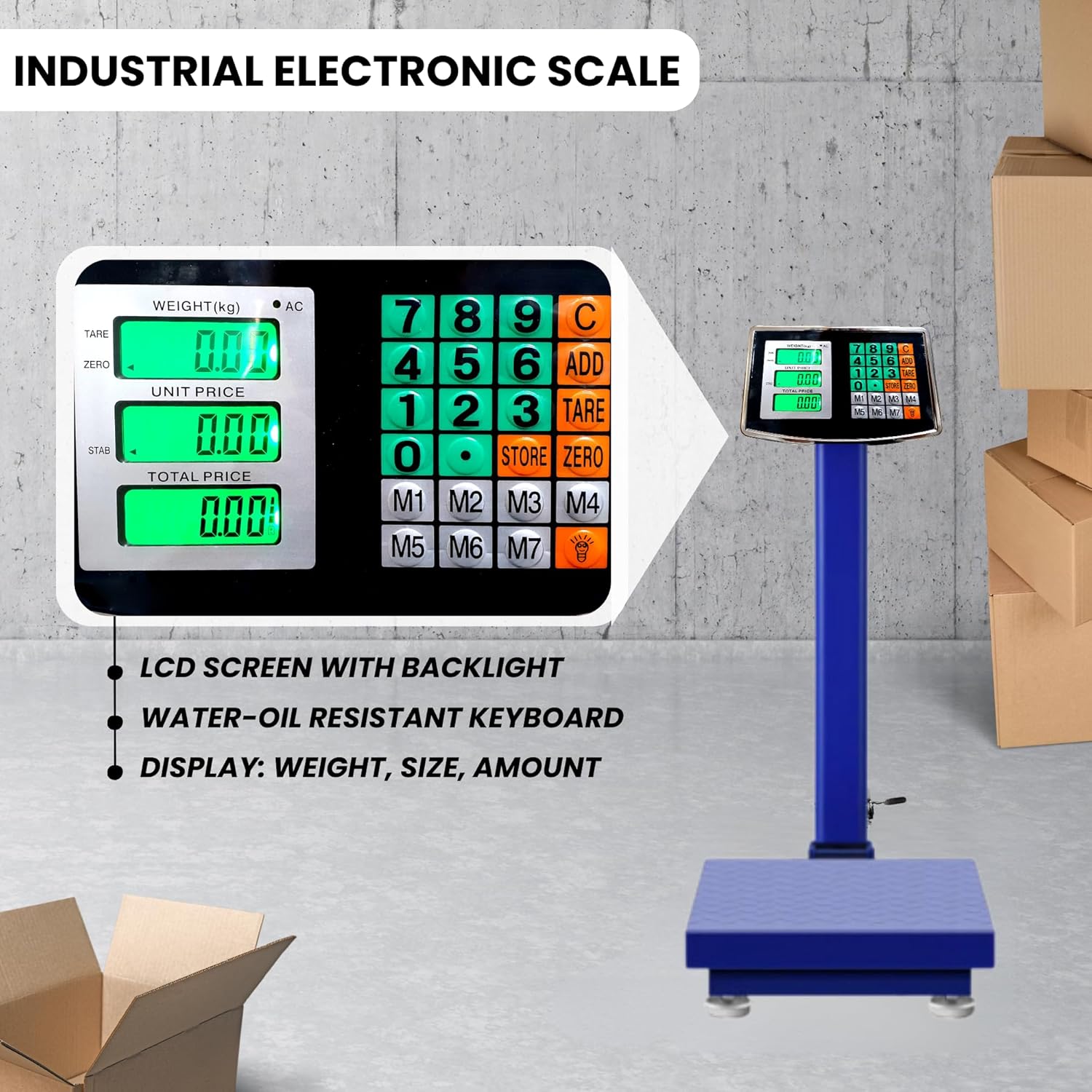
Figure 3.2: LCD Display and Control Panel. This image highlights the scale's digital display, which shows weight, unit price, and total price, alongside the durable, oil and water-resistant keypad.
4. Setup Instructions
4.1 Unpacking and Assembly
- Carefully remove all components from the packaging.
- Place the platform on a stable, level surface.
- Attach the display column to the platform base, ensuring it is securely fastened.
- Connect the display unit to the top of the column.
4.2 Powering On
The scale can be powered by its internal rechargeable battery or directly via the included AC charging cable.
- Battery Operation: The internal Lithium-ion battery provides up to 40 hours of continuous use when fully charged. To preserve battery life, the scale features an automatic shut-off function after 10 seconds of inactivity.
- AC Power: Connect the included charging cable to the scale and a power outlet. The scale can be used while charging.

Figure 4.1: Power Modes. The scale can operate either by being plugged into an AC outlet or using its internal battery, which provides up to 40 hours of use on a full charge.
4.3 Folding for Storage/Transport
The scale is designed to be foldable for easy transport and storage.

Figure 4.2: Folding Mechanism. This image illustrates the simple process of folding the scale for compact storage or convenient transportation.
5. Operating Instructions
5.1 Basic Weighing
- Press the ON/OFF button to turn on the scale.
- Wait for the display to show "0.00" kg.
- Place the item to be weighed onto the center of the platform.
- Read the weight displayed on the LCD screen. The scale measures in 20-gram increments.
5.2 Tare Function
The Tare function allows you to subtract the weight of a container, so only the contents are weighed.
- Place the empty container on the platform.
- Press the TARE button. The display will reset to "0.00".
- Add the items to be weighed into the container. The display will show the net weight of the items.
5.3 Zero Function
If the display does not show "0.00" when the platform is empty, press the ZERO button to reset it.
5.4 Add/Clear Total Functions
These functions are typically used for accumulating weights of multiple items. Refer to the display unit's specific button labels for ADD and CLEAR TOTAL operations.
5.5 Overload and Low Voltage Indicators
- Overload: If the weight exceeds 300 kg, an overload indicator will appear on the display. Remove the excess weight immediately to prevent damage.
- Low Voltage: A low voltage indicator will appear when the battery is running low. Connect the scale to AC power for charging.
6. Maintenance
6.1 Cleaning
- Wipe the scale surface with a soft, damp cloth.
- The keyboard is oil and water-resistant, but avoid excessive liquid exposure.
- Do not use abrasive cleaners or solvents, as they may damage the finish or display.
6.2 Battery Care
- Charge the battery regularly, especially if the scale will not be used for an extended period.
- Avoid completely draining the battery frequently to prolong its lifespan.
7. Troubleshooting
| Problem | Possible Cause | Solution |
|---|---|---|
| Scale does not turn on | Low battery or no power connection | Charge the battery or connect to AC power. Ensure the power switch is ON. |
| Inaccurate readings | Unstable surface, scale not zeroed, or overload | Place on a level surface. Press the ZERO button. Ensure weight is within capacity. |
| Display shows 'OL' (Overload) | Weight exceeds 300 kg capacity | Remove excess weight immediately. |
| Display is dim or flickering | Low battery | Charge the battery. |
8. Specifications
| Feature | Detail |
|---|---|
| Model | B2894 |
| Brand | MAGIC SELECT |
| Weight Limit | 300 Kilograms |
| Reading Accuracy | 20 grams |
| Platform Dimensions (L x W) | 50 x 40 cm |
| Product Dimensions (L x W x H) | 80 x 50 x 40 cm |
| Item Weight | 8.5 Kilograms |
| Material | Heat-treated steel |
| Display Type | LCD with backlight |
| Battery | 1 Lithium-ion (included), 40 hours continuous use |
| Special Features | Foldable, Portable, Oil and water-resistant keyboard, Automatic shut-off |
| Recommended Uses | Weighing raw materials, parcels, boxes, fruits in markets, warehouses, post offices. |
9. Warranty and Support
For warranty information and customer support, please refer to the documentation provided with your purchase or contact MAGIC SELECT customer service. Keep your proof of purchase for any warranty claims.


