
BAYDE 1769-L33ER
User Manual for 1769-L33ER 5370 2MB Ethernet Processor Module
Model: 1769-L33ER | Brand: BAYDE
1. Introduction
This user manual provides essential information for the installation, operation, maintenance, and troubleshooting of the BAYDE 1769-L33ER 5370 2MB Ethernet Processor Module. Please read this manual thoroughly before using the device to ensure proper functionality and safety.
The 1769-L33ER is a CompactLogix 5370 controller designed for industrial automation applications, offering 2MB of memory and integrated Ethernet/IP communication capabilities. It is suitable for a wide range of control tasks requiring reliable and efficient processing.
2. Key Features
- Model No.: 1769-L33ER
- Memory: 2MB Ethernet Processor
- Communication: Integrated Ethernet/IP
- Application: Suitable for PLC/AC Drive/Industry Panel/Collection of Module Accessories
- Quality: Original new, produced by the brand original factory.
3. Setup and Installation
Proper installation is crucial for the reliable operation of the 1769-L33ER module. Follow these steps carefully:
3.1 Unpacking and Inspection
Upon receiving the module, carefully unpack it and inspect for any signs of damage during transit. Ensure all components are present.

Figure 3.1: The 1769-L33ER module in its factory sealed packaging, indicating original new condition.

Figure 3.2: A close-up view of the product label on the module's box, showing model number 1769-L33ER and other manufacturing details.
3.2 Mounting the Module
The 1769-L33ER module is designed for DIN rail mounting within an industrial enclosure. Ensure adequate ventilation around the module.
- Securely attach the module to a standard DIN rail.
- Ensure proper grounding of the enclosure and the module.
3.3 Wiring and Connections
Connect the power supply and communication cables as per the system design. Refer to the module's labeling for specific port identification.
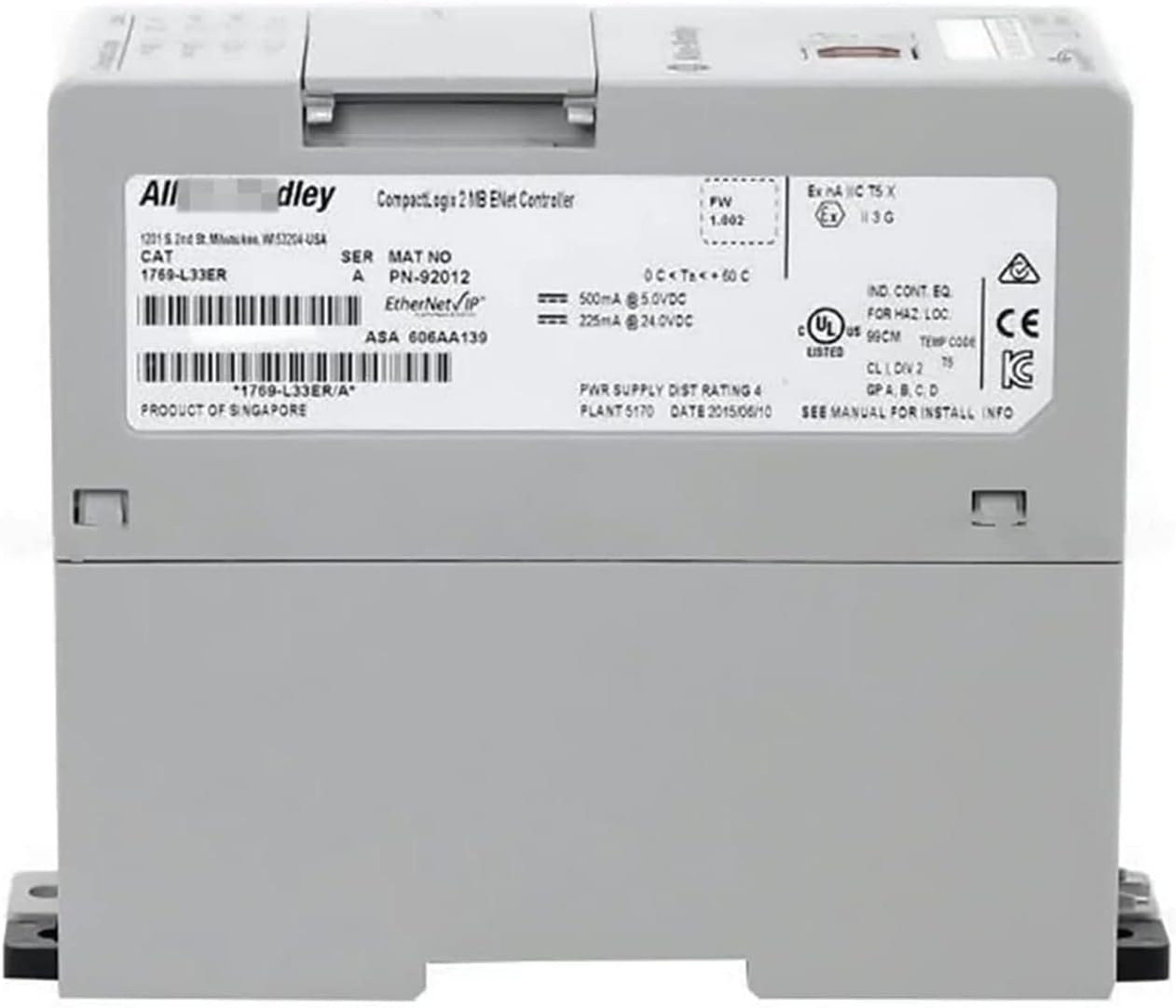
Figure 3.3: Rear view of the 1769-L33ER module, displaying its serial number, power supply requirements (500mA @ 5.0VDC, 225mA @ 24.0VDC), and compliance markings.

Figure 3.4: Front view of the 1769-L33ER module, showing LED indicators for RUN, I/O, OK, NS, LINK 1, LINK 2, and SD, along with USB and Ethernet ports.
- Power: Connect the appropriate DC power supply to the module's power terminals.
- Ethernet: Connect Ethernet cables to the designated Ethernet/IP ports for network communication.
- USB: The USB port is typically used for initial configuration and firmware updates.
4. Operating Instructions
Once installed and wired, the 1769-L33ER module can be configured and operated using compatible programming software.
4.1 Powering On
Apply power to the module. Observe the LED indicators on the front panel:
- RUN LED: Indicates the controller's operating status (e.g., green for run mode).
- OK LED: Indicates the controller's health status (e.g., green for healthy).
- LINK LEDs: Indicate Ethernet link status and activity.
4.2 Programming and Configuration
Use Rockwell Automation's Studio 5000 Logix Designer software to program and configure the 1769-L33ER controller. This involves:
- Establishing communication with the module via Ethernet or USB.
- Creating or loading a control program.
- Configuring I/O modules and network settings.
- Downloading the program to the controller.
4.3 Normal Operation
Once programmed, the module will execute the control logic. Monitor the system and LED indicators for normal operation.
5. Maintenance
The 1769-L33ER module is designed for robust industrial environments, but regular maintenance can extend its lifespan and ensure optimal performance.
5.1 Routine Checks
- Periodically inspect the module for dust accumulation, especially around ventilation openings.
- Check all wiring connections for tightness and signs of corrosion.
- Verify that environmental conditions (temperature, humidity) are within specified limits.
5.2 Cleaning
If cleaning is necessary, power down the module and use a soft, dry, lint-free cloth. Do not use liquid cleaners or solvents.
5.3 Firmware Updates
Refer to the manufacturer's documentation for information on available firmware updates and the procedure for applying them. Always back up your program before performing firmware updates.
6. Troubleshooting
This section provides guidance for common issues encountered with the 1769-L33ER module.
| Problem | Possible Cause | Solution |
|---|---|---|
| No Power / All LEDs Off | No power supply; Incorrect wiring; Faulty power supply. | Check power connections; Verify power supply voltage; Replace power supply if faulty. |
| RUN LED Flashing / Not Green | Controller in fault mode; No program loaded; Program error. | Connect with programming software to diagnose fault; Download a valid program; Correct program errors. |
| LINK LED Off (Ethernet) | No Ethernet cable connected; Faulty cable; Network issue; Incorrect IP settings. | Ensure cable is connected; Try a different cable; Check network infrastructure; Verify IP configuration. |
| OK LED Flashing Red | Major fault detected; Hardware issue. | Connect with programming software to view fault codes; Consult manufacturer's documentation for specific fault resolution; Contact support if persistent. |
For more detailed troubleshooting, refer to the official product documentation or contact technical support.
7. Specifications
The following table outlines the key technical specifications for the BAYDE 1769-L33ER 5370 2MB Ethernet Processor Module.
| Attribute | Value |
|---|---|
| Model Number | 1769-L33ER |
| Brand | BAYDE |
| Processor Type | CompactLogix 5370 |
| Memory | 2 MB |
| Communication | Ethernet/IP |
| Power Supply (Typical) | 500mA @ 5.0VDC, 225mA @ 24.0VDC |
| Operating Temperature | 0°C to +60°C |
| UPC | 614160205030 |
| ASIN | B0C4Y9PPNK |
8. Warranty Information
All BAYDE products are original new and produced by the brand original factory, ensuring high quality. Specific warranty terms and conditions may vary. Please retain your purchase receipt for warranty claims.
For detailed warranty information, please refer to the documentation provided with your purchase or contact the seller directly.
- Quality Assurance: All products are original new, produced by the brand original factory.
- Return Policy: Typically 30 days for refund/replacement (as per Amazon's policy for this product).
9. Support and Contact
If you encounter any issues or have questions regarding the 1769-L33ER module that are not covered in this manual, please contact our support team or the seller.
Seller: PLG Solutions / PLG Automation
For other model requirements or general inquiries, you are welcome to consult with the seller.
Ask a question about this manual
Ask about setup, troubleshooting, compatibility, parts, safety, or missing instructions. Manuals+ will review the question and use this page’s manual context to help answer it.