
1. Product Overview
The Orient Electric Ecotech Prime is an energy-efficient ceiling fan designed for optimal air delivery and comfort in indoor spaces. Featuring a 1200 mm sweep and a 5-star energy rating, this fan is equipped with a remote control for convenient operation. Its elegant Oak Wood finish complements various interior designs.
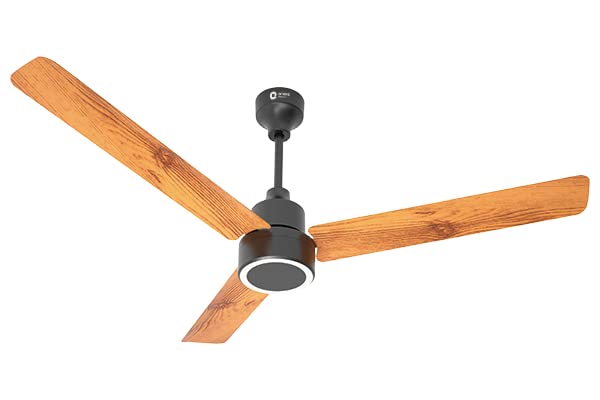
Image 1.1: The Orient Electric Ecotech Prime Ceiling Fan, showcasing its three blades and central motor housing with an Oak Wood finish.
2. Safety Instructions
Please read all safety instructions carefully before installation and operation to prevent injury or damage.
- Ensure the power supply is disconnected at the main circuit breaker before installation, cleaning, or maintenance.
- Installation must be performed by a qualified electrician in accordance with all local and national electrical codes.
- The fan must be securely mounted to a structural part of the building capable of supporting the fan's weight (approximately 3.1 kg).
- Maintain a minimum clearance of 2.3 meters (7.5 feet) from the floor to the bottom of the fan blades.
- Do not insert fingers or any objects into the fan blades while the fan is operating.
- Do not use the fan in damp or wet locations. This fan is designed for indoor use only.
- Use only original replacement parts and accessories provided or approved by Orient Electric.
3. Package Contents
Verify that all components are present in the package before beginning installation:
- Fan Motor Assembly
- Down Rod
- Shackle Kit (for hanging)
- Safety Wire
- A pair of Canopies (top and bottom)
- A set of 3 Blades
- Remote Control
- A Pair of Batteries (for remote control)
4. Installation Guide
This section provides general guidelines for installing your ceiling fan. For detailed electrical wiring and mounting instructions, consult a qualified electrician.
- Prepare the Installation Site: Ensure the power is OFF at the main circuit breaker. Select a suitable location on the ceiling that can support the fan's weight and allows for proper blade clearance.
- Install the Mounting Bracket: Securely attach the mounting bracket to a ceiling joist or a fan-rated outlet box using appropriate hardware.
- Assemble the Down Rod and Motor: Feed the electrical wires from the motor through the down rod. Attach the down rod to the fan motor assembly.
- Hang the Fan: Carefully lift the fan assembly and hang it onto the mounting bracket. Connect the safety wire to a secure point on the ceiling structure.
- Make Electrical Connections: Connect the fan's electrical wires to the household wiring according to the wiring diagram provided in the detailed instruction manual (not included here). Ensure all connections are secure and insulated.
- Attach Canopies: Slide the canopies up the down rod to cover the wiring and mounting bracket, securing them in place.
- Install Fan Blades: Attach each of the three fan blades to the motor housing using the provided screws. Ensure they are securely fastened.
- Final Check: Double-check all connections and ensure no wires are pinched. Restore power at the main circuit breaker.
5. Operating Instructions
The Orient Electric Ecotech Prime fan is operated using the included remote control.
Remote Control Functions:
- ON/OFF Button: Press to turn the fan on or off.
- Speed Control Buttons: Adjust fan speed through 5 available levels. Press '+' to increase speed and '-' to decrease speed.
- Timer Function: (If applicable, refer to specific remote manual) Allows setting the fan to turn off automatically after a set period.
- Light Control: (If applicable, for models with integrated light) Controls the fan's light.
Note: Ensure the remote control batteries are correctly inserted. Replace batteries when the remote's range decreases or it becomes unresponsive.
6. Care and Maintenance
Regular cleaning and maintenance will ensure the longevity and optimal performance of your fan.
- Cleaning: Always turn off the fan and disconnect power before cleaning. Use a soft, damp cloth to wipe down the fan blades and motor housing. Do not use abrasive cleaners or solvents, as they may damage the finish.
- Blade Balance: If the fan wobbles, check that all blade screws are tight and that the blades are not bent or damaged. Blade balancing kits can be used if necessary.
- Motor Lubrication: The fan motor is permanently lubricated and does not require additional oiling.
- Seasonal Check: Periodically check all screws and connections for tightness, especially after extended periods of non-use.
7. Troubleshooting
If you encounter issues with your Orient Electric Ecotech Prime fan, refer to the following common problems and solutions:
| Problem | Possible Cause | Solution |
|---|---|---|
| Fan does not start | No power supply Remote control batteries dead Loose wiring connection | Check circuit breaker and wall switch Replace remote control batteries Verify all electrical connections are secure (ensure power is off first) |
| Fan wobbles excessively | Loose blade screws Unbalanced blades Loose mounting bracket | Tighten all blade screws Use a blade balancing kit Ensure mounting bracket is securely fastened to the ceiling |
| Remote control not working | Dead batteries Obstruction between remote and receiver Remote not paired (if applicable) | Replace batteries Remove any obstructions Refer to the remote control's specific pairing instructions |
| Fan makes unusual noise | Loose screws Motor issue Obstruction in fan path | Check and tighten all screws Contact customer support if noise persists Ensure nothing is touching the blades or motor housing |
If the problem persists after attempting these solutions, please contact Orient Electric customer support.
8. Technical Specifications
| Specification | Value |
|---|---|
| Brand | Orient Electric |
| Model Name | Ecotech Prime with Remote |
| Colour | Oak Wood |
| Electric Fan Design | Ceiling Fan |
| Power Source | Corded Electric |
| Room Type | Living Room (Indoor Use) |
| Special Feature | Remote Controlled, Energy Efficient |
| Wattage | 32 Watts |
| Finish Type | Oak Wood |
| Number of Blades | 3 |
| Air Flow Capacity | 220 CMM (Cubic Meters per Minute) |
| Speed | 350 RPM (Revolutions Per Minute) |
| Item Weight | 3.1 kg (3100 Grams) |
| Size | 1200 MM (Sweep) |
| Number of Power Levels | 5 |
9. Warranty and Support
Your Orient Electric Ecotech Prime Ceiling Fan comes with a comprehensive warranty to ensure peace of mind.
Warranty Information:
This product is covered by a 3 Years Onsite Warranty from the date of purchase. This warranty covers manufacturing defects and issues arising from normal use. Please retain your purchase receipt as proof of purchase for warranty claims.
Customer Support:
For any queries, technical assistance, or warranty claims, please contact Orient Electric customer support. You can find contact details on the official Orient Electric website or on the product packaging.
Manufacturer: Orient Electric Limited
11, Industrial Estate, Sector - 6, Faridabad - 121006, Haryana, India


