
Introduction
Thank you for choosing the Ultrean Spin Brush, a cordless electric spin scrubber designed to simplify your cleaning tasks. This manual provides essential information for the safe and effective use, maintenance, and troubleshooting of your device. Please read it thoroughly before first use and keep it for future reference.

Image: The Ultrean Spin Brush in action, demonstrating effortless floor cleaning.
What's Included
Your Ultrean Spin Brush package contains the following components:
- 1 x Electric Spin Scrubber (main handle, extension rod, scrubber head)
- 4 x Cleaning Brush Heads (Large Flat Brush, Circular Brush, Pointed Brush, Small Flat Brush)
- 1 x USB-C Charging Cable
- 1 x Wall Hook
- 1 x User Manual

Image: A visual representation of the four distinct cleaning brush heads included with your scrubber.
Video: An overview of the powerful cordless electric spin scrubber and its components.
Product Features
Effortless Cleaning
The Ultrean Spin Brush delivers a high-speed cleaning effect of 400 RPM, significantly reducing the effort required compared to manual scrubbing. Its cordless design allows for easy maneuverability, making it ideal for cleaning various surfaces in your bathroom and home.
Multiple Brush Heads for Versatility
Equipped with four specialized brush heads, the scrubber adapts to different cleaning needs:
- Large Flat Brush: Ideal for extensive flat surfaces like floors and walls.
- Circular Brush: Perfect for curved surfaces such as bathtubs and sinks.
- Pointed Brush: Designed to reach tight corners, grout lines, and crevices.
- Small Flat Brush: Suitable for detailed cleaning tasks.
All brush bristles are constructed for sturdiness and durability, ensuring no shedding during use.
Adjustable Length
The electric scrubber features an adjustable handle with three lengths, extending from 24 inches to 44 inches. This allows you to clean high places or floors without bending, enhancing comfort and reach.

Image: The adjustable handle of the Ultrean Spin Brush, illustrating its varying lengths for different cleaning tasks.
Rechargeable & Waterproof Design
The built-in lithium-ion battery provides up to 90 minutes of continuous use on a full charge, which takes approximately 3.5 hours. The scrubber head is designed to be waterproof, allowing for safe and effective deep cleaning even in wet environments like bathtubs or showers.
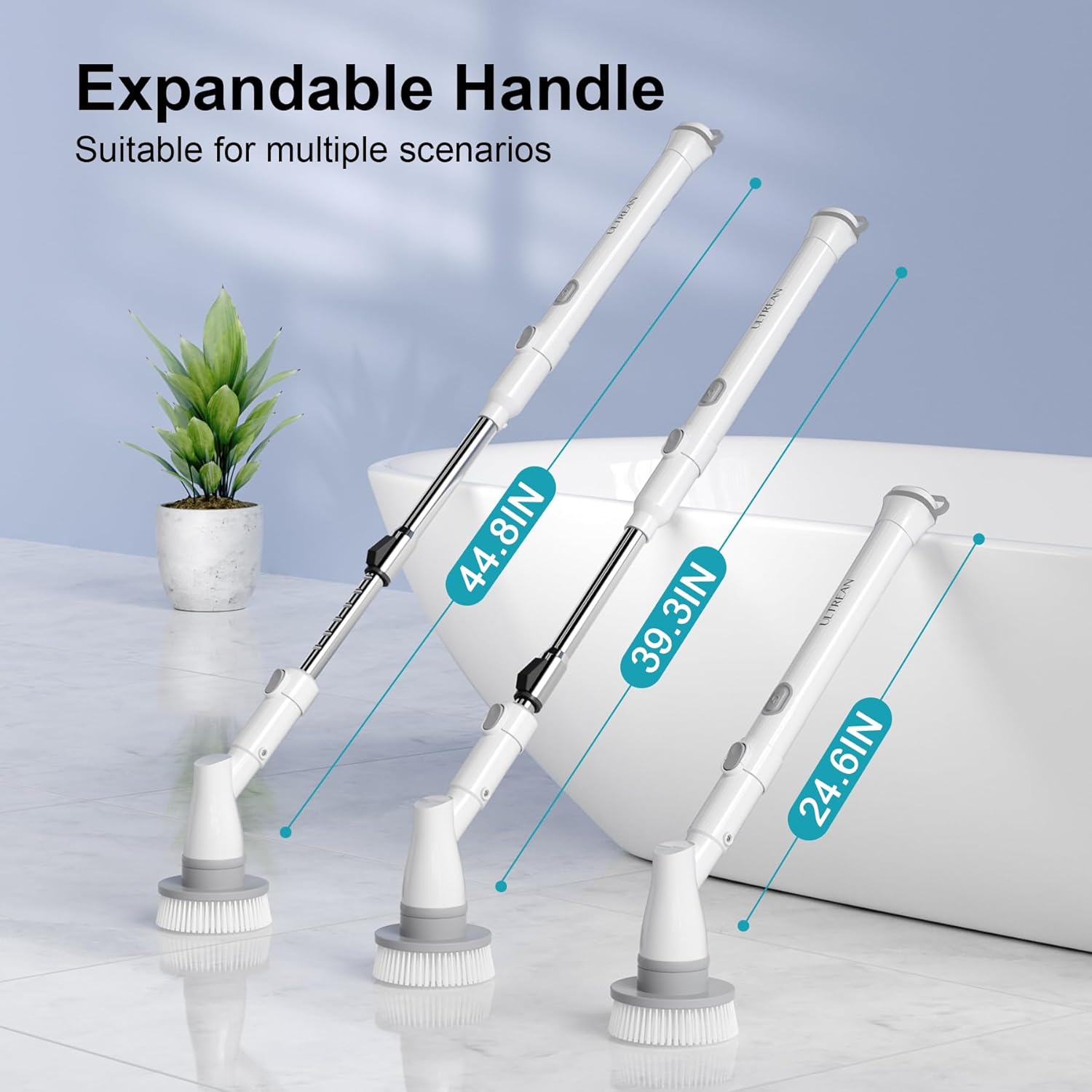
Image: The Ultrean Spin Brush connected to a USB-C charger, highlighting its fast charging and long runtime capabilities.
Setup
- Unpack Components: Carefully remove all items from the packaging.
- Assemble the Handle: Connect the extension rod to the main handle. Ensure it clicks securely into place.
- Attach Scrubber Head: Align the desired brush head with the scrubber head attachment point and press firmly until it locks.
- Charge the Device: Before first use, fully charge the spin brush using the provided USB-C cable. The charging port is located at the end of the main handle, protected by a waterproof cover.
Operating Instructions
- Select Brush Head: Choose the appropriate brush head for the surface you intend to clean.
- Adjust Handle Length: Press the adjustment button on the extension rod and slide it to your desired length (24, 39.3, or 44 inches). Release the button to lock.
- Apply Cleaning Solution: Apply your preferred cleaning solution directly to the surface or the brush head.
- Power On: Press and hold the power button on the main handle to turn on the scrubber.
- Select Speed: The scrubber features two speeds. Press the power button once for low speed (400 RPM) and twice for high speed.
- Begin Cleaning: Gently guide the spinning brush over the surface, allowing the rotation to do the work. Avoid excessive pressure, as the motor is designed for efficient cleaning with light contact.
- Power Off: Press the power button to turn off the device when finished.

Image: The Ultrean Spin Brush illustrating its two adjustable cleaning speeds for varied intensity.
Maintenance
- Cleaning Brush Heads: After each use, remove the brush head and rinse it thoroughly under running water to remove any cleaning solution residue or debris. Allow to air dry completely before storing.
- Cleaning the Scrubber: Wipe the main unit and handle with a damp cloth. Do not submerge the entire unit in water. Ensure the charging port cover is securely closed when cleaning.
- Charging: Recharge the device when the battery indicator is low. Always use the provided USB-C cable. Avoid overcharging by disconnecting once fully charged.
- Storage: Store the Ultrean Spin Brush in a cool, dry place, away from direct sunlight and extreme temperatures. Use the provided wall hook for convenient storage.
Troubleshooting
- Device Not Turning On: Ensure the device is fully charged. Check if the power button is pressed and held correctly.
- Brush Not Spinning Effectively: The battery might be low; recharge the device. Ensure the brush head is securely attached. Avoid applying excessive pressure, which can slow down the motor.
- Short Battery Life: Ensure the device is fully charged before use (approx. 3.5 hours). Battery performance may decrease over time with prolonged use.
- Water Leakage: Ensure the charging port cover is tightly sealed before using the device in wet conditions.
Specifications
| Brand | Ultrean |
| Model Number | KS-2616E-C380 |
| Color | White |
| Handle Material | Stainless Steel |
| Product Dimensions | 2.52"L x 2.52"W x 45.27"H (Extended) |
| Special Feature | Adjustable, Cordless, Waterproof |
| Battery | 1 Lithium Ion battery (included) |
| Runtime | Up to 90 minutes |
| Charge Time | Approx. 3.5 hours |
| Rotation Speed | 400 RPM |
Warranty and Support
Ultrean products are designed for lasting performance and are backed by our commitment to quality. For specific warranty details or technical support, please refer to the warranty card included in your package or visit the official Ultrean website. Our mission is to enhance everyday living through innovative, user-friendly, and thoughtfully designed home products.