
Guide Sensmart Guide Sensmart-TD210
Guide Sensmart TD210 Thermal Imaging Monocular User Manual
Model: TD210 (256x192, 50Hz) | Brand: Guide Sensmart
1. Product Overview
The Guide Sensmart TD210 is a lightweight, handheld thermal imaging monocular designed for enhanced night vision and detection in various outdoor conditions. It features a high-resolution thermal sensor, multiple display modes, and robust construction for reliable performance.

Figure 1.1: The Guide Sensmart TD210 Thermal Imaging Monocular.
Key Features:
- High-Resolution Thermal Camera: Equipped with a 256x192 thermal imaging camera sensor and a 12µm infrared detector. Offers a recognition distance of up to 400 yards and a detection range of up to 1000 yards.
- Compact and Portable: Lightweight body designed for comfortable one-hand control and easy portability. Boots up in approximately 1 second.
- Versatile Display Modes: Features 5 color palettes (White Hot, Black Hot, Red Hot, Iron Red, Blue Heat) and a Picture-in-Picture (PIP) mode for enhanced target identification and detail highlighting.
- Durable and Long-Lasting: Built with IP66 waterproof rating for protection against heavy rainfall, dust, and impact. Operates in temperatures from -86°F to 140°F. Features a 0.4-inch 1280x960 FLCOS display and a replaceable battery providing over 8 hours of continuous operation.
- Smart Connectivity: Connects to a mobile application via Wi-Fi for real-time thermal image viewing and sharing.
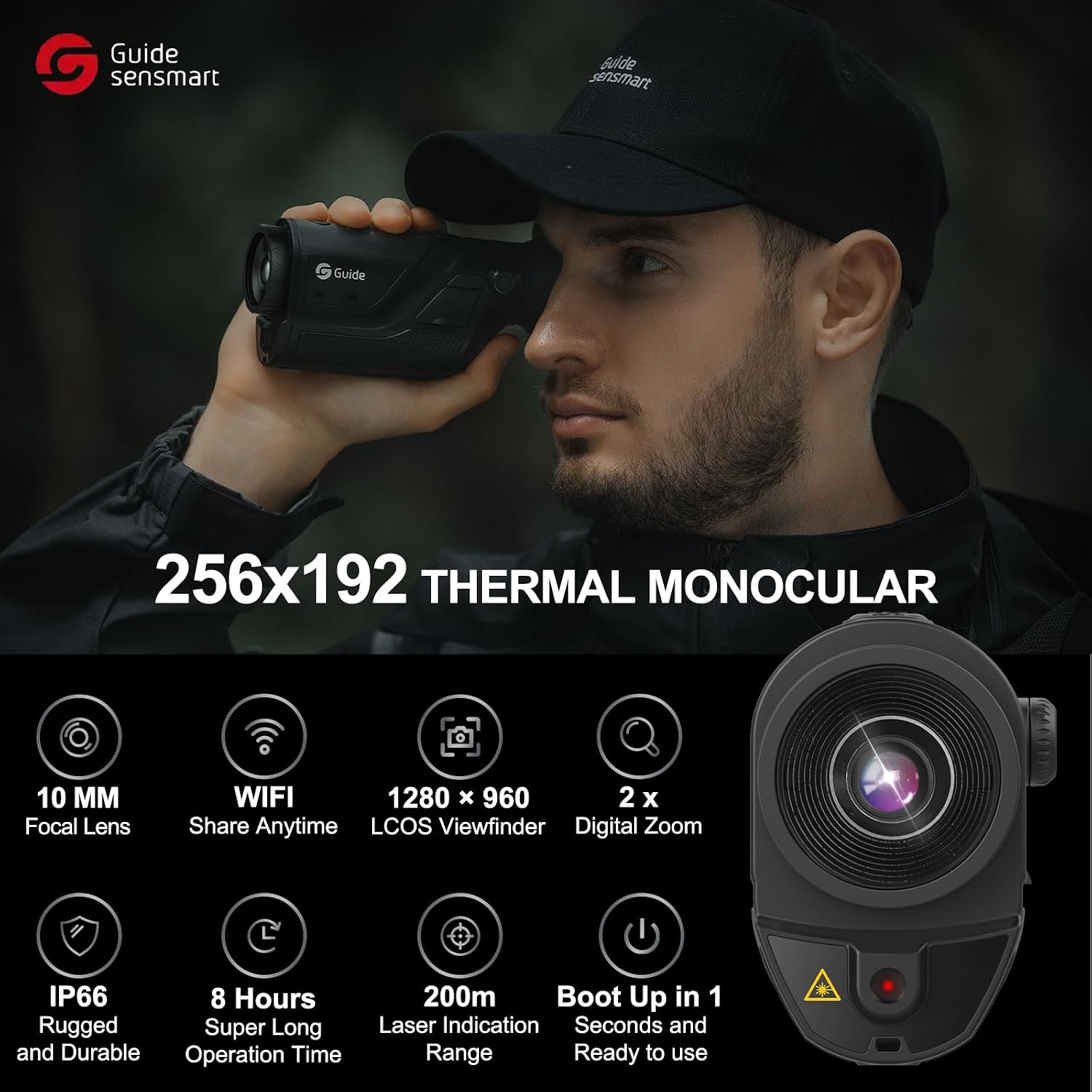
Figure 1.2: Overview of the TD210's core features including 10mm Focal Lens, WiFi, 1280x960 LCOS Viewfinder, 2x Digital Zoom, IP66 rating, 8 hours operation, and 200m Laser Indication.

Figure 1.3: Detection and recognition distances for different targets, including vehicles, humans, deer, and boar.
2. Getting Started: Setup and Components
Before using your Guide Sensmart TD210, ensure all components are present and the device is properly set up.
2.1 Package Contents:
Your TD210 package should include the following items:
- Thermal Monocular (TD210)
- Battery Charger
- Single Rechargeable Lithium-Ion Battery
- Micro USB Cable
- Video Cable
- Lens Cap
- Wrist Strap
- Carry Bag
- Quick Start Guide

Figure 2.1: All included accessories and the TD210 monocular.
2.2 Initial Setup:
- Charge Battery: Fully charge the provided rechargeable Lithium-Ion battery using the battery charger and Micro USB cable.
- Insert Battery: Locate the battery compartment on the monocular (typically at the front or bottom). Insert the charged battery, ensuring correct polarity.
- Attach Eyecup: Securely attach the desired eyecup to the eyepiece. Ensure it is firmly in place to prevent accidental detachment during use.
- Attach Wrist Strap: For added security and to prevent drops, attach the wrist strap to the designated loop on the monocular.
- Power On: Press and hold the Power Button (refer to Figure 3.1 for button layout) for approximately 1 second to turn on the device. The device is designed for quick boot-up.
Video 2.1: Official Guide Sensmart TD210 Unboxing video. This video demonstrates the contents of the package and initial setup steps, including battery insertion.
3. Operating Instructions
The TD210 is designed for intuitive operation with easily accessible controls.
3.1 Control Buttons:
The main control buttons are located on the top of the device:
- Power Button: Turns the device on/off.
- Brightness Button: Adjusts display brightness (5 levels available).
- Color Palettes Button: Cycles through the 5 available color modes.
- Zoom-IN Button: Adjusts digital zoom (1.5x, 3x, and 1.5x with 3x PIP).
A Diopter Regulation knob is located near the eyepiece for adjusting focus to your vision.

Figure 3.1: Illustration of the monocular's control buttons and diopter regulation.
3.2 Display Modes and Palettes:
The TD210 offers various display options to optimize viewing for different environments:
- Color Palettes: White Hot, Black Hot, Red Hot, Iron Red, Blue Heat. Use the Color Palettes Button to cycle through these.
- Scene Modes: Natural Mode, Enhance Mode, Highlight Mode. These modes help in quickly identifying targets in complex outdoor scenes.
- PIP Mode: Picture-in-Picture mode allows you to zoom in on a specific target while maintaining a wider field of view, highlighting details.

Figure 3.2: Visual representation of the five color palettes and three scene modes available on the TD210.
3.3 Wi-Fi Connectivity and App:
The TD210 can connect to a dedicated mobile application via Wi-Fi, allowing for real-time viewing, recording, and sharing of thermal images and videos.
- Download App: Download the official Guide Sensmart app (e.g., TargetIR) from your device's app store (Android and iOS compatible).
- Enable Wi-Fi: On the TD210, activate the Wi-Fi function (refer to the Quick Start Guide for specific steps if not immediately apparent).
- Connect Device: On your smartphone, connect to the TD210's Wi-Fi network.
- Launch App: Open the app to view the live thermal feed, adjust settings, and capture media.

Figure 3.3: The TD210 connected to a smartphone app for real-time image sharing.
Video 3.1: Official Guide Sensmart TD210 Thermal Imaging Monocular promotional video. This video showcases the monocular's features, including its use in various scenarios, display modes, and app connectivity.
4. Maintenance
Proper maintenance ensures the longevity and optimal performance of your TD210 monocular.
- Cleaning: Use a soft, lint-free cloth to clean the lens and body of the monocular. For stubborn smudges on the lens, use a specialized lens cleaning solution. Avoid abrasive materials or harsh chemicals.
- Battery Care: Always use the provided charger for the rechargeable battery. Store the battery in a cool, dry place when not in use. If storing the device for an extended period, remove the battery.
- Waterproof Protection: While the device is IP66 waterproof, ensure all port covers (e.g., USB-C port) are securely closed before exposure to water or dust.
- Eyecup Security: The rubber eyecup can sometimes detach easily. Periodically check its security and consider a small amount of adhesive if it frequently comes loose, ensuring it does not interfere with battery access or diopter adjustment.
- Storage: Store the monocular in its provided carry bag in a dry, temperate environment, away from direct sunlight and extreme temperatures.
5. Troubleshooting
This section addresses common issues you might encounter with your TD210 monocular.
| Problem | Possible Cause | Solution |
|---|---|---|
| Image is blurry or out of focus. | Diopter not adjusted; lens smudged; focus ring not adjusted. | Adjust the Diopter Regulation knob near the eyepiece. For optimal focus, long-press the Zoom or Brightness buttons to activate auto-focus or fine-tune manually. Clean the lens if smudged. |
| Device does not power on. | Battery is dead or incorrectly inserted. | Ensure the battery is fully charged and correctly inserted into the compartment with proper polarity. |
| Image appears "stuttering" or "freezing" momentarily. | Normal calibration process; environmental factors. | This can be a normal occurrence as the device performs internal calibration. If persistent or severe, ensure the device is operating within its specified temperature range. |
| Cannot connect to Wi-Fi app. | Wi-Fi not enabled on device; incorrect app settings; distance too far. | Ensure Wi-Fi is enabled on the TD210. Verify app permissions and settings on your smartphone. Move closer to the device for a stronger signal. |
Note: The provided Quick Start Guide may offer additional specific troubleshooting steps.
6. Specifications
Detailed technical specifications for the Guide Sensmart TD210 Thermal Imaging Monocular:
| Feature | Specification |
|---|---|
| Model Name | Guide Sensmart-TD210 |
| Thermal Sensor Resolution | 256x192 (50Hz) |
| Pixel Pitch | 12µm |
| Display Type | FLCOS |
| Display Resolution | 1280x960 |
| Digital Zoom | 1.5x, 3x (with PIP mode) |
| Detection Range (Human) | Up to 400 yards (approx. 365 meters) |
| Detection Range (Vehicle) | Up to 1000 yards (approx. 914 meters) |
| Battery Type | Rechargeable Lithium-Ion (replaceable) |
| Operating Time | More than 8 hours |
| Water Resistance | IP66 Rated |
| Operating Temperature | -86°F to 140°F (-65.5°C to 60°C) |
| Item Weight | 0.62 Pounds (approx. 281 grams) |
| Material | Plastic, Metal |
7. Warranty and Support
Guide Sensmart is committed to providing high-quality products and customer support.
7.1 Product Warranty:
The Guide Sensmart TD210 comes with a 3-year warranty for the entire device from the date of purchase.
7.2 Technical Support:
Lifetime firmware updates and technical support are included with your purchase. For assistance, please refer to the official Guide Sensmart website or contact their customer service.
7.3 Additional Resources:
A detailed User Manual in PDF format is available for download:
Related documentsGuide Sensmart-TD210


Ask a question about this manual
Ask about setup, troubleshooting, compatibility, parts, safety, or missing instructions. Manuals+ will review the question and use this page’s manual context to help answer it.