
1. Product Overview
This manual provides detailed instructions for the OLEVS K-S-G1106G Multifunctional Chronograph Watch. Please read this manual thoroughly before using your watch to ensure proper operation and longevity.

Figure 1: OLEVS K-S-G1106G Multifunctional Chronograph Watch, showcasing its silver bracelet and blue dial with digital displays.
Key Features:
- Original Quartz Movement with integrated analog and digital LED display.
- Multifunctional digital display: Time, Day, Date, Chronograph, Timer, Alarm, LED Luminous display.
- Luminous hands for visibility in low light.
- Durable 316L stainless steel bracelet with double locking clasp.
- 3 ATM water resistance (suitable for daily splashes, not for swimming or showering).
2. Initial Setup
2.1 Unboxing and Inspection
Carefully remove the watch from its packaging. Inspect the watch for any visible damage. Ensure all protective films are removed from the watch face and bracelet.
2.2 Adjusting the Bracelet
The stainless steel bracelet may need adjustment to fit your wrist comfortably.
- Locate the small arrows on the inside of the bracelet links, indicating the direction to push the pins.
- Use a specialized watch link removal tool (often included or purchased separately) to push out the pins in the direction of the arrows.
- Remove the desired number of links.
- Reinsert the pins to secure the bracelet.
- Note: If you are unsure about adjusting the bracelet, it is recommended to seek assistance from a professional jeweler to prevent damage to the watch or bracelet.

Figure 2: The OLEVS K-S-G1106G watch comfortably worn on a wrist, demonstrating proper fit after bracelet adjustment.
2.3 Setting Time and Date
The watch features both analog and digital displays.
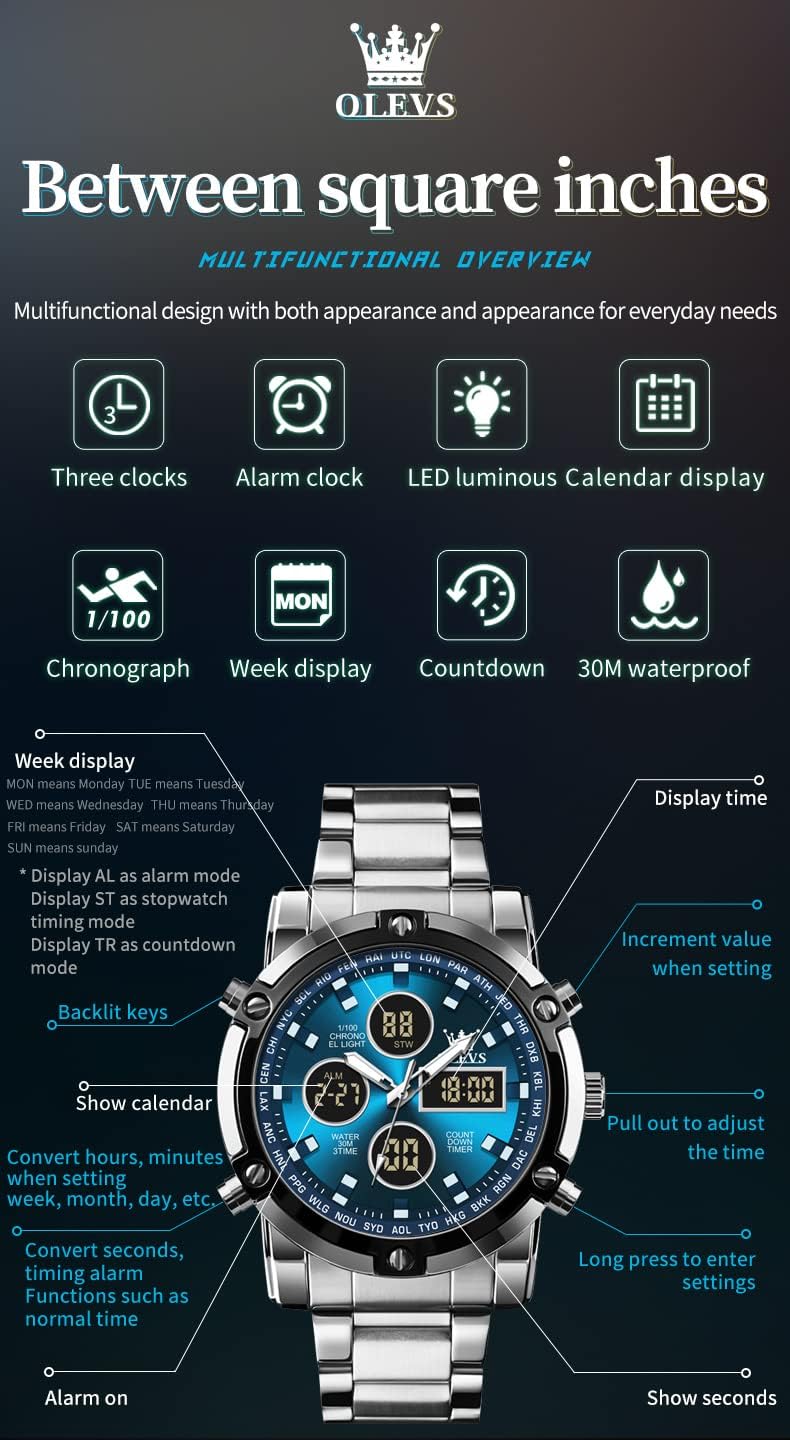
Figure 3: Detailed diagram illustrating the various functions and button controls of the OLEVS K-S-G1106G watch.
Analog Time Setting:
- Pull out the crown (P) on the right side of the watch to the first or second click position.
- Rotate the crown to adjust the hour and minute hands to the correct time.
- Push the crown back in to its normal position to start the analog movement.
Digital Time and Date Setting:
Refer to Figure 3 for button locations.
- Press and hold the MODE button (usually top-left) to enter setting mode. The seconds display will flash.
- Press the RESET button (usually bottom-right) to cycle through the settings: seconds, hours, minutes, year, month, day.
- Use the START button (usually top-right) to increment the flashing value.
- Once all settings are correct, press the MODE button again to exit setting mode.
- The digital display also shows the day of the week: MON (Monday), TUE (Tuesday), WED (Wednesday), THU (Thursday), FRI (Friday), SAT (Saturday), SUN (Sunday).
3. Operating Instructions
3.1 Basic Time Display
The watch displays time both analogically (hands) and digitally. The digital display can be toggled between 12-hour and 24-hour format in setting mode.
3.2 Chronograph (Stopwatch) Function
The chronograph allows you to measure elapsed time.
- From normal time mode, press the MODE button until "STW" (Stopwatch) appears on the digital display.
- Press the START button to begin timing.
- Press the START button again to pause timing.
- Press the RESET button to reset the stopwatch to zero.
- Press the MODE button to return to normal time display.
3.3 Timer (Countdown) Function
The countdown timer allows you to set a specific duration and counts down to zero.
- From normal time mode, press the MODE button until "TR" (Timer) appears on the digital display.
- Press and hold the RESET button to enter timer setting mode. The hours will flash.
- Use the START button to adjust the hours, then press RESET to move to minutes, and adjust with START.
- Once the desired countdown time is set, press MODE to exit setting mode.
- Press the START button to begin the countdown.
- Press the START button again to pause/resume.
- When the timer reaches zero, an alarm will sound. Press any button to stop the alarm.
3.4 Alarm Function
Set an alarm to sound at a specific time.
- From normal time mode, press the MODE button until "ALM" (Alarm) appears on the digital display.
- Press and hold the RESET button to enter alarm setting mode. The hours will flash.
- Use the START button to adjust the hours, then press RESET to move to minutes, and adjust with START.
- Press MODE to exit setting mode.
- To activate/deactivate the alarm, press the START button while in alarm mode. An alarm icon will appear/disappear.
- When the alarm sounds, press any button to stop it.
3.5 LED Luminous Display / Backlight
The watch features an LED backlight for the digital display and luminous hands for the analog display.
- Press the LIGHT button (usually bottom-left) to activate the LED backlight for the digital display. It will illuminate for a few seconds.
- The analog hands are coated with a luminous material that glows in the dark after exposure to light.

Figure 4: Features of the OLEVS K-S-G1106G watch, including 30M water resistance, high hardness coated mirror, textured bracelet, and luminous display.
3.6 Water Resistance (3 ATM)
This watch is water-resistant up to 3 ATM (30 meters). This means it is suitable for daily use and can withstand splashes, rain, or brief immersion in water.
- DO NOT press any buttons while the watch is submerged in water.
- DO NOT wear the watch for swimming, showering, or diving.
- Avoid exposing the watch to hot water or steam, as this can compromise the water resistance seals.
4. Care and Maintenance
4.1 Cleaning Your Watch
- Wipe the watch case and bracelet regularly with a soft, dry cloth to remove dust and dirt.
- For stubborn dirt on the stainless steel bracelet, use a slightly damp cloth and mild soap, then wipe dry immediately.
- Avoid using chemical cleaners, solvents, or abrasive materials, as these can damage the watch's finish.
4.2 Battery Replacement
The watch is powered by a battery. When the watch stops or the digital display becomes dim, the battery may need replacement.
- Battery replacement should be performed by a qualified watch technician to ensure proper sealing and functionality.
- Attempting to replace the battery yourself may void the warranty and compromise water resistance.
4.3 Storage
When not wearing your watch, store it in a cool, dry place away from direct sunlight, extreme temperatures, and strong magnetic fields.
5. Troubleshooting
If you encounter any issues with your OLEVS watch, please refer to the following common problems and solutions:
| Problem | Possible Cause | Solution |
|---|---|---|
| Watch not running / Digital display dim | Low or dead battery. | Replace the battery. It is recommended to have this done by a professional. |
| Incorrect analog time | Crown pulled out or accidentally adjusted. | Reset the analog time using the crown as described in Section 2.3. |
| Incorrect digital time/date | Digital settings need adjustment. | Adjust the digital time and date as described in Section 2.3. |
| Alarm/Timer not sounding or too quiet | Alarm/Timer not activated or volume issue. | Ensure the alarm/timer is activated. Check if the sound is audible in a quiet environment. If persistently low, contact support. |
| Luminous hands not glowing | Insufficient exposure to light. | Expose the watch face to a bright light source for a few minutes to charge the luminous material. |
| Water ingress / Fogging under crystal | Water resistance compromised. | Stop using the watch immediately and seek professional repair. Avoid further exposure to water. |
If the problem persists after attempting these solutions, please contact OLEVS customer support for further assistance.
6. Product Specifications

Figure 5: Visual representation of the OLEVS K-S-G1106G watch's key dimensions and material specifications.
| Feature | Detail |
|---|---|
| Brand | OLEVS |
| Model Name | Multifunctional Chronograph |
| Part Number | K-S-G1106G |
| Movement Type | Quartz |
| Display Type | Analog and Digital |
| Case Material | Stainless Steel |
| Band Material Type | Stainless Steel (Metal Bracelet) |
| Dial Window Material Type | High Hardness Coated Crystal |
| Case Diameter | 49 mm |
| Case Thickness | 16 mm |
| Band Width | 23 mm |
| Water Resistance Depth | 30 Meters (3 ATM) |
| Special Features | Alarm, Chronograph, Luminous Hands, LED Backlight, Date Display |
| Power Source | Battery Powered |
| Clasp Type | Double Folding Clasp with Push Button |
| Item Weight | 210 grams (approx.) |
7. Warranty and Customer Support
7.1 Warranty Information
Your OLEVS watch is covered by a manufacturer's warranty against defects in materials and workmanship. The specific terms and duration of the warranty may vary by region and retailer. Please retain your proof of purchase for warranty claims. The warranty typically does not cover:
- Damage resulting from improper use, accidents, or unauthorized repairs.
- Normal wear and tear of the case, crystal, or bracelet.
- Battery replacement.
- Water damage if the watch was exposed to conditions beyond its 3 ATM rating or if buttons were pressed underwater.
7.2 Customer Support
For any questions, technical assistance, or warranty claims, please contact OLEVS customer service.
- Online Support: Visit the official OLEVS website or the retailer's support page where you purchased the watch.
- Email Support: Refer to your product packaging or the retailer's website for specific contact email addresses.
- Amazon Support: If purchased via Amazon, you can contact the seller directly through your Amazon order history for assistance.
When contacting support, please provide your watch model number (K-S-G1106G) and a detailed description of the issue.