
1. Product Overview
The fishkeeper 35W 1200GPH DC 24V Ultra Quiet Submersible Water Pump is a versatile and efficient solution for various aquatic and land-based water needs. Designed for aquariums, ponds, fountains, waterfalls, hydroponics, irrigation systems, and swimming pools, this pump offers adjustable flow speeds and multiple operating modes to suit your specific requirements. Its quiet operation and durable construction ensure a reliable and long-lasting performance.
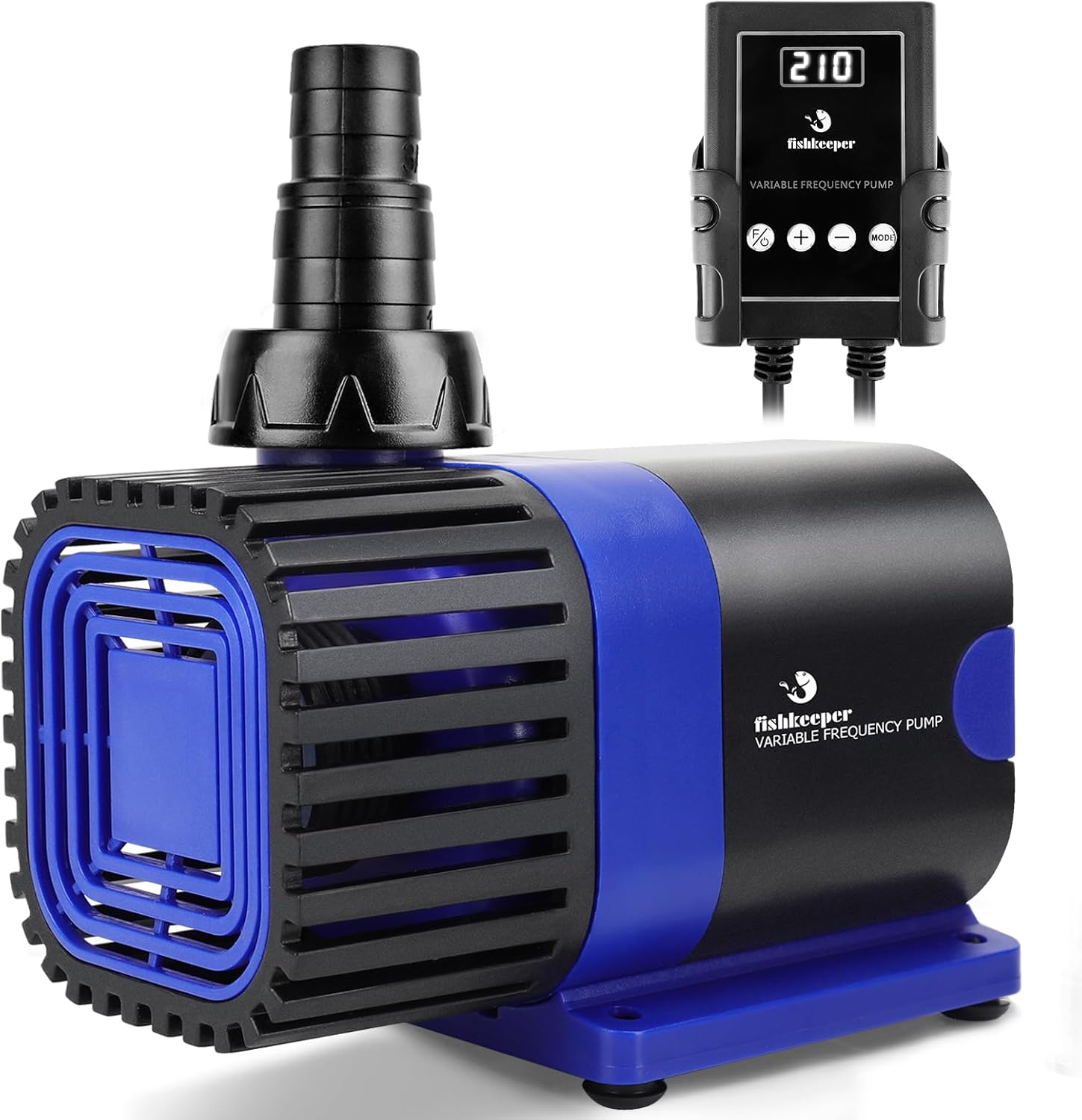
Figure 1: fishkeeper 35W 1200GPH Aquarium Water Pump with its external controller.
2. Package Contents
Please check the package carefully to ensure all items are present and in good condition:
- 1x fishkeeper Aquarium Water Pump
- 1x External Controller
- 1x Power Adapter with 13.6ft Power Cable
- 2x Water Nozzles (for rigid pipe connections)
- 2x Water Nozzles (for soft pipe connections)
- 2x O-Ring Seals
- 2x Inlet Connectors
- 4x Rubber Feet
- 1x User Manual (this document)

Figure 2: Various components included in the fishkeeper water pump package, such as the pump, controller, power adapter, nozzles, and seals.
3. Setup Instructions
-
Prepare the Pump:
- Attach the desired water nozzle(s) to the pump's outlet. Ensure a secure fit.
- If using the pump for water changes, attach the appropriate inlet connector and hose.
- Affix the four rubber feet to the bottom of the pump for stability and vibration reduction.
- Ensure the detachable mesh guard is securely in place to filter debris.
-
Positioning:
- For submersible use (aquariums, ponds), place the pump fully submerged in water.
- For land-based use (fountains, irrigation), ensure the pump is placed on a stable, level surface and connected to water sources as required.

Figure 3: The pump can be used both submerged in an aquarium or as a land pump for outdoor water features like ponds.
-
Connect the Controller and Power:
- Connect the pump's cable to the external controller.
- Connect the power adapter to the controller.
- Plug the UL-certified power cord into a standard 110V electrical outlet.
- The controller is not waterproof; ensure it is placed in a dry location, away from water splashes. It can be conveniently hung or adhered using its design.
4. Operating Instructions
The fishkeeper water pump features an intuitive external controller with multiple modes and adjustable speeds.
4.1 Power On/Off and Feed Mode
- To turn the pump ON, press the F/O button on the controller. The display will light up.
- To turn the pump OFF, press and hold the F/O button for 3 seconds.
- To activate Feed Mode, briefly press the F/O button. The pump will stop temporarily for 10 minutes, allowing fish to feed without strong currents. After 10 minutes, it will automatically resume its previous operating mode.
Video 1: Demonstrates the various operating modes of the fishkeeper water pump, including constant flow, wave maker, and feed mode, along with speed adjustments.
4.2 Constant Flow Mode
- In Constant Flow Mode, the pump provides a continuous, steady water flow.
- Use the + and - buttons to adjust the flow speed. There are 20 adjustable speeds, ranging from 101 to 120.

Figure 4: Visual representation of the three versatile flow modes: Constant Flow, Wave-making, and Feed Mode, demonstrating their effects in an aquarium.
4.3 Wave Maker Mode
- Press the MODE button to switch to Wave Maker Mode. This mode creates oscillating water movement, simulating natural ocean currents.
- Use the + and - buttons to adjust the wave intensity/speed. There are 20 adjustable speeds, ranging from 201 to 220.
4.4 Adjusting Flow Speed
- The controller allows for precise adjustment of water flow.
- Press the + button to increase the speed.
- Press the - button to decrease the speed.
- The current speed level will be displayed on the controller's screen.

Figure 5: The external controller displaying the adjustable flow speed settings, with plus and minus buttons for precise control.
5. Maintenance
Regular maintenance ensures optimal performance and longevity of your fishkeeper water pump.
-
Cleaning the Pump:
- Always unplug the pump from the power outlet before cleaning.
- Remove the detachable mesh guard and rinse it under clean water to remove accumulated debris.
- Inspect the impeller and ceramic shaft for any blockages or buildup. Gently clean with a soft brush if necessary.
- Rinse the pump body thoroughly.
-
Water Changes:
The pump can assist with water changes. To drain water, connect a hose to the pump's outlet and direct it to a bucket. To add water, place the pump in a bucket of clean, treated water and direct the hose into the aquarium.

Figure 6: Illustration of the pump's utility for both adding fresh water to an aquarium and facilitating water changes by draining old water.
-
Noise Reduction:
The pump is designed for ultra-quiet operation (as low as 25 dB). Ensure the rubber feet are properly installed to minimize vibration and noise. Regular cleaning also helps maintain quiet performance.

Figure 7: The pump's mute design ensures quiet operation, making it suitable for environments where low noise is desired, such as a nursery.
6. Troubleshooting
| Problem | Possible Cause | Solution |
|---|---|---|
| Pump not turning on. | No power, loose connection, faulty power adapter/controller. | Check power outlet. Ensure all connections are secure. Test with another outlet. Contact support if issues persist. |
| Weak or no water flow. | Clogged impeller/mesh guard, air in pump, incorrect speed setting. | Clean mesh guard and impeller. Ensure pump is fully submerged and free of air bubbles. Increase flow speed using the controller. |
| Excessive noise/vibration. | Debris in impeller, pump not stable, worn components. | Clean impeller. Ensure rubber feet are installed and pump is on a stable surface. If noise persists, contact support. |
| Controller not responding. | Power issue, controller malfunction. | Unplug and replug the power adapter. Ensure the controller is dry. If unresponsive, contact support. |
7. Specifications
| Feature | Detail |
|---|---|
| Model Number | SUS-FK020 |
| Power | 35W |
| Voltage | DC 24V (via 110V AC adapter) |
| Maximum Flow Rate | 1200 GPH (4543 L/H) |
| Maximum Head Lift | 13.1 ft |
| Adjustable Speeds | 20 levels (Constant Flow: 101-120, Wave Maker: 201-220) |
| Noise Level | As low as 25 dB |
| Power Cord Length | 13.6 ft |
| Material | Acrylonitrile Butadiene Styrene (ABS) |
| Weight | 2.72 pounds (1.24 kg) |
| Applications | Aquariums, Ponds, Fountains, Waterfalls, Hydroponics, Irrigation Systems, Swimming Pools, Water Features |

Figure 8: Detailed specifications for various fishkeeper water pump models, including power, flow rate, and dimensions.
8. Warranty and Support
fishkeeper products are manufactured with high standards of quality and reliability. For warranty information, technical support, or any inquiries regarding your product, please contact fishkeeper customer service through the retailer's platform or visit the official fishkeeper brand store:
Please retain your purchase receipt as proof of purchase for warranty claims.