
1. Introduction
Thank you for purchasing the Hisense AX3120G 3.1.2 Channel Soundbar. This soundbar system is designed to enhance your audio experience for movies, music, and games with immersive sound, including Dolby Atmos and DTS:X support. This manual provides essential information for setting up, operating, and maintaining your device. Please read it thoroughly before use and retain it for future reference.
2. Safety Information
Please observe the following safety precautions to prevent damage to the device or injury to yourself:
- Power Source: Use only the specified power supply. Ensure the voltage matches your local power supply.
- Ventilation: Do not block any ventilation openings. Maintain adequate space around the soundbar and subwoofer for proper airflow.
- Water and Moisture: Do not expose the device to rain, moisture, or dripping/splashing liquids. Do not place objects filled with liquids, such as vases, on the apparatus.
- Heat: Keep the device away from heat sources such as radiators, heat registers, stoves, or other apparatus (including amplifiers) that produce heat.
- Cleaning: Unplug the device from the power outlet before cleaning. Use a dry, soft cloth only.
- Servicing: Do not attempt to service this product yourself. Refer all servicing to qualified service personnel.
3. Package Contents
Carefully unpack your soundbar system and ensure all items listed below are present and in good condition. If any item is missing or damaged, contact your retailer.
- Hisense AX3120G Soundbar
- Wireless Subwoofer
- Remote Control
- AAA Batteries (2x)
- HDMI Cable
- Optical Audio Cable
- Wall Mounting Kit

Image: Hisense AX3120G Soundbar, wireless subwoofer, and remote control, showing product dimensions.
4. Setup
4.1. Placement
For optimal audio performance, consider the following placement guidelines:
- Soundbar: Place the soundbar centrally below your TV. Ensure it is on a stable, flat surface or securely mounted to the wall using the provided kit.
- Subwoofer: The wireless subwoofer can be placed anywhere in the room, ideally near the soundbar, for balanced bass. Experiment with different positions to find the best sound.

Image: The Hisense AX3120G Soundbar positioned below a television, with the wireless subwoofer placed to the side, illustrating a typical home entertainment setup.
4.2. Connections
Connect the soundbar to your TV or other audio sources using one of the following methods:
- HDMI ARC/eARC (Recommended): Connect one end of the HDMI cable to the HDMI OUT (ARC/eARC) port on the soundbar and the other end to the HDMI ARC/eARC port on your TV. This allows audio to be sent from the TV to the soundbar and enables control of the soundbar with your TV remote.
- Optical Audio: Connect one end of the optical cable to the OPTICAL IN port on the soundbar and the other end to the optical digital output port on your TV or audio source.
- USB: Insert a USB drive into the USB port on the soundbar to play audio files directly.
4.3. Subwoofer Pairing
The wireless subwoofer should automatically pair with the soundbar when both devices are powered on. If the subwoofer does not connect, follow these steps:
- Ensure both the soundbar and subwoofer are powered on and within range.
- Press and hold the PAIR button on the back of the subwoofer for a few seconds. The indicator light on the subwoofer will flash.
- On the soundbar, select the Bluetooth input (if applicable) or cycle through inputs. The soundbar and subwoofer should connect automatically. The indicator light on the subwoofer will turn solid when connected.
5. Operating Instructions
5.1. Power On/Off
Press the POWER button on the remote control or the soundbar to turn the unit on or off.
5.2. Input Selection
Press the INPUT button on the remote control repeatedly to cycle through available input sources (HDMI, Optical, Bluetooth, USB).
5.3. Volume Control
Use the VOL+ and VOL- buttons on the remote control to adjust the master volume. Use the BASS+ and BASS- buttons to adjust the subwoofer level.
5.4. Sound Modes and Features
The Hisense AX3120G supports advanced audio technologies for an immersive experience:
- Dolby Atmos & DTS:X: These technologies provide multi-dimensional sound, creating a captivating audio experience. The soundbar automatically detects and processes these formats when available from your source.
- 3.1.2 Channels: Enjoy a rich soundstage with dedicated left, right, center, and two up-firing channels, plus a separate subwoofer for deep bass.
- Super Bass: Enhances low-frequency sounds for a more impactful audio experience.
- AI EQ Mode & 7 Personalized Sound Modes: Optimize your audio for different content types (e.g., Movie, Music, News, Game) using the AI EQ mode or select from 7 personalized sound modes for tailored listening.

Image: Visual representation of the soundbar and subwoofer, emphasizing key features like 3.1.2 channels, Super Bass, Dolby Atmos support, and 360W total output.
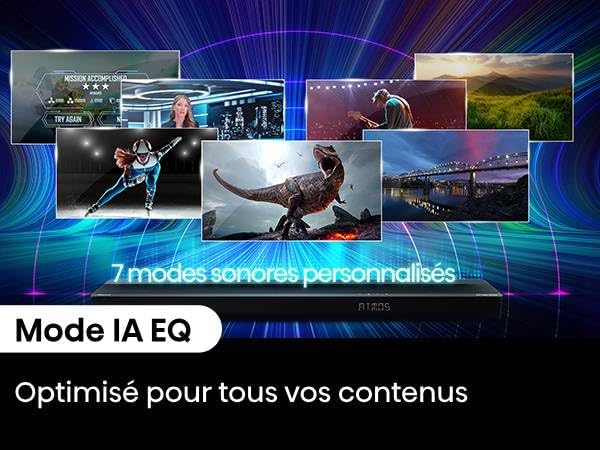
Image: The soundbar display showing 'ATOMS', with text highlighting '7 Personalized Sound Modes' and 'AI EQ Mode' for content optimization.
5.5. Bluetooth Pairing
To connect a Bluetooth device:
- Press the Bluetooth button on the remote control to select Bluetooth input. The soundbar display will show "BT" and start flashing.
- Enable Bluetooth on your device (smartphone, tablet, etc.) and search for "Hisense AX3120G".
- Select the soundbar from the list of available devices. Once connected, the "BT" indicator on the soundbar will stop flashing and remain solid.
6. Maintenance
6.1. Cleaning
To clean your soundbar and subwoofer:
- Always unplug the device from the power outlet before cleaning.
- Use a soft, dry cloth to wipe the surfaces.
- Do not use liquid cleaners, aerosol sprays, or abrasive materials, as these may damage the finish.
6.2. Storage
If you plan to store the soundbar for an extended period, unplug it from the power outlet and store it in a cool, dry place, away from direct sunlight and extreme temperatures.
7. Troubleshooting
If you encounter issues with your soundbar, refer to the following common problems and solutions:
| Problem | Possible Cause | Solution |
|---|---|---|
| No power | Power cable not connected; Power outlet not active | Ensure power cables are securely connected. Check the power outlet with another device. |
| No sound | Incorrect input selected; Volume too low; Cables not connected properly | Select the correct input source. Increase the volume. Check all audio cable connections. Ensure TV audio output is set to external speakers. |
| Subwoofer not connecting | Subwoofer not paired; Out of range | Refer to Section 4.3 for subwoofer pairing instructions. Ensure subwoofer is within 10 meters of the soundbar. |
| Bluetooth connection issues | Device not in pairing mode; Out of range; Interference | Ensure soundbar is in Bluetooth pairing mode. Move device closer to soundbar. Avoid strong electromagnetic interference. |
| Remote control not working | Batteries depleted; Obstruction; Incorrect angle | Replace batteries. Remove any obstructions between remote and soundbar. Point remote directly at the soundbar's sensor. |
8. Specifications
Below are the technical specifications for the Hisense AX3120G Soundbar system:
| Feature | Specification |
|---|---|
| Model Name | AX3120G |
| Brand | Hisense |
| Speaker Type | Soundbar with Wireless Subwoofer |
| Sound Channel Configuration | 3.1.2 Channels |
| Maximum Output Power | 360 Watts |
| Frequency Response | 20000 Hz |
| Connectivity Technology | Bluetooth, HDMI, USB, Optical Audio |
| Wireless Subwoofer Connectivity | Wireless |
| Bluetooth Range | 10 Meters |
| Special Features | Dolby Atmos, DTS:X Support, Up-firing Speakers |
| Mounting Type | Wall Mountable |
| Soundbar Dimensions (W x D x H) | 920 x 60 x 90 mm |
| Item Weight | 8.1 Kilograms |
| Included Components | Soundbar, Subwoofer, Remote Control, Batteries, Optical Cable, HDMI Cable |
9. Warranty and Support
Hisense products are manufactured to the highest quality standards. This product comes with a limited warranty. For detailed warranty information, please refer to the warranty card included in your package or visit the official Hisense website. For technical support, troubleshooting assistance, or service inquiries, please contact Hisense customer service through their official channels.


