
DaToo 500W
DaToo 500W Titanium Submersible Aquarium Heater Instruction Manual
Model: 500W (60-95 Gallon)
Introduction
The DaToo 500W Titanium Submersible Aquarium Heater is designed to maintain a stable and comfortable water temperature for your aquatic pets. This heater features a durable titanium shell, precise temperature control, and multiple safety mechanisms to ensure a secure environment for both freshwater and saltwater aquariums.
Key Features:
- Powerful Heating System: Utilizes an upgraded nickel-chromium alloy heating wire and a titanium shell for efficient and even heat distribution, ensuring rapid temperature increase throughout the aquarium.
- Sensitive and Adjustable Temperature Control: Equipped with a high-sensitivity temperature sensing probe that detects minute water temperature changes. The external temperature controller allows for easy adjustment within a range of 68°F to 94°F (20°C to 34°C) with ±1°F precision.
- Indestructible Titanium Shell: The titanium construction provides extreme strength, making the heater explosion-proof, crack-proof, and corrosion-resistant. This material is suitable for all pH levels and extends the product's lifespan.
- Dual Security Protection: Features overheating protection (displays E2 and stops heating if water exceeds 94°F) and out-of-water protection (displays E1 and stops heating if water level is too low), preventing dry burning and ensuring safety.
Setup Instructions
Follow these steps to properly install your DaToo aquarium heater:
- Unpack the Heater: Carefully remove the heater and all components from the packaging. Inspect for any damage.
- Attach Suction Cups: Secure the included suction cups to the heater body. These will hold the heater firmly against the aquarium glass.
- Position the Heater: Place the heater fully submerged in the aquarium water. Ensure the heating element is completely covered by water. The heater can be positioned vertically or horizontally.
- Mount the External Controller: The external temperature controller should be mounted outside the aquarium, in a dry location, using its integrated suction cups or clip. Ensure it is easily accessible for temperature adjustments.
- Connect to Power: Plug the heater's power cord into a suitable electrical outlet. Ensure the outlet is protected by a Ground Fault Circuit Interrupter (GFCI) for safety.

Image: DaToo Aquarium Heater with dimensions. The heater measures 12.56 inches in length and 0.94 inches in diameter. The cable is 65.35 inches long, and the external controller is 1.73 inches by 0.79 inches.

Image: A DaToo aquarium heater installed vertically in a fish tank, fully submerged, with fish swimming around it.
Video: This video demonstrates the assembly and installation of an aquarium heater, showing how to attach the protective shell and suction cups, and how to submerge it in the aquarium. It also shows plugging in the controller and adjusting the temperature.
Operating Instructions
The DaToo aquarium heater features an external controller for easy temperature management.
- Power On: Once plugged in, the digital display on the external controller will illuminate, showing the current water temperature and the set temperature.
- Adjust Temperature: Use the '+' and '-' buttons on the external controller to set your desired water temperature. The adjustable range is 68°F to 94°F (20°C to 34°C). Each press adjusts the temperature by 1°F.
- Temperature Unit Conversion: To switch between Fahrenheit (°F) and Celsius (°C), press and hold the 'SET' button for approximately 3 seconds.
- Heating Indicator: A red light on the controller indicates that the heater is actively heating the water. A green light indicates the heater is maintaining the set temperature.

Image: Close-up view of the DaToo aquarium heater's high-sensitivity temperature sensing probe and the external temperature regulator. The regulator displays the temperature range of 20-34°C (68-94°F) and has a 'SET' button.
Video: This video demonstrates how to use an external digital display controller for an aquarium heater. It shows how to switch between Celsius and Fahrenheit, and how to set the desired temperature using the '+' and '-' buttons.
Video: This video illustrates the installation and operation of an aquarium heater with an external controller. It shows how to submerge the heater, connect the power, and adjust the temperature settings.
Maintenance
Regular maintenance ensures optimal performance and longevity of your aquarium heater:
- Cleaning: Periodically remove the heater from the aquarium (after unplugging and allowing it to cool) and gently wipe down the titanium shell to remove any algae or mineral buildup. Use a soft cloth and warm water. Do not use harsh chemicals or abrasive materials.
- Inspection: Regularly check the power cord and the heater body for any signs of damage, cracks, or wear. If any damage is observed, discontinue use immediately and replace the heater.
- Water Level: Always ensure the heater is fully submerged in water. Operating the heater out of water can cause damage and trigger safety features.
Troubleshooting
If you encounter issues with your DaToo aquarium heater, refer to the following common problems and solutions:
- Heater Not Heating:
- Check if the heater is properly plugged into a working power outlet.
- Ensure the set temperature is higher than the current water temperature.
- Verify that the heating indicator light (red) is on. If not, check connections.
- Temperature Displaying 'E1' (Out of Water Protection):
- This indicates the heater is not fully submerged. Add water to the aquarium until the heater is completely covered. The heater will resume normal operation once submerged.
- Temperature Displaying 'E2' (Overheating Protection):
- This indicates the water temperature has exceeded 94°F. The heater has automatically shut off for safety. Allow the water to cool naturally or perform a partial water change with cooler water. Check for external heat sources.
- Inaccurate Temperature Reading:
- Ensure the temperature sensing probe is clean and free from debris.
- Compare the reading with a separate, reliable aquarium thermometer. If there's a significant discrepancy, contact customer support.
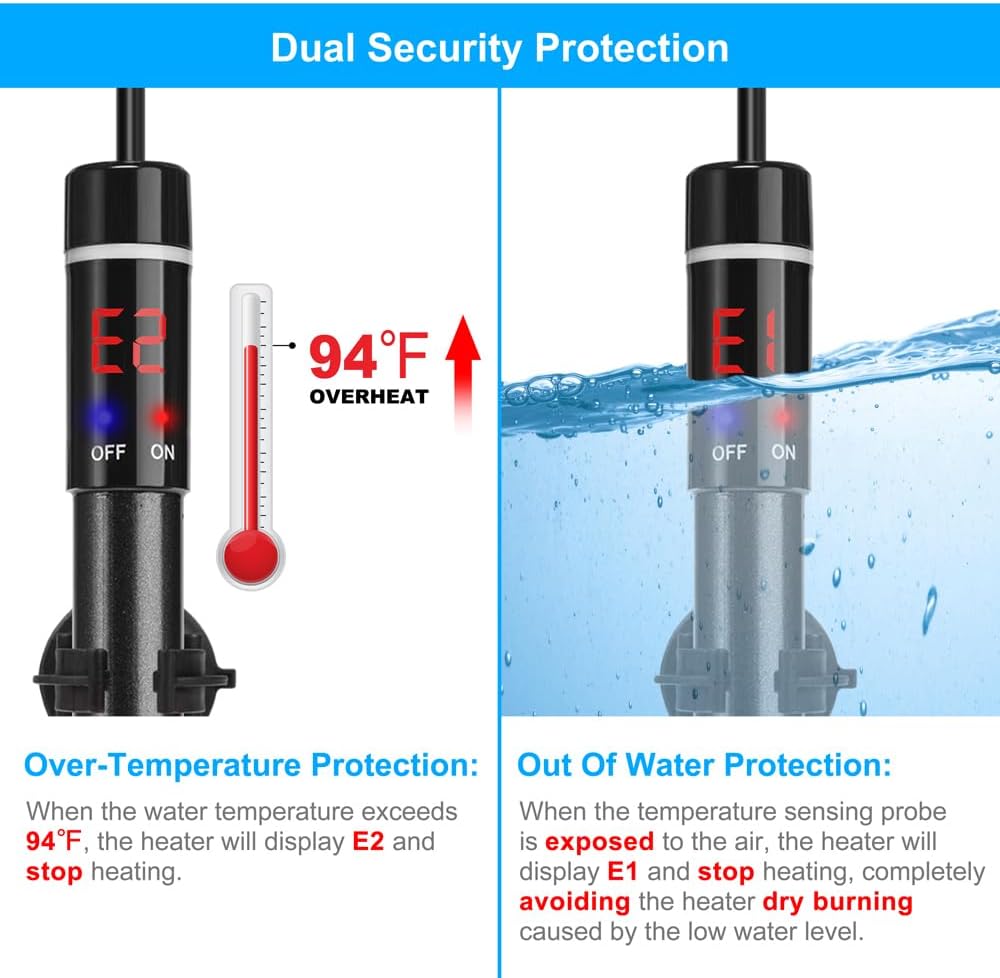
Image: Illustration of the dual security protection features of the DaToo aquarium heater. It shows an 'E2' display for over-temperature protection (above 94°F) and an 'E1' display for out-of-water protection.
Specifications
| Feature | Detail |
|---|---|
| Power | 500W |
| Material | Titanium |
| Size (Heater) | 12.56 x 1 x 1 inch (31.9 x 2.54 x 2.54 cm) |
| Temperature Adjustment Range | 68°F ~ 94°F (20°C ~ 34°C) |
| Temperature Precision | ±1°F |
| Recommended Tank Size | 60-95 Gallons |
| Manufacturer | DaToo |
| Model Number | DTAHT-5 |
| ASIN | B0C4ST2M7Q |
| Date First Available | May 11, 2023 |
Warranty & Support
The DaToo 500W Titanium Submersible Aquarium Heater comes with a One Year Warranty. For any product-related inquiries, technical assistance, or warranty claims, please contact DaToo customer support through your retailer or the official DaToo website. Please retain your proof of purchase for warranty validation.
For returns, a 30-day refund/replacement policy is typically offered by retailers. Please check with your specific point of purchase for their exact return policy details.
Ask a question about this manual
Ask about setup, troubleshooting, compatibility, parts, safety, or missing instructions. Manuals+ will review the question and use this page’s manual context to help answer it.