
AVERA CED80T
AVERA CED80T 80 cm Wall-Mounted Kitchen Hood User Manual
Model: CED80T
Introduction
This manual provides essential information for the safe and efficient installation, operation, and maintenance of your AVERA CED80T 80 cm Wall-Mounted Kitchen Hood. Please read these instructions carefully before using the appliance and retain them for future reference.

Image: The AVERA CED80T 80 cm Wall-Mounted Kitchen Hood, showcasing its sleek black stainless steel design and slide-out functionality.
Important Safety Instructions
To reduce the risk of fire, electric shock, or injury, observe the following:
- Read all instructions before using this appliance.
- Installation work and electrical wiring must be done by qualified person(s) in accordance with all applicable codes and standards.
- Do not operate any fan with a damaged cord or plug. Discard fan or return to an authorized service facility for examination and/or repair.
- Sufficient air is needed for proper combustion and exhausting of gases through the flue (chimney) of fuel burning equipment to prevent back-drafting.
- When cutting or drilling into wall or ceiling, do not damage electrical wiring and other hidden utilities.
- Ducted fans must always be vented to the outdoors.
- Clean grease filters frequently. Grease should not be allowed to accumulate on fan or filter.
- Never leave surface units unattended at high settings. Boilovers cause smoking and greasy spillovers that may ignite.
- Always turn hood ON when cooking at high heat or when flambéing food.
- Use appropriate size cookware. Always use cookware appropriate for the size of the surface element.
Product Overview and Components
The AVERA CED80T kitchen hood is designed to efficiently remove smoke, grease, and odors from your cooking area. It features a durable stainless steel construction, LED lighting, and a digital touch control panel.

Image: Diagram highlighting key features of the AVERA CED80T hood, including smoke extraction, 127V voltage, 154W power, LED light, 3 extraction speeds, and removable filter.
Key Features:
- Design: 80 cm slide-out design in black stainless steel.
- Motor: Powerful 154 W motor with 650 m³/h airflow.
- Control: Digital touch control panel with 3 speeds.
- Lighting: Integrated LED illumination.
- Timer: Delayed shut-off timer (1-9 minutes).
- Filtration: Dual protection with washable metal grease filters and activated carbon filters (for recirculation mode).
Setup and Installation
The AVERA CED80T kitchen hood is designed for wall mounting. A basic installation kit is included. Proper installation is crucial for optimal performance and safety.
Mounting Guidelines:
- Ensure the wall structure can support the weight of the hood.
- Maintain a correct distance between the hood and the cooking surface (grill/hob) of 65 to 75 cm.
- Consult a qualified technician for electrical connections.

Image: Illustration showing the recommended installation distance of 65 to 75 cm between the bottom of the hood and the cooking surface.
Ventilation Modes:
Your hood can be configured for two types of ventilation:
- Ducted (Exterior Ventilation): Air is extracted and expelled outdoors through a ducting system. This requires a suitable exhaust pipe connection.
- Recirculation (Interior Ventilation): Air is filtered through activated carbon filters and then returned to the kitchen. This mode is used when external venting is not possible. Activated carbon filters are included.
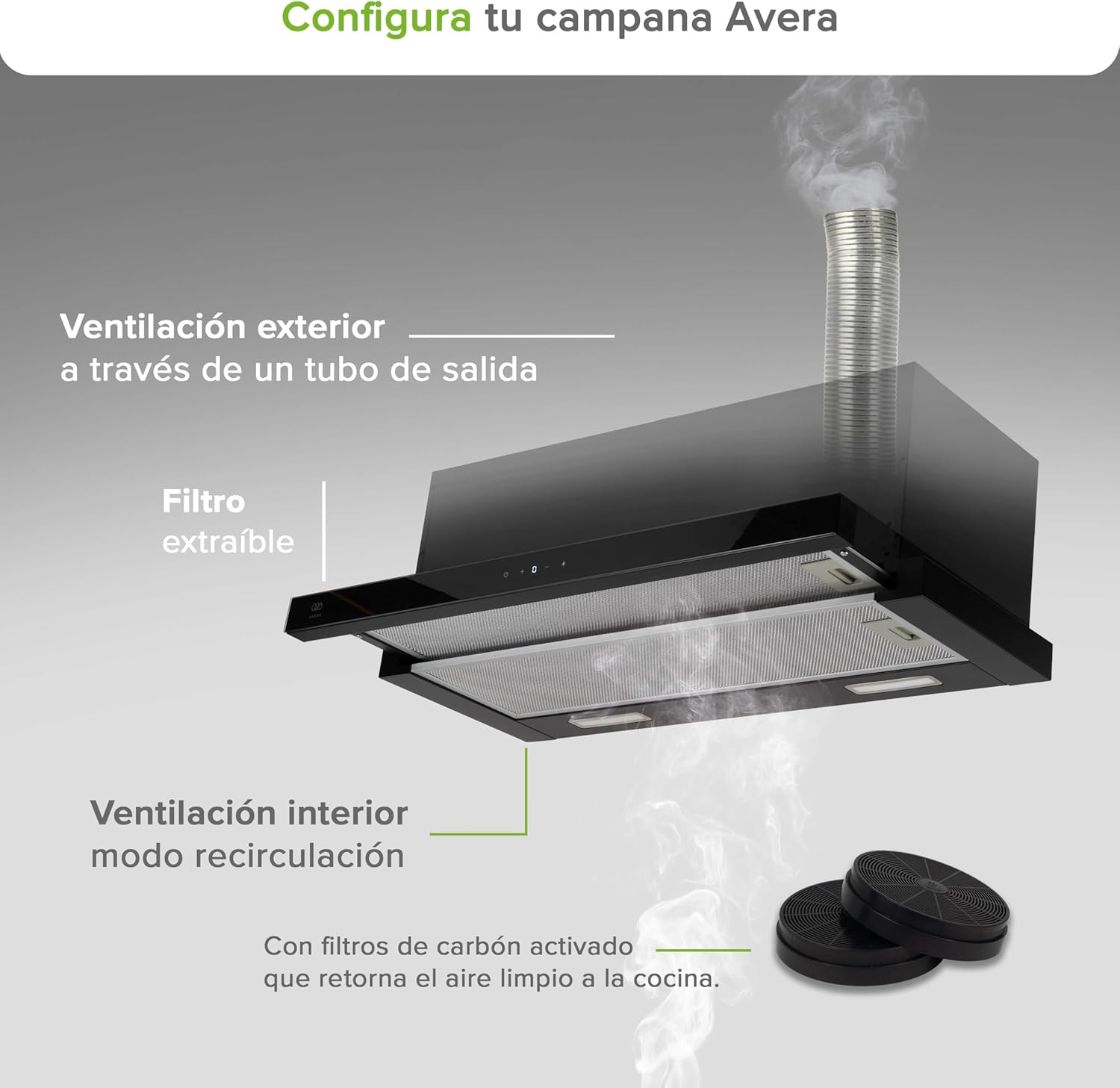
Image: Diagram illustrating both exterior ventilation (ducted through a pipe) and interior recirculation mode with activated carbon filters.
Operating Instructions
The hood features a digital touch control panel for easy operation.

Image: Close-up of the digital touch control panel, showing buttons for power (on/off), speed adjustment (+/-), and light control. The bottom view of the hood also shows the LED lights and removable metal grease filters.
Control Panel Functions:
- Power Button: Press to turn the hood on or off.
- Speed Adjustment (+/-): Use these buttons to cycle through the 3 extraction speeds (Low, Medium, High). The current speed level will be displayed digitally.
- Light Button: Press to turn the LED lights on or off.
- Timer Function: The hood includes a delayed shut-off timer (1-9 minutes) for automatic cleaning. Refer to the full manual for specific timer setting instructions.
Extraction Speeds and Noise Levels:
The hood offers three speed settings to match your cooking needs, with varying noise levels:

Image: Visual representation of the three extraction speeds: Low (48 dB), Medium (56 dB), and High (62 dB), shown above a kitchen stove.
- Low Speed: 48 dB - Ideal for light cooking and simmering.
- Medium Speed: 56 dB - Suitable for general cooking.
- High Speed: 62 dB - For heavy cooking, frying, or strong odors.
Maintenance and Cleaning
Regular maintenance ensures the longevity and efficient operation of your kitchen hood.
Cleaning the Metal Grease Filters:
The metal grease filters capture airborne grease particles. They should be cleaned regularly (approximately every 2-4 weeks, depending on usage) to prevent grease buildup and maintain extraction efficiency.
- Turn off the hood and disconnect it from the power supply.
- Locate the filter release latches and remove the filters.
- Wash the filters by hand in hot soapy water or in a dishwasher. Ensure they are completely dry before reinstallation.
- Reinstall the clean, dry filters into the hood.
Replacing Activated Carbon Filters (for Recirculation Mode):
If your hood is operating in recirculation mode, the activated carbon filters remove odors. These filters are not washable and must be replaced periodically (typically every 3-6 months, depending on usage).
- Turn off the hood and disconnect it from the power supply.
- Remove the metal grease filters to access the carbon filters.
- Remove the old carbon filters and dispose of them.
- Install new activated carbon filters according to the manufacturer's instructions.
- Reinstall the metal grease filters.
Cleaning the Exterior:
Clean the stainless steel exterior with a soft cloth and a non-abrasive cleaner specifically designed for stainless steel. Avoid harsh chemicals or abrasive pads that can scratch the surface.
Troubleshooting
Before contacting customer service, please check the following common issues and solutions:
| Problem | Possible Cause | Solution |
|---|---|---|
| Hood does not turn on. | No power supply. | Check if the hood is properly plugged in and if the circuit breaker is tripped. |
| Poor extraction performance. | Clogged grease filters or saturated carbon filters. Incorrect installation distance. | Clean or replace filters. Verify the distance between the hood and the cooking surface. Ensure ducting is clear if applicable. |
| Excessive noise. | Loose components or improper installation. Obstruction in the fan or ductwork. | Check for loose screws or parts. Ensure no foreign objects are in the fan. Inspect ductwork for obstructions. |
| Lights not working. | Faulty LED bulb or electrical connection. | Check electrical connections. If LED is integrated, contact service. |
Technical Specifications
Detailed specifications for the AVERA CED80T kitchen hood:

Image: Diagram showing the dimensions (Length: 30 cm, Width: 80 cm, Height: 27 cm) and weight (10 kg) of the AVERA CED80T kitchen hood.
| Feature | Specification |
|---|---|
| Model Number | CED80T |
| Material | Stainless Steel |
| Dimensions (D x W x H) | 30 x 80 x 27 cm |
| Weight | 10 kg |
| Airflow Capacity | 650 m³/h |
| Motor Wattage | 154 W |
| Voltage | 127 Volts |
| Number of Speeds | 3 |
| Control Type | Digital Touch |
| Noise Level | 57 dB (average), 48 dB (low), 56 dB (medium), 62 dB (high) |
| Light Type | LED |
| Filter Type | Washable Metal Grease Filter, Activated Carbon Filter |
| Mounting Type | Wall Mount |
Warranty and Customer Support
AVERA products are designed for quality and reliability. For specific warranty details, please refer to the warranty card included with your product or visit the official AVERA website.
If you encounter any issues or require technical assistance, please contact AVERA customer support:
- Website: Visit the AVERA Store on Amazon (for general product information)
- Refer to your product packaging or included documentation for direct contact information (phone, email).
Please have your model number (CED80T) and purchase date available when contacting support.
Related documentsCED80T


Ask a question about this manual
Ask about setup, troubleshooting, compatibility, parts, safety, or missing instructions. Manuals+ will review the question and use this page’s manual context to help answer it.