
1. Introduction
This manual provides detailed instructions for the assembly, operation, maintenance, and troubleshooting of your COLAMY Executive Office Chair Model 6686. Please read this manual thoroughly before assembly and use to ensure proper function and longevity of your chair. Keep this manual for future reference.

Image 1.1: The COLAMY Executive Office Chair Model 6686. This chair features a high back, padded flip-up arms, and upgraded casters, designed for ergonomic support and comfort in various settings.
2. Safety Information
- Designed for a maximum weight capacity of 300 pounds. Exceeding this weight recommendation could result in product damage or injury.
- Ensure all bolts and screws are securely tightened before use. Periodically check and re-tighten as necessary.
- Do not stand on the chair.
- Avoid using harsh chemicals or abrasive cleaners on the chair's surfaces.
- Keep small parts away from children during assembly.
3. Package Contents
Verify that all components are present before beginning assembly. If any parts are missing or damaged, please contact customer support.
- Backrest
- Seat Cushion
- Armrests (2)
- Gas Lift Cylinder
- Base (5-star)
- Casters (5)
- Mechanism Plate
- Hardware Kit (bolts, washers, Allen wrench)
4. Assembly Instructions
Follow these steps carefully for proper assembly. It is recommended to assemble the chair on a soft, clean surface to prevent damage.
- Attach Casters to Base: Insert each of the five casters into the holes at the end of the 5-star base until they click securely into place.
- Insert Gas Lift: Place the gas lift cylinder into the center hole of the assembled 5-star base.
- Attach Mechanism Plate to Seat: Align the mechanism plate with the pre-drilled holes on the underside of the seat cushion. Ensure the front of the mechanism faces the front of the seat. Secure with the appropriate bolts and washers using the provided Allen wrench.
- Attach Armrests to Seat: Secure the armrests to the sides of the seat cushion using the designated bolts. Ensure they are firmly attached.
- Attach Backrest to Seat: Align the backrest with the mounting points on the seat cushion and armrests. Secure with bolts. It may be helpful to have a second person assist with holding the backrest during this step.
- Connect Seat Assembly to Gas Lift: Carefully place the assembled seat onto the gas lift cylinder, ensuring it is centered and fully seated.

Image 4.1: Comparison highlighting the upgraded heavy-calibre casters designed for smooth, silent rolling without floor damage.

Image 4.2: Detail of the double-padded seat cushion, indicating its soft, high-density foam construction for comfort and support.

Image 4.3: Close-up view of the padded flip-up armrests, designed to provide forearm support and allow for space-saving storage under a desk.
5. Operating Instructions
Your COLAMY Executive Office Chair offers several adjustable features to customize your seating experience.
- Seat Height Adjustment: To raise the seat, lift the lever on the right side of the chair while taking your weight off the seat. To lower the seat, lift the lever while seated. The seat height can be adjusted between 18.9 inches and 22 inches.
- Rocking Function: Pull the left lever outwards to enable the rocking function. The chair can rock from 90° to 113°. Push the lever inwards to lock the chair in an upright position.
- Flip-up Armrests: The armrests can be flipped up by rotating them upwards. This feature allows the chair to be tucked closer to a desk, saving space, or to provide more freedom of movement.

Image 5.1: A user demonstrating proper posture while seated in the COLAMY Executive Office Chair, highlighting its ergonomic design for comfortable work.
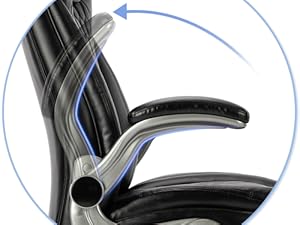
Image 5.2: Illustration of the armrest's flip-up mechanism, allowing for flexible use and space optimization.
6. Maintenance
- Cleaning: For general cleaning, wipe the chair with a soft, damp cloth. For tougher spots, use a mild soap solution and then wipe clean with a dry cloth. Avoid using abrasive cleaners or solvents.
- Inspection: Periodically check all bolts and screws to ensure they are tight. Re-tighten if necessary to maintain stability and safety.
- Caster Care: The upgraded casters are designed to be floor-friendly. Keep them free of debris (hair, dust) to ensure smooth rolling.
7. Troubleshooting
| Problem | Possible Cause | Solution |
|---|---|---|
| Chair wobbles or feels unstable. | Loose bolts or screws. | Check and tighten all assembly bolts, especially those connecting the backrest, armrests, and mechanism plate. |
| Seat height adjustment not working. | Gas lift cylinder not properly engaged or damaged. | Ensure the gas lift is fully inserted into the base and mechanism. If the issue persists, the gas lift may need replacement. |
| Casters not rolling smoothly. | Debris caught in casters; casters damaged. | Remove any hair or debris from the caster wheels. If casters are damaged, they may need replacement. |
| Rocking function does not engage/disengage. | Mechanism lever not fully engaged. | Ensure the left lever is pulled fully outwards for rocking or pushed fully inwards to lock. Check for any obstructions. |
8. Specifications
| Feature | Detail |
|---|---|
| Brand | COLAMY |
| Model Name | 6686 office chair |
| Color | Black |
| Product Dimensions (D x W x H) | 29.53"D x 28.35"W x 48.43"H |
| Maximum Weight Recommendation | 300 Pounds |
| Seat Height Range | 18.9" - 22" |
| Seat Depth | 19.7 inches |
| Seat Back Interior Height | 28 Inches |
| Chair Backrest Width | 24 Inches |
| Arm Style | Flip-up |
| Special Features | Adjustable Height, Ergonomic, Flip-up Arms, Upgraded Casters, Upholstered Leather |
| Fill Material | Foam |
| Furniture Finish | Leather |
| Item Weight | 38.5 pounds |

Image 8.1: Detailed diagram illustrating the key dimensions of the COLAMY Executive Office Chair, including height, width, depth, seat height, and backrest height.
9. Warranty Information
COLAMY products are manufactured to high-quality standards and are backed by a limited warranty against defects in materials and workmanship. Please refer to the product packaging or contact customer support for specific warranty terms and conditions applicable to your region.
10. Customer Support
If you have any questions, require assistance with assembly, or need to report a missing or damaged part, please contact COLAMY customer support through the retailer's platform or visit the official COLAMY website for contact information.
For additional resources, you may also refer to the official COLAMY store: COLAMY Store on Amazon


