
1. Introduction and Overview
The Waterdrop Countertop Reverse Osmosis System (Model WD-A1) provides a convenient and efficient solution for purified drinking water directly from your countertop. This innovative system requires no installation, offering filtered water at various temperatures, including hot, cold, and room temperature. It is designed to deliver clean, great-tasting water for your daily needs.
This manual provides essential information for the safe and effective use, maintenance, and troubleshooting of your Waterdrop WD-A1 system.
2. Important Safety Information
Please read and understand all safety instructions before operating the appliance to prevent injury or damage.
- Always ensure the power supply voltage matches the rating label on the appliance (800 watts).
- Do not immerse the appliance, power cord, or plug in water or any other liquid.
- Keep the appliance out of reach of children and pets.
- Use the system only with potable city water. Do not use with well water or water from unknown sources.
- Unplug the system from the power outlet before cleaning, maintenance, or when not in use for extended periods.
- Do not operate the appliance if it has a damaged cord or plug, or if it malfunctions or has been damaged in any manner.
3. Package Contents
Upon unpacking, please ensure all items are present and in good condition:
- Waterdrop Countertop Reverse Osmosis System Unit
- Reverse Osmosis Filter Cartridges (2 included)
- Power Cord
- User Manual (this document)
4. Setup
Your Waterdrop WD-A1 system is designed for easy, no-installation setup.
- Unpack: Carefully remove the unit and all components from the packaging.
- Placement: Place the system on a stable, flat, and dry countertop surface, ensuring adequate ventilation around the unit.
- Fill Water Tank: Remove the raw water tank and fill it with potable tap water. Ensure the tank is properly seated back into the unit.
- Initial Flush: Before first use, perform an initial flushing cycle as detailed in the comprehensive Installation Manual (PDF). This process cleans the internal components and prepares the filters for optimal performance.
- Connect Power: Plug the power cord into the system and then into a grounded electrical outlet.

Image: The Waterdrop Countertop Reverse Osmosis System, showcasing its sleek design.
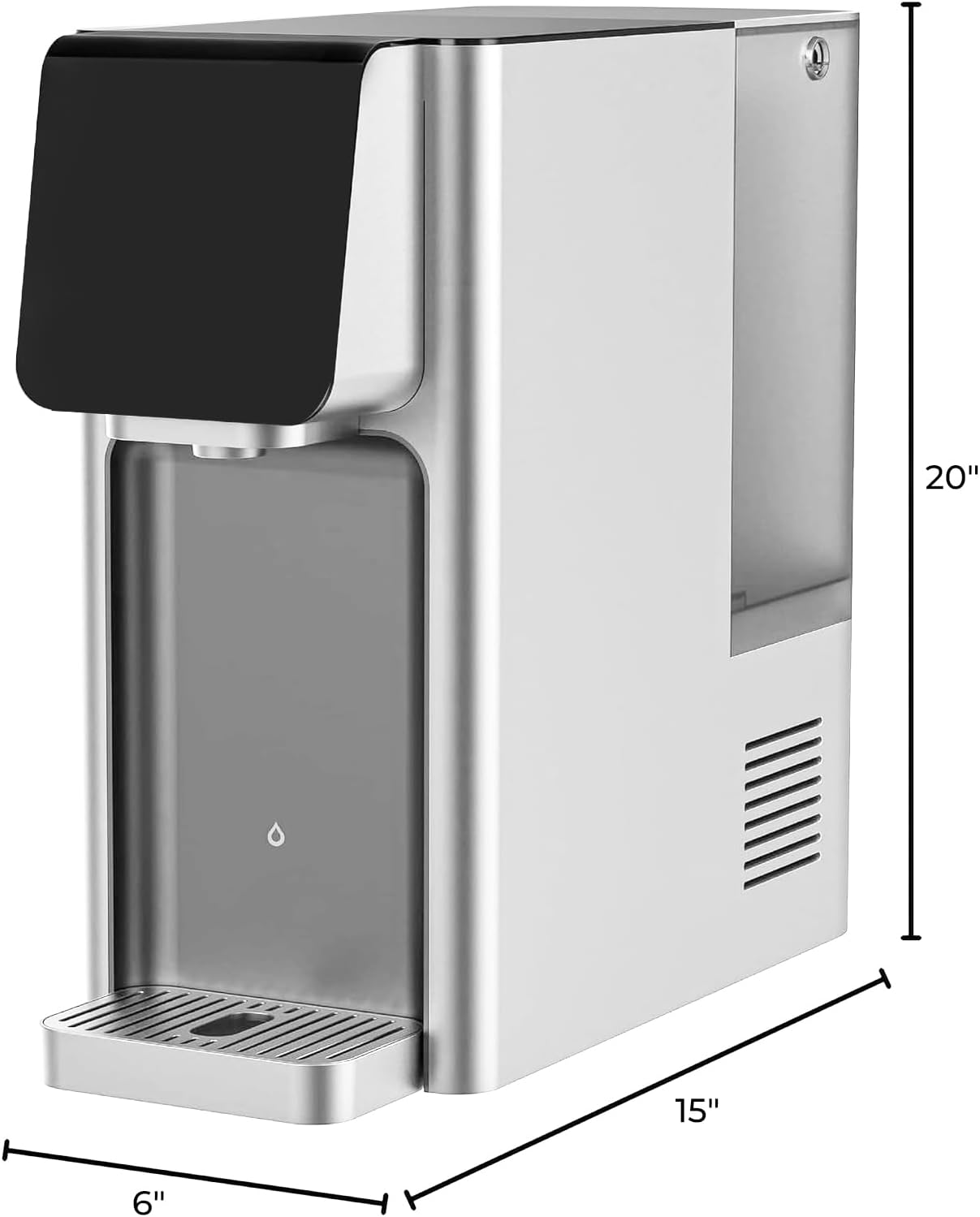
Image: Dimensions of the Waterdrop Countertop Reverse Osmosis System, showing height, width, and depth measurements.
5. Operating Instructions
The WD-A1 system offers intuitive controls for dispensing purified water at your desired temperature.
- Power On: Press the power button to turn on the system. The display will illuminate.
- Select Temperature: Use the touch controls on the display to select your desired water temperature. Options typically include room temperature, cold (down to 41°F), and hot (up to 203°F). The system offers 6 different temperature settings.
- Dispense Water: Place your cup or container under the dispenser spout. Press the dispense button to start the water flow. Press it again to stop.
- Refilling: When the raw water tank is low, the system will indicate a need for refill. Lift the tank, fill with fresh tap water, and reinsert it.
- Wastewater Tank: The system will collect wastewater in a separate tank. Ensure this tank is emptied regularly to maintain optimal performance and prevent overflow.
6. Maintenance
Regular maintenance ensures the longevity and efficiency of your Waterdrop system.
- Filter Replacement: The system will indicate when filters need replacement. Refer to the user manual for specific instructions on how to change the reverse osmosis filter cartridges. Filter life varies based on water quality and usage.
- Cleaning Water Tanks: Periodically clean both the raw water tank and the wastewater tank with mild soap and water. Rinse thoroughly before reassembling.
- Exterior Cleaning: Wipe the exterior of the unit with a soft, damp cloth. Do not use abrasive cleaners or solvents.
- Descaling: If you notice mineral buildup, consult the full user guide for descaling procedures.
7. Troubleshooting
If you encounter issues with your Waterdrop system, refer to the following common problems and solutions:
| Problem | Possible Cause | Solution |
|---|---|---|
| System not turning on | No power, loose connection | Check power cord connection; ensure outlet is functional. |
| Water leaking from unit | Improper tank seating, internal leak | Ensure water tanks are correctly installed. If leaking persists, contact customer support. |
| Error Code (e.g., E03) | Sensor issue, internal malfunction | Refer to the full user manual for specific error codes or contact customer support. |
| Inconsistent water temperature | System still heating/cooling, sensor issue | Allow adequate time for temperature stabilization. If issue persists, contact support. |
| Touchscreen unresponsive | Temporary software glitch | Unplug the unit for 5 minutes, then plug it back in. |
| Random water dispensing | Electronic issue | Unplug the unit immediately and contact customer support. |
For issues not listed above or if solutions do not resolve the problem, please contact Waterdrop Customer Support.
8. Specifications
| Brand | Waterdrop |
| Model Number | WD-A1 |
| Color | Blue |
| Material | Reverse Osmosis Membrane & Carbon Block & PP Cotton |
| Capacity | 100 Gallons (daily production) |
| Product Dimensions (D x W x H) | 18.3"D x 7.8"W x 17.1"H |
| Weight | 38.5 Pounds |
| Wattage | 800 watts |
| Installation Type | Countertop |
| Temperature Range | 41°F (cold) to 203°F (hot) |
| Number of Settings | 6 |
| UPC | 840814179963 |
9. Warranty and Support
Waterdrop stands behind the quality of its products. Your Waterdrop Countertop Reverse Osmosis System typically comes with a 1-year limited warranty from the date of purchase, covering defects in materials and workmanship under normal use.
For warranty claims, technical assistance, or any questions regarding your product, please contact Waterdrop Customer Support. Our dedicated team is ready to assist you with any inquiries or issues you may have.
Please have your model number (WD-A1) and proof of purchase ready when contacting support.


