
Introduction
The Open Ear X1 Bone Conduction Headphones are designed for individuals who wish to listen to audio while maintaining awareness of their surroundings. This headset utilizes bone conduction technology to transmit sound directly through the cheekbones, allowing users to enjoy music or take calls without blocking ambient noise, thereby supporting auditory health.
Key features include Bluetooth 5.3 for stable connectivity, IPX5 water resistance, and a lightweight, comfortable design suitable for various activities, including sports and outdoor use.
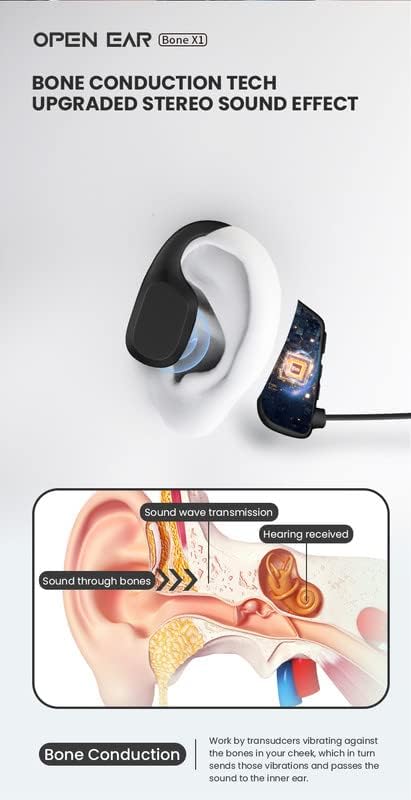
What's in the Box
Please check the package contents upon unboxing:
- Open Ear X1 Bone Conduction Headphones
- USB Magnetic Charging Cable
- User Manual

Setup
1. Charging the Headphones
Before first use, fully charge your Open Ear X1 headphones. The headphones feature a magnetic charging port.
- Connect the provided USB magnetic charging cable to the charging port on the headphones.
- Connect the other end of the USB cable to a compatible USB power source (e.g., computer, wall adapter).
- A charging indicator light will illuminate. The headphones typically require approximately 2 hours for a full charge.
- Once fully charged, the indicator light will change or turn off. Disconnect the charging cable.


2. Bluetooth Pairing
The Open Ear X1 headphones use Bluetooth 5.3 for a fast and stable connection up to 10 meters. They are compatible with all Bluetooth-enabled devices such as smartphones, tablets, and laptops.
- Power On: Press and hold the Multi-Function Button (MFB) for 3 seconds until the indicator light flashes blue and red, indicating pairing mode.
- Activate Bluetooth: On your device (smartphone, tablet, etc.), go to the Bluetooth settings and ensure Bluetooth is enabled.
- Select Device: Look for "OPENEAR X1" in the list of available devices and select it to pair.
- Confirmation: Once successfully paired, the headphones will indicate a successful connection, and the indicator light will typically show a steady blue or flash blue slowly.
Operating Instructions
Wearing the Headphones
The Open Ear X1 headphones are designed for comfort and a secure fit. Place the headphones around the back of your head with the transducers resting on your cheekbones, just in front of your ears. The flexible headband ensures a comfortable and adjustable fit without exerting excessive pressure on your ears.



Button Controls
The headphones feature intuitive buttons for controlling various functions:
- Power On/Off: Press and hold the Multi-Function Button (MFB) for 3 seconds.
- Play/Pause Music: Click the MFB once.
- Answer/Hang Up Call: Click the MFB once.
- Reject Call: Double click the MFB.
- Volume Up: Click the '+' button once.
- Volume Down: Click the '-' button once.
- Previous Track: Press & hold the '-' button.
- Next Track: Press & hold the '+' button.
- Voice Command (Siri, Alexa, etc.): Triple click the MFB.
Maintenance
To ensure the longevity and optimal performance of your Open Ear X1 headphones, follow these maintenance guidelines:
- Cleaning: Wipe the headphones with a soft, dry cloth. Avoid using harsh chemicals or abrasive materials.
- Water Resistance: The headphones are IPX5 rated, meaning they are resistant to sweat and splashes. They can be used in light rain and during intense workouts. However, they are not designed for submersion in water. Do not expose them to strong jets of water or prolonged immersion.
- Storage: Store the headphones in a cool, dry place away from direct sunlight and extreme temperatures.
- Charging: Always use the provided charging cable. Avoid overcharging the battery.

Troubleshooting
If you encounter issues with your Open Ear X1 headphones, refer to the following common solutions:
- No Power: Ensure the headphones are fully charged. Connect them to the charger for at least 30 minutes.
- Cannot Pair:
- Make sure Bluetooth is enabled on your device and the headphones are in pairing mode (flashing blue and red).
- Ensure the headphones are within the 10-meter Bluetooth range of your device.
- Turn off Bluetooth on other nearby devices to avoid interference.
- Try restarting both the headphones and your device.
- Low Sound Volume or Poor Quality:
- Ensure the headphones are positioned correctly on your cheekbones. Proper placement is crucial for optimal bone conduction sound.
- Adjust the volume on both the headphones and your connected device.
- In noisy environments, bone conduction audio may seem quieter.
- Low Battery Indication: When the battery is low (below 10%), the headphones will typically provide an audible alert. Charge the headphones promptly.
- Factory Reset: If you experience persistent issues, you can restore the headphones to factory settings. Refer to the included physical user manual for specific instructions on performing a factory reset, as this often involves a combination of button presses.
Specifications
| Model Name | Bone X1 |
| Model Number | OPENEARBONEX1 |
| Brand | Open Ear |
| Connectivity Technology | Wireless (Bluetooth) |
| Bluetooth Version | 5.3 |
| Bluetooth Range | 10 Meters |
| Audio Driver Type | Bone Conduction |
| Water Resistance Rating | IPX5 (Splash-proof, Sweat-resistant) |
| Battery Life (Music) | Approx. 7 hours |
| Battery Life (Standby) | Approx. 300 hours |
| Charging Time | Approx. 2 hours |
| Weight | 29 Grams |
| Compatible Devices | All Bluetooth-enabled devices (smartphones, tablets, laptops, etc.), Voice command (Siri, Alexa, etc.) |
| Headphone Jack | USB (for charging) |

Warranty and Support
The Open Ear X1 headphones come with a warranty as per Amazon Prime's free return policy. For specific details regarding your purchase, please refer to your Amazon order history.
For further assistance or inquiries, you may visit the official Open Ear Brand Store on Amazon.


