
Introduction
This manual provides detailed instructions for the Beyution AKB74955604 replacement infrared remote control. This remote is designed to operate various LG Air Conditioner models without requiring any programming or setup. Simply insert batteries, and it is ready for use.

Image: Front view of the Beyution AKB74955604 remote control.
Product Features
- Remote Control Model: AKB74955604
- Connectivity Technology: Infrared
- Maximum Distance: Up to 10 meters (33 feet)
- Material: Durable ABS Plastic
- No Setup Required: Functions immediately after battery insertion.
- Ergonomic Design: Lightweight and easy to grip.
- Responsive Buttons: Buttons offer good elasticity for comfortable use.
Compatibility
This remote control is compatible with a wide range of LG Air Conditioner models, including but not limited to:
- AKB73995805, AKB74955617, AKB74075602, AKB74955604, AKB75215401, AKB74955602, AKB74955603
- P24AWN-N214, S18AWN-N214, T09AWN-NM17, S4NQ18KL25A, S4NQ24KE3Q0, S4NQ18KL3QA
- BSNQ126J3A2, BSNQ246K3A1, P28AWN-N214, P18AWN-N214, S24AWN-N214, S28AWN-N214
- T12AWN-NM17, S4NQ12JA2JB, BSNQ186K3A1, S4NQ12JA25B, S4NQ09WA5QA, USNW246K3A1
- S4UQ12JA2JB, USNW096J3A0, S4NQ12JARJB, S4UQ12JARJB, S4NQ24K2RJD, S4NQ09WA5QG, S4UQ09WA5QG, S4UQ24K2RJD
If your specific model is not listed, please contact customer support for verification before purchase.
Setup
Battery Installation
- Locate the battery compartment on the back of the remote control.
- Slide the battery compartment cover downwards to open it.
- Insert two (2) AAA batteries, ensuring the positive (+) and negative (-) terminals align correctly with the markings inside the compartment.
- Slide the battery compartment cover back into place until it clicks securely.

Image: Battery compartment of the remote control with batteries inserted.
The remote control is now ready for use. No additional programming is required.
Operating Instructions
Point the remote control directly at your LG Air Conditioner unit for optimal performance. The maximum effective range is approximately 10 meters.
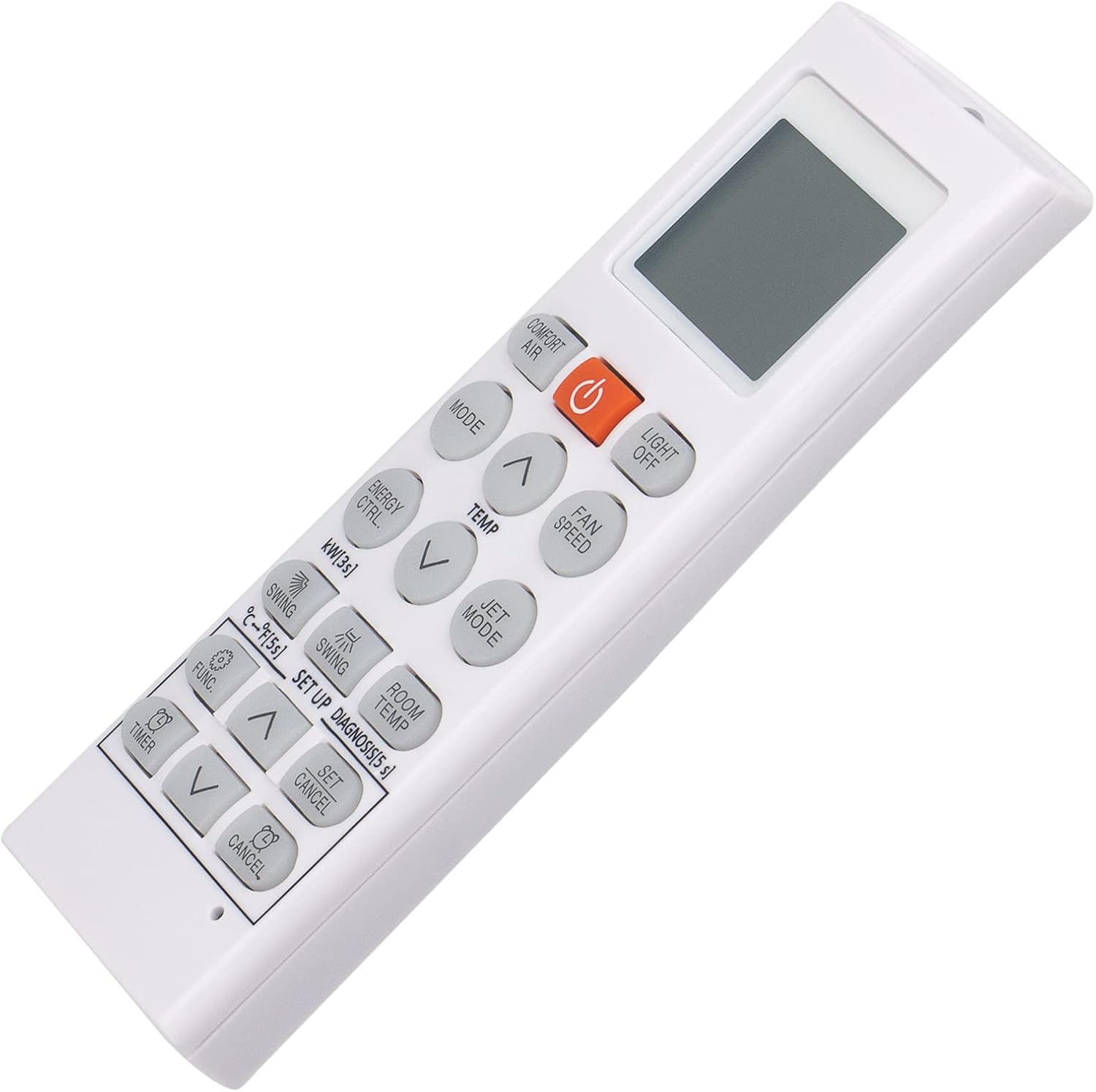
Image: Close-up of the remote control's buttons and display.
Key Functions:
- Power Button (Orange): Turns the air conditioner ON or OFF.
- Comfort Air: Activates or deactivates the Comfort Air feature.
- Light Off: Turns the display light on the air conditioner unit ON or OFF.
- Mode: Cycles through various operating modes (e.g., Cool, Heat, Fan, Dry, Auto).
- Temp (Up/Down Arrows): Adjusts the desired temperature setting.
- Fan Speed: Adjusts the fan speed (e.g., Low, Medium, High, Auto).
- Energy Saving: Activates the energy-saving mode to optimize power consumption.
- Jet Mode: Engages a powerful cooling or heating mode for rapid temperature change.
- Swing: Controls the horizontal or vertical swing of the air conditioner's louvers.
- Swing Setup: Configures the swing direction or range.
- Room Temp: Displays the current room temperature.
- Func (Function): Accesses additional functions or settings.
- Timer: Sets a timer for the air conditioner to turn ON or OFF automatically.
- Set/Cancel: Used to confirm or cancel settings, particularly for the timer function.
Maintenance
- Cleaning: Wipe the remote control with a soft, dry cloth. Do not use liquid cleaners or abrasive materials.
- Battery Replacement: Replace batteries when the remote's performance diminishes or the display becomes dim. Always replace both batteries at the same time with new AAA alkaline batteries.
- Storage: If the remote control will not be used for an extended period, remove the batteries to prevent leakage and damage.
Troubleshooting
- Remote not responding:
- Ensure batteries are inserted correctly with the correct polarity.
- Replace old batteries with new AAA alkaline batteries.
- Check for any obstructions between the remote control and the air conditioner unit.
- Ensure you are within the effective operating range (up to 10 meters).
- Buttons not working:
- Press buttons firmly. If specific buttons are unresponsive, it may indicate a fault with the remote.
If the issue persists after following these steps, please refer to the Warranty and Support section for further assistance.
Specifications
- Product Dimensions: 6.3 x 1.57 x 0.39 inches (16 x 4 x 1 cm)
- Item Weight: 2.82 ounces (80 grams)
- Battery Type: 2 x AAA batteries (not included)
- Color: White
Warranty and Support
This product comes with a 6-month warranty period.
If you encounter any issues with your remote control, such as damage upon receipt or non-functionality, please contact our customer service team via email. Our staff will provide a satisfactory solution within 24 hours.