
DROK DROK-DC11-90V-5V6A
DROK Waterproof DC to DC Buck Converter Instruction Manual
Model: DROK-DC11-90V-5V6A
1. Introduction
This manual provides essential information for the safe and effective use of your DROK Waterproof DC to DC Buck Converter. This device is designed to step down a wide range of DC input voltages (11-90V) to a stable 5V DC output, suitable for various electronic applications. Please read this manual thoroughly before installation and operation.

Front view of the DROK DC to DC Buck Converter, showcasing its compact, waterproof aluminum casing and integrated wiring.
2. Safety Information
Observe the following safety precautions to prevent injury or damage to the device:
- Ensure the input voltage is within the specified range of DC 11-90V. Exceeding this range can damage the converter.
- Do not exceed the maximum output current of 6A. Overloading the converter can lead to overheating and failure.
- Verify correct polarity before connecting the input and output wires. Incorrect wiring can cause severe damage to the converter and connected devices.
- Install the converter in a well-ventilated area, even though it features good heat dissipation.
- Avoid short-circuiting the output terminals. The converter has short-circuit protection, but prolonged short circuits should be avoided.
- Keep the device away from flammable materials during operation.
- If the device shows signs of damage or malfunction, disconnect power immediately and do not attempt to repair it.
3. Product Overview and Features
The DROK DC to DC Buck Converter is a robust and efficient power regulation module designed for demanding environments. Its key features include:
- Wide Input Voltage Range: Accepts DC 11-90V (compatible with 12V, 24V, 36V, 48V, 60V, 72V systems).
- Stable Output: Provides a regulated DC 5V output with a maximum current of 6A.
- High Conversion Efficiency: Achieves over 95% efficiency, minimizing heat generation.
- Comprehensive Protection: Includes over-current, over-temperature, input reverse connection, and short-circuit protection.
- Durable Construction: Features an aluminum case for excellent heat dissipation and an IP67 waterproof rating, making it dust-proof, moisture-proof, and shock-proof.
- Compact Design: Small footprint for easy integration into various applications.

Diagram illustrating the key protective features of the DC to DC Buck Converter, including output reverse connection, short circuit, over current, and over temperature protection, alongside high efficiency and compact size.

Visual representation of the converter's IP67 waterproof, dustproof, moisture-proof, and shock-resistant design, submerged partially in water.
4. Specifications
| Parameter | Value |
|---|---|
| Input Voltage | DC 11-90V (12V, 24V, 36V, 48V, 60V, 72V) |
| Output Voltage | DC 5V |
| Output Current | 6A (Max) |
| Output Power | 30W |
| Conversion Efficiency | Over 95% (Max) |
| Working Temperature | -25℃ to 80℃ |
| Waterproof Grade | IP67 |
| Dimensions (L*W*H) | 64mm * 57mm * 22mm (2.5 * 2.2 * 0.87 inches) |
| Installation Cable Length | Approximately 13-14cm (5.11-5.51 inches) |
| Cooling Method | Natural cooling |

Table displaying the technical parameters of the converter, including input voltage, output voltage, output current, output power, conversion efficiency, and working temperature.
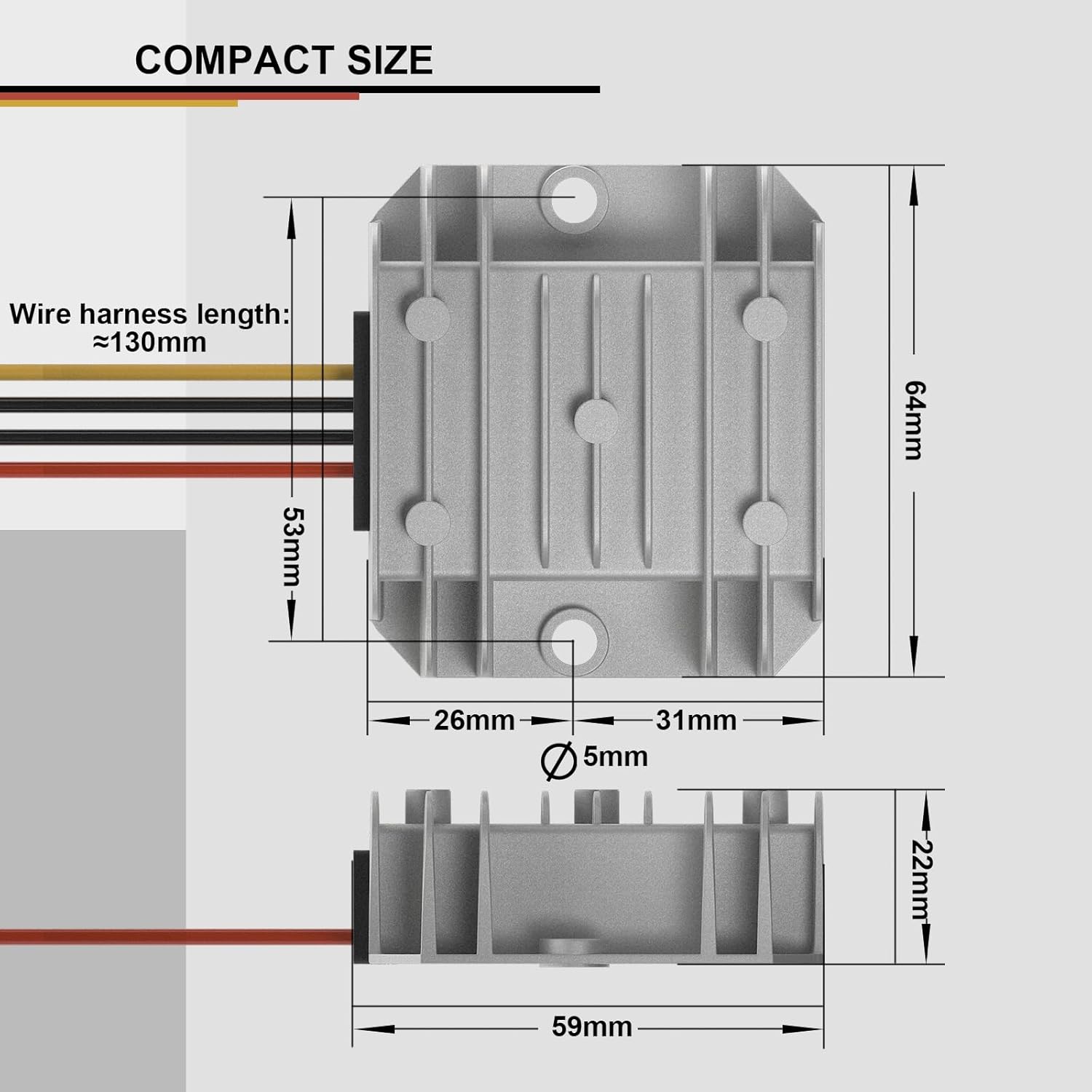
Technical drawing with dimensions of the converter, showing its length (64mm), width (59mm), height (22mm), and wire harness length (approximately 130mm).
5. Setup and Installation
Follow these steps for proper installation:
- Prepare Wiring: The converter comes with pre-attached wires. Identify them as follows:
- Input: Red wire (Input +), Black wire (Input -)
- Output: Yellow wire (Output +), Black wire (Output -)
- Mounting: Securely mount the converter in a suitable location using the integrated mounting holes. Ensure it is protected from excessive mechanical stress.
- Connect Input: Connect the Red wire (Input +) to the positive terminal of your DC power source (11-90V). Connect the Black wire (Input -) to the negative terminal of your DC power source. Ensure connections are firm and insulated.
- Connect Output: Connect the Yellow wire (Output +) to the positive input of your 5V device. Connect the Black wire (Output -) to the negative input of your 5V device. Double-check polarity before applying power.
- Verify Connections: Before applying power, visually inspect all connections to ensure correct polarity and secure wiring.
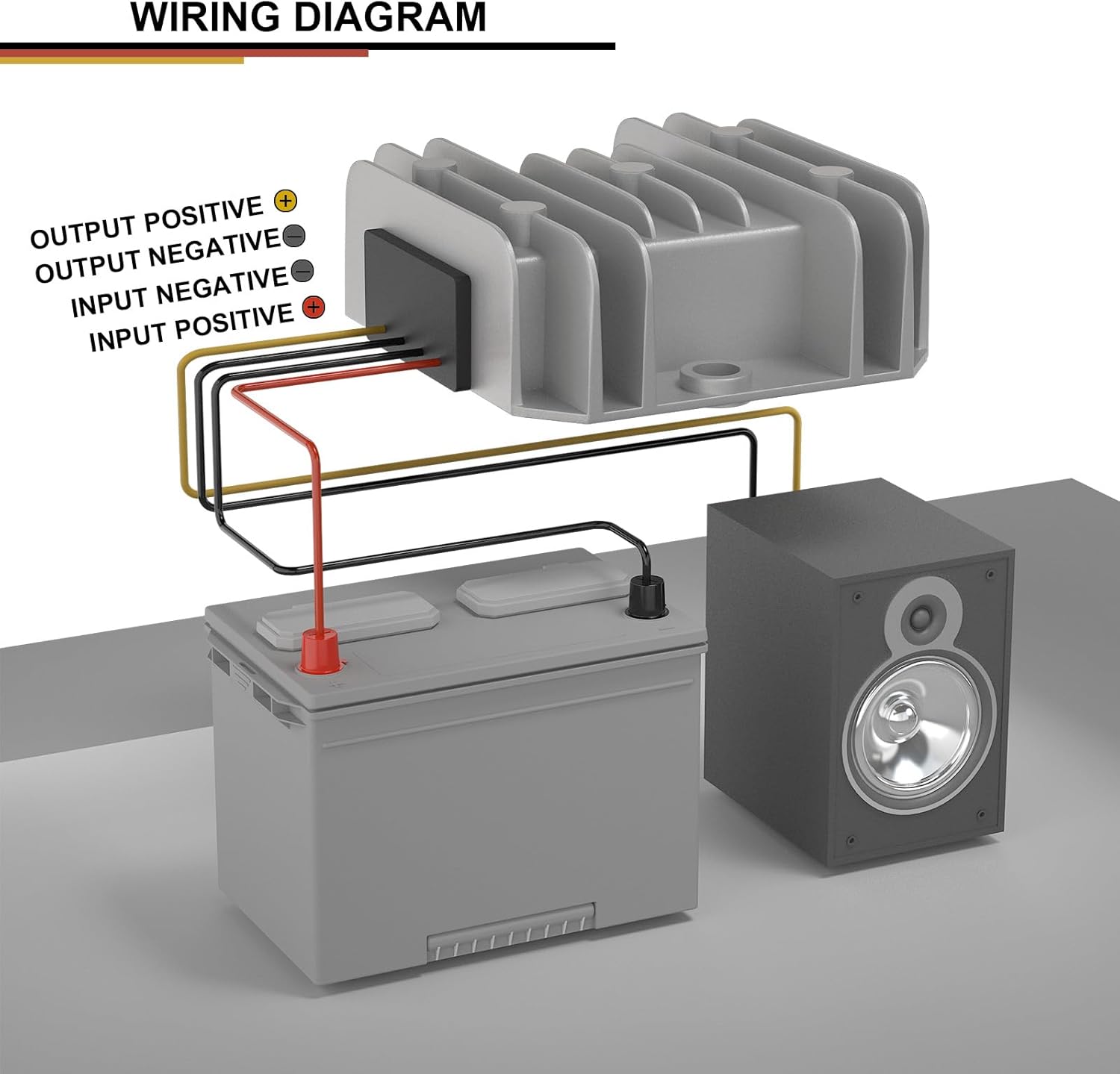
Detailed wiring diagram showing how to connect the converter to a power source (battery) and a load (speaker). Input wires are red (+) and black (-), output wires are yellow (+) and black (-).
6. Operating Instructions
Once properly installed and wired, operating the DROK Buck Converter is straightforward:
- Apply power to the input terminals. The converter will automatically regulate the voltage to a stable 5V DC output.
- The converter operates continuously as long as input power is supplied and within the specified range.
- Monitor the connected device to ensure it is receiving the correct voltage and current.
7. Applications
This versatile buck converter is suitable for a wide range of applications, including but not limited to:
- Car audio systems
- LED displays
- Motors and speakers
- Auto map navigators
- Hard disk players
- Electric fans
- Toy cars
- Air conditioning systems
- Solar energy systems
- Dash cameras
- General car conversions

Collage of images demonstrating various applications for the DC to DC Buck Converter, such as powering a dash camera, car conversions, audio systems, and solar systems.
8. Maintenance
The DROK Waterproof DC to DC Buck Converter is designed for minimal maintenance due to its robust and sealed construction. However, consider the following:
- Periodically inspect the wiring for any signs of wear, corrosion, or loose connections.
- Ensure the converter's casing is free from excessive dirt or debris that could impede natural cooling. Clean with a soft, dry cloth if necessary.
- Do not open the casing, as this will void the waterproof rating and potentially damage internal components.
9. Troubleshooting
If you encounter issues with your converter, refer to the following:
- No Output Voltage:
- Check if the input voltage is present and within the 11-90V range.
- Verify input polarity (Red to +, Black to -).
- Check for any short circuits on the output.
- Ensure the load does not exceed 6A.
- Converter Overheating:
- Reduce the load current to ensure it is within the 6A limit.
- Ensure adequate ventilation around the converter.
- Verify the ambient temperature is within the specified operating range (-25℃ to 80℃).
- Connected Device Malfunctions:
- Confirm the connected device requires 5V DC.
- Check output polarity (Yellow to +, Black to -).
- Ensure the device's current draw is not fluctuating excessively.
If problems persist after checking these points, contact DROK customer support.
10. Warranty and Support
DROK products are designed for reliability and performance. This product is covered by a one-year service period from the date of purchase. During this period, if any quality issues arise with your item, you may be eligible for a brand new replacement.
For technical support, warranty claims, or any inquiries, please contact DROK customer service through the retailer where the product was purchased or visit the official DROK store online.
Related documentsDROK-DC11-90V-5V6A


Ask a question about this manual
Ask about setup, troubleshooting, compatibility, parts, safety, or missing instructions. Manuals+ will review the question and use this page’s manual context to help answer it.