
1. Product Overview
The RDINSCOS RD630W Digital EMF Meter is a versatile 3-in-1 device designed to detect electric fields (EF), magnetic fields (MF), and radio frequency (RF) radiation. It provides real-time readings with visual and audible alerts, making it suitable for home EMF inspections, office environments, and outdoor use. The meter features simple one-handed operation, a bright backlight for various lighting conditions, and power-saving functions.

Image: The RDINSCOS RD630W EMF Meter displaying readings for Electric Field (EF), Magnetic Field (MF), and Radio Frequency (RF) radiation.
2. Safety Information
- Do not attempt to disassemble or modify the device.
- Keep the device away from water and extreme temperatures.
- Use only the specified battery type (9V battery) and ensure correct polarity during installation.
- Avoid dropping the device to prevent damage.
- This device is for informational measurement purposes only and should not be used as a substitute for professional safety assessments.
3. Package Contents
The RDINSCOS RD630W Digital EMF Meter package includes:
- 1 x RDINSCOS RD630W EMF Meter
- 1 x 9V Battery
- 1 x User Manual
- 1 x Protective Cap
4. Device Layout
The EMF meter features a clear LCD display and intuitive button layout for ease of use.

Image: Front view of the RDINSCOS RD630W EMF Meter with its LCD screen and control buttons.
- LCD Display: Shows real-time readings for EF, MF, and RF, along with warning indicators.
- Power Button: Turns the device on/off.
- UNIT Button: Switches between different measurement units (e.g., µT/mG for magnetic fields).
- Hold/Max Button: Freezes the current reading or displays the maximum detected value.
- Mute Button: Toggles audible alarms on/off.
- Backlight Button: Activates or deactivates the screen backlight.
5. Setup
To set up your RDINSCOS RD630W EMF Meter:
- Open the battery compartment on the back of the device.
- Insert the provided 9V battery, ensuring correct polarity.
- Close the battery compartment securely.
- Press and hold the Power Button for approximately 2 seconds to turn on the device.
6. Operating Instructions
6.1 Basic Operation
To power on, press and hold the power button. The device will perform a self-test and then display real-time readings. To power off, press and hold the power button again.
6.2 Measurement Modes (EF, MF, RF)
The RD630W simultaneously measures Electric Fields (EF), Magnetic Fields (MF), and Radio Frequencies (RF). Readings are displayed on the LCD screen in real-time.
- Electric Field (EF) Detection: Measures radiation from wiring and chargers.
- Magnetic Field (MF) Detection: Measures radiation from appliances.
- Radio Frequency (RF) Detection: Measures radiation from Wi-Fi, 5G, and smart devices.

Image: Magnetic Field (MF) detection near a microwave oven.
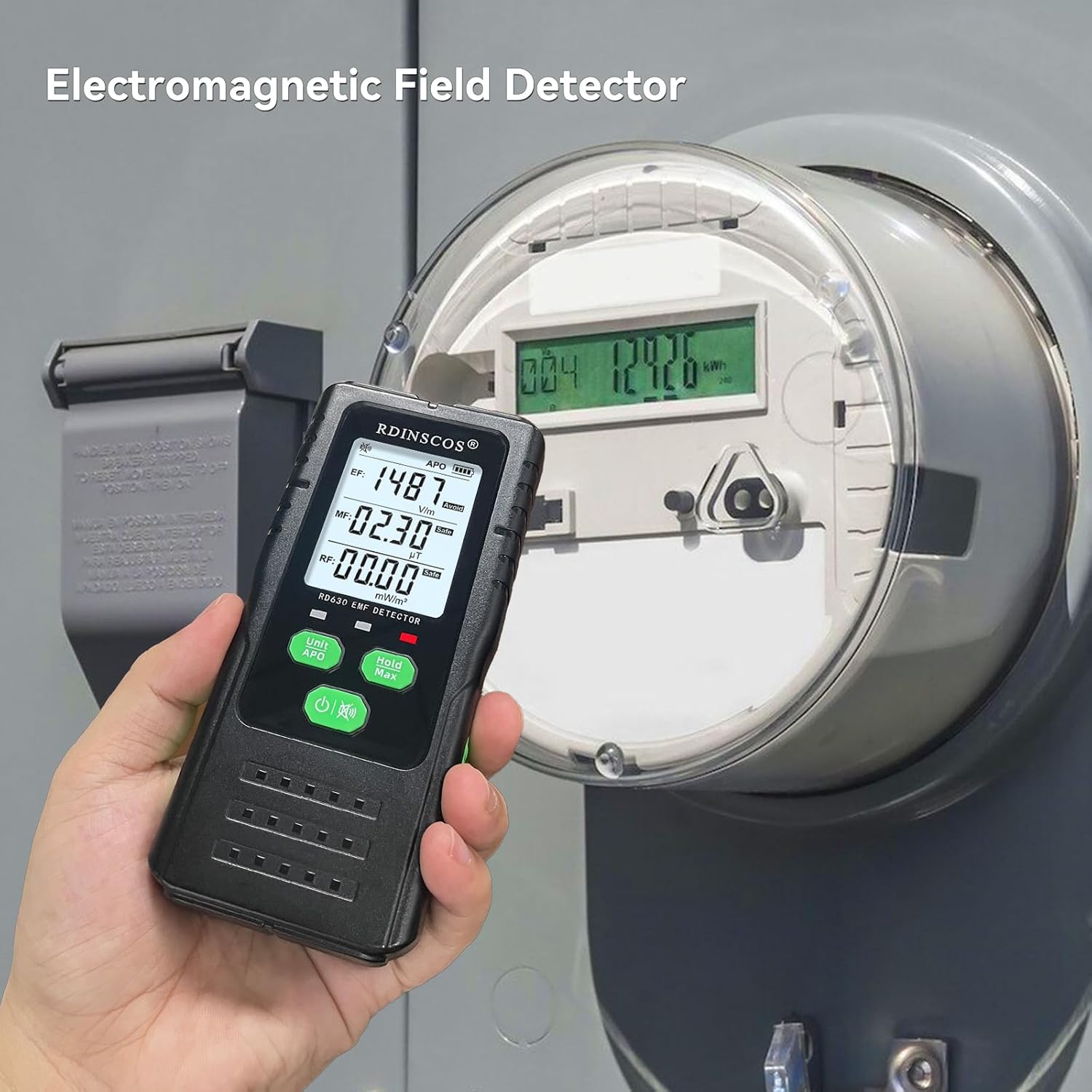
Image: Electric Field (EF) detection near an electricity meter.

Image: Radio Frequency (RF) detection near a Wi-Fi router.
6.3 Alarm Thresholds
The device provides visual and audible alarms based on detected radiation levels. The alarm thresholds are:
| Level | EF (V/m) | MF (mG) | RF (mW/m²) |
|---|---|---|---|
| Safe | < 250 | < 50 | < 50 |
| Alert | 250 ~ 500 | 50 ~ 100 | 50 ~ 100 |
| Avoid | > 500 | > 100 | > 100 |

Image: Visual and audible double alarms indicating different radiation levels.
6.4 Data Hold and Max Value
Press the Hold/Max button to freeze the current readings on the display. Press it again to release. Long-pressing this button may activate a mode to display the maximum detected value.
6.5 Backlight Control
The device features a bright backlight for improved visibility in low-light conditions. Use the dedicated backlight button to toggle it on or off as needed.
6.6 Unit Switching
Press the UNIT button to cycle through available measurement units for magnetic fields (µT and mG) and radio frequency (mW/m²).
6.7 Auto Power Off (APO)
The device is equipped with an auto shut-off feature that activates after 15 minutes of inactivity to conserve battery life. To disable auto power-off, long-press the 'APO' button for 2 seconds until 'UOFF' appears on the display.

Image: Disabling Auto Power Off for continuous monitoring.
7. Maintenance
- Clean the device with a soft, dry cloth. Do not use abrasive cleaners or solvents.
- Store the device in a cool, dry place away from direct sunlight and extreme temperatures.
- Remove the battery if the device will not be used for an extended period to prevent battery leakage.
8. Troubleshooting
| Problem | Possible Cause | Solution |
|---|---|---|
| Device does not power on | Low or dead battery; Incorrect battery installation | Replace battery; Ensure correct polarity |
| Inaccurate or fluctuating readings | Interference from other electronic devices; Device not held steadily | Move away from other electronics; Hold the device still during measurement |
| No audible alarm | Mute mode is active | Press the Mute button to reactivate alarms |
9. Specifications
| Feature | Detail |
|---|---|
| Model Number | RD630W |
| Item Weight | 200 g |
| Product Dimensions | 12 x 5 x 5 cm |
| Measurement Accuracy | +/-5% - +/-20% |
| Batteries | 1 Lithium Polymer battery required (included) |
| Manufacturer | SHENZHEN REDDRAGON INSTRUMENTS CO.,LTD |
10. Warranty and Support
For warranty information, technical support, or any inquiries regarding your RDINSCOS RD630W Digital EMF Meter, please contact the manufacturer directly. Refer to the contact details provided in your product packaging or on the official RDINSCOS website.

Image: Contact information for support.
