
Introduction
This manual provides comprehensive instructions for the ALLIMITY Replacement Remote Control, designed to operate various RCA and HKC LED TV models. This remote control functions as a direct replacement and requires no programming for immediate use. Please read this manual carefully to ensure proper operation and longevity of your remote control.
Setup
Battery Installation
- Locate the battery compartment on the back of the remote control.
- Slide the battery cover downwards or in the direction indicated by an arrow to open it.
- Insert two AAA alkaline batteries, ensuring the positive (+) and negative (-) terminals align correctly with the markings inside the compartment.
- Replace the battery cover by sliding it back into position until it clicks securely.
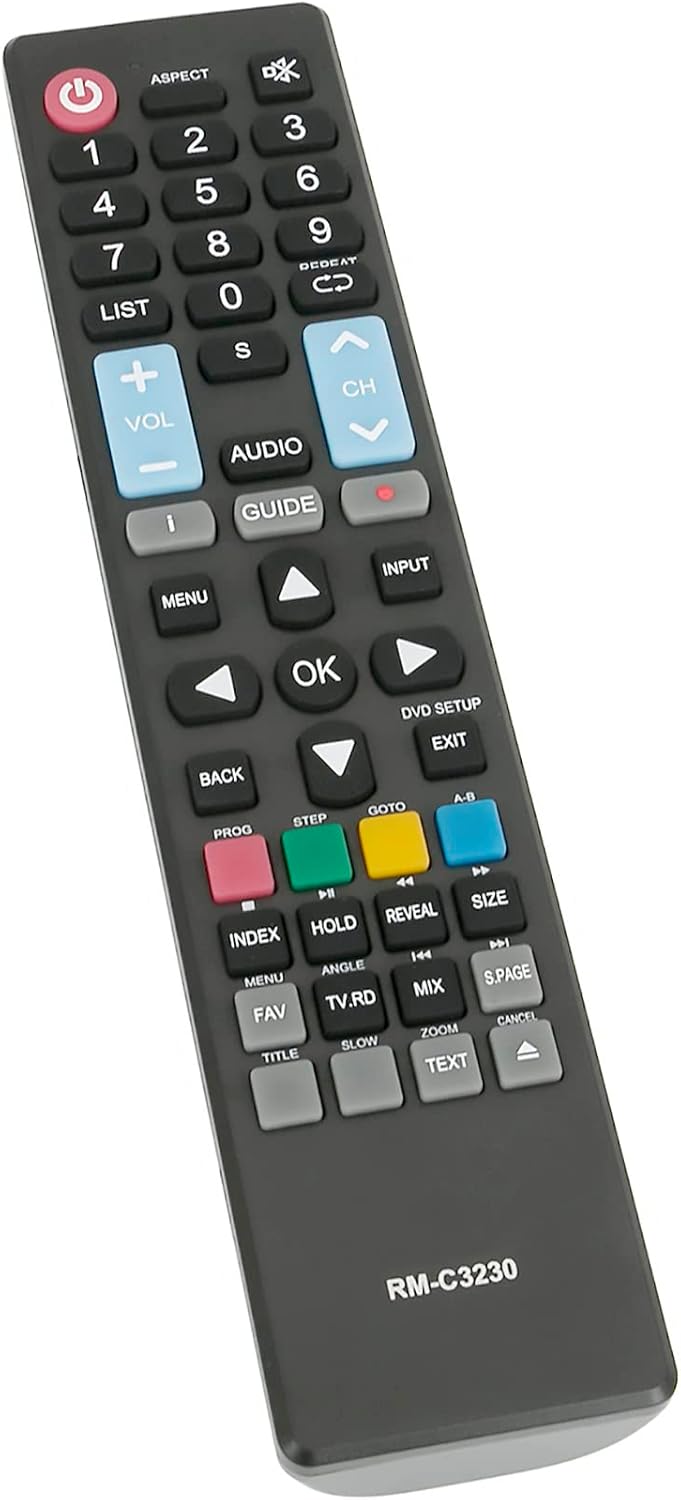
Image: Angled view of the remote control. The battery compartment is located on the back of the device.
Operating Instructions
This remote control is designed to replicate the functions of your original TV remote. Point the remote control directly at your TV's infrared receiver for optimal performance.
Key Functions Overview

Image: Front view of the remote control, highlighting various function buttons.
- Power Button (U): Turns the TV on or off.
- Number Buttons (0-9): Directly select TV channels.
- VOL +/-: Adjusts the volume level.
- CH +/-: Changes the TV channel up or down.
- MENU: Accesses the TV's main menu.
- INPUT: Selects the input source (e.g., HDMI, AV).
- OK / Navigation Arrows: Confirms selections and navigates through menus.
- BACK / EXIT: Returns to the previous screen or exits the current menu.
- GUIDE: Displays the electronic program guide (if supported by TV).
- Colored Buttons (Red, Green, Yellow, Blue): Provide access to specific functions within menus or applications, as indicated on your TV screen.
Compatible Models
This ALLIMITY remote control is compatible with a range of RCA and HKC LED TV models. No programming is required; simply insert batteries and use. Below is a list of some compatible models:
- RS50U1-EU
- RB40F1-EU
- RS43F1-EU
- RS65U1-EU
- 13M4C
- RB32H1-EU
- RS55U1-EU
- 50F1
- 40K7A
- 43F6
- 50A7520F
- 50A7540F
- 50A7560F
- 50AE7400F
- 50AE7410F
- 50AE7430F
- 50AE7450F
Maintenance
- Cleaning: Use a soft, dry cloth to clean the remote control. Do not use liquid cleaners or abrasive materials.
- Battery Replacement: Replace batteries when the remote's response becomes sluggish or stops working. Always replace both batteries at the same time with new alkaline batteries.
- Storage: If the remote control will not be used for an extended period, remove the batteries to prevent leakage and damage.
- Avoid Damage: Do not drop the remote control or expose it to extreme temperatures, humidity, or direct sunlight.
Troubleshooting
- Remote not responding: Check if the batteries are inserted correctly with the correct polarity (+/-). Replace old batteries with new ones. Ensure there is a clear line of sight between the remote and the TV's infrared receiver.
- Limited functionality: Verify that your TV model is listed in the compatible models section. While this remote is a direct replacement, some advanced or smart TV specific functions might require the original remote or specific TV settings.
- Interference: Ensure no other devices are blocking the infrared signal or causing interference.
Specifications
| Feature | Detail |
|---|---|
| Brand | ALLIMITY |
| Model Name | QYSY-PSGA-QYSY |
| Connectivity Technology | Infrared |
| Compatible Devices | RCA, HKC LED TVs (specific models listed above) |
| Max Number of Supported Devices | 1 |
| Controller Type | Button Control |
| Button Quantity | 25 |
| Maximum Range | 10 Meters |
| Battery Type | AAA Alkaline (2 required) |
| Color | Black |
| Item Weight | 0.08 Kilograms |
| Special Features | Ergonomic design |
Warranty and Support
For warranty information or technical support, please refer to the seller's policies on the platform where the product was purchased. Keep your purchase receipt as proof of purchase. If you encounter any issues not covered in this manual, please contact the seller directly for assistance.