1. Introduction
This manual provides essential instructions for the ALLIMITY replacement remote control, designed for various Strong SRT series digital receivers. It covers setup, operation, and basic troubleshooting to ensure optimal performance. This remote control is a direct replacement and requires no programming.
Compatible Models: SRT 5301, SRT 5302, STR5202, SRT 5205, SRT 8202, SRT 5003, SRT 5222, SRT 5202, SRT 5303, SRT 5200, SRT 5301E, SRT 5203, SRT 8114, SRT 5300, SRT 8903, SRT 80, PRIMA VIII, PRIMA VII, SRT5205, SRT5303, SRT5200, SRT5301E, SRT5203, SRT8114, SRT5300, SRT5301, SRT5302, STR5202, SRT8903, SRT80, SRT8202, SRT5003, SRT5222, SRT5202, SRT8112, RT8115, SRT3001, PRIMA-V, PRIMA-VI, PRIMA-VII, PRIMA-VIII.
2. Product Overview
The ALLIMITY replacement remote control is designed to replicate all functions of your original Strong SRT series remote. It features a standard layout for easy navigation and control of your digital receiver.

Figure 1: Front view of the ALLIMITY replacement remote control. This image displays the full button layout, including power, volume, channel, navigation, and numeric keys.
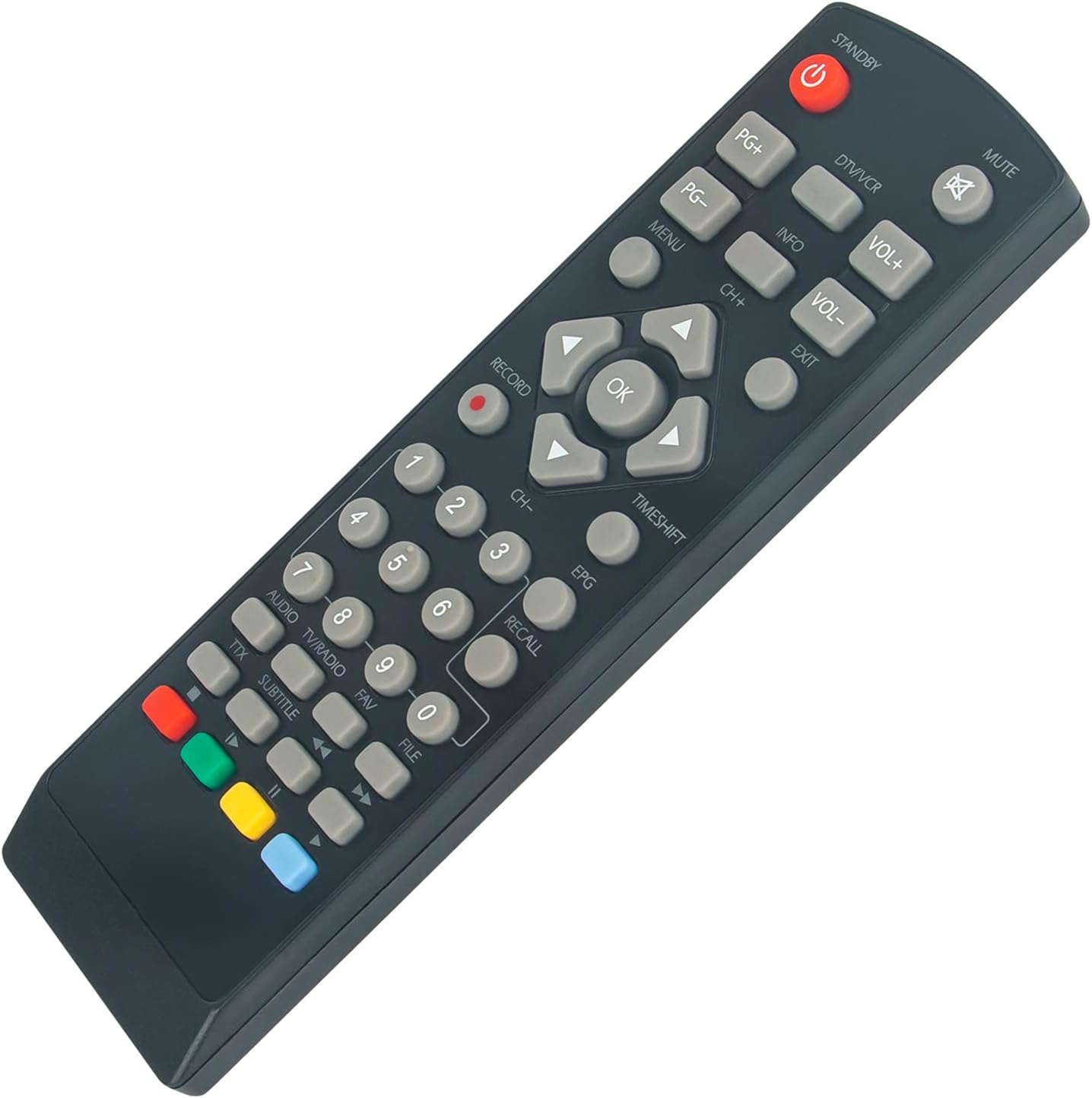
Figure 2: Angled front view of the remote control. This perspective shows the slight curvature and button placement, emphasizing its comfortable grip.

Figure 3: Back view of the remote control. This image clearly shows the battery compartment cover and the overall rear casing design.
3. Setup
3.1 Battery Installation
This remote control requires two AAA alkaline batteries (not included). No programming is necessary; simply insert the batteries, and the remote will function immediately with compatible Strong SRT series receivers.
- Locate the battery compartment on the back of the remote control (refer to Figure 3).
- Slide the battery compartment cover downwards and lift it off.
- Insert two AAA alkaline batteries, ensuring the positive (+) and negative (-) terminals match the diagrams inside the compartment.
- Replace the battery compartment cover by sliding it back into place until it clicks securely.
Note: Always use new alkaline batteries for optimal performance. Do not mix old and new batteries, or different types of batteries.
4. Operating Instructions
The ALLIMITY replacement remote control operates via infrared (IR) technology. Ensure a clear line of sight between the remote control and your Strong SRT series receiver for proper functionality.
4.1 Basic Functions
- Power (STANDBY): Press the red power button to turn the receiver on or off.
- Volume (VOL+/-): Use the VOL+ and VOL- buttons to adjust the audio volume.
- Channel (CH+/-): Use the CH+ and CH- buttons to change channels.
- Numeric Keys (0-9): Use these buttons to directly enter channel numbers.
- Mute: Press the MUTE button to temporarily silence the audio. Press again to restore sound.
- Navigation (Arrow Keys & OK): Use the arrow keys to navigate menus and lists. Press the OK button to confirm selections.
- Menu: Access the receiver's main menu.
- Exit: Exit current menu or function.
- Info: Display information about the current program.
4.2 Advanced Functions
This remote includes dedicated buttons for various advanced functions, mirroring the original remote's capabilities:
- Record: Initiate recording of the current program.
- Timeshift: Activate the timeshift function (if supported by your receiver).
- EPG: Access the Electronic Program Guide.
- Recall: Switch between the last viewed channels.
- File: Access recorded files or media browser.
- Audio/TV/Radio: Switch between audio, TV, and radio modes.
- Subtitle: Toggle subtitles on or off.
- TTX: Access Teletext.
- Color Buttons (Red, Green, Yellow, Blue): These buttons correspond to specific functions within menus or interactive services, as indicated on your TV screen.
5. Maintenance
To ensure the longevity and proper functioning of your remote control, follow these maintenance guidelines:
- Cleaning: Wipe the remote control with a soft, dry cloth. Do not use liquid cleaners, abrasive pads, or chemical solvents, as these can damage the surface or internal components.
- Battery Replacement: Replace batteries when the remote's response becomes sluggish or stops working. Always replace both batteries at the same time.
- Storage: Store the remote control in a cool, dry place away from direct sunlight, extreme temperatures, and high humidity. If the remote will not be used for an extended period, remove the batteries to prevent leakage.
- Avoid Drops: Protect the remote from physical impact. Dropping it can damage internal circuits or external casing.
6. Troubleshooting
If you experience issues with your remote control, try the following troubleshooting steps:
- Remote Not Responding:
- Check if the batteries are inserted correctly with the correct polarity (+/-).
- Replace the batteries with new alkaline batteries.
- Ensure there is a clear line of sight between the remote control and the receiver. Remove any obstructions.
- Make sure you are within the effective operating range (up to 10 meters).
- Specific Buttons Not Working:
- Clean the remote control surface, especially around the problematic buttons, to remove any dirt or debris that might be obstructing them.
- If cleaning and battery replacement do not resolve the issue, the remote control may be faulty.
- Receiver Not Responding to Any Remote:
- Check if your receiver is powered on and functioning correctly.
- Ensure the receiver's infrared sensor is not blocked.
- If you have another remote for the same device, test it to determine if the issue is with the remote or the receiver.
7. Specifications
| Feature | Specification |
|---|---|
| Brand | ALLIMITY |
| Model | QYSY-SRT5003-QYSY |
| Compatible Devices | Strong SRT Series Digital Receivers |
| Connectivity Technology | Infrared (IR) |
| Maximum Range | 10 Meters |
| Number of Buttons | 25 |
| Battery Type | AAA Alkaline (2 required, not included) |
| Product Dimensions | 4 x 12 x 0.3 cm |
| Item Weight | 40 grams |
| Special Feature | No programming required |
8. Warranty and Support
For any warranty claims or technical support inquiries, please contact the seller or retailer from whom you purchased this product. Keep your proof of purchase for any potential claims.
