
Introduction
This manual provides instructions for the proper use and maintenance of your MugEasy W400-B15 Endoscope Camera. This device is designed for visual inspection in hard-to-reach areas, featuring a 1920P HD camera, adjustable LED lighting, and a waterproof semi-rigid cable. Please read this manual thoroughly before operating the device.
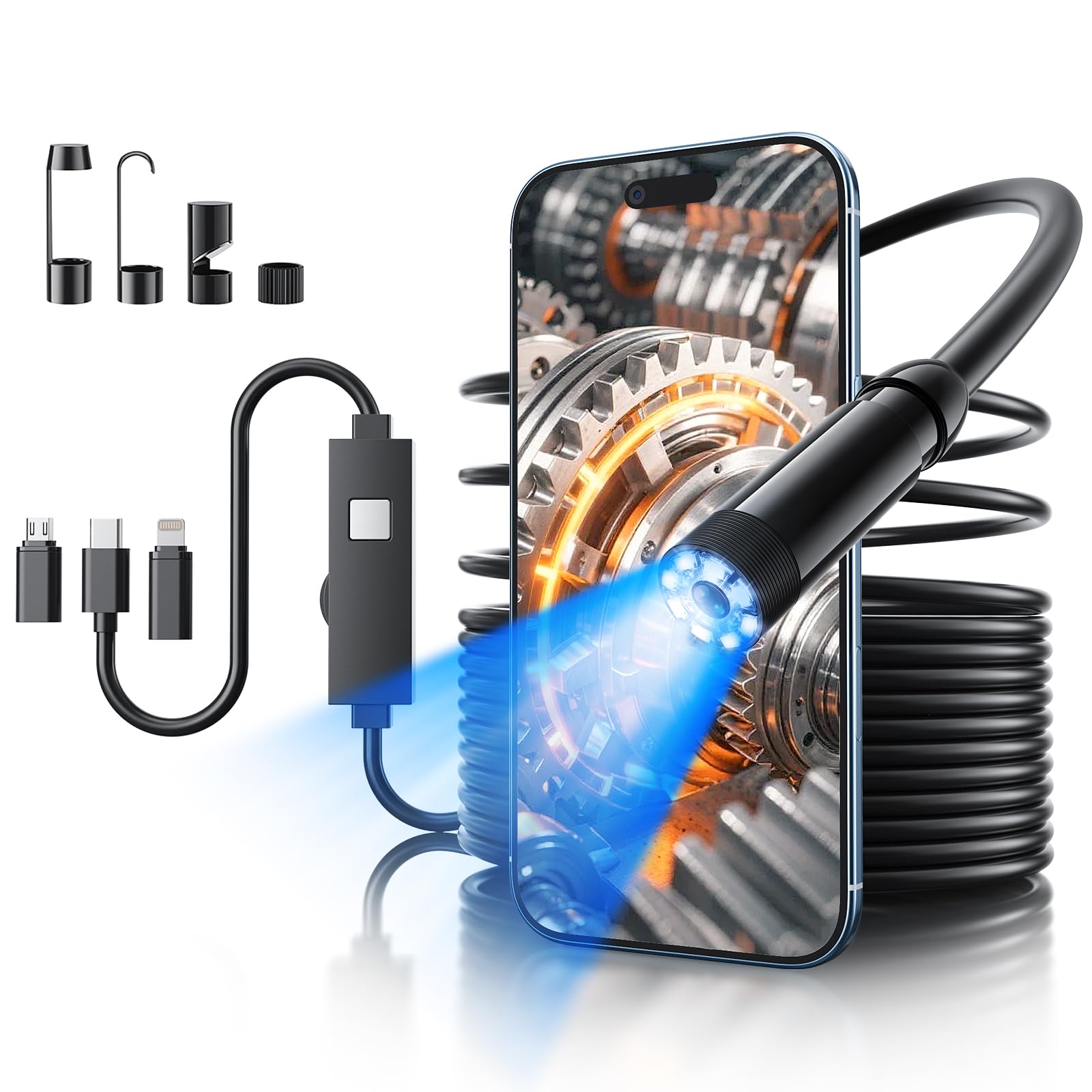
Image: The MugEasy W400-B15 Endoscope Camera, showcasing its compact design and flexible cable.
Safety Information
- Do not attempt to disassemble or modify the device. This may void the warranty and cause damage.
- Keep the device away from extreme temperatures and direct sunlight.
- Ensure the camera probe is clean before and after use to maintain optimal image quality.
- While the camera probe is IP67 waterproof, avoid prolonged immersion in water deeper than 3 meters.
- Do not use the endoscope in environments with corrosive liquids or explosive gases.
What's in the Box
Verify that all items are present in the package:
- Endoscope Camera with Lights (1)
- Hook (1)
- Magnet (1)
- Side Mirror (1)
- Protective Cap (1)
- User Manual (1)

Image: The endoscope camera, various adapters, and accessories included in the package.
Setup
1. App Installation
- For iOS users: Search for "SUP-ANESOK" in the App Store, then download and install it.
- For Android users: Scan the QR code provided in the manual or on the product packaging to download the recommended application.

Image: Visual guide for downloading and installing the companion application.
2. Device Connection
- Open the installed application on your smartphone or tablet.
- Connect the endoscope camera to your device using the appropriate adapter (USB-C, Lightning, or Micro USB). The endoscope supports iOS 9.0+ and Android 4.4+ devices.
- Once connected, the application interface should display a live video feed from the endoscope camera. The connection icon within the app will typically change color (e.g., turn orange) to indicate a successful connection.

Image: Diagram showing the endoscope camera connected to a smartphone, illustrating system compatibility.
Operating Instructions
1. Adjusting LED Brightness
The endoscope features 8 adjustable LED lights. Locate the brightness adjustment wheel on the cable. Rotate the wheel to increase or decrease the light intensity to suit your inspection environment.

Image: The endoscope camera probe with adjustable LED lights, demonstrating different brightness levels.
2. Capturing Photos and Videos
Within the application interface, you will find dedicated buttons for taking photos and recording videos. Press the photo button to capture a still image or the video button to start/stop video recording. Captured media will be saved directly to your connected device's gallery or the app's designated folder.
3. Using Accessories
The endoscope comes with several accessories to enhance its functionality:
- Hook: Attach the hook to the camera tip to retrieve small objects from confined spaces.
- Magnet: Use the magnet attachment to pick up metallic items.
- Side Mirror: The side mirror allows for viewing at a 90-degree angle, useful for inspecting walls of pipes or other side surfaces.
- Protective Cap: Use the protective cap to shield the camera lens when not in use or during storage.

Image: Demonstrations of the hook, magnet, and side mirror accessories in various inspection scenarios.
4. Flexible Cable Usage
The 16.4FT semi-rigid cable can be bent and held in shape to navigate through complex pathways, providing access to difficult inspection areas. This design allows for precise positioning of the camera probe.

Image: Comparison illustrating the flexibility and shape-retention of the semi-rigid cable versus a soft cable.
Maintenance
Cleaning
After each use, especially in dirty or wet environments, gently wipe the camera lens and probe with a soft, damp cloth. Ensure no debris obstructs the lens or LED lights. Do not use harsh chemicals or abrasive materials.
Storage
Store the endoscope camera in a cool, dry place, away from direct sunlight and extreme temperatures. Coil the cable loosely to prevent damage. Use the protective cap to cover the camera lens.
Water Resistance
The camera probe is IP67 waterproof, meaning it is protected against dust and can withstand immersion in water up to 1 meter for 30 minutes. However, it is recommended to avoid prolonged use in water deeper than 3 meters to prevent potential damage.

Image: The endoscope camera probe demonstrating its IP67 waterproof capability in water.
Troubleshooting
- No Image/Connection Issue:
- Ensure the app is correctly installed and updated.
- Verify the endoscope is securely connected to your device using the correct adapter.
- Restart the app and reconnect the endoscope.
- Check if your phone's operating system (iOS 9.0+ or Android 4.4+) is compatible. - Poor Image Quality:
- Clean the camera lens with a soft cloth.
- Adjust the LED brightness using the control wheel on the cable.
- Ensure the camera is within the optimal focal range (approximately 0.8-3.9 inches or 2-10 cm). - LED Lights Not Working:
- Check the brightness adjustment wheel to ensure it is not set to the lowest setting.
- Ensure the endoscope is properly connected and receiving power from your device. - App Crashing/Freezing:
- Close other applications running in the background.
- Ensure your device has sufficient storage space.
- Reinstall the app if the issue persists.
Specifications
| Model Name | W400-B15 |
| Brand | MugEasy |
| Video Capture Resolution | 1440p (1920x1440) |
| Effective Still Resolution | 2 Megapixels |
| Camera Diameter | 7.9mm |
| Cable Length | 16.4 FT (5 meters) |
| Cable Type | Semi-Rigid |
| Water Resistance Level | IP67 (Camera Probe) |
| LED Lights | 8, Adjustable Brightness |
| Compatible Devices | iPhone, iPad, Android (iOS 9.0+, Android 4.4+) |
| Connectivity Technology | Auxiliary (USB-C, Lightning, Micro USB) |
| Focus Type | Fixed Focus |
| Focal Length | 1-2mm (Optimal 2-10cm / 0.8-3.9in) |
| Operating Temperature | 0-45°C (32-113°F) |
| Probe Working Temperature | 10-80°C (50-176°F) |
| Item Weight | 0.18 kg |
Warranty and Support
The MugEasy W400-B15 Endoscope Camera comes with a 12-month free warranty service from the date of purchase. This warranty covers manufacturing defects and malfunctions under normal use. Please retain your proof of purchase for warranty claims.
For any questions, technical assistance, or warranty support, please contact our customer service. We offer 24-hour professional and kind after-sales service to assist you.
- Customer Service: Refer to the contact information provided on the product packaging or the official MugEasy website.

