
Yunbaoit NEW-VT01
Yunbaoit Upgraded Visual Timer Instruction Manual
Model: VT01 (Black Blue)
Brand: Yunbaoit
1. Introduction
Thank you for choosing the Yunbaoit Upgraded Visual Timer. This device is designed to help individuals, including children and adults, develop a better sense of time management through a clear visual countdown. Its silent operation and adjustable alarm features make it suitable for various environments and tasks.

Figure 1.1: Yunbaoit Upgraded Visual Timer (Black Blue)
This image shows the front view of the Yunbaoit visual timer in black with a blue colored disk indicating remaining time. The timer features a white central knob for setting time and clear numerical markings from 0 to 60 minutes.
2. Setup
2.1 Battery Installation
The Yunbaoit Visual Timer requires 2 AAA batteries (not included). Follow these steps to install the batteries:
- Locate the battery compartment on the back of the timer.
- Using a small screwdriver (often included with the product), unscrew the battery compartment cover.
- Insert 2 AAA batteries, ensuring the correct polarity (+ and -) as indicated inside the compartment.
- Replace the battery compartment cover and secure it with the screw.
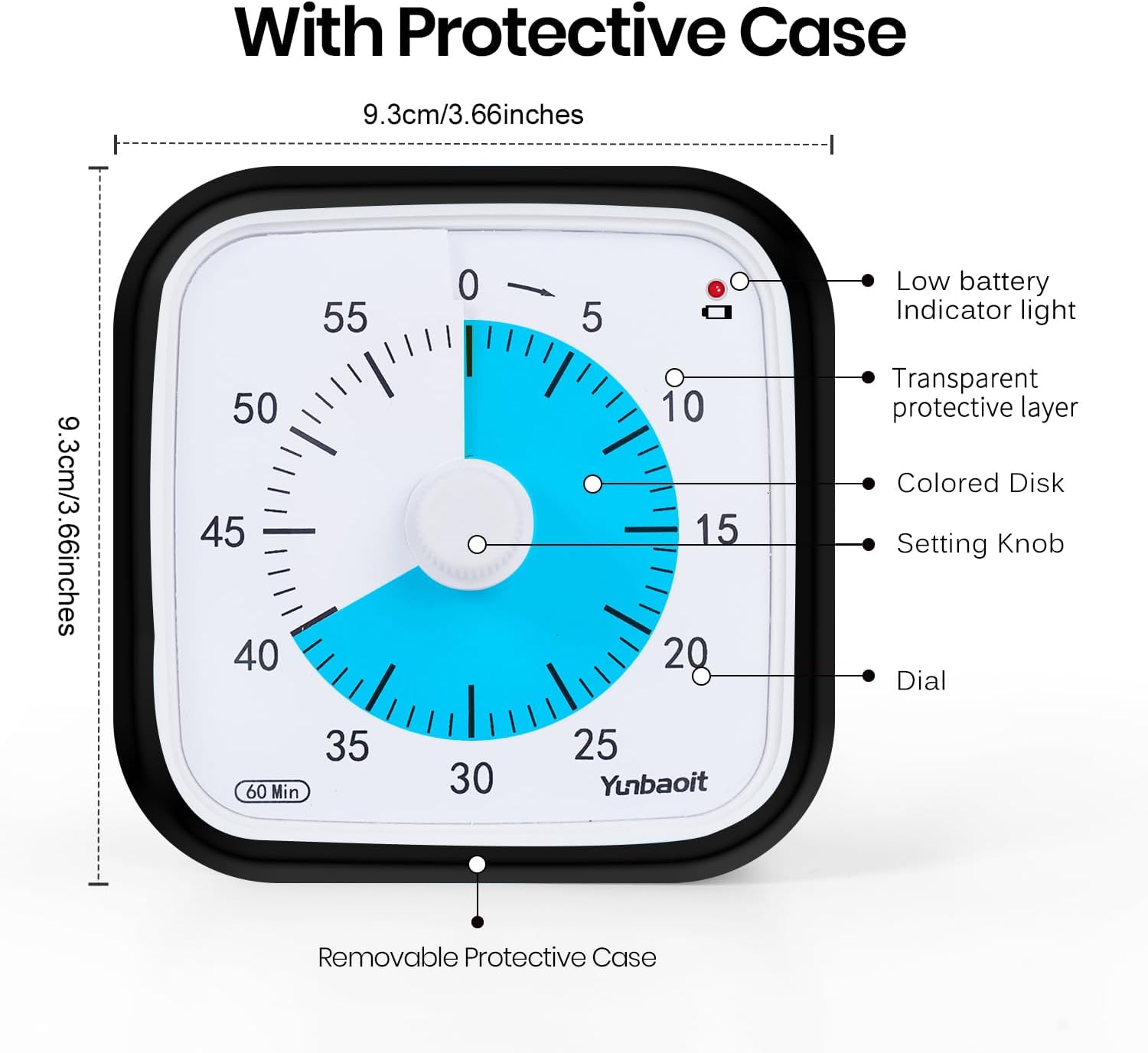
Figure 2.1: Timer Components and Dimensions
This diagram illustrates the key components of the visual timer, including the low battery indicator light, transparent protective layer, colored disk, setting knob, and dial. It also shows the overall dimensions of the timer and its removable protective case.
Note: A small screwdriver is typically provided for battery compartment access. Ensure batteries are inserted correctly to avoid damage to the device.
3. Operating Instructions
3.1 Setting the Timer
To set the countdown time:
- Turn the central knob clockwise to the desired time duration, up to 60 minutes. The colored disk will expand to indicate the set time.
- The timer will immediately begin counting down, and the colored disk will gradually disappear as time passes.

Figure 3.1: Easy to Use Steps
This image provides a visual guide for operating the timer. Step 1 shows turning the knob clockwise to set the time. Step 2 illustrates pressing the top button to stop the alarm when time is up. A warning advises against turning the knob over "0" minutes from both directions to prevent damage.
Important: Do not turn the knob over "0" minutes from both directions, as this may damage the internal mechanism of the timer.
3.2 Alarm Settings
The timer offers customizable alarm settings:
- Volume Options: Choose from three alert volumes: mute, weak, or loud. The volume switch is located on the back of the timer.
- Alarm Duration: Select between a 3-second or 30-second alarm duration. This switch is also located on the back.
- Stopping the Alarm: When the time is up, the alarm will sound (or flash if muted). Press the button on the top of the timer to stop the alarm.

Figure 3.2: Mute Function
This image highlights the mute switch located on the back of the timer, allowing for silent operation in sound-sensitive environments like libraries or classrooms. A child is shown reading quietly in a library, demonstrating a suitable use case for the mute function.

Figure 3.3: Alarm-stop Button
This image demonstrates the convenient alarm-stop button located on the top of the timer. A hand is shown pressing the button, indicating how to quickly silence the alarm once the countdown is complete. This feature is useful for various scenarios, including study or nap times.
4. Maintenance
4.1 Cleaning
To maintain the timer's appearance and functionality:
- Wipe the timer with a soft, dry cloth.
- Avoid using abrasive cleaners or solvents, as these can damage the surface.
- Ensure the timer is dry before storing or using.
4.2 Protective Case
The timer comes with a removable protective silicone case. This case helps to make the timer more drop-resistant and provides an additional layer of protection against minor impacts.

Figure 4.1: Protective Case Feature
This image depicts the visual timer encased in its protective cover, with graphic elements suggesting its drop-resistant qualities. The protective case is designed to absorb minor impacts, enhancing the durability of the device.
5. Troubleshooting
5.1 Common Issues and Solutions
| Problem | Possible Cause | Solution |
|---|---|---|
| Timer not starting/working. | Batteries incorrectly installed or depleted. | Check battery polarity. Replace with new AAA batteries. |
| Alarm not sounding. | Timer set to mute mode. | Check the volume switch on the back of the timer and ensure it is not set to mute. |
| Low power reminder flashing. | Batteries are low. | Replace the AAA batteries immediately. |
| Knob feels stiff or timer mechanism is stuck. | Knob turned past "0" minutes from both directions. | Avoid turning the knob past "0" minutes. If damage occurs, contact customer support. |

Figure 5.1: Low Power Reminder
This image highlights the low power indicator light, which flashes every 5 seconds to alert the user when the batteries are running low. This feature ensures timely battery replacement to maintain continuous operation of the timer.
6. Specifications
- Model: NEW-VT01
- Color: Black Blue
- Material: Plastic
- Product Dimensions: 1.5"D x 3.93"W x 3.93"H (approximately 3.8cm D x 10cm W x 10cm H)
- Item Weight: 4.8 ounces (approximately 136 grams)
- Screen Size: 3.93 Inches (diagonal)
- Maximum Countdown Time: 60 minutes
- Alarm Settings: 3 volume options (mute, weak, loud), 2 duration options (3 seconds, 30 seconds)
- Power Source: 2 x AAA batteries (not included)
- Features: Visual countdown, silent operation, protective case, low power indicator light, alarm-stop button.
7. Warranty and Support
Yunbaoit is committed to providing high-quality products and customer satisfaction. If you encounter any issues with your Yunbaoit Visual Timer, please contact our customer support team.
7.1 Customer Service
For assistance, questions, or concerns regarding your product, please reach out to the seller via the Amazon platform. We are dedicated to addressing your problems and providing satisfying solutions, even if the standard return window has closed.
For more information about Yunbaoit products, visit the official Yunbaoit Store on Amazon.
Ask a question about this manual
Ask about setup, troubleshooting, compatibility, parts, safety, or missing instructions. Manuals+ will review the question and use this page’s manual context to help answer it.